
Fonts Folder Permission

shrikanthgc

New member
Local time
10:31 AM
Messages
1
Hello EveryOne,

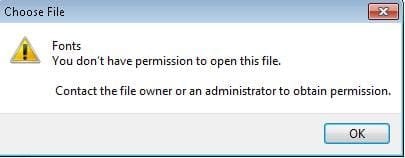
I have an issue when i try to select font from font dialogue using the path

Drive:\Windows\Fonts

Even though i have logged in as a Administrator Its throwing an Permission error like

You dont have the permission to open the File.
Contact the File owner or Administrator.


Thanks & regards,
Shrikanth Reddy GC
 

Attachments
  • Error.JPG
    Error.JPG
    8 KB · Views: 39

My Computer

OS
Windows 7
Last edited by a moderator:

My Computer

Computer Manufacturer/Model Number
Apple Macbook Pro (April 2009)
OS
W7 Ult. x64 | OS X
CPU
Intel Mobile Core 2 Duo 2.93Ghz [T9800 Penryn]
Motherboard
NVIDIA nForce 730i Rev. B1 [Mac-F2268EC8 (U2E1)]
Memory
4096MB Samsung DDR3 Dual Channel [PC3-8500F 1066Mhz]
Graphics Card(s)
NVIDIA GeForce 9600M GT 512MB [G96M Rev. C1]
Sound Card
SB X-Fi Surround 5.1 USB | Onboard Realtek (Disabled)
Monitor(s) Displays
Acer x223wbd 22" | Apple Anti-Glare 17" (Disabled)
Screen Resolution
{Current} 1440x900 {Acer} 1680x1050 {Apple} 1920x1200
Hard Drives
{Internal}
Seagate Momentus 320GB 2.5" 7200RPM [ST9320421AS]

{Externals}
LaCie 320GB USB 2.0 HDD [301284UR]
LaCie 750GB USB 2.0 FW400 eSATA HDD [301314U]
LaCie 1TB USB 2.0 HDD [301304UR]
PSU
Magsafe
Case
Aluminum/Unibody (MBP52)
Cooling
2 x 6000 RPM Fans
Keyboard
Logitech G-15v2 [PN 920-000379]
Mouse
Logitech G-9 [PN 910-000338]
Internet Speed
12Mbps/2.5Mbps w/ 24Mbps Speed Boost [Comcast]
Other Info
Logitech X-540 Speakers [PN 970223-0122]
Sennheiser PC-151 Headset
Hello EveryOne,

I have an issue when i try to select font from font dialogue using the path

Drive:\Windows\Fonts

Even though i have logged in as a Administrator Its throwing an Permission error like

You dont have the permission to open the File.
Contact the File owner or Administrator.


Thanks & regards,
Shrikanth Reddy GC

The correct path is

c:\windows\fonts

Drive: does not exist.

Yeah I know... I'm knit picking but all the same it's silly things like this that cause most of the errors we see in day to day computing.
 

My Computer

Computer Manufacturer/Model Number
Homebrew
OS
XP Pro SP3 X86 / Win7 Pro X86
CPU
Amd 64 x2 4200 (2.4ghz)
Motherboard
Asus M2N-MX SE Plus
Memory
Kingston DDR2 800 2gb
Graphics Card(s)
Nvidia GF-8400
Sound Card
Realtek on Motherboard
Monitor(s) Displays
Acer x-193bw
Screen Resolution
1440 x 900
Hard Drives
Western Digital 500g
PSU
350watt In-Win
Case
In-Win
Cooling
Air
Keyboard
yes
Mouse
yes
Internet Speed
5mpbs
Other Info
Also ASRock ION 330 as HTPC (on XP).
Acer Aspire as GP netbook (on XP).
This is very annoying, but after about an hour our IT team found the solution :mad: lol

UAC needs to be disabled (Control Panel > User Accounts > Change User Account Control Settings, select “Never Notify”)
Now we need to give the user access to the font directory and registry key

For the Directory:

1. Open the command prompt WITH ADMINISTRATOR PRIVILEGES (right click cmd, “run as administrator”)
2. Type “attrib –r –s c:\windows\fonts” (obviously minus the quotes), hit Enter
3. Right click on the fonts folder and choose properties
4. Click the Security tab
5. Click Advanced
6. Click the Owner tab
7. Click the Edit button
8. Change the Current Owner to yourself
9. Check the “Replace owner on subcontainers and objects” box
10. Click OK
As a pop-up box will tell you, you must close the window completely for the changes to take in effect

For the registry key:

1. Run regedit
2. Browse to : HKEY_LOCAL_MACHINE\SOFTWARE\MICROSOFT\WINDOWS NT\CURRENT VERSION\FONTS
3. Give permission to Users

Restart the computer and you should be able to set Full Control permissions for the Users group on the Fonts folder :D
 
Last edited:

My Computer

Computer Manufacturer/Model Number
Custom Built
OS
Windows 7 Ultimate
CPU
AMD Athlon II X2 245 2.90Ghz
Motherboard
Some Gigabyte one, dont remember model
Memory
3.00 GB
Graphics Card(s)
8800GTS 512MB
Sound Card
Sound Blaster X-Fi Titanium Fatal1ty
Monitor(s) Displays
Dual 22" widescreen
Hard Drives
250GB internal, 500GB internal
PSU
CORSAIR CMPSU-850TX 850W Power Supply
Case
Thermalkake Tsunami Dream
Cooling
Thermaltake Golden Orb II
Keyboard
Saitek Eclipse 2
Mouse
Logitech MX518
Because this helped me

This thread helped me fix what I needed. I wound up creating a .bat file that automates all of what needs done. Here it is:

REM Bat for changing permissions for font folder
REM Win 32bit only

cd \
attrib -r -s "C:\Windows\Fonts"
takeown /a /f C:\Windows\Fonts /r /d y
icacls C:\Windows\Fonts /grant administrators:F
icacls C:\Windows\Fonts /grant users:M
icacls C:\Windows\System32\FNTCACHE.DAT /grant users:M
echo \registry\machine\SOFTWARE\Microsoft\Windows NT\CurrentVersion\Fonts [1 5 7 17] >%temp%\a.txt
regini.exe %temp%\a.txt
 

My Computer

Computer type
PC/Desktop
OS
Windows 7 64
Back
Top