
For the life of me i cannot get audio to work

Surreall

New member
Local time
9:41 PM
Messages
13
For the life of me i cannot get audio to work - SOLVED

Hey all

I hope someone can help. I have read a lot on the forums but have not come across my particular problem

Here is my system Processor (CPU) AMD ATHLON™ 64 X2 7750+ (2.7GHz) 2 x 512K L2 Cache (Socket AM2)
Memory (RAM) 2GB CORSAIR DOMINATOR 1066MHz
Motherboard ASUS® M3N78: DUAL DDR2, S-ATA II, PCIe x16, 2 x PCIe x1, 3 x PCI
Operating System W764Bit
USB Options 6 x USB 2.0 PORTS (4 REAR + 2 FRONT) AS STANDARD
Memory - 1st Hard Disk 160GB SERIAL ATA II
HARD DRIVE WITH 8MB CACHE (7,200rpm)
Graphics Card 1024MB GEFORCE 9800GT PCI Express + DVI + TV-OUT
Sound Card ONBOARD 8 CHANNEL (7.1) HIGH DEF AUDIO (AS STANDARD)
Modem NONE, I WILL BE USING BROADBAND
Network Facilities ONBOARD 10/100/1000 GIGABIT LAN PORT
Memory Card Reader INTERNAL 52 IN 1 CARD READER (READS XD, MS, CF, SD, etc)

I recently put on W764bit, and for some bizarre reason i have no sound at all.
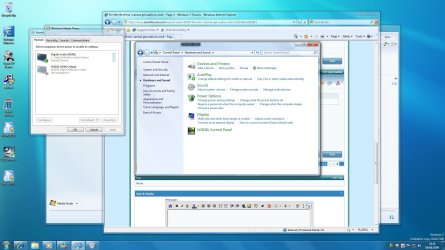
In the sound options under playback i have to devices
1)Digital Audio (HDMI)
2) NVIDIA HDMI Output (Not plugged in)

I have tried disabling both and using just one, still no sound I downloaded the latest realtek (no idea if i need it or not) no change. The really strange thing is, when i play sound, it indicates that sound is playing but my speakers which are plugged into the desktop mic out. No sound. I tested the speakers with my laptop and no problems there so the speakers are fine

Does anyone have any suggestions? I also have the latest nvidia driver

Regards Surreall

EDIT: all solved check page 3
 
Last edited:

My Computer My Computer

At a glance

W7 64bitAMD ATHLON™ 64 X2 7750+ (2.7GHz) 2 x 512K L2 ...2GB CORSAIR DOMINATOR 1066MHz1024MB GEFORCE 9800GT PCI Express + DVI + TV-OUT
OS
W7 64bit
CPU
AMD ATHLON™ 64 X2 7750+ (2.7GHz) 2 x 512K L2 Cache (Socket A
Motherboard
ASUS® M3N78: DUAL DDR2, S-ATA II, PCIe x16, 2 x PCIe x1, 3 x
Memory
2GB CORSAIR DOMINATOR 1066MHz
Graphics Card(s)
1024MB GEFORCE 9800GT PCI Express + DVI + TV-OUT
Sound Card
ONBOARD 8 CHANNEL (7.1) HIGH DEF AUDIO (AS STANDARD)
Monitor(s) Displays
HP2159V
Hard Drives
160GB SERIAL ATA II HARD DRIVE WITH 8MB CACHE (7,200rpm)
PSU
450W Quiet Dual Rail PSU + 120mm Case Fan
Case
STYLISH TRIDENT MID TOWER ATX CASE
Cooling
SUPER QUIET 22dBA TRIPLE COPPER HEATPIPE CPU COOLER
Hey all

I hope someone can help. I have read a lot on the forums but have not come across my particular problem

Unfortunately HDMI sound is something that isn't quite yet functional. Many people have issues. I use the spdif output myself.There are people who claim it's the drivers, i think it's the audio sublayer of windows 7 at fault.

For the sound output, did you check Device Advanced Settings in the Realtek Audiomanager panel?
 

My Computer My Computer

At a glance

vista x64/ win 7 x64phenom 9950 BE8 gbnvidia gts 250
Computer Manufacturer/Model Number
me and myself
OS
vista x64/ win 7 x64
CPU
phenom 9950 BE
Motherboard
ASUS M2A-VM HDMI
Memory
8 gb
Graphics Card(s)
nvidia gts 250
Sound Card
realtek HD onboard
Monitor(s) Displays
dual hd 19" tft
Screen Resolution
1440x900
Hard Drives
2 x 500 gb WDC
1 x 500 gb Seagate
1 x 1000 gb Seagate
1 80 gb raptor
1 usb 160 gb
Cooling
standard issue
Keyboard
logitech g11
Mouse
usb wireless MS laser 6000
Internet Speed
18 mb (according to my provider :)
My system requires a particular adapter connected between the DVI out and the DVI-HDMI cable to the TV. I have ATI HD3850. A $15 part.
 

My Computer My Computer

At a glance

vista x64/ win 7 x64phenom 9950 BE8 gbnvidia gts 250
Computer Manufacturer/Model Number
me and myself
OS
vista x64/ win 7 x64
CPU
phenom 9950 BE
Motherboard
ASUS M2A-VM HDMI
Memory
8 gb
Graphics Card(s)
nvidia gts 250
Sound Card
realtek HD onboard
Monitor(s) Displays
dual hd 19" tft
Screen Resolution
1440x900
Hard Drives
2 x 500 gb WDC
1 x 500 gb Seagate
1 x 1000 gb Seagate
1 80 gb raptor
1 usb 160 gb
Cooling
standard issue
Keyboard
logitech g11
Mouse
usb wireless MS laser 6000
Internet Speed
18 mb (according to my provider :)
With realtek, i cannot find where it is, no device manager for it, no program file. And yes i have installed it

With the cable thing, i didnt need one for xp, does that mean it was running with the onboard sound card? And now i cannot use it?

Regards

Surreall, and thank you for your help
 

My Computer My Computer

At a glance

W7 64bitAMD ATHLON™ 64 X2 7750+ (2.7GHz) 2 x 512K L2 ...2GB CORSAIR DOMINATOR 1066MHz1024MB GEFORCE 9800GT PCI Express + DVI + TV-OUT
OS
W7 64bit
CPU
AMD ATHLON™ 64 X2 7750+ (2.7GHz) 2 x 512K L2 Cache (Socket A
Motherboard
ASUS® M3N78: DUAL DDR2, S-ATA II, PCIe x16, 2 x PCIe x1, 3 x
Memory
2GB CORSAIR DOMINATOR 1066MHz
Graphics Card(s)
1024MB GEFORCE 9800GT PCI Express + DVI + TV-OUT
Sound Card
ONBOARD 8 CHANNEL (7.1) HIGH DEF AUDIO (AS STANDARD)
Monitor(s) Displays
HP2159V
Hard Drives
160GB SERIAL ATA II HARD DRIVE WITH 8MB CACHE (7,200rpm)
PSU
450W Quiet Dual Rail PSU + 120mm Case Fan
Case
STYLISH TRIDENT MID TOWER ATX CASE
Cooling
SUPER QUIET 22dBA TRIPLE COPPER HEATPIPE CPU COOLER
With realtek, i cannot find where it is, no device manager for it, no program file. And yes i have installed it

With the cable thing, i didnt need one for xp, does that mean it was running with the onboard sound card? And now i cannot use it?

Regards

Surreall, and thank you for your help


ah, you have the default windows driver installed? if not, you'll find the cpl in the control panel. Else dl the realtekdrivers, see Sticky for latest drivers.
 

My Computer My Computer

At a glance

vista x64/ win 7 x64phenom 9950 BE8 gbnvidia gts 250
Computer Manufacturer/Model Number
me and myself
OS
vista x64/ win 7 x64
CPU
phenom 9950 BE
Motherboard
ASUS M2A-VM HDMI
Memory
8 gb
Graphics Card(s)
nvidia gts 250
Sound Card
realtek HD onboard
Monitor(s) Displays
dual hd 19" tft
Screen Resolution
1440x900
Hard Drives
2 x 500 gb WDC
1 x 500 gb Seagate
1 x 1000 gb Seagate
1 80 gb raptor
1 usb 160 gb
Cooling
standard issue
Keyboard
logitech g11
Mouse
usb wireless MS laser 6000
Internet Speed
18 mb (according to my provider :)
ah, you have the default windows driver installed? if not, you'll find the cpl in the control panel. Else dl the realtekdrivers, see Sticky for latest drivers.

I apologise for my stupidity, lamens terms? cpl? etc

Regards Surreall
 

My Computer My Computer

At a glance

W7 64bitAMD ATHLON™ 64 X2 7750+ (2.7GHz) 2 x 512K L2 ...2GB CORSAIR DOMINATOR 1066MHz1024MB GEFORCE 9800GT PCI Express + DVI + TV-OUT
OS
W7 64bit
CPU
AMD ATHLON™ 64 X2 7750+ (2.7GHz) 2 x 512K L2 Cache (Socket A
Motherboard
ASUS® M3N78: DUAL DDR2, S-ATA II, PCIe x16, 2 x PCIe x1, 3 x
Memory
2GB CORSAIR DOMINATOR 1066MHz
Graphics Card(s)
1024MB GEFORCE 9800GT PCI Express + DVI + TV-OUT
Sound Card
ONBOARD 8 CHANNEL (7.1) HIGH DEF AUDIO (AS STANDARD)
Monitor(s) Displays
HP2159V
Hard Drives
160GB SERIAL ATA II HARD DRIVE WITH 8MB CACHE (7,200rpm)
PSU
450W Quiet Dual Rail PSU + 120mm Case Fan
Case
STYLISH TRIDENT MID TOWER ATX CASE
Cooling
SUPER QUIET 22dBA TRIPLE COPPER HEATPIPE CPU COOLER
ah, you have the default windows driver installed? if not, you'll find the cpl in the control panel. Else dl the realtekdrivers, see Sticky for latest drivers.

Yep got the latest realtek drivers, how do i find out about the default windows driver?

Regards

Surreall
 

My Computer My Computer

At a glance

W7 64bitAMD ATHLON™ 64 X2 7750+ (2.7GHz) 2 x 512K L2 ...2GB CORSAIR DOMINATOR 1066MHz1024MB GEFORCE 9800GT PCI Express + DVI + TV-OUT
OS
W7 64bit
CPU
AMD ATHLON™ 64 X2 7750+ (2.7GHz) 2 x 512K L2 Cache (Socket A
Motherboard
ASUS® M3N78: DUAL DDR2, S-ATA II, PCIe x16, 2 x PCIe x1, 3 x
Memory
2GB CORSAIR DOMINATOR 1066MHz
Graphics Card(s)
1024MB GEFORCE 9800GT PCI Express + DVI + TV-OUT
Sound Card
ONBOARD 8 CHANNEL (7.1) HIGH DEF AUDIO (AS STANDARD)
Monitor(s) Displays
HP2159V
Hard Drives
160GB SERIAL ATA II HARD DRIVE WITH 8MB CACHE (7,200rpm)
PSU
450W Quiet Dual Rail PSU + 120mm Case Fan
Case
STYLISH TRIDENT MID TOWER ATX CASE
Cooling
SUPER QUIET 22dBA TRIPLE COPPER HEATPIPE CPU COOLER
Attachments

  • realtek.JPG
    realtek.JPG
    53.8 KB · Views: 157

My Computer My Computer

At a glance

vista x64/ win 7 x64phenom 9950 BE8 gbnvidia gts 250
Computer Manufacturer/Model Number
me and myself
OS
vista x64/ win 7 x64
CPU
phenom 9950 BE
Motherboard
ASUS M2A-VM HDMI
Memory
8 gb
Graphics Card(s)
nvidia gts 250
Sound Card
realtek HD onboard
Monitor(s) Displays
dual hd 19" tft
Screen Resolution
1440x900
Hard Drives
2 x 500 gb WDC
1 x 500 gb Seagate
1 x 1000 gb Seagate
1 80 gb raptor
1 usb 160 gb
Cooling
standard issue
Keyboard
logitech g11
Mouse
usb wireless MS laser 6000
Internet Speed
18 mb (according to my provider :)
Yep got the latest realtek drivers, how do i find out about the default windows driver?

Regards

Surreall

if you uninstall the realtek driver and reboot windows installs its default driver.
 

My Computer My Computer

At a glance

vista x64/ win 7 x64phenom 9950 BE8 gbnvidia gts 250
Computer Manufacturer/Model Number
me and myself
OS
vista x64/ win 7 x64
CPU
phenom 9950 BE
Motherboard
ASUS M2A-VM HDMI
Memory
8 gb
Graphics Card(s)
nvidia gts 250
Sound Card
realtek HD onboard
Monitor(s) Displays
dual hd 19" tft
Screen Resolution
1440x900
Hard Drives
2 x 500 gb WDC
1 x 500 gb Seagate
1 x 1000 gb Seagate
1 80 gb raptor
1 usb 160 gb
Cooling
standard issue
Keyboard
logitech g11
Mouse
usb wireless MS laser 6000
Internet Speed
18 mb (according to my provider :)
Okay i will download again realtek drivers and ATI one, see if i get that red speaker. If not i will uninstall realtek and reboot for the default windows one and see if this helps

Regards

Surreall
 

My Computer My Computer

At a glance

W7 64bitAMD ATHLON™ 64 X2 7750+ (2.7GHz) 2 x 512K L2 ...2GB CORSAIR DOMINATOR 1066MHz1024MB GEFORCE 9800GT PCI Express + DVI + TV-OUT
OS
W7 64bit
CPU
AMD ATHLON™ 64 X2 7750+ (2.7GHz) 2 x 512K L2 Cache (Socket A
Motherboard
ASUS® M3N78: DUAL DDR2, S-ATA II, PCIe x16, 2 x PCIe x1, 3 x
Memory
2GB CORSAIR DOMINATOR 1066MHz
Graphics Card(s)
1024MB GEFORCE 9800GT PCI Express + DVI + TV-OUT
Sound Card
ONBOARD 8 CHANNEL (7.1) HIGH DEF AUDIO (AS STANDARD)
Monitor(s) Displays
HP2159V
Hard Drives
160GB SERIAL ATA II HARD DRIVE WITH 8MB CACHE (7,200rpm)
PSU
450W Quiet Dual Rail PSU + 120mm Case Fan
Case
STYLISH TRIDENT MID TOWER ATX CASE
Cooling
SUPER QUIET 22dBA TRIPLE COPPER HEATPIPE CPU COOLER
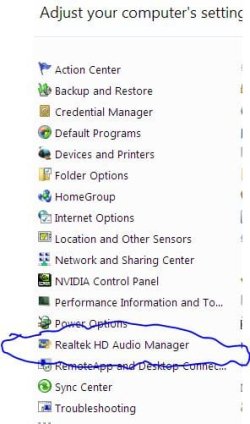
Okay i will download again realtek drivers and ATI one, see if i get that red speaker. If not i will uninstall realtek and reboot for the default windows one and see if this helps

Regards

Surreall

NOTE: no audiomanager with default driver, just the standard sound applet.
 

My Computer My Computer

At a glance

vista x64/ win 7 x64phenom 9950 BE8 gbnvidia gts 250
Computer Manufacturer/Model Number
me and myself
OS
vista x64/ win 7 x64
CPU
phenom 9950 BE
Motherboard
ASUS M2A-VM HDMI
Memory
8 gb
Graphics Card(s)
nvidia gts 250
Sound Card
realtek HD onboard
Monitor(s) Displays
dual hd 19" tft
Screen Resolution
1440x900
Hard Drives
2 x 500 gb WDC
1 x 500 gb Seagate
1 x 1000 gb Seagate
1 80 gb raptor
1 usb 160 gb
Cooling
standard issue
Keyboard
logitech g11
Mouse
usb wireless MS laser 6000
Internet Speed
18 mb (according to my provider :)
Just a thought.

I lost sound when I installed 7 rtm. All sound meters indicated that sound was being generated, but not heard.

I installed the Reltek drivers and then in sound control panel I had to right click on the analog outputs and select 'Connector Retasking'. I am using a 5.1 setup and the system had defaulted to two connectors for the rear channel and not one for the front channel.

Hope it helps.
 

Attachments

  • screen2.PNG
    screen2.PNG
    11.5 KB · Views: 11

My Computer My Computer

At a glance

Windows 7 Ultimate 64Intel Core 2 Duo E8400 @ 3GHzCORSAIR DOMINATOR 4GB (2 x 2GB) 240-Pin DDR2 ...SAPPHIRE 100245L Radeon HD 4850 512MB 256-bit...
Computer Manufacturer/Model Number
Captain Logic Design Works
OS
Windows 7 Ultimate 64
CPU
Intel Core 2 Duo E8400 @ 3GHz
Motherboard
Gigabyte EP35-DS3R
Memory
CORSAIR DOMINATOR 4GB (2 x 2GB) 240-Pin DDR2 SDRAM DDR2 1066
Graphics Card(s)
SAPPHIRE 100245L Radeon HD 4850 512MB 256-bit GDDR3 PCI Expr
Sound Card
On-board
Monitor(s) Displays
Primary:Acer H213H 21.5" Secondary:Sony old lcd
Screen Resolution
Primary 1920.1080 Secondary 1280.768
Hard Drives
Primary: WD 500 GB SATA "Green"
Secondary: WD 320 GB PATA
PSU
APEX SL-8600EPS 600W ATX12V / EPS12V
Case
LIAN LI PC-A05B Black Aluminum ATX Mid Tower
Cooling
Stock
Keyboard
Logitech G510
Mouse
LX8
Internet Speed
Comcast 7Mb/768Kb
NOTE: no audiomanager with default driver, just the standard sound applet.

No change, realtek still not recognised

Captain

Where can i find the analogue outs? I can only find the two hdmi's out

Regards

Surreall
 

My Computer My Computer

At a glance

W7 64bitAMD ATHLON™ 64 X2 7750+ (2.7GHz) 2 x 512K L2 ...2GB CORSAIR DOMINATOR 1066MHz1024MB GEFORCE 9800GT PCI Express + DVI + TV-OUT
OS
W7 64bit
CPU
AMD ATHLON™ 64 X2 7750+ (2.7GHz) 2 x 512K L2 Cache (Socket A
Motherboard
ASUS® M3N78: DUAL DDR2, S-ATA II, PCIe x16, 2 x PCIe x1, 3 x
Memory
2GB CORSAIR DOMINATOR 1066MHz
Graphics Card(s)
1024MB GEFORCE 9800GT PCI Express + DVI + TV-OUT
Sound Card
ONBOARD 8 CHANNEL (7.1) HIGH DEF AUDIO (AS STANDARD)
Monitor(s) Displays
HP2159V
Hard Drives
160GB SERIAL ATA II HARD DRIVE WITH 8MB CACHE (7,200rpm)
PSU
450W Quiet Dual Rail PSU + 120mm Case Fan
Case
STYLISH TRIDENT MID TOWER ATX CASE
Cooling
SUPER QUIET 22dBA TRIPLE COPPER HEATPIPE CPU COOLER
No change, realtek still not recognised

Captain

Where can i find the analogue outs? I can only find the two hdmi's out

Regards

Surreall

can you give screencap?
 

My Computer My Computer

At a glance

vista x64/ win 7 x64phenom 9950 BE8 gbnvidia gts 250
Computer Manufacturer/Model Number
me and myself
OS
vista x64/ win 7 x64
CPU
phenom 9950 BE
Motherboard
ASUS M2A-VM HDMI
Memory
8 gb
Graphics Card(s)
nvidia gts 250
Sound Card
realtek HD onboard
Monitor(s) Displays
dual hd 19" tft
Screen Resolution
1440x900
Hard Drives
2 x 500 gb WDC
1 x 500 gb Seagate
1 x 1000 gb Seagate
1 80 gb raptor
1 usb 160 gb
Cooling
standard issue
Keyboard
logitech g11
Mouse
usb wireless MS laser 6000
Internet Speed
18 mb (according to my provider :)
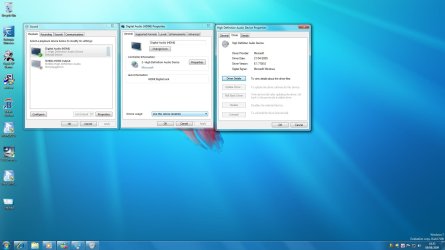
Here is the screen shot of the sound devices, just the HDMI ones :huh:
 

Attachments

  • Untitled.jpg
    Untitled.jpg
    186.3 KB · Views: 182

My Computer My Computer

At a glance

W7 64bitAMD ATHLON™ 64 X2 7750+ (2.7GHz) 2 x 512K L2 ...2GB CORSAIR DOMINATOR 1066MHz1024MB GEFORCE 9800GT PCI Express + DVI + TV-OUT
OS
W7 64bit
CPU
AMD ATHLON™ 64 X2 7750+ (2.7GHz) 2 x 512K L2 Cache (Socket A
Motherboard
ASUS® M3N78: DUAL DDR2, S-ATA II, PCIe x16, 2 x PCIe x1, 3 x
Memory
2GB CORSAIR DOMINATOR 1066MHz
Graphics Card(s)
1024MB GEFORCE 9800GT PCI Express + DVI + TV-OUT
Sound Card
ONBOARD 8 CHANNEL (7.1) HIGH DEF AUDIO (AS STANDARD)
Monitor(s) Displays
HP2159V
Hard Drives
160GB SERIAL ATA II HARD DRIVE WITH 8MB CACHE (7,200rpm)
PSU
450W Quiet Dual Rail PSU + 120mm Case Fan
Case
STYLISH TRIDENT MID TOWER ATX CASE
Cooling
SUPER QUIET 22dBA TRIPLE COPPER HEATPIPE CPU COOLER
Here is the screen shot of the sound devices, just the HDMI ones :huh:

that's the standard windows soundpanel, not the realtek one.
 

Attachments

  • treal.JPG
    treal.JPG
    30.5 KB · Views: 19

My Computer My Computer

At a glance

vista x64/ win 7 x64phenom 9950 BE8 gbnvidia gts 250
Computer Manufacturer/Model Number
me and myself
OS
vista x64/ win 7 x64
CPU
phenom 9950 BE
Motherboard
ASUS M2A-VM HDMI
Memory
8 gb
Graphics Card(s)
nvidia gts 250
Sound Card
realtek HD onboard
Monitor(s) Displays
dual hd 19" tft
Screen Resolution
1440x900
Hard Drives
2 x 500 gb WDC
1 x 500 gb Seagate
1 x 1000 gb Seagate
1 80 gb raptor
1 usb 160 gb
Cooling
standard issue
Keyboard
logitech g11
Mouse
usb wireless MS laser 6000
Internet Speed
18 mb (according to my provider :)
that's the standard windows soundpanel, not the realtek one.


I cannot find the realtek one, i did a search in start panel didnt come up with anything, nor in programme files

Rgds

Surreall
 

My Computer My Computer

At a glance

W7 64bitAMD ATHLON™ 64 X2 7750+ (2.7GHz) 2 x 512K L2 ...2GB CORSAIR DOMINATOR 1066MHz1024MB GEFORCE 9800GT PCI Express + DVI + TV-OUT
OS
W7 64bit
CPU
AMD ATHLON™ 64 X2 7750+ (2.7GHz) 2 x 512K L2 Cache (Socket A
Motherboard
ASUS® M3N78: DUAL DDR2, S-ATA II, PCIe x16, 2 x PCIe x1, 3 x
Memory
2GB CORSAIR DOMINATOR 1066MHz
Graphics Card(s)
1024MB GEFORCE 9800GT PCI Express + DVI + TV-OUT
Sound Card
ONBOARD 8 CHANNEL (7.1) HIGH DEF AUDIO (AS STANDARD)
Monitor(s) Displays
HP2159V
Hard Drives
160GB SERIAL ATA II HARD DRIVE WITH 8MB CACHE (7,200rpm)
PSU
450W Quiet Dual Rail PSU + 120mm Case Fan
Case
STYLISH TRIDENT MID TOWER ATX CASE
Cooling
SUPER QUIET 22dBA TRIPLE COPPER HEATPIPE CPU COOLER
I cannot find the realtek one, i did a search in start panel didnt come up with anything, nor in programme files

Rgds

Surreall

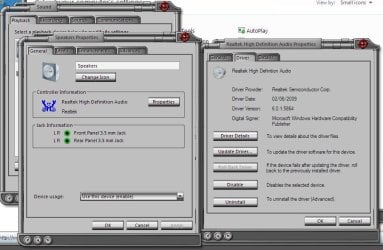
post screencap properties of realtek driver panel,
 

Attachments

  • realt.JPG
    realt.JPG
    76.5 KB · Views: 64

My Computer My Computer

At a glance

vista x64/ win 7 x64phenom 9950 BE8 gbnvidia gts 250
Computer Manufacturer/Model Number
me and myself
OS
vista x64/ win 7 x64
CPU
phenom 9950 BE
Motherboard
ASUS M2A-VM HDMI
Memory
8 gb
Graphics Card(s)
nvidia gts 250
Sound Card
realtek HD onboard
Monitor(s) Displays
dual hd 19" tft
Screen Resolution
1440x900
Hard Drives
2 x 500 gb WDC
1 x 500 gb Seagate
1 x 1000 gb Seagate
1 80 gb raptor
1 usb 160 gb
Cooling
standard issue
Keyboard
logitech g11
Mouse
usb wireless MS laser 6000
Internet Speed
18 mb (according to my provider :)
Obviously for some reason it is not installing Realtek as it is not recognised
 

Attachments

  • Properties.jpg
    Properties.jpg
    119.7 KB · Views: 74

My Computer My Computer

At a glance

W7 64bitAMD ATHLON™ 64 X2 7750+ (2.7GHz) 2 x 512K L2 ...2GB CORSAIR DOMINATOR 1066MHz1024MB GEFORCE 9800GT PCI Express + DVI + TV-OUT
OS
W7 64bit
CPU
AMD ATHLON™ 64 X2 7750+ (2.7GHz) 2 x 512K L2 Cache (Socket A
Motherboard
ASUS® M3N78: DUAL DDR2, S-ATA II, PCIe x16, 2 x PCIe x1, 3 x
Memory
2GB CORSAIR DOMINATOR 1066MHz
Graphics Card(s)
1024MB GEFORCE 9800GT PCI Express + DVI + TV-OUT
Sound Card
ONBOARD 8 CHANNEL (7.1) HIGH DEF AUDIO (AS STANDARD)
Monitor(s) Displays
HP2159V
Hard Drives
160GB SERIAL ATA II HARD DRIVE WITH 8MB CACHE (7,200rpm)
PSU
450W Quiet Dual Rail PSU + 120mm Case Fan
Case
STYLISH TRIDENT MID TOWER ATX CASE
Cooling
SUPER QUIET 22dBA TRIPLE COPPER HEATPIPE CPU COOLER
Back
Top