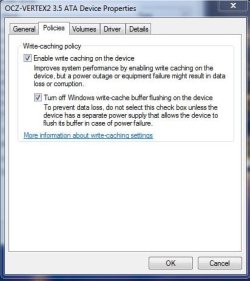
For the write caching experts

My only question is (and this is not meant to be sarcastic) If in practical use, you can tell no difference, what difference does it really make. Mine is on and my WEI is 7.7 . I'm not sure I can improve on that.
Look at it as an academic exercise - most of those do not yield anything. :D
 

My Computer

Computer Manufacturer/Model Number
HP, Dell, Gateway, Toshiba - 4 laptops and 2 desktops
OS
Vista, Windows7, Mint Mate, Zorin, Windows 8
CPU
from 1.6GHz Duo to i7
Monitor(s) Displays
2x HP w2207
Hard Drives
5x HDD, 7x SSD, 12x Externals
Keyboard
with trackball - no mices
Mouse
Trackball mice
Internet Speed
DSL 6000
My only question is (and this is not meant to be sarcastic) If in practical use, you can tell no difference, what difference does it really make. Mine is on and my WEI is 7.7 . I'm not sure I can improve on that.
Look at it as an academic exercise - most of those do not yield anything. :D

No essenbe, nothing you can "adjust" will raise your disks WEI from 7.7 to 7.8 or 7.9.
BUT, it still, it is important to try to understand all the factors that influence performance as whs suggests - it is very much an academic exercise as well as an intellectual one :):):)
 

My Computer

Computer Manufacturer/Model Number
Alienware Aurora
OS
Win 7 Ultimate x64
CPU
Core I7 980X O.C. to 4.0 Ghz
Motherboard
Custom Intel mATX (Bios ver A10)
Memory
12GB 1600 mhz triple channel DDR3 - Kingston
Graphics Card(s)
ATI Radeon HD 5970 2GB Video Card
Sound Card
Creative Labs Titanium sound blaster
Monitor(s) Displays
30" Dell LCD
Screen Resolution
2560 x 1600
Hard Drives
240 GB OCZ Vertex 2 SSD
256 GB Samsung V2 SSD
2TB WD Black Caviar 7200 rpm SATA3
600GB WD Velociraptor 10,000 rpm SATA3
3TB WD MyBook Essential USB 3.0 7200 rpm External
PSU
850 Watt
Case
Alienware Aurora
Cooling
Water
Keyboard
Logitech G15 (original version)
Mouse
Logitech MX1000 Laser - Wireless
Internet Speed
Cable 22 Mb/sec download
Other Info
USB 3.0,
Blue Ray DVD Read/Writer
Bose Companion 3 Speakers
WRT54G Wireless Router
"flush write cache buffer" option turned on and off.
Dumb question - How do you do that?

PS: my experience with the OCZ technicians was pretty good. Though that was 2 years ago. They were persons of few words though.

Hi whs - get to device manager and expand disk drives - find the drive you are interested in, click on it to highlight - once highlighted, right click and then select "Properties". From there, click on the "Policies" tab - then you can turn on/off write caching for the drive you have chosen.
 

My Computer

Computer Manufacturer/Model Number
Alienware Aurora
OS
Win 7 Ultimate x64
CPU
Core I7 980X O.C. to 4.0 Ghz
Motherboard
Custom Intel mATX (Bios ver A10)
Memory
12GB 1600 mhz triple channel DDR3 - Kingston
Graphics Card(s)
ATI Radeon HD 5970 2GB Video Card
Sound Card
Creative Labs Titanium sound blaster
Monitor(s) Displays
30" Dell LCD
Screen Resolution
2560 x 1600
Hard Drives
240 GB OCZ Vertex 2 SSD
256 GB Samsung V2 SSD
2TB WD Black Caviar 7200 rpm SATA3
600GB WD Velociraptor 10,000 rpm SATA3
3TB WD MyBook Essential USB 3.0 7200 rpm External
PSU
850 Watt
Case
Alienware Aurora
Cooling
Water
Keyboard
Logitech G15 (original version)
Mouse
Logitech MX1000 Laser - Wireless
Internet Speed
Cable 22 Mb/sec download
Other Info
USB 3.0,
Blue Ray DVD Read/Writer
Bose Companion 3 Speakers
WRT54G Wireless Router
:cry:I am not as technically astute as you, so I cannot indulge in an acedemic exercise on this subject. My only knowledge of caching is that in a worse case if a power outage were to occur during a write operation, without cashing your data would become corrupted. I am sure ther are other reasons also. But, with an SSD which is only an OS drive, according to Microsoft reads outnumber writes by 40:1. and something like 80% of writes are 4kb or less. It would seem that an SSD is fast enough to write 4kb in an extremely short time as in ms. And due to the fact that writes are a quite infrequent, is write caching necessary? I am sure that there are many more implications of write caching, but the last sentence of Happyman's last post leaves me out of the discussion.:cry::confused: My write caching is turned on. At least it's on when my computer is running. My MB is RMA'd right now.:mad::mad2:
 

My Computers

System One System Two

  • Computer type
    PC/Desktop
    Computer Manufacturer/Model Number
    ALWAYS UNDER CONSTRUCTION
    OS
    Windows 11 Pro
    CPU
    Ryzen 9 5900X
    Motherboard
    Asus X570 Crosshair Viii Hero
    Memory
    32GB G Skill DDR4-3600
    Graphics Card(s)
    EVGA RTX 3080 FTW 3 Ultra
    Sound Card
    On Board/Sennheiser PC37X Headset
    Monitor(s) Displays
    3 X Asus 27"
    Screen Resolution
    2560x1440
    Hard Drives
    2 X 1 TB NVME drives
    PSU
    EVGA 850
    Case
    Phanteks Eclipse P400A
    Cooling
    EVGA 280 AIO
    Keyboard
    Logitech G510s/ Logitech G13
    Mouse
    Logitech G502
    Internet Speed
    24/1
    Antivirus
    ESET/MBAM Pro/SAS Pro
    Browser
    Chrome/ Firefox/ Edge
  • Computer type
    Laptop
    System Manufacturer/Model Number
    Dell 16 Plus
    OS
    Windows 11 Pro
    CPU
    Intel Ultra 9 288V
    Memory
    32 GB LPDDR5X 8533
    Monitor(s) Displays
    16" Mini-LED HDR600 Touch 90 Hz
    Screen Resolution
    2560X1600
    Hard Drives
    1 TB NVME
"flush write cache buffer" option turned on and off.
Dumb question - How do you do that?

PS: my experience with the OCZ technicians was pretty good. Though that was 2 years ago. They were persons of few words though.

Hi whs - get to device manager and expand disk drives - find the drive you are interested in, click on it to highlight - once highlighted, right click and then select "Properties". From there, click on the "Policies" tab - then you can turn on/off write caching for the drive you have chosen.
LOL - thanks, but that I know of course. I thought there was a setting to enable the buffer in the SSD controller. Sorry for the misunderstanding.

PS: essenbe, you are too modest
 

My Computer

Computer Manufacturer/Model Number
HP, Dell, Gateway, Toshiba - 4 laptops and 2 desktops
OS
Vista, Windows7, Mint Mate, Zorin, Windows 8
CPU
from 1.6GHz Duo to i7
Monitor(s) Displays
2x HP w2207
Hard Drives
5x HDD, 7x SSD, 12x Externals
Keyboard
with trackball - no mices
Mouse
Trackball mice
Internet Speed
DSL 6000
Dumb question - How do you do that?

PS: my experience with the OCZ technicians was pretty good. Though that was 2 years ago. They were persons of few words though.

Hi whs - get to device manager and expand disk drives - find the drive you are interested in, click on it to highlight - once highlighted, right click and then select "Properties". From there, click on the "Policies" tab - then you can turn on/off write caching for the drive you have chosen.
LOL - thanks, but that I know of course. I thought there was a setting to enable the buffer in the SSD controller. Sorry for the misunderstanding.

Once you get to the "Write Caching" tab, you can turn On/Off the "Flush Write Buffer" option from the same screen as shown below - Read Both Options Carefully

No, no way to enable/disable buffering in the SSD from your desktop
 

Attachments

  • Capture.JPG
    Capture.JPG
    35.3 KB · Views: 14

My Computer

Computer Manufacturer/Model Number
Alienware Aurora
OS
Win 7 Ultimate x64
CPU
Core I7 980X O.C. to 4.0 Ghz
Motherboard
Custom Intel mATX (Bios ver A10)
Memory
12GB 1600 mhz triple channel DDR3 - Kingston
Graphics Card(s)
ATI Radeon HD 5970 2GB Video Card
Sound Card
Creative Labs Titanium sound blaster
Monitor(s) Displays
30" Dell LCD
Screen Resolution
2560 x 1600
Hard Drives
240 GB OCZ Vertex 2 SSD
256 GB Samsung V2 SSD
2TB WD Black Caviar 7200 rpm SATA3
600GB WD Velociraptor 10,000 rpm SATA3
3TB WD MyBook Essential USB 3.0 7200 rpm External
PSU
850 Watt
Case
Alienware Aurora
Cooling
Water
Keyboard
Logitech G15 (original version)
Mouse
Logitech MX1000 Laser - Wireless
Internet Speed
Cable 22 Mb/sec download
Other Info
USB 3.0,
Blue Ray DVD Read/Writer
Bose Companion 3 Speakers
WRT54G Wireless Router
[QUOTE
LOL - thanks, but that I know of course. I thought there was a setting to enable the buffer in the SSD controller. Sorry for the misunderstanding.
[/QUOTE]

WHS, maybe that is what the guy on the OCZ forum meant when he said that you had to leave it off for 24 hrs and restart 10-12 times for it to be noticeable.
 

My Computers

System One System Two

  • Computer type
    PC/Desktop
    Computer Manufacturer/Model Number
    ALWAYS UNDER CONSTRUCTION
    OS
    Windows 11 Pro
    CPU
    Ryzen 9 5900X
    Motherboard
    Asus X570 Crosshair Viii Hero
    Memory
    32GB G Skill DDR4-3600
    Graphics Card(s)
    EVGA RTX 3080 FTW 3 Ultra
    Sound Card
    On Board/Sennheiser PC37X Headset
    Monitor(s) Displays
    3 X Asus 27"
    Screen Resolution
    2560x1440
    Hard Drives
    2 X 1 TB NVME drives
    PSU
    EVGA 850
    Case
    Phanteks Eclipse P400A
    Cooling
    EVGA 280 AIO
    Keyboard
    Logitech G510s/ Logitech G13
    Mouse
    Logitech G502
    Internet Speed
    24/1
    Antivirus
    ESET/MBAM Pro/SAS Pro
    Browser
    Chrome/ Firefox/ Edge
  • Computer type
    Laptop
    System Manufacturer/Model Number
    Dell 16 Plus
    OS
    Windows 11 Pro
    CPU
    Intel Ultra 9 288V
    Memory
    32 GB LPDDR5X 8533
    Monitor(s) Displays
    16" Mini-LED HDR600 Touch 90 Hz
    Screen Resolution
    2560X1600
    Hard Drives
    1 TB NVME
WHS, maybe that is what the guy on the OCZ forum meant when he said that you had to leave it off for 24 hrs and restart 10-12 times for it to be noticeable
As we have discussed earlier, I do not think he knew what he was talking about. He must have meant the PC of Fred Flintstone.

There are a lot of weird types on the OCZ forum. But some of their senior people are useful. You have to apply a lot of judgement.
 

My Computer

Computer Manufacturer/Model Number
HP, Dell, Gateway, Toshiba - 4 laptops and 2 desktops
OS
Vista, Windows7, Mint Mate, Zorin, Windows 8
CPU
from 1.6GHz Duo to i7
Monitor(s) Displays
2x HP w2207
Hard Drives
5x HDD, 7x SSD, 12x Externals
Keyboard
with trackball - no mices
Mouse
Trackball mice
Internet Speed
DSL 6000
WHS, I have applied good judgment. I don't go there anymore.;)
 

My Computers

System One System Two

  • Computer type
    PC/Desktop
    Computer Manufacturer/Model Number
    ALWAYS UNDER CONSTRUCTION
    OS
    Windows 11 Pro
    CPU
    Ryzen 9 5900X
    Motherboard
    Asus X570 Crosshair Viii Hero
    Memory
    32GB G Skill DDR4-3600
    Graphics Card(s)
    EVGA RTX 3080 FTW 3 Ultra
    Sound Card
    On Board/Sennheiser PC37X Headset
    Monitor(s) Displays
    3 X Asus 27"
    Screen Resolution
    2560x1440
    Hard Drives
    2 X 1 TB NVME drives
    PSU
    EVGA 850
    Case
    Phanteks Eclipse P400A
    Cooling
    EVGA 280 AIO
    Keyboard
    Logitech G510s/ Logitech G13
    Mouse
    Logitech G502
    Internet Speed
    24/1
    Antivirus
    ESET/MBAM Pro/SAS Pro
    Browser
    Chrome/ Firefox/ Edge
  • Computer type
    Laptop
    System Manufacturer/Model Number
    Dell 16 Plus
    OS
    Windows 11 Pro
    CPU
    Intel Ultra 9 288V
    Memory
    32 GB LPDDR5X 8533
    Monitor(s) Displays
    16" Mini-LED HDR600 Touch 90 Hz
    Screen Resolution
    2560X1600
    Hard Drives
    1 TB NVME
But in the above Winsat tests was the Write Cache Buffer Flushing turned "On" or "Off" :eek:
In both tests, the Buffer Flushing was turned OFF (disabled).
 

My Computer

Computer type
PC/Desktop
Computer Manufacturer/Model Number
Golden Mk. I.4
OS
Windows 10 Pro x64 ; Xubuntu x64
CPU
Intel i7 860 @ 2.80 GHz O/C'ed to 4.0GHz
Motherboard
Gigabyte P55A-UD3R Rev.1. Award BIOS F13
Memory
16GB Corsair Vengance DDR3 @ 661 MHz Dual Channel (9-9-9-24)
Graphics Card(s)
EVGA NVidia GTX 560 1024MB
Sound Card
Realtek Integrated
Monitor(s) Displays
Dual Samsung SyncMaster 2494HS
Screen Resolution
1920*1080 and 1920*1080
Hard Drives
1*Samsung 840 EVO 120GB SSD;
1*OCZ Vertex 2 60GB SSD;
2*Samsung F3 SpinPoint 1TB in RAID0;
1*Samsung F1 SpinPoint 1TB;
2*Western Digital 1TB External USB 3.0
1*Western Digital 500GB External USB 3.0
1*Seagate 500GB External USB 2.0
PSU
Thermaltake ToughPower QFan 750W
Case
Thermaltake Element S VK60001W2Z
Cooling
Corsair H60 Water Cooling, 2*230mm and 2*80mm case fans
Keyboard
Logitech G110
Mouse
Logitech MX518
Back
Top