
SSD "Enable Write Caching" turning back on after being turned off

bowtiebill

New member
Local time
7:56 PM
Messages
8
SSD "Enable Write Caching" turning back on after being turned off

Windows 7 Ultimate x64 SP1. I've noticed this strange behaviour where, after I have un-ticked "Enable write caching" for the main (only) drive in my laptop (Intel 240GB SSD) the setting keeps getting turned on again every time Windows wakes up from sleep. I turn if off again, and then it's on again after waking up. :huh:
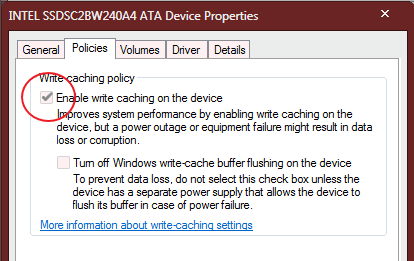
sMLsrHT.gif


What could be causing this, and is there another way (eg. group policy or registry setting) of forceably, permanently, disabling write caching? Or could this be some sort of driver issue? I wouldn't have thought turning a feature *off* would be a problem though. :)
 

My Computer My Computer

Computer type
Laptop
Computer Manufacturer/Model Number
HP 8510p
OS
Windows 7 Ultimate x64 SP1
CPU
Intel Core2 Duo T8100 @ 2.10GHz
Memory
4GB
Graphics Card(s)
ATI Mobility Radeon HD 2600
Hard Drives
Intel SSD 240GB AHCI
Antivirus
Avast Home
Browser
Firefox
Hi and welcome to SevenForums,
Is hibernation disabled ?
Not a great thing to do on a laptop seeing it has a battery.
 

My Computer My Computer

Computer type
PC/Desktop
Computer Manufacturer/Model Number
Custom assembled by me :}
OS
Win-7-Pro64bit 7-H-Prem-64bit
CPU
i7-5930K 2nd i9-9940x both water blocked VRM's too
Motherboard
ASUS SABERTOOTH X99 2nd ASUS x299 Apex
Memory
Trident-z 3200C14 2nd Trident-z 3600C16
Graphics Card(s)
EVGA 1080ti ftw3 2nd Titan Xp both water blocked
Sound Card
Built-in Realtek
Monitor(s) Displays
1-AOC G2460PG 24"G-Sync 144Hz/ 2nd 1-ASUS VG248QE 24" 144Hz
Screen Resolution
1920 x 1080 144Hz
Hard Drives
2-Samsung M.2 Evo & Evo Plus
2-Samsung 850 EVO 500GB SSD's/ 3-2.5 W.D. Black 1tb-&3-1tb/3-3.5 WD Black 1tb hdd's
PSU
EVGA SuperNOVA 1000-P2 2nd 1200-P2
Case
2-Corsair Obsidian Series 450D Black ATX Mid Tower
Cooling
Custom water loops
Keyboard
Logitech G710+/ 2nd Logitech G910
Mouse
2-RedDragon M901 Perdition 16400 dpi Gaming mouse = wired
Internet Speed
Comcast Ping 19ms 89.31mbps download speed 6.12mbps upload
Antivirus
Malwarebytes Pro/ Superantispyware Pro
Browser
FireFox & Pale moon
Other Info
2nd ASUS X299 Apex/Intel i9-9940x with Custom water loop/7H-Prem-x64/Corsair 450D case/Ram Trident-z 3600C16 4x8gb / Samsung970Evo plus 500gb SSD/Dual ssd EZ swap evo/PSU EVGA SuperNova 1200w-P2 80+Platinum/GPU Titan Xp /8-ML-140 on push-pull on 2-280GTX rads
Hi and welcome to SevenForums,
Is hibernation disabled ?
Not a great thing to do on a laptop seeing it has a battery.

Hi ThrashZone, thanks. Hibernation is disabled, yes. How does that affect write caching? What isn't a great thing to do? Do you mean turning off write caching isn't good? I understand SSD life is mostly defined by writing, but I thought the danger of data corruption from power loss would be more important - ie. an SSD costs $100 but getting data back is far more costly in time. What is the prevailing wisdom about that?

Could Windows be turning it on again because that is just what it decides is right for SSDs?
 

My Computer My Computer

Computer type
Laptop
Computer Manufacturer/Model Number
HP 8510p
OS
Windows 7 Ultimate x64 SP1
CPU
Intel Core2 Duo T8100 @ 2.10GHz
Memory
4GB
Graphics Card(s)
ATI Mobility Radeon HD 2600
Hard Drives
Intel SSD 240GB AHCI
Antivirus
Avast Home
Browser
Firefox
Nobody knows how to keep write caching turned off? :)
 

My Computer My Computer

Computer type
Laptop
Computer Manufacturer/Model Number
HP 8510p
OS
Windows 7 Ultimate x64 SP1
CPU
Intel Core2 Duo T8100 @ 2.10GHz
Memory
4GB
Graphics Card(s)
ATI Mobility Radeon HD 2600
Hard Drives
Intel SSD 240GB AHCI
Antivirus
Avast Home
Browser
Firefox
Hi,
Nope
I have samsung magician and my setting is as yours is :/
 

My Computer My Computer

Computer type
PC/Desktop
Computer Manufacturer/Model Number
Custom assembled by me :}
OS
Win-7-Pro64bit 7-H-Prem-64bit
CPU
i7-5930K 2nd i9-9940x both water blocked VRM's too
Motherboard
ASUS SABERTOOTH X99 2nd ASUS x299 Apex
Memory
Trident-z 3200C14 2nd Trident-z 3600C16
Graphics Card(s)
EVGA 1080ti ftw3 2nd Titan Xp both water blocked
Sound Card
Built-in Realtek
Monitor(s) Displays
1-AOC G2460PG 24"G-Sync 144Hz/ 2nd 1-ASUS VG248QE 24" 144Hz
Screen Resolution
1920 x 1080 144Hz
Hard Drives
2-Samsung M.2 Evo & Evo Plus
2-Samsung 850 EVO 500GB SSD's/ 3-2.5 W.D. Black 1tb-&3-1tb/3-3.5 WD Black 1tb hdd's
PSU
EVGA SuperNOVA 1000-P2 2nd 1200-P2
Case
2-Corsair Obsidian Series 450D Black ATX Mid Tower
Cooling
Custom water loops
Keyboard
Logitech G710+/ 2nd Logitech G910
Mouse
2-RedDragon M901 Perdition 16400 dpi Gaming mouse = wired
Internet Speed
Comcast Ping 19ms 89.31mbps download speed 6.12mbps upload
Antivirus
Malwarebytes Pro/ Superantispyware Pro
Browser
FireFox & Pale moon
Other Info
2nd ASUS X299 Apex/Intel i9-9940x with Custom water loop/7H-Prem-x64/Corsair 450D case/Ram Trident-z 3600C16 4x8gb / Samsung970Evo plus 500gb SSD/Dual ssd EZ swap evo/PSU EVGA SuperNova 1200w-P2 80+Platinum/GPU Titan Xp /8-ML-140 on push-pull on 2-280GTX rads
I have a Samsung SSD as well & if I access the Samsung Magician software, which enables me to change settings, it says that the "Write Caching Buffer" "Must be enabled for better SSD performance".

There is also a side note on that says:

"The use of this feature does not affect the life or capacity of the SSD. In order to maximize both system and SSD performance, this feature is recommended. When using this feature, you will notice improvements, especially in random read/write performance".

Perhaps that will set your mind at rest.
 

My Computer My Computer

Computer type
PC/Desktop
Computer Manufacturer/Model Number
Self built using existing case
OS
Windows 7 Home Premium 64 bit sp1
CPU
Intel i5 3570 3.4Ghz Ivy Bridge SKT 1155 quad core
Motherboard
Gigabyte Z77-HD3 SKT 1155 2xSata 3, 4x USB 3.0
Memory
G-Skill Rip Jaws 16Gb (8x2) DDR3 -1600 PC3 12800 CL 10 red
Graphics Card(s)
Gigabyte NVIDIA GT610 1Gb DDR3 810/1200 PCI-E 2.0 Silent
Sound Card
NVIDIA High Definition & Realtech High Definition Audio
Monitor(s) Displays
2 x Philips 226V4L 16:9 aspect ratio
Screen Resolution
1920 x 1080 HD
Hard Drives
Samsung 840 Pro 256gb SSD, SATA 3.
Hitachi Touro Portable 1tb, USB 3.0 HDD used for image b/ups.
PSU
Corsair VS450
Case
Codeng
Cooling
PSU fan & CPU fan
Keyboard
Logitech
Mouse
Logitech Wireless trackball M570
Internet Speed
Wireless 3G. 3mg down & 550kb up.
Antivirus
Bitdefender Internet Security 2020
Browser
Opera (Current Version) & Firefox
Other Info
MS Office 2013 Pro. Davis weather station software. MGE Nova 600 avr UPS.
What isn't a great thing to do? Do you mean turning off write caching isn't good?

It's not a good idea to turn off write caching, mainly for the performance improvement it brings, but also because there aren't significant drawbacks to it either. It's a proven technique, with more than 20 years of use in a wide variety of systems. One has to have a very strong reason to disable it.
Why do you want to go without it?


I understand SSD life is mostly defined by writing, but I thought the danger of data corruption from power loss would be more important - ie. an SSD costs $100 but getting data back is far more costly in time. What is the prevailing wisdom about that?

Both things are true I think, the data is far more important than the hardware. But your assumption is wrong, power loss will NOT corrupt data in the disk at all. Problem from power losses come from the fact that the OS may be stopped half-writing some data, and that for sure won't save it properly. Write caching exacerbates this problem by keeping data in RAM for longer before writing it to disk, so the window for data loss is somewhat greater. And also, are you getting constant power failures to worry about this?
Of course, that kind of data loss is always limited to the data the computer was writing at that very moments, or a few seconds ago at most. The rest is unaffected. Specially with modern filesystems like NTFS, they are reasonable resilient to failures even in system areas.

Besides, don't forget about backups. With a good backup set you can almost forget about all this. Even if your disk explodes right now, you just buy a new one (sorry wallet), restore the backup and continue as if nothing happened.

In short, don't try to disable it. You lose a significant performance improvement for pretty much nothing in return.

But to concretely answer the question, I really have no idea why that's happening :p
Even if it's a blunder, Windows MUST obey the user no matter what, and go and disable it if instructed to do so. My guess is that something else is enabling it back, maybe a driver or its support programs, or some kind of "optimizer" perhaps. But I don't have a concrete answer.
 

My Computer My Computer

Computer type
Laptop
Computer Manufacturer/Model Number
Toshiba Sattelite A665-S6092
OS
Windows 7 Ultimate x64
CPU
Intel Core i7-740QM
Memory
8 GB DDR3
Graphics Card(s)
NVIDIA GeForce 330GT
Screen Resolution
1366x768
Hard Drives
Samsung 840 SSD 500GB
1TB USB3 external HD
Cooling
Coolermaster Notepal U3 notebook cooling pad
Internet Speed
3mbps ASDL
Antivirus
ClamWin 0.98.7
Browser
Opera 12.17 x86 (main), Firefox 38 (sec), IE11 (last resort)
Further to Alejandro's post, data loss occurring in a sudden power failure when using Write Caching, is protected by "Write Caching Buffer Flushing". This side note from the Samsung Magician reads as follows:

"If you are using the Windows Write-Cache Buffer and experience a loss of power or a device failure, any data stored in the cache memory could be lost or corrupted. Windows Write-Cache Buffer Flushing should be enabled to ensure data integrity. In particular, this feature is important if your SSD is being used in a server application.*When using an SSD and HDD together, this feature should also be turned on".

Also it's quite possible your Intel SSD is instructing Windows to turn on Write Caching, as there are many advantages in using write caching as has been discussed.
 

My Computer My Computer

Computer type
PC/Desktop
Computer Manufacturer/Model Number
Self built using existing case
OS
Windows 7 Home Premium 64 bit sp1
CPU
Intel i5 3570 3.4Ghz Ivy Bridge SKT 1155 quad core
Motherboard
Gigabyte Z77-HD3 SKT 1155 2xSata 3, 4x USB 3.0
Memory
G-Skill Rip Jaws 16Gb (8x2) DDR3 -1600 PC3 12800 CL 10 red
Graphics Card(s)
Gigabyte NVIDIA GT610 1Gb DDR3 810/1200 PCI-E 2.0 Silent
Sound Card
NVIDIA High Definition & Realtech High Definition Audio
Monitor(s) Displays
2 x Philips 226V4L 16:9 aspect ratio
Screen Resolution
1920 x 1080 HD
Hard Drives
Samsung 840 Pro 256gb SSD, SATA 3.
Hitachi Touro Portable 1tb, USB 3.0 HDD used for image b/ups.
PSU
Corsair VS450
Case
Codeng
Cooling
PSU fan & CPU fan
Keyboard
Logitech
Mouse
Logitech Wireless trackball M570
Internet Speed
Wireless 3G. 3mg down & 550kb up.
Antivirus
Bitdefender Internet Security 2020
Browser
Opera (Current Version) & Firefox
Other Info
MS Office 2013 Pro. Davis weather station software. MGE Nova 600 avr UPS.
Thanks guys, ok I feel better about it now. :)

I only thought to turn caching off for the very reason that SSDs are much faster than HDDs, and traditionally write caching for HDDs was done purely for a speed increase. In that light, it seemed that if a non-cached SSD was just as fast (or faster) than a cached HDD, why not turn it off for the bit of extra data safety it brings? So I thought I'd try it, just to see how it goes, and found this issue.

However your points about flushing etc. are well made. I have had the odd problem over the years with a power outage and losing a file after the CHKDSK finishes, but it's very rare of course. Backups are a daily thing at best, so the possible loss of a few hours' work still niggles in the mind sometimes. Best thing I suppose is "autosave" in whatever software is being used, if it has it.

Speaking of backups, it's amazing how "tech savvy" kids seem to be, accumulating hundreds of gigs of photos, music, etc. yet hardly any of them know how to back stuff up! They seem to rely mainly on the "sync" services of MS, Apple and Google. Or Dropbox if they really "know how to use a computer". :) A friend's teenage daughter just spilled coffee on her Macbook, which was completely full of travel photos and stuff.. first thing I said was, "have you been backing it up?".. nope. :rolleyes:
 

My Computer My Computer

Computer type
Laptop
Computer Manufacturer/Model Number
HP 8510p
OS
Windows 7 Ultimate x64 SP1
CPU
Intel Core2 Duo T8100 @ 2.10GHz
Memory
4GB
Graphics Card(s)
ATI Mobility Radeon HD 2600
Hard Drives
Intel SSD 240GB AHCI
Antivirus
Avast Home
Browser
Firefox
Back
Top