Force DVI/HDMI resolutions and refresh rates

How to Force DVI or HDMI Resolutions and Refresh Rates in Windows 7

   Information
There have been innumerable posts on SevenForums about things like 59Hz refresh rates and 1080p 16:9 HDTVs that display only 1024x768 when connected with DVI or HDMI. After a ton of research and development I think I've got a working solution for virtually all of these issues.


Starting with Vista, Microsoft has required graphics vendors to read and respect monitor capability information from the display itself if they wanted to pass Windows Hardware Quality Labs (WHQL) certification. This display capability data is encapsulated in an EDID. Few HDTV manufacturers sought WHQL and it's unclear whether Microsoft tests display EDIDs from monitor manufacturers as a WHQL requirement. Please let me know if you have a WHQL display that seems to have a bad EDID.

As a result, many DVI/HDMI connected HDTVs and some monitors are locked into displaying only those resolutions and refresh rates that are specified in the EDID. No graphics adapter or driver is supposed to allow configurations not listed in the EDID at least as a default. Newer ATI drivers allow for a small number of HD resolutions to be forced but it's been hit or miss for the users I've surveyed and nVidia's offerings don't seem to be a 100% solution either.

The natural solution would appear to be changing the EDID information in the display. Rarely, this is possible with Powestrip if the display stores the EDID in a flash memory but more commonly the EDID is stored in an EPROM that can only be updated with specialized hardware. I've talked with several display vendors during the development of this tutorial and none of them consider a bad EDID grounds for warranty service. So if next to no displays support updating the EDID through software and the manufacturer won't fix the hardware, what are we left to do? Break out the toolkit and warm up the soldering iron?

While that's well within my capabilities it seems to put some end-users off a bit, although I really can't understand why -- I love the smell of solder in the morning! :geek: But there has to be a better way right? Again, Microsoft has a solution if you really dig for it and do your homework: How to Use an INF to Override the Monitor EDID While it's not intended for end users, what really fun stuff is? The challenge was to develop a method accessible to a greater audience -- to improve on the solution that Microsoft provides that's intended for hardware manufacturers and make it work for us.
   Warning

Prerequisites
  • Read and understand both linked documents above.
  • Post questions if anything is unclear before you proceed.
  • Don't blame me when you ruin your $3000 HDTV. Smoke can happen.
  • Read up on what your displays true capabilities are stick close to them.
  • This is more of a coffee tutorial than a beer tutorial...


Procedure
  1. Download View attachment Phoenix.zip and extract it to a working folder.
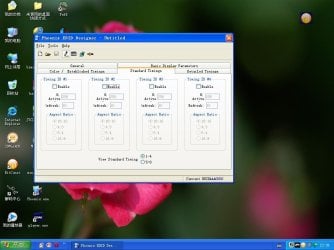
  2. Run it and click the registry toolbar button.
  3. Click the pencil toolbar button for edit mode.
  4. Change the EDID settings to reflect you display's true capabilities
  5. Pay special attention to the Standard Timings tab.
  6. Detailed Timing blocks 2-4 provide some very interested additional options.
  7. Save the EDID to a .DAT file in the working folder.
  8. Download moninfo.exe and install it.
  9. Open the saved .DAT with MonInfo and make sure it doesn't complain about it
  10. If it does post here for help
  11. If MonInfo reads in an displays the settings the way you configured them in Phoenix then...
  12. Select Create INF... from the file menu and save it to the working folder.
  13. Feel free to edit the strings in the INF to your liking.
  14. Open Start, type devmgmt.msc and press Enter.
  15. Select the monitor you want to change, right click and select Update Driver Software
  16. Use the tried and true "Have Disk" method to select the INF and install it.
  17. Reboot and enjoy your new resolution!


Last edited by a moderator:
You tried the tutorial? What happened?
when i edited it, it would do 75hz but for some reason its only doing 840 x 1050 instead of 1680x1050, cant figure out why.
 

My Computer My Computer

At a glance

Windows 7 Ultimate 64-Bit
OS
Windows 7 Ultimate 64-Bit
You tried the tutorial? What happened?
when i edited it, it would do 75hz but for some reason its only doing 840 x 1050 instead of 1680x1050, cant figure out why.

I have the exact same problem. I switched from nvidia to ati and I no longer can create custom resolutions from the cc. The thing is, I used to have an nvida videocard and in the control panel I could create the wanted 75hz. I got the 840 x 1050 even with the nvidia card if I didn't set the timing standard as CVT reduced blank.
I just can't get it to work with the edid editor. always get only half of the horizontal resolution. If the CVT isn't on there are blank frames between frames which is too much for the display ( the 75hz alone is pushing it ).
I have ati radeon now and in the control panel there is the option to "reduce dvi frequency..." but no luck with that either.
Read somewhere that edid v1.3 does not contain information about CVT because CVT is new and v1.3 is not.
So anyone know how to tackle this? :cry: ( I wish I still had an nvidia card... )
 

My Computer My Computer

At a glance

Windows 7 64bit
OS
Windows 7 64bit
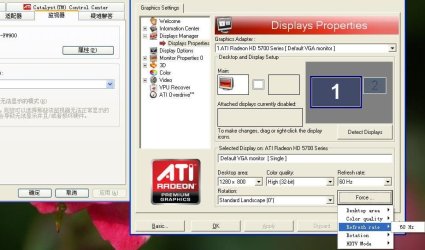
IN the CCC go to desktops and displays, lower corner right click the monitor your using (choose configure) it goes to DTV HDMI 3. See if you can force the resolution under HDTV support. In there you will find all that you need to adjust everything.....
 
ATIHD5770cant get 60hzabove

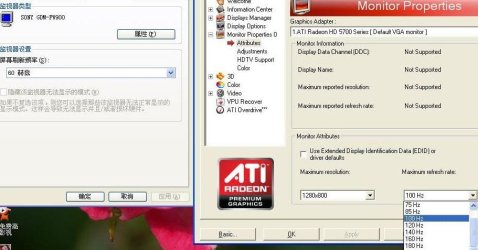
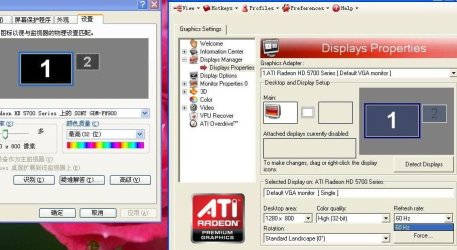
my os win7 ATIHD5770 sony fw900 CRT ATI 10.4 driver
I cannot get refresh rate 60HZ above on my minitor (on GF6800 OK)
 

Attachments

  • 2.JPG
    2.JPG
    76.1 KB · Views: 271
  • 4.JPG
    4.JPG
    72.4 KB · Views: 292
  • 3.JPG
    3.JPG
    62.1 KB · Views: 334

My Computer My Computer

At a glance

win7
OS
win7
I follow your Procedure
Download Phoenix.zip and extract it to a working folder. ok
Run it and click the registry toolbar button. ok
Click the pencil toolbar button for edit mode. ok
when 4Change the EDID settings to reflect you display's true capabilities
but what number to change ?what is my display's true capabilities ?where I can find ?
my DDC not supported
 

Attachments

  • 未命名.JPG
    未命名.JPG
    78.8 KB · Views: 349

My Computer My Computer

At a glance

win7
OS
win7
anybody here ?

Sorry. I've been away. How is your monitor connected to your video card? DVI? HDMI? VGA? I need to know about any adapters or KVMs as well. Best case is to connect your monitor to the card directly using a digital signal path like DVI or HDMI and NO ADAPTERS! They don't work.
 

My Computer My Computer

At a glance

El Capitan / Windows 10i7-4980HQ16GBIris 5200
Computer type
Laptop
Computer Manufacturer/Model Number
Apple
OS
El Capitan / Windows 10
CPU
i7-4980HQ
Memory
16GB
Graphics Card(s)
Iris 5200
ati5770,SONY fw900,dvi-vga,or vga-vga.cant get 60hz above.
i ASK AMD,THEY LOCK 5770 TO 60 HZ.
THINK YOU
PLEASE SEE THE JPG ABOVE
MY POWESRIP SAY
I CANT GET EDID BECOUSE DDC NOT SUPPORT
CAN YOU GIVE ME A EDID FILE SIMILAR TO SONY FW900?
 

My Computer My Computer

At a glance

win7
OS
win7
Code:
DVI-VGA
ATI5770 fw900
I cannot get 60hz above refresh rate,so as many user I modify 10.4drivers
open C:\ATI\Support\10-4_vista32_win7_32_dd_ccc_wdm_enu\Packages\Drivers\Display
get tow inf files:CL_98768,CW_98768
CL_98768 change to
[ati2mtag_Evergreen_SoftwareDeviceSettings]
HKR,, DALNonStandardModesBCD1, %REG_BINARY%,12,80,08,00,00,00,01,00,13,60,07,68,00,00,00,59,13,60,07,68,00,00,00,60,14,00,10,50 ,00,00,00,59,14,00,10,50,00,00,00,60,14,40,09,00,00,00,00,59 ,14,40,09,00,00,00,00,60,14,40,09,00,00,00,00,59
HKR,, DALNonStandardModesBCD2, %REG_BINARY%,14,40,09,00,00,00,00,60,12,80,07,68,00,00,00,00 ,12,80,09,60,00,00,00,00,16,00,12,00,00,00,00,70,17,92,13,44 ,00,00,00,00,18,00,14,40,00,00,00,00,18,56,13,92,00,00,00,00 ,12,80,08,00,00,00,00,85
HKR,, Gxo50HzTimingSupport, %REG_DWORD%, 1
CW_98768 change to
[ati2mtag_Evergreen_SoftwareDeviceSettings]
HKR,, DALNonStandardModesBCD1, %REG_BINARY%,12,80,08,00,00,00,01,00,13,60,07,68,00,00,00,85,13,60,07,68,00,00,00,85,14,00,10,50 ,00,00,00,85,14,00,10,50,00,00,00,60,14,40,09,00,00,00,00,59 ,14,40,09,00,00,00,00,60,14,40,09,00,00,00,00,59
HKR,, DALNonStandardModesBCD2, %REG_BINARY%,14,40,09,00,00,00,00,60,12,80,07,68,00,00,00,00 ,12,80,09,60,00,00,00,00,16,00,12,00,00,00,00,70,17,92,13,44 ,00,00,00,00,18,00,14,40,00,00,00,00,18,56,13,92,00,00,00,00 ,12,80,08,00,00,00,01,00
HKR,, Gxo50HzTimingSupport, %REG_DWORD%, 1
installed reboot
but not work only 60hz can use
I had spent 5days on this only 60hz
help me !
 

My Computer My Computer

At a glance

win7
OS
win7
So i've read alot of posts here and still no help so here i go.

So i downloaded and installed Phoenix EDID Designer.
When i hit the registry button i just get a box that says

"Phoenix EDID Designer has stopped working. Windows is looking for a solution"
After a few seconds of "looking" it closes.

Ive read through the above reading and even looked a few other places but i cannot find anything to solve my problem.

Is there somewhere specific i need to run Phoenix at? What else might i be doing wrong?
 

My Computer My Computer

At a glance

Win7Intel(R) Core(TM) 2 Quad CPU Q6600 @ 2.4GHz (...2048MB DDR2ATI Radeon HD 2900 XT
Computer Manufacturer/Model Number
Hewlett-Packard/ Blackbird-002
OS
Win7
CPU
Intel(R) Core(TM) 2 Quad CPU Q6600 @ 2.4GHz (4CPUs)
Motherboard
StrikerExtreme by ASUSTek
Memory
2048MB DDR2
Graphics Card(s)
ATI Radeon HD 2900 XT
Sound Card
Creative SB X-Fi
Monitor(s) Displays
42" Samsung Plasma Tv
Hard Drives
150GB 10000RPM
300GB 7200RPM
Case
Blackbird
Cooling
Liquid Cooled
forget it...
 
Last edited:

My Computer My Computer

At a glance

Win7 32
OS
Win7 32
overscan sony vpl-hs60 at 1080/24PsF (1080/48i) trough hdmi

hello all,
thanks to this amazing thread and many sleepless hours I've finally managed to run my old and good projector at the resolution specified in the subject.
the smoothness improved tremendously when watching bluray (24fps) content.
I've attached the .inf and the .dat used to generate the .inf, the .inf should also work on the vpl-hs51.
now I'm dealing with the overscan, anyone can help me to get rid of it? I've tried to modify the parameters to generate a new .inf that wouldn't cause overscan but I've had no success.
the 16:9 resolution that the projector seems able to manage with no overscan is 1821x512.
unfortunately the ati radeon drivers of my HD 5750 card (I'm using the latest 10.5) don't allow to correct overscan trough the slider when you are using a non-standard resolution.
powerstrip also doesn't work on this card.
these are the parameters I've used in the phoenix edid designer:
Pixel Clk: 74.30
H Active Pxl: 1920
H Blank: 832
H Sync Offset: 640
H Sync Width: 48
H Image Size: 0
H Border: 0
V Active Lines: 540
V Blank: 22
V Sync Offset: 2
V Sync Width: 2
V Image Size: 0
V Border: 0
Interlaced: Checked
in the .inf:
Native/preferred timing.. 1920x1080i at 48Hz
Modeline............... "1920x1080" 74.300 1920 2560 2608 2752 1080 1084 1088 1124 interlace +hsync +vsync
thanks a lot and best regards.
 

Attachments

Last edited:

My Computer My Computer

At a glance

Windows 7 x64
OS
Windows 7 x64
I recently purchased a ati hd 5750 and i am using my CRT monitor with dvi to vga adapter with my gpu as my monitor has vga plug.... before the gpu i used 100 hz refresh rate and when i started using the gpu my refresh rate got stuck at 60hz and it was not pleasent for my eyes..... then i came across this thread ........ first i removed the seventh(7th) pin from the dvi plug and then used the modified driver of view sonic p227f i found in this thread..... this did the work and i got all my monitor's capabilities back :D ... thanx guys!!!!! :D
 

My Computer My Computer

At a glance

windows 7 32bitIntel Core 2 Duo e84002gb+2gb 800mhzXFX ATI HD 5750
OS
windows 7 32bit
CPU
Intel Core 2 Duo e8400
Motherboard
Asus P5QPL-AM G41
Memory
2gb+2gb 800mhz
Graphics Card(s)
XFX ATI HD 5750
Sound Card
Motherboard Integrated
Monitor(s) Displays
View sonic p220f
Hard Drives
500gb 7200rpm Seagate sata
PSU
Cooler master 600watt psu
Case
Cooler master Gladiator
Cooling
lots of fans :D
This morning the power co. mistakenly turned my power off, once i phoned them they turned me back on. Upon turning my pc back on, i noticed the POST text was a lower resolution and wasnt being stretched to fit the screen like before, and once windows tried loading to desktop im getting "signal out of range". The monitor is a soyo 24" 1920x1200, VA panel (dylm24d6)

Hooked my pc up to my Plasma and post screen is fine, windows boots fine

After much tinkering, im able to run the monitor at 1280x720 as long as i have gpu scaling enabled in CCC, also if i try to change resolutions in windows, the only options are 1920x1080 and 1280x720, so...a couple things:

1. obvious hardware scaler in the monitor is fried, right?
2. wherever windows pulls possible resolution capabilities from (whether it's pulling from EDID, unlikely, or pulling from something ATI/CCC related due to me using GPU Scaling), is not functioning properly, thus defaulting to basic 720 and 1080p options. 1080p unfortunately doesnt display correctly (image corruption on right side)

Would trying to create a new EDID/Monitor driver be a possibility or is there something else I can do?
 

My Computer My Computer

At a glance

Windows 7 Ultimate x64Intel Core2 Q66004x2GB Mushkin DDR2-1066MSI Radeon 5870 Eyefinity 6
Computer Manufacturer/Model Number
Custom
OS
Windows 7 Ultimate x64
CPU
Intel Core2 Q6600
Motherboard
EVGA 780i SLI
Memory
4x2GB Mushkin DDR2-1066
Graphics Card(s)
MSI Radeon 5870 Eyefinity 6
Sound Card
N/A
Monitor(s) Displays
Soyo DYLM24D6 (24" - 1920x1200)
Hard Drives
500GB SATAII (C:, D:)
1TB x2 SATAII (E: RAID0)
500GB SATAII (F:)
2TB SATAII (G: RAID0 Backup)
PSU
Thermaltake 650W Modular
Case
Silverstone Raven RV-02
Cooling
TRUE-120
I have a SyncMaster 226BW (S) panel monitor with 1680x1050@60hz.
Currently running 10.6 ATI driver at 4890 sapphire vapor-x video card,Windows 7 x64.
Can someone guide me via msn trough the steps of how to force the monitor for native resolution at 75hz ? I think its possible since I saw alot of people over the internet.
 

My Computer My Computer

At a glance

Windows 7 x64Q96508GigHD4890
OS
Windows 7 x64
CPU
Q9650
Motherboard
P5Q Turbo
Memory
8Gig
Graphics Card(s)
HD4890
Monitor(s) Displays
Samsung SyncMaster 226BW
Hard Drives
1TB WDC
PSU
600W
Case
Enermax Chakra
Hi!

I have the same problems as most people here with my Radeon 9100 IGP (came with an ASUS Pundit R Barebone) and my LG Studioworks 773E CRT. I have tried everything possible but nothing helps. As a last ressort i tried the EDID override steps here in this tutorial. The problem is that I can't go higher than 60 Hz. I can select higher rates in Windows control panel but the monitor still shows 60 Hz. The next problem is that I can't read the monitors EDID-information on the ASUS Pundit. MonInfo doesn't show any EDID infos. So i tried to connect the CRT to my Laptop and there I can get the EDID without any problem. So I tried to create an INF-driver out of the EDID within MonInfo on my Laptop. Then I've installed the new driver on the ASUS. I can select all the available resolutions and refresh rates but the refresh rates still don't work on the CRT (the resolutions all work).

What's strange for me is, that the ASUS can't read the EDID from the monitor whereas the Laptop can. Maybe that's the problem, it looks to me like the graphics card can't "communicate" with the monitor. Anyone knows what to do or has a solution? It's so frustrating, I've spent so many hours with this problem and it still doesn't work. :cry:

Thanks

Peteee
 

My Computer My Computer

At a glance

Win 7Intel Pentium IV512 MBATI Radeon 9100 IGP
Computer Manufacturer/Model Number
ASUS Pundi R Barebone
OS
Win 7
CPU
Intel Pentium IV
Motherboard
ASUS P4R8L
Memory
512 MB
Graphics Card(s)
ATI Radeon 9100 IGP
Monitor(s) Displays
LG StudioWorks 773E CRT
:cry:I may have the same problem. I have used phoenix and moninfo generated the inf and installed. The problem a lot of people are having is that the tut says change the settings to match your display, Joe Bloggs wouldn't have a clue where to look for this info. I've managed to add a custom resolution through nvida control panel of 1366 x 768 @ 60hz which works and looks perfect on general desktop use. When I load any game I can only select a maximum of 1280 x 720 which is pants. Is this due to an edid problem or something else. This is driving me nuts.
 

My Computer My Computer

At a glance

Windows 7 64 bitintel q9550GTX 460
OS
Windows 7 64 bit
CPU
intel q9550
Graphics Card(s)
GTX 460
Monitor(s) Displays
37" Atec LCD tv
I have an old Mitsubishi RPTV (CRT) HDTV that I want to connect to my HTPC and use a 1776x1000 (30Hz) resolution. The HDTV has a VGA (RGBHV) connection and the video card (a HP OEM ATI 5450) has a DVI connection -- but came with a DVI-to-VGA converter. When I connect the TV, it shows up as "Generic Non PnP". So can the techniques/steps described in this thread help me? Or do they not apply since my monitor shows up as "Generic Non PnP"?
 

My Computer My Computer

At a glance

Windows 7 64-bitATI 5450
Computer Manufacturer/Model Number
HP HPE-210f
OS
Windows 7 64-bit
Graphics Card(s)
ATI 5450
I found the powerstrip settings info for a similar Mits:
PowerStrip timing parameters:
1776x1000i=1776,166,88,274,1000,44,5,76,77760,280

Generic timing details for 1776x1000:
HFP=166 HSW=88 HBP=274 kHz=34 VFP=44 VSW=5 VBP=76 Hz=30
interlace +hsync +vsync

Powerstrip doesn't work with my video card, but perhaps these settings will work with the techniques here?
 

My Computer My Computer

At a glance

Windows 7 64-bitATI 5450
Computer Manufacturer/Model Number
HP HPE-210f
OS
Windows 7 64-bit
Graphics Card(s)
ATI 5450
Back
Top