
Force recognize mp3 player as external hard drive instead of player

lordcorvin

New member
Local time
3:01 AM
Messages
13
I wonder if there is a method to force windows7 to recognise my mp3 player as hard drive instead of player.

Why? 2 things.

I find it annoying that I have to click on player then internal storage, when it could go directly to internal storage right away.

2. When I first plugged my player in I saw lots of files inside, after running the Phillips (sync?) setup it hid lot's of files even though I have show hidden files on.

Anyone knows the roundabout?

Thanks
 

My Computer My Computer

At a glance

Windows 7 Home Premium x64Intel Core i5-460M Processor4GB DDR3 MemoryATI Radeon HD 5650, with up to 2651MB HyperMe...
OS
Windows 7 Home Premium x64
CPU
Intel Core i5-460M Processor
Memory
4GB DDR3 Memory
Graphics Card(s)
ATI Radeon HD 5650, with up to 2651MB HyperMemory
well the easiest way to over come your first problem is to change what windows does when its first plugged in. its called default services I think in control panel. and when plugged in you can set it to open in file view as default. no clicking needed.
only reason it does what it does is because when you first plugged it in windows box popped up and asked you what you wanted to do amd you chose to open player not open folders.
 

My Computer My Computer

At a glance

Windows 7 Ultimate x64, & Mac OS X 10.9.2Intel Core i5 2500kCorsair Vengence 8gb 1866mhzNvidia GTX 770 OC
Computer type
PC/Desktop
Computer Manufacturer/Model Number
Built by badgers!!!
OS
Windows 7 Ultimate x64, & Mac OS X 10.9.2
CPU
Intel Core i5 2500k
Motherboard
Asus P8z68 LE
Memory
Corsair Vengence 8gb 1866mhz
Graphics Card(s)
Nvidia GTX 770 OC
Monitor(s) Displays
2x ASUS LED 22" IPS
Screen Resolution
3840x1080
Hard Drives
240GB Crucial M500 SSD
120gb Corsair Force 3 SSD
1TB Western Digital
PSU
Corsair HX650w Modular
Case
Corsair Air 540
Cooling
Corsair H60 Push/Pull
Keyboard
Corsair K70/ Logitech G27 wheel
Mouse
Saitek R.A.T 9
Internet Speed
Too slow!
Other Info
AMD fusion E350N Home server-Windows Home Server 2011 (also made by badgers!)
2011 Macbook 2.4ghz Core2Duo, 4gb ddr3, 120gb Ocz Vertex SSD
I never choose to open it as player, I always select view as folder, what I mean as clicking is when you select view folders it opens up explorer to the device but there is separate internal storage inside, before installing Phillips Songbird everything was alright.

I'll post a picture of what I mean when I'll find the player in my mess

Edit:
NMK2vSq.jpg


As you can see there's now internal storage inside the player, while before it went directly to the internal storage and was recognized as external storage
 
Last edited:

My Computer My Computer

At a glance

Windows 7 Home Premium x64Intel Core i5-460M Processor4GB DDR3 MemoryATI Radeon HD 5650, with up to 2651MB HyperMe...
OS
Windows 7 Home Premium x64
CPU
Intel Core i5-460M Processor
Memory
4GB DDR3 Memory
Graphics Card(s)
ATI Radeon HD 5650, with up to 2651MB HyperMemory
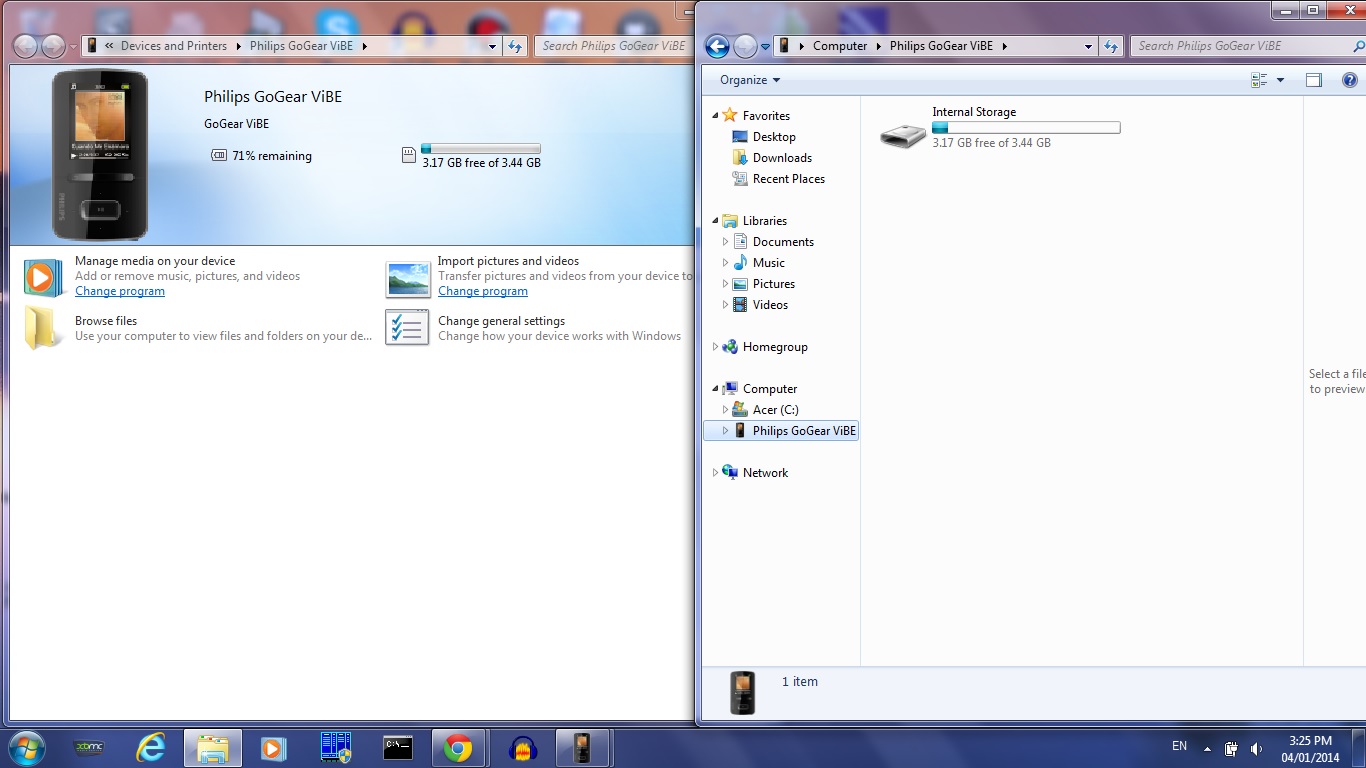
So does anyone knows how to fix thi?. :/ I can try system restore but want to leave it as last resort if possible
 

My Computer My Computer

At a glance

Windows 7 Home Premium x64Intel Core i5-460M Processor4GB DDR3 MemoryATI Radeon HD 5650, with up to 2651MB HyperMe...
OS
Windows 7 Home Premium x64
CPU
Intel Core i5-460M Processor
Memory
4GB DDR3 Memory
Graphics Card(s)
ATI Radeon HD 5650, with up to 2651MB HyperMemory
Back
Top