Solved Storing games in the 2nd hard drive (D Drive) instead of Win C Drive.

cheesum

New member
Member
Local time
12:32 AM
Messages
61
Hi - just a quick question.

Currently, my laptop is configured in the following manner:
C Drive: where Windows 7 is stored -> on an SSD
D Drive: hard disk drive.

I want to store my games in my D drive but is concerned whether the way i do it is correct or not. When installing the games; the default path chosen by the installer is
C: Program Files (x86): Activision: Call of Duty- World at War.
Using this path, the installer does not ask for Direct X 9.0. Please note i have a higher version of Direct X installed in my laptop.

However, routing the game to my D Drive:
Path:
D: Games: Activision: Call of Duty- World at War
the installer is asking for an installation of Direct X 9.0 despite my laptop comes with a higher Direct X.

So far, this is the only issue that i come across when changing the default installation path from C drive to D Drive.
-----------------------------------------------------------------------------

Do you guys have another other useful hints when installing games on second hard disk instead of the Windows C Drive? Also, will it be any issue by NOT installing to the C Drive: Program Files (x86)? More often than not, all the default installations will route to the Program Files (x86) in C Drive. I am just afraid that by routing it to the D Drive, this will cause the program to act up.
 

My Computer My Computer

At a glance

Windows 7 Home Premium 64Bit
Computer type
Laptop
Computer Manufacturer/Model Number
Lenovo Ideapad Y580
OS
Windows 7 Home Premium 64Bit
It's very rare for a program to have problems when installing it to a directory of your choosing. I personally don't know of any nor have I seen any, except I remember being told that drivers should be installed to their default location, but that's it.

I think the way you're doing it is correct, but I don't know why it's asking you to install DirectX. Although, that could be normal when doing this.
 

My Computer My Computer

Computer type
PC/Desktop
I have all my games as well as Steam installed on a drive other than C, and have never had any problems. One added bonus is quite a few games don't need to be re-installed if you re-install Windows, just make a shortcut to it and it is good to go. For those that require re-installing you can sometimes get around that by visiting the game makers site and checking their FAQ's for the necessary registry entries and then making a copy of them and save.

the installer is asking for an installation of Direct X 9.0 despite my laptop comes with a higher Direct X.

Windows may have a higher DirectX version, but most games use their own modified version fo DirectX files (there is over 40 different DirectX 9 files/DLL's), which Windows 7 will not have. Just let it install the files it wants, and if already present will just not install any.
 

My Computer My Computer

At a glance

Win 7 Ultimate x64FX-8350 @ 4.6 GHz so farADATA XPG V1 Series Black 8GB DDR3 1600Sapphire R9 270x Dual-X
Computer type
PC/Desktop
Computer Manufacturer/Model Number
Me
OS
Win 7 Ultimate x64
CPU
FX-8350 @ 4.6 GHz so far
Motherboard
Asus M5A97 EVO
Memory
ADATA XPG V1 Series Black 8GB DDR3 1600
Graphics Card(s)
Sapphire R9 270x Dual-X
Sound Card
Xonar DGX w/ Corsair Vengence 1300
Monitor(s) Displays
Acer S232HL Abid
Screen Resolution
1920x1080
Hard Drives
120 GB OCZ Vertex 3
500 GB Seagate 7200.12
PSU
Antec Earthwatts 650W Green
Case
Antec Three Hundred
Cooling
Cooler Master 212 EVO
Keyboard
Logitech G510
Mouse
Logitech G500s
Internet Speed
35000/3000
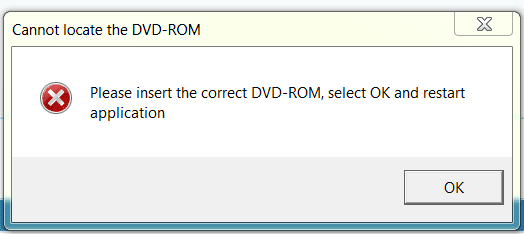
Hi all - there is an issue with my game. When launching it, the following error takes place:

2013-07-25 20_42_44-Storing games in the 2nd hard drive (D Drive) instead of Win C Drive. - Wind.png
Any advice on how to load the entire game on the my 2nd hard disk? I want to launch and play it on my laptop without the need to insert the DVD everytime i want to play it.
 

My Computer My Computer

At a glance

Windows 7 Home Premium 64Bit
Computer type
Laptop
Computer Manufacturer/Model Number
Lenovo Ideapad Y580
OS
Windows 7 Home Premium 64Bit
That is a game registry entry error, usually caused by the drive letter for the DVD drive being changed. It can also happen for games that use the registry to store the drive letter info of both the drive installed to and the DVD drive used for the install, and then the game folder is moved to another drive.

If it is the first, changing the DVD drive letter back to what it was should fix it. If it is the other there is 2 likely fixes,

1. Uninstall the game and re-install to D.

2. Open regedit and search for the game looking for anything that mentions the installed drive as well as the DVD drive installed from, and change the letter(s) to match how the drives are installed.
 

My Computer My Computer

At a glance

Win 7 Ultimate x64FX-8350 @ 4.6 GHz so farADATA XPG V1 Series Black 8GB DDR3 1600Sapphire R9 270x Dual-X
Computer type
PC/Desktop
Computer Manufacturer/Model Number
Me
OS
Win 7 Ultimate x64
CPU
FX-8350 @ 4.6 GHz so far
Motherboard
Asus M5A97 EVO
Memory
ADATA XPG V1 Series Black 8GB DDR3 1600
Graphics Card(s)
Sapphire R9 270x Dual-X
Sound Card
Xonar DGX w/ Corsair Vengence 1300
Monitor(s) Displays
Acer S232HL Abid
Screen Resolution
1920x1080
Hard Drives
120 GB OCZ Vertex 3
500 GB Seagate 7200.12
PSU
Antec Earthwatts 650W Green
Case
Antec Three Hundred
Cooling
Cooler Master 212 EVO
Keyboard
Logitech G510
Mouse
Logitech G500s
Internet Speed
35000/3000
Hi all - there is an issue with my game. When launching it, the following error takes place:

View attachment 278091
Any advice on how to load the entire game on the my 2nd hard disk? I want to launch and play it on my laptop without the need to insert the DVD everytime i want to play it.

Some games require the presence of the DVD in order to play. This is merely a way to reduce piracy. So, you'd need to find a "crack" that enables your game to work without requiring the presence of the DVD. Although, some games require the presence of the DVD due to having things on the DVD that can not be installed onto the hard drive (again, to help reduce piracy).
 

My Computer My Computer

Computer type
PC/Desktop
Hi all - there is an issue with my game. When launching it, the following error takes place:

View attachment 278091
Any advice on how to load the entire game on the my 2nd hard disk? I want to launch and play it on my laptop without the need to insert the DVD everytime i want to play it.

Some games require the presence of the DVD in order to play. This is merely a way to reduce piracy. So, you'd need to find a "crack" that enables your game to work without requiring the presence of the DVD. Although, some games require the presence of the DVD due to having things on the DVD that can not be installed onto the hard drive (again, to help reduce piracy).

Thanks alot. That is what i did. Get the "crack" online and then replace the original .exe file with the "cracked" file and the game straightaway run from the hard disk. Problem solved. Thanks alot for your help. :)
 

My Computer My Computer

At a glance

Windows 7 Home Premium 64Bit
Computer type
Laptop
Computer Manufacturer/Model Number
Lenovo Ideapad Y580
OS
Windows 7 Home Premium 64Bit
Hi all - there is an issue with my game. When launching it, the following error takes place:

View attachment 278091
Any advice on how to load the entire game on the my 2nd hard disk? I want to launch and play it on my laptop without the need to insert the DVD everytime i want to play it.

Some games require the presence of the DVD in order to play. This is merely a way to reduce piracy. So, you'd need to find a "crack" that enables your game to work without requiring the presence of the DVD. Although, some games require the presence of the DVD due to having things on the DVD that can not be installed onto the hard drive (again, to help reduce piracy).

Thanks alot. That is what i did. Get the "crack" online and then replace the original .exe file with the "cracked" file and the game straightaway run from the hard disk. Problem solved. Thanks alot for your help. :)

You're welcome.

However, I need the record to show here that I wasn't recommending that you do this. I was just saying that this would be the only solution (notice the lack of "I recommend doing this"). I'm only saying this just in case someone decides to consider banning me on the spot. They're a bit trigger-happy on here.
 

My Computer My Computer

Computer type
PC/Desktop
Hi, all my games are installed on a different drive, I don't install games to my system drive, and have never had a problem with those games myself.
 

My Computer My Computer

At a glance

Windows 8.1 Proi5 3550 Ivy Bridge8gb 1600 GSkill 9-9-9-24 xmpGigabyte GTX 760 OC
Computer type
PC/Desktop
Computer Manufacturer/Model Number
Home Build
OS
Windows 8.1 Pro
CPU
i5 3550 Ivy Bridge
Motherboard
Gigabyte Z77MX-D3H
Memory
8gb 1600 GSkill 9-9-9-24 xmp
Graphics Card(s)
Gigabyte GTX 760 OC
Sound Card
VIA VT2021 onboard
Monitor(s) Displays
BenQ GL2760H 27inch hdmi; LG Flatron E2351 23inch dvi
Screen Resolution
1920x1080
Hard Drives
1x Samsung 850 Evo 120GB
1x 4TB WD Green HDD
1x 3TB WD Green HDD
2x 2TB Seagate HDD
1x 1TB Seagate External HDD
PSU
Cooler Master V750
Case
Coolermaster HAF 912 Advanced
Cooling
Standard
Keyboard
Logitech K120 USB
Mouse
Razor Abyssus USB
Internet Speed
Broadband
Antivirus
MSE + Malwarebytes
Browser
Palemoon
Other Info
It's been the worst day since yesterday (thanks Flogging Molly) so apt!
Having to have a disc in the drive, makes me want to punch a wall, archaic protection!
Fortunately I haven't had that issue in a long time.

Different drives is usually not a problem (I currently use D: for ALL my game installs) some games have had patches by the devs come out later with 'adjustments', prime example of this was Diablo II, worth a quick look into on the creators website under support/patches.

If you manually moved a game from C: to D: and it doesn't work, better off reinstalling, just find and protect the save games by moving them elsewhere first and note where they were, since that varies.
Settings, MAYBE can salvage as well.

I have had to contact devs on more than one occasion to be ALLOWED to reinstall programs that have check servers
protection, that I hate more. *Please hold, we will....* or 24/48/who knows how long, waits, via emails.

I hate it because it prevents me from wiping and dropping MORE often. muhahaha!
 

My Computer My Computer

At a glance

Windows 7 Ultimate Retail Box (64-bit install...AMD FX-8350 CPU v1.15 (or 1.0F) BIOS was requ...8G CAS-7 G-Skill DDR3 @1333 (2 fours) [mobo n...Radeon HD 7950 [3 gigs of GDDR5] MSI Twin Fro...
Computer type
PC/Desktop
Computer Manufacturer/Model Number
Self Built Custom
OS
Windows 7 Ultimate Retail Box (64-bit installed) + Service Pack 1
CPU
AMD FX-8350 CPU v1.15 (or 1.0F) BIOS was required!
Motherboard
MSI 890FXA-GD70
Memory
8G CAS-7 G-Skill DDR3 @1333 (2 fours) [mobo nonOC max rec'd]
Graphics Card(s)
Radeon HD 7950 [3 gigs of GDDR5] MSI Twin Frozr model
Sound Card
Realtek High Definition Audio (onboard mobo, ALC-889 chip)
Monitor(s) Displays
2 WS LED Monitors: One LG One Viewsonic
Screen Resolution
1920 by 1080
Hard Drives
SSD for OS: Samsung 840 Pro
SSD for VM and utilities: Adata SX900
7200 RPM SATA HDs for the rest: Hitachi and Seagate
PSU
Corsair TX850 - 850W max, in service since August 2010.
Case
Thermaltake Armor A90
Cooling
Thermaltake Spin Q CPU Cooler, in service since August 2010
Keyboard
Logitech G11
Mouse
Logitech M310 Wireless
Internet Speed
100 Megabit broadband supposedly upgraded from 50 (Cable)
Antivirus
Bitdefender Internet Security 2014 suite
Browser
Pale Moon 64-bit main, also IceDragon, Opera, and Maxthon.
Other Info
CompTIA A+ certified (220-800 series) in July 2013.
Back
Top