Foreign Language for the on-screen keyboard

Zal

New member
Local time
12:41 PM
Messages
1
Can somebody advise me on the following:
In Windows 7 I would like to load a Foreign Language (Cyrilic) onto the on-screen keyboard, and then to be able to switch between the regular and on-screen keyboards by pressing some two-keys combination (maybe ALT-K). I could not find any info on this in the Windows 7 help.
Thank you.
Appreciate your help.
 

My Computer My Computer

OS
Windows 7
From the Control Panel (Start -> Control Panel) double click on the 'Regional and Language Options' icon, then 'Format', then 'Change Keyboard' to 'Russian'. Hit "App;y" then "OK" and your keyboard should be good.

The following link will give some hints on Cyrillic Cyrillic fonts for MS Windows
 

My Computer My Computer

Computer Manufacturer/Model Number
DELL XPS Studio 435T
OS
Vista 64 Ultimate, Windows 7 64 Ultimate, Ubuntu 9.10
CPU
i7 975 3.3 GHz Extreme (Factory OC'd to 3.6 GHz)
Motherboard
DELL provided
Memory
18 Gb Tri-Channel 1066
Graphics Card(s)
ATI 5970 2048 Mb
Sound Card
X-Fi Extreme Gamer
Monitor(s) Displays
Vizio 37" HD-TV
Screen Resolution
1920 x 1080
Hard Drives
1.5 Tb HDD
1.5 Tb HDD
2.0 Tb Network Drive
512 Gb Crucial SSD
PSU
DELL Provided 475 watts
Case
DELL
Cooling
3 fans
Keyboard
Logitech Performance K350 Wireless
Mouse
Logitech Performance MX Wireless
Internet Speed
3 Mb up 750 Kb down
Other Info
Bamboo Fun Tablet, Belkin N+ Wireless router, Pioneer Dolby System Wireless Headphones, Bose 5.1 Dolby Surround Sound System, LifeCam VX 3000 Webcam, Blu-Ray/Hi Def DVD +RW combo and Blu-ray +RW,l 15 in 1 media card reader, Logitech Rumblepad 2, Hauppauge 2250 DTV Tuner with MS Media Center Remote

Laptop:Alienware M17x, Q9100 CPU, 8Gb RAM, 1920x1200 WUXGA LCD driven by 4870's in CrossFireX, Bl
Hello Zal, welcome to the Seven Forums.

If you want to use two keyboard layouts and switch between them when needed, the post above gives you a perfect answer.

If you want to use two layouts simultaneously, one layout in on-screen keyboard and another from normal keyboard, it's not possible. On-screen keyboard is always using the current keyboard layout. I'm normally using a Finnish layout, so my on-screen keyboard is also using that layout:

KB_FIN.PNG

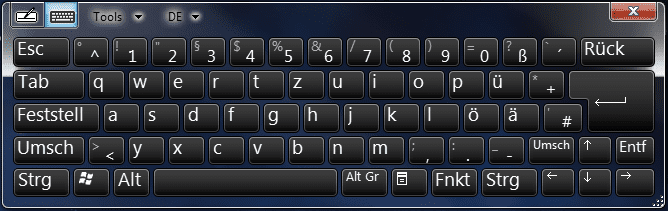
As soon as I open the language bar and change the layout, for instance to German which I also use quite often, the on-screen layout is also changed:

KB_GER.PNG

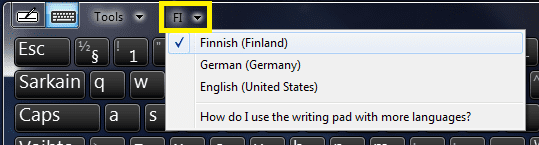
Also if you change the input language from on-screen keyboards menu, it's changed in the language bar. Those two selections are always the same.

Did you know the Windows input language selection for each application is remembered as long as the application is not closed? An example: if you need sometimes type in Russian but normally in English, you could set input language to English in your main word processor (Word, OpenOffice etc.) and Russian as input language in WordPad. Now every time you open WordPad, the input language (i.e. keyboard layout) is automatically switched to Russian. When you go back to that other word processor, the input language is once again changed. Annoying thing with this is, that input language selection is reverted to default always when application is closed.

A clumsier but working solution would be to use for instance XP Mode virtual machine and set its input language to another language, then switch to XP Mode whenever you want to use that language for input.

However, my recommendation is to accept two additional mouse clicks and change the input language when needed, from language bar or from on-screen keyboards menu.

KB_Change.png

Kari
 
Last edited by a moderator:

My Computer My Computer

Computer type
Laptop
Computer Manufacturer/Model Number
HP ENVY 17-1150eg
OS
Windows 10 Pro x64 EN-GB
CPU
1.6 GHz Intel Core i7-720QM Processor
Memory
6 GB
Graphics Card(s)
ATI Mobility Radeon HD 5850 Graphics
Sound Card
Beats sound system with integrated subwoofer
Monitor(s) Displays
17" laptop display, 22" LED and 32" Full HD TV through HDMI
Screen Resolution
1600*900 (1), 1920*1080 (2&3)
Hard Drives
Internal: 2 x 500 GB SATA Hard Disk Drive 7200 rpm
External: 2TB for backups, 3TB USB3 network drive for media
Cooling
As Envy runs a bit warm, I have it on a Cooler Master pad
Keyboard
Logitech diNovo Media Desktop Laser (bluetooth)
Mouse
Logitech Performance Mouse MX
Internet Speed
50/10 Mbps VDSL
Antivirus
Windows Defender 4.3.9431.0
Browser
Maxthon 3.5.2., IE11
in addition, you can use and alt+shift, на пример: Здраво (eg: Hello) for switching, nice and fast.
cheers
 

My Computer My Computer

Computer Manufacturer/Model Number
Micro-Star International/MS-7529
OS
Windows 7 Ultimate x32
CPU
DualCore Intel Pentium E2200, 2218 MHz (11 x 202)
Motherboard
MSI G31M3 V2 (MS-7529) (2 PCI, 1 PCI-E x16,2 DDR2 DIMM)
Memory
2 GB DDR2-800 DDR2 SDRAM
Graphics Card(s)
nVIDIA GeForce 9500GT 1GB
Sound Card
Realtek ALC888/1200 @ Intel 82801GB ICH7
Monitor(s) Displays
Samsung SyncMaster 2253BW (Digital) 22'' LCD
Screen Resolution
1680x1050
Hard Drives
SAMSUNG HD322IJ ATA Device (298 GB , IDE)
Hello Zal, welcome to the Seven Forums.

If you want to use two keyboard layouts and switch between them when needed, the post above gives you a perfect answer.

If you want to use two layouts simultaneously, one layout in on-screen keyboard and another from normal keyboard, it's not possible. On-screen keyboard is always using the current keyboard layout. I'm normally using a Finnish layout, so my on-screen keyboard is also using that layout:

View attachment 79129

As soon as I open the language bar and change the layout, for instance to German which I also use quite often, the on-screen layout is also changed:

View attachment 79135

Also if you change the input language from on-screen keyboards menu, it's changed in the language bar. Those two selections are always the same.

Did you know the Windows input language selection for each application is remembered as long as the application is not closed? An example: if you need sometimes type in Russian but normally in English, you could set input language to English in your main word processor (Word, OpenOffice etc.) and Russian as input language in WordPad. Now every time you open WordPad, the input language (i.e. keyboard layout) is automatically switched to Russian. When you go back to that other word processor, the input language is once again changed. Annoying thing with this is, that input language selection is reverted to default always when application is closed.

A clumsier but working solution would be to use for instance XP Mode virtual machine and set its input language to another language, then switch to XP Mode whenever you want to use that language for input.

However, my recommendation is to accept two additional mouse clicks and change the input language when needed, from language bar or from on-screen keyboards menu.

View attachment 79136

Kari

Kari, how do I get that online keyboard like yours? I got it once, but I can't find it again. The normal on-screen keyboard just closes when you close it, but that one you have just goes to the side...i want that! please and thank you
 

My Computer My Computer

OS
Windows 7 x64
Hi Mnguyen36, welcome to the Seven Forums.

As you correctly noticed, Seven has two differently behaving on-screen keyboards. To open the one I'm using, the one which instead of closing when Close button is clicked hides itself on the left edge of the display, you need to add a Tablet PC Input Panel to your Taskbar. Right click an empty spot on your Taskbar, select Toolbars > Tablet PC Input Panel:

Add_Toolbar.png

Notice please: If the context menu described above does not list Tablet PC Input Panel, open Control Panel > Programs and Features, select Turn Windows features on or off, and enable Tablet PC Components:

TabletPC_Components.png

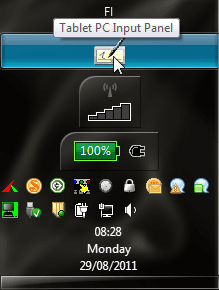
Now when you need on-screen keyboard, just click Tablet PC icon on Taskbar. Here's how the icon looks on my vertical Taskbar:

Tablet_Input_vertical.png

And here on the normal horizontal Taskbar:

Tablet_Input_horisontal.png

Kari
 

My Computer My Computer

Computer type
Laptop
Computer Manufacturer/Model Number
HP ENVY 17-1150eg
OS
Windows 10 Pro x64 EN-GB
CPU
1.6 GHz Intel Core i7-720QM Processor
Memory
6 GB
Graphics Card(s)
ATI Mobility Radeon HD 5850 Graphics
Sound Card
Beats sound system with integrated subwoofer
Monitor(s) Displays
17" laptop display, 22" LED and 32" Full HD TV through HDMI
Screen Resolution
1600*900 (1), 1920*1080 (2&3)
Hard Drives
Internal: 2 x 500 GB SATA Hard Disk Drive 7200 rpm
External: 2TB for backups, 3TB USB3 network drive for media
Cooling
As Envy runs a bit warm, I have it on a Cooler Master pad
Keyboard
Logitech diNovo Media Desktop Laser (bluetooth)
Mouse
Logitech Performance Mouse MX
Internet Speed
50/10 Mbps VDSL
Antivirus
Windows Defender 4.3.9431.0
Browser
Maxthon 3.5.2., IE11
Back
Top