
Hi All,
I have 2 hard disks. One (C has the OS (Win 7-64 Pro) and the other (E has all my data - images, music, docs etc.
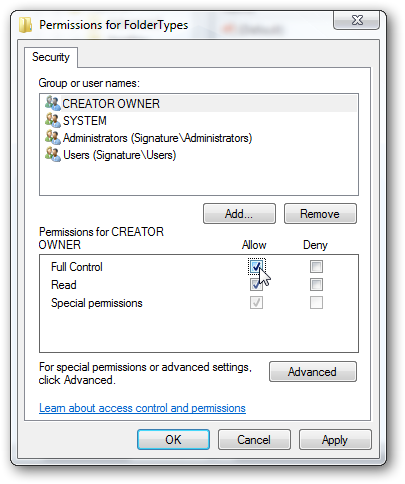
After formatting and re-installing Win 7 on C: due to software related crashes, I now find that I am unable to play music files on the Windows Media Player. I firstly get security message that I do not have permission to access the folder, then on clicking OK. I then get directed to the Security Tab and select the PC name. I can then see the files in the folder but still cannot play them - Win Media Player gives the following message:
Windows Media Player cannot access the file. The file might be in use, you might not have access to the computer where the file is stored, or your proxy settings might not be correct.
How can I regain permission on these files which I am guessing is the problem. I am the admin (only registered user) on this PC!
I have 2 hard disks. One (C
has the OS (Win 7-64 Pro) and the other (E has all my data - images, music, docs etc.After formatting and re-installing Win 7 on C: due to software related crashes, I now find that I am unable to play music files on the Windows Media Player. I firstly get security message that I do not have permission to access the folder, then on clicking OK. I then get directed to the Security Tab and select the PC name. I can then see the files in the folder but still cannot play them - Win Media Player gives the following message:
Windows Media Player cannot access the file. The file might be in use, you might not have access to the computer where the file is stored, or your proxy settings might not be correct.
How can I regain permission on these files which I am guessing is the problem. I am the admin (only registered user) on this PC!
My Computer
At a glance
Windows 7 - x64 ProfessionalCore i7 4770K @4.2 GHzCorsair DDR3-2400 16 GBGTX 780 Ti Superclocked EVGA
- Computer type
- PC/Desktop
- Computer Manufacturer/Model Number
- Custom
- OS
- Windows 7 - x64 Professional
- CPU
- Core i7 4770K @4.2 GHz
- Motherboard
- Asus Maximus Hero V1
- Memory
- Corsair DDR3-2400 16 GB
- Graphics Card(s)
- GTX 780 Ti Superclocked EVGA
- Sound Card
- Onboard Realtek
- Monitor(s) Displays
- Asus 27 inch
- Screen Resolution
- 2560 x 1480
- Hard Drives
- Samsung EVO 840 500 GB SSD
Sandisk Extreme 250 GB SSD
Samsung 1.5TB HDD
- PSU
- Corsair 1150W
- Case
- A big one :-)
- Cooling
- Corsair H100i closed loop water cooler
- Keyboard
- Logitech G110 Gaming
- Mouse
- R.A.T 5
- Internet Speed
- 1 GB ADSL
- Antivirus
- Bit Defender
- Browser
- I.E. 11


 ! It is not just re-ripping the disks - I rename all the tracks to suit my preference and have a single standard! That will take weeks.


 I then enter this command and wait for cmd to give me back ownership of those few 3TBs (an hour sometimes more) (you don't wanna know how long it takes to do this on a few 100GBs, files by files, in my first noobee ways, and I won't tell you either


