(Re-) Activate, or Flatten and Re-install?

Geekasaurus

New member
Local time
7:14 PM
Messages
20
I have exhausted YouTube, and tried dozens of Google solutions (including several from this forum) to rid my system of the Windows Activation "This copy of Windows is not genuine" error. I am an experienced Unix/Linux administrator, but this one has me baffled. But then of course, this IS a Microsoft product, <Golum> AND WE HATES THEM </Golum>. I have spent many dozens of hours researching various solutions to this.

And this is just another reason to hate.

I built this thing myself last year. The motherboard has built-in hardware mirroring. I purchased 2 OC SSD disks, and mirrored these for Drive C, and then 2 1TB Samsung disks, and mirrored these. This is Drive E. Drive D: is the backup partition.

A few months after the install, one of the SSD disks failed. Since it was mirrored, this was No Big Deal, and I sent it back to OC to re-init. Of course, they sent it back and now it won't even be recognized as a disk, so I have not re-installed it.

So, the first question--does un-mirroring somehow inactivate a perfectly legitimate Win 7 installation?

Some months later, the motherboard itself also croaked. I replaced it. I suspect that one or the other of these events caused Win 7 to inactivate itself. My research indicates that changing out the motherboard may be the cause of this problem. It makes no sense to me, but then many things Microsoft does makes no sense to me. If I could completely eliminate Microsoft products from my life, my stress levels would drop measurably. But they are the 800lb Gorilla in the living room. They can't be ignored.

Now when I look at start-->computer-->properties, it shows an OEM product key that does not match the key that I installed.

I have the proper key in a handy-dandy text file, so I don't have typing mistakes.

If I try to activate it online, I get an "error code 0x80070005 Access is denied" error.

I then tried to activate it by calling the Windows activation phone number. The wizard gives me a drop down box to identify my country. When I enter United States, I immediately get the "error code 0x80070005 Access is denied" which is becoming very rapidly boring.

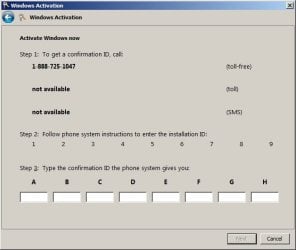
When I clear the error, a dialog box is displayed, showing the attached .png file.

As you can see, it does not provide a Windows ID number. I called the phone number, and the We Hate Our Customers system asked me to enter this number.

Eventually, it let me speak to an actual person, who also asked for this number. When I told him this was blank, he told me to shut down the machine, wait for 10 minutes, then re-try the phone activation with this Windows ID number.

Of course it is blank again, and again and again.

I called, and was told that this did not happen. Eventually, I was routed to some else at Microsoft, who helpfully suggested that the cause of this problem is some virus or malware. My malware and virus definitions are up to date. They could not tell me WHICH virus this might be.

They then offered to charge me $140 to fix an $80 piece of software. Since this is a public forum and children of tender years may be reading this, I will not write here my counter-suggestion, but suffice it to say that it was absurdly anatomically impossible.

Question number two then, is there any way to fix this?

Or do I have to back up my system to my always-reliable Linux box, and re-format the SSD and re-install the OS from the get-go? This does appear to be how Microsoft solves most of its problems.

I have more than a dozen applications installed. Though I have all the installation media, it would take me a very long time to re-install them and recover all the data files from the Linux system (running Samba).

When I purchased this Windows 7 disk (from Newegg) I purchased 2 others just like it. One alternative would be to use one of the other product keys, but I have little hope that this will work, and will probably invalidate that product key also.

Does anyone have authoritative knowledge of how Windows 7 Activation actually works? I've tried sluimgr and slmgr programs. I tried stopping the Software Protection service--it wasn't running anyway. Starting it is useless also.

The solution I am looking for would activate the Windows system without actually getting permission from, or contacting Microsoft in any way, since the problem is apparently on their end.
 

Attachments
  • Windows Activation Wizard.jpg
    Windows Activation Wizard.jpg
    23.1 KB · Views: 35

My Computer

Computer type
PC/Desktop
Computer Manufacturer/Model Number
Homebrew
OS
Windows 7 Home Premium 64bit
CPU
AMD 8350 4.1Mhz
Memory
16gb
Graphics Card(s)
AMD Radeon 6900 Series
Hard Drives
240Gb OC SSD (Drive c:)
(2) 1TB Samsung (hardware mirror)
Antivirus
ZoneAlarm
Browser
Chrome, Firefox, IE
Please perform the following:

1. Download and save this tool to your desktop:
http://go.microsoft.com/fwlink/?linkid=52012

2. Run the tool, and then click Copy - ignore any errors if they appear

3. Use CTRL+V to paste the unedited results of the tool here in your next reply
 

My Computer

Computer type
PC/Desktop
Computer Manufacturer/Model Number
Golden Mk. I.4
OS
Windows 10 Pro x64 ; Xubuntu x64
CPU
Intel i7 860 @ 2.80 GHz O/C'ed to 4.0GHz
Motherboard
Gigabyte P55A-UD3R Rev.1. Award BIOS F13
Memory
16GB Corsair Vengance DDR3 @ 661 MHz Dual Channel (9-9-9-24)
Graphics Card(s)
EVGA NVidia GTX 560 1024MB
Sound Card
Realtek Integrated
Monitor(s) Displays
Dual Samsung SyncMaster 2494HS
Screen Resolution
1920*1080 and 1920*1080
Hard Drives
1*Samsung 840 EVO 120GB SSD;
1*OCZ Vertex 2 60GB SSD;
2*Samsung F3 SpinPoint 1TB in RAID0;
1*Samsung F1 SpinPoint 1TB;
2*Western Digital 1TB External USB 3.0
1*Western Digital 500GB External USB 3.0
1*Seagate 500GB External USB 2.0
PSU
Thermaltake ToughPower QFan 750W
Case
Thermaltake Element S VK60001W2Z
Cooling
Corsair H60 Water Cooling, 2*230mm and 2*80mm case fans
Keyboard
Logitech G110
Mouse
Logitech MX518
Thanks for the quick reply

Code:
Here is the output you requested:
Diagnostic Report (1.9.0027.0):
-----------------------------------------
Windows Validation Data-->

Validation Code: 50
Cached Online Validation Code: 0x0
Windows Product Key: N/A, hr=0x80070005
Windows Product Key Hash: N/A, hr=0x80070005
Windows Product ID: 00359-OEM-8703917-84448
Windows Product ID Type: 3
Windows License Type: OEM System Builder
Windows OS version: 6.1.7601.2.00010300.1.0.003
ID: {C4579C6A-19F5-477E-BB43-4936E525E7D6}(3)
Is Admin: Yes
TestCab: 0x0
LegitcheckControl ActiveX: N/A, hr = 0x80070002
Signed By: N/A, hr = 0x80070002
Product Name: Windows 7 Home Premium
Architecture: 0x00000009
Build lab: 7601.win7sp1_gdr.140303-2144
TTS Error: 
Validation Diagnostic: 
Resolution Status: N/A

Vista WgaER Data-->
ThreatID(s): N/A, hr = 0x80070002
Version: N/A, hr = 0x80070002

Windows XP Notifications Data-->
Cached Result: N/A, hr = 0x80070002
File Exists: No
Version: N/A, hr = 0x80070002
WgaTray.exe Signed By: N/A, hr = 0x80070002
WgaLogon.dll Signed By: N/A, hr = 0x80070002

OGA Notifications Data-->
Cached Result: N/A, hr = 0x80070002
Version: N/A, hr = 0x80070002
OGAExec.exe Signed By: N/A, hr = 0x80070002
OGAAddin.dll Signed By: N/A, hr = 0x80070002

OGA Data-->
Office Status: 109 N/A
OGA Version: N/A, 0x80070002
Signed By: N/A, hr = 0x80070002
Office Diagnostics: 025D1FF3-364-80041010_025D1FF3-229-80041010_025D1FF3-230-1_025D1FF3-517-80040154_025D1FF3-237-80040154_025D1FF3-238-2_025D1FF3-244-80070002_025D1FF3-258-3

Browser Data-->
Proxy settings: N/A
User Agent: Mozilla/4.0 (compatible; MSIE 8.0; Win32)
Default Browser: C:\Program Files (x86)\Google\Chrome\Application\chrome.exe
Download signed ActiveX controls: Prompt
Download unsigned ActiveX controls: Disabled
Run ActiveX controls and plug-ins: Allowed
Initialize and script ActiveX controls not marked as safe: Disabled
Allow scripting of Internet Explorer Webbrowser control: Disabled
Active scripting: Allowed
Script ActiveX controls marked as safe for scripting: Allowed

File Scan Data-->

Other data-->
Office Details: <GenuineResults><MachineData><UGUID>{C4579C6A-19F5-477E-BB43-4936E525E7D6}</UGUID><Version>1.9.0027.0</Version><OS>6.1.7601.2.00010300.1.0.003</OS><Architecture>x64</Architecture><PKey>*****-*****-*****-*****-BBBBB</PKey><PID>00359-OEM-8703917-84448</PID><PIDType>3</PIDType><SID>S-1-5-21-364757089-888712819-4013641008</SID><SYSTEM><Manufacturer>Gigabyte Technology Co., Ltd.</Manufacturer><Model>GA-990FXA-UD3</Model></SYSTEM><BIOS><Manufacturer>Award Software International, Inc.</Manufacturer><Version>F9</Version><SMBIOSVersion major="2" minor="4"/><Date>20121022000000.000000+000</Date></BIOS><HWID>5BFF3607018400F2</HWID><UserLCID>0409</UserLCID><SystemLCID>0409</SystemLCID><TimeZone>Central Standard Time(GMT-06:00)</TimeZone><iJoin>0</iJoin><SBID><stat>3</stat><msppid></msppid><name></name><model></model></SBID><OEM/><GANotification/></MachineData><Software><Office><Result>109</Result><Products/><Applications/></Office></Software></GenuineResults>  

Spsys.log Content: 0x80070002

Licensing Data-->
C:\Windows\system32\slmgr.vbs(1333, 5) Microsoft VBScript runtime error: Permission denied

Windows Activation Technologies-->
HrOffline: 0x00000000
HrOnline: 0x00000000
HealthStatus: 0x0000000000000000
Event Time Stamp: 7:27:2014 04:25
ActiveX: Registered, Version: 7.1.7600.16395
Admin Service: Registered, Version: 7.1.7600.16395
HealthStatus Bitmask Output:


HWID Data-->
HWID Hash Current: MgAAAAIAAAABAAEAAwACAAAAAQABAAEAHKKYaaRWwNiK01AE7hZqreCPYj1Q1DbvbnU=

OEM Activation 1.0 Data-->
N/A

OEM Activation 2.0 Data-->
BIOS valid for OA 2.0: yes, but no SLIC table
Windows marker version: N/A
OEMID and OEMTableID Consistent: N/A
BIOS Information: 
  ACPI Table Name    OEMID Value    OEMTableID Value
  APIC            GBT           GBTUACPI
  FACP            GBT           GBTUACPI
  HPET            GBT           GBTUACPI
  MCFG            GBT           GBTUACPI
  MSDM            GBT           GBTUACPI
  EUDS            GBT           
  MATS            GBT           
  TAMG            GBT           GBT   B0
  MATS            GBT           
  IVRS            AMD          RD890S


The first few characters of the correct (purchased) key is: FDC9B-PF3JR
 
Last edited:

My Computer

Computer type
PC/Desktop
Computer Manufacturer/Model Number
Homebrew
OS
Windows 7 Home Premium 64bit
CPU
AMD 8350 4.1Mhz
Memory
16gb
Graphics Card(s)
AMD Radeon 6900 Series
Hard Drives
240Gb OC SSD (Drive c:)
(2) 1TB Samsung (hardware mirror)
Antivirus
ZoneAlarm
Browser
Chrome, Firefox, IE
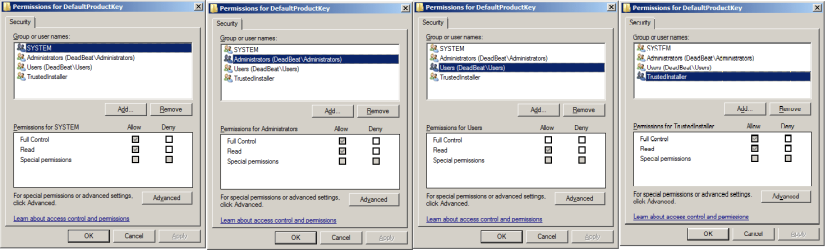
You have some permissions problems which are blocking access to the registry to read/write the Key properly.

Please open Regedit and navigate to the
HKEY_LOCAL_MACHINE\SOFTWARE\Microsoft\Windows NT\CurrentVersion
key and expand it.
right-click on the
DefaultProductKey
subkey and select Permissions

What are the permissions there? (permissions for all users should be greyed out) What users have permissions?
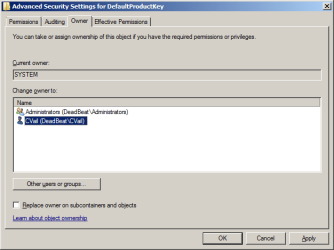
Click on the Owner tab - who is the current Owner? (it should be SYSTEM)
If the permissions are greyed out, and the owner is SYSTEM, then repeat the process for the
HKEY_LOCAL_MACHINE\SOFTWARE\Microsoft\Windows NT\CurrentVersion
key itself -
This Key should not have permissions greyed out, and the owner should be TrustedInstaller.
Check that the 'sppsvc' user has special permissions to the Key - what other users have what permissions?
 

My Computer

Computer type
Laptop
Computer Manufacturer/Model Number
Asus K52F or Lenovo B51-80
OS
Win 7 x64 Home Premium (and x86 VirtualBox VM)/Win10
CPU
i3 370M/i7 6500U
Motherboard
Asus/Lenovo
Memory
8GB - finally :)/8GB
Graphics Card(s)
it's an i3, dude!/dual Intel&nVidia
Sound Card
onboard
Monitor(s) Displays
15.6" built-in
Screen Resolution
1366x768/1920x1080
Hard Drives
750GB Seagate internal
Sundry external drives attached to other computers on the local network
1TB SSD on the Lenovo
PSU
n/a
Internet Speed
as much as I can get - usually on a dongle/phone, so <1MB/s
Antivirus
MSE/Defender
Browser
IE11/12/Edge/Chrome/FF(if I must)
Registry key as requested.

The registry key is attached. I can't answer all your questions--they're a bit confusing, but here is the raw data. Is it readable?
 

Attachments

  • regedit product key.png
    regedit product key.png
    18.4 KB · Views: 8

My Computer

Computer type
PC/Desktop
Computer Manufacturer/Model Number
Homebrew
OS
Windows 7 Home Premium 64bit
CPU
AMD 8350 4.1Mhz
Memory
16gb
Graphics Card(s)
AMD Radeon 6900 Series
Hard Drives
240Gb OC SSD (Drive c:)
(2) 1TB Samsung (hardware mirror)
Antivirus
ZoneAlarm
Browser
Chrome, Firefox, IE
You need to right-click on the subkey highlighted in the left pane in your picture, and select Permissions from the popup (I'd prefer to do this via the Command Line - but there's no way to do it without installing 3rd-party software, which I always try to avoid if I can)
 

My Computer

Computer type
Laptop
Computer Manufacturer/Model Number
Asus K52F or Lenovo B51-80
OS
Win 7 x64 Home Premium (and x86 VirtualBox VM)/Win10
CPU
i3 370M/i7 6500U
Motherboard
Asus/Lenovo
Memory
8GB - finally :)/8GB
Graphics Card(s)
it's an i3, dude!/dual Intel&nVidia
Sound Card
onboard
Monitor(s) Displays
15.6" built-in
Screen Resolution
1366x768/1920x1080
Hard Drives
750GB Seagate internal
Sundry external drives attached to other computers on the local network
1TB SSD on the Lenovo
PSU
n/a
Internet Speed
as much as I can get - usually on a dongle/phone, so <1MB/s
Antivirus
MSE/Defender
Browser
IE11/12/Edge/Chrome/FF(if I must)
Permissions

I think this is what you're looking for.
 

Attachments

  • Regedit Permissions.png
    Regedit Permissions.png
    16.4 KB · Views: 5

My Computer

Computer type
PC/Desktop
Computer Manufacturer/Model Number
Homebrew
OS
Windows 7 Home Premium 64bit
CPU
AMD 8350 4.1Mhz
Memory
16gb
Graphics Card(s)
AMD Radeon 6900 Series
Hard Drives
240Gb OC SSD (Drive c:)
(2) 1TB Samsung (hardware mirror)
Antivirus
ZoneAlarm
Browser
Chrome, Firefox, IE
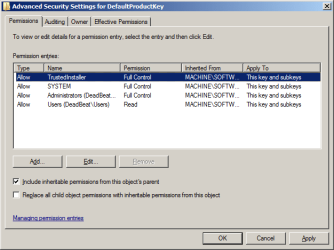
Advanced Settings--Owner

I clicked Advanced Settings-->Owner

I am Chris Vail. It appears that I do not own this key. Is this the problem?
 

Attachments

  • Regedit Owner.png
    Regedit Owner.png
    9.3 KB · Views: 33
  • Regedit Owner 2.png
    Regedit Owner 2.png
    11.1 KB · Views: 31

My Computer

Computer type
PC/Desktop
Computer Manufacturer/Model Number
Homebrew
OS
Windows 7 Home Premium 64bit
CPU
AMD 8350 4.1Mhz
Memory
16gb
Graphics Card(s)
AMD Radeon 6900 Series
Hard Drives
240Gb OC SSD (Drive c:)
(2) 1TB Samsung (hardware mirror)
Antivirus
ZoneAlarm
Browser
Chrome, Firefox, IE
That looks normal - which means that the problem may be with the files, or with scripting itself.

What Anti-Virus products have EVER been installed on this machine (since the last reformat) ?

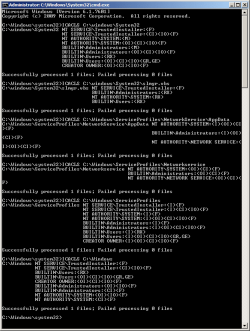
Please open an Elevated Command Prompt, and run the following commands...

ICACLS C:\windows\System32
ICACLS C:\windows\System32\slmgr.vbs
ICACLS C:\Windows\ServiceProfiles\NetworkService\AppData
ICACLS C:\Windows\ServiceProfiles\Networkservice
ICACLS C:\Windows\ServiceProfiles
ICACLS C:\Windows

Post the results...

Here are some instructions to make life easier :)
1) To open an Elevated Command Prompt Window (the ECP window), click on Start, All Programs, Accessories – then right-click on Command Prompt, and select Run as Administrator. Accept the UAC prompt.
2) To run the commands easier, highlight the block of commands, and right-click on the highlight – select Copy. In the CP Window, click on the black/white icon at top left – select Paste. The commands will run but may not complete the last command, so hit the Enter Key once.
3) To copy the results... click on the Black/White icon in the top left, and select Edit... 'Select All', and hit the Enter key - then use Ctrl+V or r-click+Paste to paste it into your response.
 

My Computer

Computer type
Laptop
Computer Manufacturer/Model Number
Asus K52F or Lenovo B51-80
OS
Win 7 x64 Home Premium (and x86 VirtualBox VM)/Win10
CPU
i3 370M/i7 6500U
Motherboard
Asus/Lenovo
Memory
8GB - finally :)/8GB
Graphics Card(s)
it's an i3, dude!/dual Intel&nVidia
Sound Card
onboard
Monitor(s) Displays
15.6" built-in
Screen Resolution
1366x768/1920x1080
Hard Drives
750GB Seagate internal
Sundry external drives attached to other computers on the local network
1TB SSD on the Lenovo
PSU
n/a
Internet Speed
as much as I can get - usually on a dongle/phone, so <1MB/s
Antivirus
MSE/Defender
Browser
IE11/12/Edge/Chrome/FF(if I must)
Thanks for your help.
Originally I installed AVG antivirus. Later it hijacked my browsers and caused other mischief. I had been using the Zone Alarm Firewall from the beginning, so I dumped AVG and loaded the ZA antivirus component.

I frequently run CCCleaner and the Registry tool therein. I have backup copies of my registry (only 3).

I do know a few Windows things, like how to get an elevated privilege command prompt, how to copy and paste. Here is the output of the commands you sent:
 

Attachments

  • Iacls output.png
    Iacls output.png
    16.9 KB · Views: 3

My Computer

Computer type
PC/Desktop
Computer Manufacturer/Model Number
Homebrew
OS
Windows 7 Home Premium 64bit
CPU
AMD 8350 4.1Mhz
Memory
16gb
Graphics Card(s)
AMD Radeon 6900 Series
Hard Drives
240Gb OC SSD (Drive c:)
(2) 1TB Samsung (hardware mirror)
Antivirus
ZoneAlarm
Browser
Chrome, Firefox, IE
...and that's why I'd rather people followed the instructions given - because often the way that people know how to do things is very inefficient, and produces results that are difficult to work with.

Compare your picture with...
Code:
C:\Windows\system32>ICACLS C:\windows\System32
C:\windows\System32 NT SERVICE\TrustedInstaller:(F)
                    NT SERVICE\TrustedInstaller:(CI)(IO)(F)
                    NT AUTHORITY\SYSTEM:(M)
                    NT AUTHORITY\SYSTEM:(OI)(CI)(IO)(F)
                    BUILTIN\Administrators:(M)
                    BUILTIN\Administrators:(OI)(CI)(IO)(F)
                    BUILTIN\Users:(RX)
                    BUILTIN\Users:(OI)(CI)(IO)(GR,GE)
                    CREATOR OWNER:(OI)(CI)(IO)(F)
Successfully processed 1 files; Failed processing 0 files
C:\Windows\system32>ICACLS C:\windows\System32\slmgr.vbs
C:\windows\System32\slmgr.vbs NT SERVICE\TrustedInstaller:(F)
                              BUILTIN\Administrators:(RX)
                              NT AUTHORITY\SYSTEM:(RX)
                              BUILTIN\Users:(RX)
Successfully processed 1 files; Failed processing 0 files
C:\Windows\system32>ICACLS C:\Windows\ServiceProfiles\NetworkService\AppData
C:\Windows\ServiceProfiles\NetworkService\AppData NT AUTHORITY\SYSTEM:(I)(OI)(CI
)(F)
                                                  BUILTIN\Administrators:(I)(OI)
(CI)(F)
                                                  NT AUTHORITY\NETWORK SERVICE:(
I)(OI)(CI)(F)
                                                  NoelAsus-PC\NoelAsus:(I)(OI)(C
I)(F)
Successfully processed 1 files; Failed processing 0 files
C:\Windows\system32>ICACLS C:\Windows\ServiceProfiles\Networkservice
C:\Windows\ServiceProfiles\Networkservice NT AUTHORITY\SYSTEM:(OI)(CI)(F)
                                          BUILTIN\Administrators:(OI)(CI)(F)
                                          NT AUTHORITY\NETWORK SERVICE:(OI)(CI)(
F)
                                          NoelAsus-PC\NoelAsus:(OI)(CI)(F)
Successfully processed 1 files; Failed processing 0 files
C:\Windows\system32>ICACLS C:\Windows\ServiceProfiles
C:\Windows\ServiceProfiles NT SERVICE\TrustedInstaller:(I)(F)
                           NT SERVICE\TrustedInstaller:(I)(CI)(IO)(F)
                           NT AUTHORITY\SYSTEM:(I)(F)
                           NT AUTHORITY\SYSTEM:(I)(OI)(CI)(IO)(F)
                           BUILTIN\Administrators:(I)(F)
                           BUILTIN\Administrators:(I)(OI)(CI)(IO)(F)
                           BUILTIN\Users:(I)(RX)
                           BUILTIN\Users:(I)(OI)(CI)(IO)(GR,GE)
                           CREATOR OWNER:(I)(OI)(CI)(IO)(F)
Successfully processed 1 files; Failed processing 0 files
C:\Windows\system32>ICACLS C:\Windows
C:\Windows NT SERVICE\TrustedInstaller:(F)
           NT SERVICE\TrustedInstaller:(CI)(IO)(F)
           NT AUTHORITY\SYSTEM:(M)
           NT AUTHORITY\SYSTEM:(OI)(CI)(IO)(F)
           BUILTIN\Administrators:(M)
           BUILTIN\Administrators:(OI)(CI)(IO)(F)
           BUILTIN\Users:(RX)
           BUILTIN\Users:(OI)(CI)(IO)(GR,GE)
           CREATOR OWNER:(OI)(CI)(IO)(F)
Successfully processed 1 files; Failed processing 0 files
C:\Windows\system32>

Which is easier to read?

Back to the actual results...
There's nothing obviously wrong there, so we need to look for other problems.


Open an Elevated Command Prompt, and run the following commands

Code:
sc sdshow plugplay
REG QUERY "HKEY_LOCAL_MACHINE\SOFTWARE\Microsoft\Windows NT\CurrentVersion\ProfileList\S-1-5-18" /S
REG QUERY "HKEY_LOCAL_MACHINE\SOFTWARE\Microsoft\Windows NT\CurrentVersion\ProfileList\S-1-5-19" /S
REG QUERY "HKEY_LOCAL_MACHINE\SOFTWARE\Microsoft\Windows NT\CurrentVersion\ProfileList\S-1-5-20" /S
  
.
Copy and paste the results to your reply
 

My Computer

Computer type
Laptop
Computer Manufacturer/Model Number
Asus K52F or Lenovo B51-80
OS
Win 7 x64 Home Premium (and x86 VirtualBox VM)/Win10
CPU
i3 370M/i7 6500U
Motherboard
Asus/Lenovo
Memory
8GB - finally :)/8GB
Graphics Card(s)
it's an i3, dude!/dual Intel&nVidia
Sound Card
onboard
Monitor(s) Displays
15.6" built-in
Screen Resolution
1366x768/1920x1080
Hard Drives
750GB Seagate internal
Sundry external drives attached to other computers on the local network
1TB SSD on the Lenovo
PSU
n/a
Internet Speed
as much as I can get - usually on a dongle/phone, so <1MB/s
Antivirus
MSE/Defender
Browser
IE11/12/Edge/Chrome/FF(if I must)
Sorry for the wait--but here's the data you requiested.

Code:
C:\Windows\system32>sc sdshow plugplay

D:(A;;CCLCSWRPWPDTLOCRRC;;;SY)(A;;CCDCLCSWRPWPDTLOCRSDRCWDWO;;;BA)(A;;CCLCSWLOCRRC;;;IU)(A;;CCLCSWLOCRRC;;;SU)S:(AU;FA;CCDCLCSWRPWPDTLOCRSDRCWDWO;;;WD)

C:\Windows\system32>REG QUERY "HKEY_LOCAL_MACHINE\SOFTWARE\Microsoft\Windows NT\CurrentVersion\ProfileList\S-1-5-18" /S

HKEY_LOCAL_MACHINE\SOFTWARE\Microsoft\Windows NT\CurrentVersion\ProfileList\S-1-5-18
    Flags    REG_DWORD    0xc
    State    REG_DWORD    0x0
    RefCount    REG_DWORD    0x1
    Sid    REG_BINARY    010100000000000512000000
    ProfileImagePath    REG_EXPAND_SZ    %systemroot%\system32\config\systemprofile


C:\Windows\system32>REG QUERY "HKEY_LOCAL_MACHINE\SOFTWARE\Microsoft\Windows NT\CurrentVersion\ProfileList\S-1-5-19" /S

HKEY_LOCAL_MACHINE\SOFTWARE\Microsoft\Windows NT\CurrentVersion\ProfileList\S-1-5-19
    ProfileImagePath    REG_EXPAND_SZ    C:\Windows\ServiceProfiles\LocalService

    Flags    REG_DWORD    0x0
    State    REG_DWORD    0x0


C:\Windows\system32>REG QUERY "HKEY_LOCAL_MACHINE\SOFTWARE\Microsoft\Windows NT\CurrentVersion\ProfileList\S-1-5-20" /S

HKEY_LOCAL_MACHINE\SOFTWARE\Microsoft\Windows NT\CurrentVersion\ProfileList\S-1-5-20
    ProfileImagePath    REG_EXPAND_SZ    C:\Windows\ServiceProfiles\NetworkService
    Flags    REG_DWORD    0x0
    State    REG_DWORD    0x0
 

My Computer

Computer type
PC/Desktop
Computer Manufacturer/Model Number
Homebrew
OS
Windows 7 Home Premium 64bit
CPU
AMD 8350 4.1Mhz
Memory
16gb
Graphics Card(s)
AMD Radeon 6900 Series
Hard Drives
240Gb OC SSD (Drive c:)
(2) 1TB Samsung (hardware mirror)
Antivirus
ZoneAlarm
Browser
Chrome, Firefox, IE

My Computer

Computer type
Laptop
Computer Manufacturer/Model Number
Asus K52F or Lenovo B51-80
OS
Win 7 x64 Home Premium (and x86 VirtualBox VM)/Win10
CPU
i3 370M/i7 6500U
Motherboard
Asus/Lenovo
Memory
8GB - finally :)/8GB
Graphics Card(s)
it's an i3, dude!/dual Intel&nVidia
Sound Card
onboard
Monitor(s) Displays
15.6" built-in
Screen Resolution
1366x768/1920x1080
Hard Drives
750GB Seagate internal
Sundry external drives attached to other computers on the local network
1TB SSD on the Lenovo
PSU
n/a
Internet Speed
as much as I can get - usually on a dongle/phone, so <1MB/s
Antivirus
MSE/Defender
Browser
IE11/12/Edge/Chrome/FF(if I must)
mcadiag, run 2

Code:
Diagnostic Report (1.9.0027.0):
-----------------------------------------
Windows Validation Data-->

Validation Code: 50
Cached Online Validation Code: 0x0
Windows Product Key: N/A, hr=0x80070005
Windows Product Key Hash: N/A, hr=0x80070005
Windows Product ID: 00359-OEM-8703917-84448
Windows Product ID Type: 3
Windows License Type: OEM System Builder
Windows OS version: 6.1.7601.2.00010300.1.0.003
ID: {C4579C6A-19F5-477E-BB43-4936E525E7D6}(3)
Is Admin: Yes
TestCab: 0x0
LegitcheckControl ActiveX: N/A, hr = 0x80070002
Signed By: N/A, hr = 0x80070002
Product Name: Windows 7 Home Premium
Architecture: 0x00000009
Build lab: 7601.win7sp1_gdr.140303-2144
TTS Error: 
Validation Diagnostic: 
Resolution Status: N/A

Vista WgaER Data-->
ThreatID(s): N/A, hr = 0x80070002
Version: N/A, hr = 0x80070002

Windows XP Notifications Data-->
Cached Result: N/A, hr = 0x80070002
File Exists: No
Version: N/A, hr = 0x80070002
WgaTray.exe Signed By: N/A, hr = 0x80070002
WgaLogon.dll Signed By: N/A, hr = 0x80070002

OGA Notifications Data-->
Cached Result: N/A, hr = 0x80070002
Version: N/A, hr = 0x80070002
OGAExec.exe Signed By: N/A, hr = 0x80070002
OGAAddin.dll Signed By: N/A, hr = 0x80070002

OGA Data-->
Office Status: 109 N/A
OGA Version: N/A, 0x80070002
Signed By: N/A, hr = 0x80070002
Office Diagnostics: 025D1FF3-364-80041010_025D1FF3-229-80041010_025D1FF3-230-1_025D1FF3-517-80040154_025D1FF3-237-80040154_025D1FF3-238-2_025D1FF3-244-80070002_025D1FF3-258-3

Browser Data-->
Proxy settings: N/A
User Agent: Mozilla/4.0 (compatible; MSIE 8.0; Win32)
Default Browser: C:\Program Files (x86)\Google\Chrome\Application\chrome.exe
Download signed ActiveX controls: Prompt
Download unsigned ActiveX controls: Disabled
Run ActiveX controls and plug-ins: Allowed
Initialize and script ActiveX controls not marked as safe: Disabled
Allow scripting of Internet Explorer Webbrowser control: Disabled
Active scripting: Allowed
Script ActiveX controls marked as safe for scripting: Allowed

File Scan Data-->

Other data-->
Office Details: <GenuineResults><MachineData><UGUID>{C4579C6A-19F5-477E-BB43-4936E525E7D6}</UGUID><Version>1.9.0027.0</Version><OS>6.1.7601.2.00010300.1.0.003</OS><Architecture>x64</Architecture><PKey>*****-*****-*****-*****-BBBBB</PKey><PID>00359-OEM-8703917-84448</PID><PIDType>3</PIDType><SID>S-1-5-21-364757089-888712819-4013641008</SID><SYSTEM><Manufacturer>Gigabyte Technology Co., Ltd.</Manufacturer><Model>GA-990FXA-UD3</Model></SYSTEM><BIOS><Manufacturer>Award Software International, Inc.</Manufacturer><Version>F9</Version><SMBIOSVersion major="2" minor="4"/><Date>20121022000000.000000+000</Date></BIOS><HWID>5BFF3607018400F2</HWID><UserLCID>0409</UserLCID><SystemLCID>0409</SystemLCID><TimeZone>Central Standard Time(GMT-06:00)</TimeZone><iJoin>0</iJoin><SBID><stat>3</stat><msppid></msppid><name></name><model></model></SBID><OEM/><GANotification/></MachineData><Software><Office><Result>109</Result><Products/><Applications/></Office></Software></GenuineResults>  

Spsys.log Content: 0x80070002

Licensing Data-->
C:\Windows\system32\slmgr.vbs(1333, 5) Microsoft VBScript runtime error: Permission denied

Windows Activation Technologies-->
HrOffline: 0x00000000
HrOnline: 0x00000000
HealthStatus: 0x0000000000000000
Event Time Stamp: 7:27:2014 04:25
ActiveX: Registered, Version: 7.1.7600.16395
Admin Service: Registered, Version: 7.1.7600.16395
HealthStatus Bitmask Output:


HWID Data-->
HWID Hash Current: MgAAAAIAAAABAAEAAwACAAAAAQABAAEAHKKYaaRWwNiK01AE7hZqreCPYj1Q1DbvbnU=

OEM Activation 1.0 Data-->
N/A

OEM Activation 2.0 Data-->
BIOS valid for OA 2.0: yes, but no SLIC table
Windows marker version: N/A
OEMID and OEMTableID Consistent: N/A
BIOS Information: 
  ACPI Table Name	OEMID Value	OEMTableID Value
  APIC			GBT   		GBTUACPI
  FACP			GBT   		GBTUACPI
  HPET			GBT   		GBTUACPI
  MCFG			GBT   		GBTUACPI
  MSDM			GBT   		GBTUACPI
  EUDS			GBT   		
  MATS			GBT   		
  TAMG			GBT   		GBT   B0
  MATS			GBT   		
  IVRS			AMD  		RD890S

I haven't done a byte-for-byte comparison, but it looks the same as the previous run.

BTW: if you help me avoid flattening and re-installing, I don't mind sending some funds via pay-pal to your tip jar.
 

My Computer

Computer type
PC/Desktop
Computer Manufacturer/Model Number
Homebrew
OS
Windows 7 Home Premium 64bit
CPU
AMD 8350 4.1Mhz
Memory
16gb
Graphics Card(s)
AMD Radeon 6900 Series
Hard Drives
240Gb OC SSD (Drive c:)
(2) 1TB Samsung (hardware mirror)
Antivirus
ZoneAlarm
Browser
Chrome, Firefox, IE
Looks the same to me, as well.

Let's try this...

Open an Elevated COmmand Prompt, and run the following commands...

Code:
[B]ATTRIB  C:\Windows\System32\7b*.*[/B]
[B]ICACLS  C:\Windows\System32\7b*.*[/B]
[B]ATTRIB  [B]%windir%\ServiceProfiles\NetworkService\AppData\Roaming\Microsoft\SoftwareProtectionPlatform\[/B][B]tokens.dat[/B][/B]
[B]ICACLS [B]%windir%\ServiceProfiles\NetworkService\AppData\Roaming\Microsoft\SoftwareProtectionPlatform\[/B][B]tokens.dat[/B][/B]

.

post the results.
 

My Computer

Computer type
Laptop
Computer Manufacturer/Model Number
Asus K52F or Lenovo B51-80
OS
Win 7 x64 Home Premium (and x86 VirtualBox VM)/Win10
CPU
i3 370M/i7 6500U
Motherboard
Asus/Lenovo
Memory
8GB - finally :)/8GB
Graphics Card(s)
it's an i3, dude!/dual Intel&nVidia
Sound Card
onboard
Monitor(s) Displays
15.6" built-in
Screen Resolution
1366x768/1920x1080
Hard Drives
750GB Seagate internal
Sundry external drives attached to other computers on the local network
1TB SSD on the Lenovo
PSU
n/a
Internet Speed
as much as I can get - usually on a dongle/phone, so <1MB/s
Antivirus
MSE/Defender
Browser
IE11/12/Edge/Chrome/FF(if I must)
More results

Code:
C:\Windows\system32>ATTRIB  C:\Windows\System32\7b*.*
A   H        C:\Windows\System32\7B296FB0-376B-497e-B012-9C450E1B7327-5P-0.C74456-A289-439d-8115-601632D005A0
A   H        C:\Windows\System32\7B296FB0-376B-497e-B012-9C450E1B7327-5P-1.C74456-A289-439d-8115-601632D005A0

C:\Windows\system32>ICACLS  C:\Windows\System32\7b*.*
C:\Windows\System32\7B296FB0-376B-497e-B012-9C450E1B7327-5P-0.C7483456-A289-43-8115-601632D005A0 NT AUTHORITY\SYSTEM:(I)(F)

                   BUILTIN\Administrators:(I)(F)

                   BUILTIN\Users:(I)(RX)

C:\Windows\System32\7B296FB0-376B-497e-B012-9C450E1B7327-5P-1.C7483456-A289-43-8115-601632D005A0 NT AUTHORITY\SYSTEM:(I)(F)

                   BUILTIN\Administrators:(I)(F)

                   BUILTIN\Users:(I)(RX)

Successfully processed 2 files; Failed processing 0 files

C:\Windows\system32>ATTRIB  %windir%\ServiceProfiles\NetworkService\AppData\Roaming\Microsoft\SoftwareProtectionPlatform\tokens.dat
A       I    C:\Windows\ServiceProfiles\NetworkService\AppData\Roaming\Microso\SoftwareProtectionPlatform\tokens.dat

C:\Windows\system32>ICACLS %windir%\ServiceProfiles\NetworkService\AppData\Roaming\Microsoft\SoftwareProtectionPlatform\tokens.dat
C:\Windows\ServiceProfiles\NetworkService\AppData\Roaming\Microsoft\SoftwareProtectionPlatform\tokens.dat NT AUTHORITY\SYSTEM:(I)(F)

                          BUILTIN\Administrators:(I)(F)

                          NT AUTHORITY\NETWORK SERVICE:(I)(F)

Successfully processed 1 files; Failed processing 0 files

C:\Windows\system32>
 

My Computer

Computer type
PC/Desktop
Computer Manufacturer/Model Number
Homebrew
OS
Windows 7 Home Premium 64bit
CPU
AMD 8350 4.1Mhz
Memory
16gb
Graphics Card(s)
AMD Radeon 6900 Series
Hard Drives
240Gb OC SSD (Drive c:)
(2) 1TB Samsung (hardware mirror)
Antivirus
ZoneAlarm
Browser
Chrome, Firefox, IE
We've now exhausted every known way to get a Code 5 error at this point - so we'll have to look elsewhere.


Please open Event Viewer
In the left pane, navigate to the Windows Logs
right-click on Applications and select 'Save all events as...' save as Apps.evtx
repeat for the System logs - save as Sys.evtx
Compress both files, and attach to your reply or upload to your favourite fileshare site (preferably Dropbox or OneDrive/SkyDrive) and post a link in your reply

I'll take a look tomorrow - I'm off to bed ;)
 

My Computer

Computer type
Laptop
Computer Manufacturer/Model Number
Asus K52F or Lenovo B51-80
OS
Win 7 x64 Home Premium (and x86 VirtualBox VM)/Win10
CPU
i3 370M/i7 6500U
Motherboard
Asus/Lenovo
Memory
8GB - finally :)/8GB
Graphics Card(s)
it's an i3, dude!/dual Intel&nVidia
Sound Card
onboard
Monitor(s) Displays
15.6" built-in
Screen Resolution
1366x768/1920x1080
Hard Drives
750GB Seagate internal
Sundry external drives attached to other computers on the local network
1TB SSD on the Lenovo
PSU
n/a
Internet Speed
as much as I can get - usually on a dongle/phone, so <1MB/s
Antivirus
MSE/Defender
Browser
IE11/12/Edge/Chrome/FF(if I must)
I know that its late for you. From a desperate Texan: Thanks. These will be ready for you in the morning. This gives me an excuse to use Dropbox--never needed it before.

Get some sleep.
 

My Computer

Computer type
PC/Desktop
Computer Manufacturer/Model Number
Homebrew
OS
Windows 7 Home Premium 64bit
CPU
AMD 8350 4.1Mhz
Memory
16gb
Graphics Card(s)
AMD Radeon 6900 Series
Hard Drives
240Gb OC SSD (Drive c:)
(2) 1TB Samsung (hardware mirror)
Antivirus
ZoneAlarm
Browser
Chrome, Firefox, IE
Noel is the foremost expert on these issues. However reading your thread, both AVG and ZoneAlarm raise flags when you bring them up. Over the 5 1/2 years of Win7 I have never seen anything except problems reported here for either, which are often solved by uninstalling them. Just to clean them out of the registry is a herculean task. But not to worry, you have Noel on the case! :geek:
 
Last edited:
Noel gets the Academy Award for Windows Administration

I'm a Linux geek. I delight in obscure and mostly unknowable language. But this Windows Activation stuff is beyond dense to me.

Of course, I am an open-source kinda guy, so I see no need of it. There are lots of companies selling billions of dollars of free software. They are making tidy profits by giving away their products.

But beyond the question of why, is why me? All I want is a operating system that will operate my computer in a secure manner.

I know that Windows was never designed to be networked. In the original PC, if you wanted security, you turned it off and locked your floppy disks in your desk drawer. So security is a 'bolted on' afterthought. Hence an antivirus, a firewall and a malware system must be purchased in addition to the cost of the OS itself.

In my world, security is baked in to the system at every level. Its not that it can't be virused, but it would not be by a 13YO script kiddy. And anyone who breaks through my *nix security gets a free steak meal before I throw him in jail so fast and so far it will take a month for his ass to catch up with the rest of him.

And of course, there is no registry to be hacked. *nix doesn't need one. Now its true that AIX has a form of a registry in its kernel. But its a micro-set of the DB2 RDBMS, not a flat file. So its blindingly fast, and is rebuilt every time the machine boots, and frequently thereafter. Its called the Object Data Manager, and mostly is used for keeping track of I/O. 25 years ago, I had to manually rebuild the ODM when a disk crashed. But later versions of the OS take care of even that.

But apart from AIX, the very concept of a registry doesn't exist. And if it doesn't exist, it can't be hacked. There are ways, for example, to force buffer overflows and attain root privileges. Those will be caught by careful monitoring though. I haven't heard of any of these in a long time either.

So I don't understand why this sort of thing is even necessary. I've installed several programs that seem to operate fine but make no changes to the registry. It seems then that the registry is just a kluge.
 

My Computer

Computer type
PC/Desktop
Computer Manufacturer/Model Number
Homebrew
OS
Windows 7 Home Premium 64bit
CPU
AMD 8350 4.1Mhz
Memory
16gb
Graphics Card(s)
AMD Radeon 6900 Series
Hard Drives
240Gb OC SSD (Drive c:)
(2) 1TB Samsung (hardware mirror)
Antivirus
ZoneAlarm
Browser
Chrome, Firefox, IE
Back
Top