Format old OS hard drive

beagrie07

New member
Member
VIP
Local time
1:30 AM
Messages
118
Location
UK
Hi, I recently upgraded and moved the OS to a new drive. I want to format the old OS drive (now D drive). How would I go about doing this? I know you can't format a bootable drive too :)

Any help?

Thanks!
 

My Computer

Computer Manufacturer/Model Number
Custom
OS
Windows 7 Ultimate 64 Bit
CPU
Intel Core i7 2600k 3.8GHz
Motherboard
Asus P8Z68-V Pro
Memory
Corsair Vengeance 16GB DDR3 1600Mhz
Graphics Card(s)
Asus NVIDIA GeForce GTX 680 - 2GB GDDR5
Sound Card
On Board
Monitor(s) Displays
LG DM2780D
Screen Resolution
1920 x 1080
Hard Drives
OCZ Vertex 4 240GB SATA-III SSD
OCZ Agility 3 240GB SATA-III SSD
WD 500 GB SATA-II HDD
Hitachi 500 GB SATA-II HDD
Hitachi 1 TB SATA-II HDD
Seagate Barracuda 2 TB SATA-III HDD
250GB External HD
PSU
Corsair TX650M PSU
Case
NZXT Phantom Full Tower Case - Black
Cooling
1 x Sickleflow, 2 x AF120 Quiet, 1 x 200mm Top, Corsair H70
Keyboard
Logitech G110
Mouse
Logitech G500
Internet Speed
80 Down / 20 Up
Make sure the drive is connected to your computer (internal drive should be, external drive needs to be plugged in.) Then click Start > Computer and find the drive in the list of drives. Ensure any data on the drive that you wish to keep has been copied to another drive, as formatting will remove all data. Right-click on the drive's icon and select the "Format..." option to bring up the Format window.

Select the required file system (you'll probably want to stay with NTFS) and give the drive a new name (called a "Volume label"). If you just want to erase a drive that has already been formatted, consider using the "Quick Format" option; otherwise leave this option unchecked. Click "Start" to begin the formatting process. A full format could take several hours.
 

My Computer

Computer type
Laptop
Computer Manufacturer/Model Number
Sony Vaio VPCEB47GM Laptop
OS
Win 7 Pro 64-bit
CPU
Intel i5 2.4 Ghz
Memory
8GB DDR3
Graphics Card(s)
Intel HD 3000
Sound Card
IDT High Definition
Monitor(s) Displays
15.6 WGXA Anti-Glare LED
Screen Resolution
1280x800
Hard Drives
640Gb 7200rpm
Antivirus
MSE
Browser
Opera (primary) with IE9 backup
I tried that but it says "windows cannot format this drive" or something like that. It's because the drive has old windows files on it. I've deleted the boot path using easyBCD but it doesn't work still.
 

My Computer

Computer Manufacturer/Model Number
Custom
OS
Windows 7 Ultimate 64 Bit
CPU
Intel Core i7 2600k 3.8GHz
Motherboard
Asus P8Z68-V Pro
Memory
Corsair Vengeance 16GB DDR3 1600Mhz
Graphics Card(s)
Asus NVIDIA GeForce GTX 680 - 2GB GDDR5
Sound Card
On Board
Monitor(s) Displays
LG DM2780D
Screen Resolution
1920 x 1080
Hard Drives
OCZ Vertex 4 240GB SATA-III SSD
OCZ Agility 3 240GB SATA-III SSD
WD 500 GB SATA-II HDD
Hitachi 500 GB SATA-II HDD
Hitachi 1 TB SATA-II HDD
Seagate Barracuda 2 TB SATA-III HDD
250GB External HD
PSU
Corsair TX650M PSU
Case
NZXT Phantom Full Tower Case - Black
Cooling
1 x Sickleflow, 2 x AF120 Quiet, 1 x 200mm Top, Corsair H70
Keyboard
Logitech G110
Mouse
Logitech G500
Internet Speed
80 Down / 20 Up
That sounds good, I'll have to have a look later after work. Would formatting it affect booting into windows at all? The boot drive is now my new one but I'm unsure if booting into windows will be an issue.
 

My Computer

Computer Manufacturer/Model Number
Custom
OS
Windows 7 Ultimate 64 Bit
CPU
Intel Core i7 2600k 3.8GHz
Motherboard
Asus P8Z68-V Pro
Memory
Corsair Vengeance 16GB DDR3 1600Mhz
Graphics Card(s)
Asus NVIDIA GeForce GTX 680 - 2GB GDDR5
Sound Card
On Board
Monitor(s) Displays
LG DM2780D
Screen Resolution
1920 x 1080
Hard Drives
OCZ Vertex 4 240GB SATA-III SSD
OCZ Agility 3 240GB SATA-III SSD
WD 500 GB SATA-II HDD
Hitachi 500 GB SATA-II HDD
Hitachi 1 TB SATA-II HDD
Seagate Barracuda 2 TB SATA-III HDD
250GB External HD
PSU
Corsair TX650M PSU
Case
NZXT Phantom Full Tower Case - Black
Cooling
1 x Sickleflow, 2 x AF120 Quiet, 1 x 200mm Top, Corsair H70
Keyboard
Logitech G110
Mouse
Logitech G500
Internet Speed
80 Down / 20 Up
Sounds good, I'll give it a shot later, I'll post my results :)
 

My Computer

Computer Manufacturer/Model Number
Custom
OS
Windows 7 Ultimate 64 Bit
CPU
Intel Core i7 2600k 3.8GHz
Motherboard
Asus P8Z68-V Pro
Memory
Corsair Vengeance 16GB DDR3 1600Mhz
Graphics Card(s)
Asus NVIDIA GeForce GTX 680 - 2GB GDDR5
Sound Card
On Board
Monitor(s) Displays
LG DM2780D
Screen Resolution
1920 x 1080
Hard Drives
OCZ Vertex 4 240GB SATA-III SSD
OCZ Agility 3 240GB SATA-III SSD
WD 500 GB SATA-II HDD
Hitachi 500 GB SATA-II HDD
Hitachi 1 TB SATA-II HDD
Seagate Barracuda 2 TB SATA-III HDD
250GB External HD
PSU
Corsair TX650M PSU
Case
NZXT Phantom Full Tower Case - Black
Cooling
1 x Sickleflow, 2 x AF120 Quiet, 1 x 200mm Top, Corsair H70
Keyboard
Logitech G110
Mouse
Logitech G500
Internet Speed
80 Down / 20 Up
It might be a good idea to post a screenshot of your Disk Management window with both drives connected. You may have a system reserved partition on the old drive.

How did you "move the OS" to the other drive?

Other thoughts:
Run Disk Check on the drive to test for potential problems in windows, and run the hard drive manufacturer's diagnostic program also before using the old drive as a data drive.
 

My Computer

Computer type
PC/Desktop
Computer Manufacturer/Model Number
Home Built - Jan 2013
OS
Windows 7 64 Bit Home Premium SP1
CPU
i7-3820
Motherboard
Asus P9X79-PRO - Bios 4608
Memory
GSkill F3-14900CL9Q - 16GB
Graphics Card(s)
EVGA GeForce GTX660 - Driver 352.86
Sound Card
On board Realtek ALC898
Monitor(s) Displays
Acer S271HL
Screen Resolution
1920 x 1080
Hard Drives
#1- Samsung 840 Pro Series
#2- Western Digital WD1002FAEX Sata3 Black
#3- Western Digital WD1002FAEX Sata3 Black
PSU
Corsair CMPSU-850TX-V2 - 850 watt (by Seasonic)
Case
Corsair Obsidian 550D
Cooling
Standard 3 120mm case fans, Cooler Master Hyper 212 EVO
Keyboard
MS KC-0405
Mouse
Intellimouse 5-button
Internet Speed
56 Mbits/Sec (on a good day)
Antivirus
Avast & Malwarebytes
Browser
Firefox
Other Info
Asus DVD - DRW-24B1ST 24X

My Computers

System One System Two

  • Computer type
    PC/Desktop
    Computer Manufacturer/Model Number
    ALWAYS UNDER CONSTRUCTION
    OS
    Windows 11 Pro
    CPU
    Ryzen 9 5900X
    Motherboard
    Asus X570 Crosshair Viii Hero
    Memory
    32GB G Skill DDR4-3600
    Graphics Card(s)
    EVGA RTX 3080 FTW 3 Ultra
    Sound Card
    On Board/Sennheiser PC37X Headset
    Monitor(s) Displays
    3 X Asus 27"
    Screen Resolution
    2560x1440
    Hard Drives
    2 X 1 TB NVME drives
    PSU
    EVGA 850
    Case
    Phanteks Eclipse P400A
    Cooling
    EVGA 280 AIO
    Keyboard
    Logitech G510s/ Logitech G13
    Mouse
    Logitech G502
    Internet Speed
    24/1
    Antivirus
    ESET/MBAM Pro/SAS Pro
    Browser
    Chrome/ Firefox/ Edge
  • Computer type
    Laptop
    System Manufacturer/Model Number
    Dell 16 Plus
    OS
    Windows 11 Pro
    CPU
    Intel Ultra 9 288V
    Memory
    32 GB LPDDR5X 8533
    Monitor(s) Displays
    16" Mini-LED HDR600 Touch 90 Hz
    Screen Resolution
    2560X1600
    Hard Drives
    1 TB NVME

My Computer

Computer type
PC/Desktop
Computer Manufacturer/Model Number
Home Built - Jan 2013
OS
Windows 7 64 Bit Home Premium SP1
CPU
i7-3820
Motherboard
Asus P9X79-PRO - Bios 4608
Memory
GSkill F3-14900CL9Q - 16GB
Graphics Card(s)
EVGA GeForce GTX660 - Driver 352.86
Sound Card
On board Realtek ALC898
Monitor(s) Displays
Acer S271HL
Screen Resolution
1920 x 1080
Hard Drives
#1- Samsung 840 Pro Series
#2- Western Digital WD1002FAEX Sata3 Black
#3- Western Digital WD1002FAEX Sata3 Black
PSU
Corsair CMPSU-850TX-V2 - 850 watt (by Seasonic)
Case
Corsair Obsidian 550D
Cooling
Standard 3 120mm case fans, Cooler Master Hyper 212 EVO
Keyboard
MS KC-0405
Mouse
Intellimouse 5-button
Internet Speed
56 Mbits/Sec (on a good day)
Antivirus
Avast & Malwarebytes
Browser
Firefox
Other Info
Asus DVD - DRW-24B1ST 24X
It might be a good idea to post a screenshot of your Disk Management window with both drives connected. You may have a system reserved partition on the old drive.

How did you "move the OS" to the other drive?

By that I meant I did a clean install on another drive
 

My Computer

Computer Manufacturer/Model Number
Custom
OS
Windows 7 Ultimate 64 Bit
CPU
Intel Core i7 2600k 3.8GHz
Motherboard
Asus P8Z68-V Pro
Memory
Corsair Vengeance 16GB DDR3 1600Mhz
Graphics Card(s)
Asus NVIDIA GeForce GTX 680 - 2GB GDDR5
Sound Card
On Board
Monitor(s) Displays
LG DM2780D
Screen Resolution
1920 x 1080
Hard Drives
OCZ Vertex 4 240GB SATA-III SSD
OCZ Agility 3 240GB SATA-III SSD
WD 500 GB SATA-II HDD
Hitachi 500 GB SATA-II HDD
Hitachi 1 TB SATA-II HDD
Seagate Barracuda 2 TB SATA-III HDD
250GB External HD
PSU
Corsair TX650M PSU
Case
NZXT Phantom Full Tower Case - Black
Cooling
1 x Sickleflow, 2 x AF120 Quiet, 1 x 200mm Top, Corsair H70
Keyboard
Logitech G110
Mouse
Logitech G500
Internet Speed
80 Down / 20 Up
Were both drives connected during the install? Also, please post a screenshot of your disk management expanded to show the top and bottom sections.
 

My Computers

System One System Two

  • Computer type
    PC/Desktop
    Computer Manufacturer/Model Number
    ALWAYS UNDER CONSTRUCTION
    OS
    Windows 11 Pro
    CPU
    Ryzen 9 5900X
    Motherboard
    Asus X570 Crosshair Viii Hero
    Memory
    32GB G Skill DDR4-3600
    Graphics Card(s)
    EVGA RTX 3080 FTW 3 Ultra
    Sound Card
    On Board/Sennheiser PC37X Headset
    Monitor(s) Displays
    3 X Asus 27"
    Screen Resolution
    2560x1440
    Hard Drives
    2 X 1 TB NVME drives
    PSU
    EVGA 850
    Case
    Phanteks Eclipse P400A
    Cooling
    EVGA 280 AIO
    Keyboard
    Logitech G510s/ Logitech G13
    Mouse
    Logitech G502
    Internet Speed
    24/1
    Antivirus
    ESET/MBAM Pro/SAS Pro
    Browser
    Chrome/ Firefox/ Edge
  • Computer type
    Laptop
    System Manufacturer/Model Number
    Dell 16 Plus
    OS
    Windows 11 Pro
    CPU
    Intel Ultra 9 288V
    Memory
    32 GB LPDDR5X 8533
    Monitor(s) Displays
    16" Mini-LED HDR600 Touch 90 Hz
    Screen Resolution
    2560X1600
    Hard Drives
    1 TB NVME
They were both connected on install yeah, I'll have to post a screenshot in a couple of hours when I'm home from work :)
 

My Computer

Computer Manufacturer/Model Number
Custom
OS
Windows 7 Ultimate 64 Bit
CPU
Intel Core i7 2600k 3.8GHz
Motherboard
Asus P8Z68-V Pro
Memory
Corsair Vengeance 16GB DDR3 1600Mhz
Graphics Card(s)
Asus NVIDIA GeForce GTX 680 - 2GB GDDR5
Sound Card
On Board
Monitor(s) Displays
LG DM2780D
Screen Resolution
1920 x 1080
Hard Drives
OCZ Vertex 4 240GB SATA-III SSD
OCZ Agility 3 240GB SATA-III SSD
WD 500 GB SATA-II HDD
Hitachi 500 GB SATA-II HDD
Hitachi 1 TB SATA-II HDD
Seagate Barracuda 2 TB SATA-III HDD
250GB External HD
PSU
Corsair TX650M PSU
Case
NZXT Phantom Full Tower Case - Black
Cooling
1 x Sickleflow, 2 x AF120 Quiet, 1 x 200mm Top, Corsair H70
Keyboard
Logitech G110
Mouse
Logitech G500
Internet Speed
80 Down / 20 Up
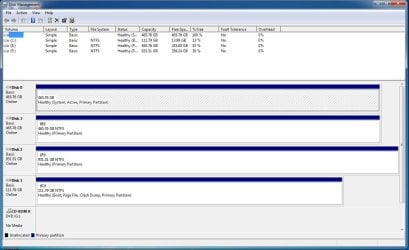
Ok, I added the disk management, the highlighted disk is the one I want to format but it doesn't show properly because I tried to use the disk part command on it. Is there any way I can access it to get something off it before its formatted?

Cheers
 

Attachments

  • dm.jpg
    dm.jpg
    109.6 KB · Views: 86

My Computer

Computer Manufacturer/Model Number
Custom
OS
Windows 7 Ultimate 64 Bit
CPU
Intel Core i7 2600k 3.8GHz
Motherboard
Asus P8Z68-V Pro
Memory
Corsair Vengeance 16GB DDR3 1600Mhz
Graphics Card(s)
Asus NVIDIA GeForce GTX 680 - 2GB GDDR5
Sound Card
On Board
Monitor(s) Displays
LG DM2780D
Screen Resolution
1920 x 1080
Hard Drives
OCZ Vertex 4 240GB SATA-III SSD
OCZ Agility 3 240GB SATA-III SSD
WD 500 GB SATA-II HDD
Hitachi 500 GB SATA-II HDD
Hitachi 1 TB SATA-II HDD
Seagate Barracuda 2 TB SATA-III HDD
250GB External HD
PSU
Corsair TX650M PSU
Case
NZXT Phantom Full Tower Case - Black
Cooling
1 x Sickleflow, 2 x AF120 Quiet, 1 x 200mm Top, Corsair H70
Keyboard
Logitech G110
Mouse
Logitech G500
Internet Speed
80 Down / 20 Up
I would suggest before doing anything else, shut down the computer, remove the power cable from the hard drive and start back up. That should show you whether there are ant needed system files on the drive. If you get a good startup with that drive disconnected, there should be no problem with wiping it. I don't know what you did in diskpart, but the drive appears empty. You may try Recuva to see if it can recover any data from the drive. Of course it begs the question, if there was needed data on the drive, why use diskpart to wipe it. Also, You may have better luck if you put your OS on port 0. After making those changes, reconnect the drive, go to disk management, right click the drive, and see if you have the option to delete partition. If you do that, then just create a new simple volume.
 

My Computers

System One System Two

  • Computer type
    PC/Desktop
    Computer Manufacturer/Model Number
    ALWAYS UNDER CONSTRUCTION
    OS
    Windows 11 Pro
    CPU
    Ryzen 9 5900X
    Motherboard
    Asus X570 Crosshair Viii Hero
    Memory
    32GB G Skill DDR4-3600
    Graphics Card(s)
    EVGA RTX 3080 FTW 3 Ultra
    Sound Card
    On Board/Sennheiser PC37X Headset
    Monitor(s) Displays
    3 X Asus 27"
    Screen Resolution
    2560x1440
    Hard Drives
    2 X 1 TB NVME drives
    PSU
    EVGA 850
    Case
    Phanteks Eclipse P400A
    Cooling
    EVGA 280 AIO
    Keyboard
    Logitech G510s/ Logitech G13
    Mouse
    Logitech G502
    Internet Speed
    24/1
    Antivirus
    ESET/MBAM Pro/SAS Pro
    Browser
    Chrome/ Firefox/ Edge
  • Computer type
    Laptop
    System Manufacturer/Model Number
    Dell 16 Plus
    OS
    Windows 11 Pro
    CPU
    Intel Ultra 9 288V
    Memory
    32 GB LPDDR5X 8533
    Monitor(s) Displays
    16" Mini-LED HDR600 Touch 90 Hz
    Screen Resolution
    2560X1600
    Hard Drives
    1 TB NVME
Yeah I thought there wasnt any data on it at the time then I realised there was something I needed, I fixed it, just gave it a drive letter and I can see it again.

I'll disconnect the drive now and see if it boots in.
 

My Computer

Computer Manufacturer/Model Number
Custom
OS
Windows 7 Ultimate 64 Bit
CPU
Intel Core i7 2600k 3.8GHz
Motherboard
Asus P8Z68-V Pro
Memory
Corsair Vengeance 16GB DDR3 1600Mhz
Graphics Card(s)
Asus NVIDIA GeForce GTX 680 - 2GB GDDR5
Sound Card
On Board
Monitor(s) Displays
LG DM2780D
Screen Resolution
1920 x 1080
Hard Drives
OCZ Vertex 4 240GB SATA-III SSD
OCZ Agility 3 240GB SATA-III SSD
WD 500 GB SATA-II HDD
Hitachi 500 GB SATA-II HDD
Hitachi 1 TB SATA-II HDD
Seagate Barracuda 2 TB SATA-III HDD
250GB External HD
PSU
Corsair TX650M PSU
Case
NZXT Phantom Full Tower Case - Black
Cooling
1 x Sickleflow, 2 x AF120 Quiet, 1 x 200mm Top, Corsair H70
Keyboard
Logitech G110
Mouse
Logitech G500
Internet Speed
80 Down / 20 Up
Ok, I disconnected the drive and windows won't boot without it plugged in, what do I do next?
 

My Computer

Computer Manufacturer/Model Number
Custom
OS
Windows 7 Ultimate 64 Bit
CPU
Intel Core i7 2600k 3.8GHz
Motherboard
Asus P8Z68-V Pro
Memory
Corsair Vengeance 16GB DDR3 1600Mhz
Graphics Card(s)
Asus NVIDIA GeForce GTX 680 - 2GB GDDR5
Sound Card
On Board
Monitor(s) Displays
LG DM2780D
Screen Resolution
1920 x 1080
Hard Drives
OCZ Vertex 4 240GB SATA-III SSD
OCZ Agility 3 240GB SATA-III SSD
WD 500 GB SATA-II HDD
Hitachi 500 GB SATA-II HDD
Hitachi 1 TB SATA-II HDD
Seagate Barracuda 2 TB SATA-III HDD
250GB External HD
PSU
Corsair TX650M PSU
Case
NZXT Phantom Full Tower Case - Black
Cooling
1 x Sickleflow, 2 x AF120 Quiet, 1 x 200mm Top, Corsair H70
Keyboard
Logitech G110
Mouse
Logitech G500
Internet Speed
80 Down / 20 Up
Go you have the repair disk? if not go to control panel, backup your computer and select create system repair disk, or you can use the installation disk and click on repair on the 2nd screen.
Boot into the repair disk and follow this tutorial on Boot manager is missing.
You can also try to restore MBR
Someone who knows better than me may need to help, but I am pretty sure you will have to set your C drive as active using diskpart.
 

My Computers

System One System Two

  • Computer type
    PC/Desktop
    Computer Manufacturer/Model Number
    ALWAYS UNDER CONSTRUCTION
    OS
    Windows 11 Pro
    CPU
    Ryzen 9 5900X
    Motherboard
    Asus X570 Crosshair Viii Hero
    Memory
    32GB G Skill DDR4-3600
    Graphics Card(s)
    EVGA RTX 3080 FTW 3 Ultra
    Sound Card
    On Board/Sennheiser PC37X Headset
    Monitor(s) Displays
    3 X Asus 27"
    Screen Resolution
    2560x1440
    Hard Drives
    2 X 1 TB NVME drives
    PSU
    EVGA 850
    Case
    Phanteks Eclipse P400A
    Cooling
    EVGA 280 AIO
    Keyboard
    Logitech G510s/ Logitech G13
    Mouse
    Logitech G502
    Internet Speed
    24/1
    Antivirus
    ESET/MBAM Pro/SAS Pro
    Browser
    Chrome/ Firefox/ Edge
  • Computer type
    Laptop
    System Manufacturer/Model Number
    Dell 16 Plus
    OS
    Windows 11 Pro
    CPU
    Intel Ultra 9 288V
    Memory
    32 GB LPDDR5X 8533
    Monitor(s) Displays
    16" Mini-LED HDR600 Touch 90 Hz
    Screen Resolution
    2560X1600
    Hard Drives
    1 TB NVME
Yes, the old hard drive is marked System and Active, so it contains the files needed to boot.

You will need to Use Diskpart to set that Disk with the C: drive to Active, then run Startup Repair 3 or more times to create the correct files in the correct place.
http://www.sevenforums.com/tutorials/105541-startup-repair-run-3-separate-times.html
http://www.sevenforums.com/tutorials/681-startup-repair.html?ltr=S

Important: Be sure to disconnect all the other drives before doing this! When you run Startup Repair you should only have the Disk with the C: drive connected.

If you are game, and you haven't got too far with installing all your programs, you could just reinstall Windows again - this time with all the extra drive disconnected.

http://www.sevenforums.com/tutorials/71432-partition-mark-active.html
http://www.sevenforums.com/tutorials/197157-partition-mark-inactive.html
 

My Computer

Computer type
PC/Desktop
Computer Manufacturer/Model Number
Home Built - Jan 2013
OS
Windows 7 64 Bit Home Premium SP1
CPU
i7-3820
Motherboard
Asus P9X79-PRO - Bios 4608
Memory
GSkill F3-14900CL9Q - 16GB
Graphics Card(s)
EVGA GeForce GTX660 - Driver 352.86
Sound Card
On board Realtek ALC898
Monitor(s) Displays
Acer S271HL
Screen Resolution
1920 x 1080
Hard Drives
#1- Samsung 840 Pro Series
#2- Western Digital WD1002FAEX Sata3 Black
#3- Western Digital WD1002FAEX Sata3 Black
PSU
Corsair CMPSU-850TX-V2 - 850 watt (by Seasonic)
Case
Corsair Obsidian 550D
Cooling
Standard 3 120mm case fans, Cooler Master Hyper 212 EVO
Keyboard
MS KC-0405
Mouse
Intellimouse 5-button
Internet Speed
56 Mbits/Sec (on a good day)
Antivirus
Avast & Malwarebytes
Browser
Firefox
Other Info
Asus DVD - DRW-24B1ST 24X
Back
Top