Found.001 Folder - What the Heck is it? After Win7 Install? ?!?!!!?!?

TonyS317

New member
Member
Local time
1:22 PM
Messages
25
So, if you look at my post from 2 days ago I was having windows issues. So, I gave up and reinstalled everything. I did the reinstall so Win7 would move my stuff to windows.old. I've done this once successfully in the past (Only once - not this time).


The install went great! Seems to be working now - spot ON! However, while I have a windows.old dir - there is nothing in it. There was this found.001 folder, it was hidden and had some VERY strange security settings on it. Me, not having a clue it took me about an hour to get in. I randomly applied settings....(sorry).

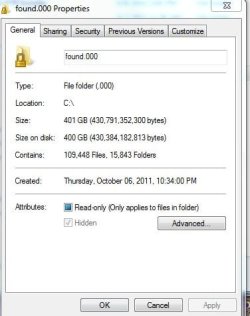
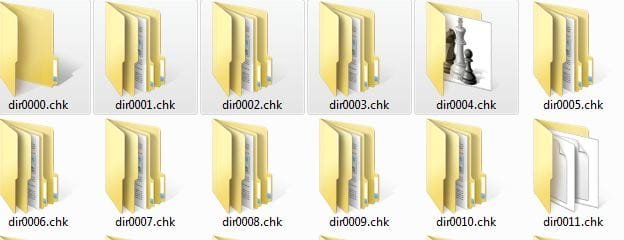
There is some weird stuff in this folder - WTHeck is it? It seems to have some of my old stuff in it? AND? I dunno - someone tell me what it is? Why it is here(on my cpu)? Should I be AlArMeD? I am not cpu is working fine.... BUT WTH?:what:
 

Attachments

  • WhatHell.JPG
    WhatHell.JPG
    30.3 KB · Views: 28
  • Whathell2.JPG
    Whathell2.JPG
    30.4 KB · Views: 41
  • WHATHell3.JPG
    WHATHell3.JPG
    28.7 KB · Views: 27

My Computer My Computer

At a glance

Win 7 64 BitAsus
Computer Manufacturer/Model Number
CyberPower
OS
Win 7 64 Bit
Memory
Asus
Also

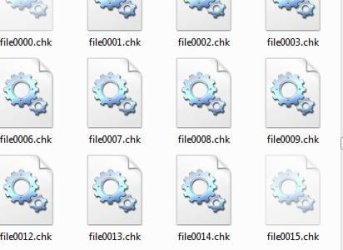
Also there is a few thousand files like this.......
 

Attachments

  • WHATHell4.JPG
    WHATHell4.JPG
    25.7 KB · Views: 17

My Computer My Computer

At a glance

Win 7 64 BitAsus
Computer Manufacturer/Model Number
CyberPower
OS
Win 7 64 Bit
Memory
Asus
These look like fragment files from a chkdsk/scandisk scan. From your post, you seem to have had some disk problems. Have you run HD Tune or similar hard disk checking program to see if you have a failing hard drive?
 

My Computer My Computer

At a glance

dual boot with Win7 SP1 and XP SP3Intel Q9400Crucial 4GB dual channelnVidia GTX260
OS
dual boot with Win7 SP1 and XP SP3
CPU
Intel Q9400
Motherboard
Gigabyte UD3P
Memory
Crucial 4GB dual channel
Graphics Card(s)
nVidia GTX260
Sound Card
onboard
Monitor(s) Displays
NEC LCD
Hard Drives
WD Black 640GB
PSU
Power PC and Cooling 700W
Case
Antec
Cooling
2 case fans
These look like fragment files from a chkdsk/scandisk scan. From your post, you seem to have had some disk problems. Have you run HD Tune or similar hard disk checking program to see if you have a failing hard drive?


So, something went wrong when I reinstalled windows? There are literally thousands and thousands of files and folders..... Just bits and pieces of files going to the wrong spot - that is an awful lot of "wrongness" though isn't it? It is working much better now though.

Ya, I ran checkdsk, sfc /scan.... and manufacture checks on both - One did have errors but are now coming back with the "000" or whatever the manf code if for 'all' clear. I did not do the reinstall until both came back "all clear" on all 3 scans.
 

My Computer My Computer

At a glance

Win 7 64 BitAsus
Computer Manufacturer/Model Number
CyberPower
OS
Win 7 64 Bit
Memory
Asus
These look like fragment files from a chkdsk/scandisk scan...
You called it. :D

If all of your data is intact you can get rid of the folder and the files. I would wait about a month before doing that, though, just to be sure. :)
 

My Computer My Computer

At a glance

Main - Windows 7 Pro SP1 64-Bit; 2nd - Window...Main - Core i7 2600K; 2nd - Core i7 920Main - 16GB Corsair Vengeance; 2nd - 12GB Cor...Main - XFX Radeon 6870 1GB; 2nd - XFX Radeon ...
Computer Manufacturer/Model Number
Self
OS
Main - Windows 7 Pro SP1 64-Bit; 2nd - Windows Server 2008 R2
CPU
Main - Core i7 2600K; 2nd - Core i7 920
Motherboard
Main - Asus P8Z68-V Pro/Gen3; 2nd - Gigabyte GA-EX58-UDR3
Memory
Main - 16GB Corsair Vengeance; 2nd - 12GB Corsair Vengeance
Graphics Card(s)
Main - XFX Radeon 6870 1GB; 2nd - XFX Radeon 4870 1GB
Sound Card
Both: Onboard Realtek Azalia
Monitor(s) Displays
Main - Hann 25" + I-INC 25" + Acer 23"; 2nd - Upgrading Soon
Screen Resolution
Main - 1920x1080 (All Three Monitors); 2nd - Upgrading Soon
Hard Drives
Main - (1) Crucial M4 128GB (Boot)
Main - (1) Seagate 2TB 64MB Cache (Data)
Main - (1) Seagate 2TB 64MB Cache (Data Backup)
2nd - (1) Intel X25-M SSD 80GB (Boot)
2nd - (3) Seagate 1TB 32MB Cache (Data Backup)
2nd - (1) Seagate 320GB (Because)
PSU
Main - OCZ 600W Modular; 2nd - OCZ 600W
Case
Main - Thermaltake Element G; 2nd - NZXT something or other
Cooling
Main - Corsair H80; 2nd - Prolimatech Megahalems
Keyboard
Main - Razer Reclusa; 2nd - Old MS Keyboard
Mouse
Main - Logitech MX Revolution; 2nd - Old MS Mouse
Internet Speed
20Mbps Time-Warner Cable
These look like fragment files from a chkdsk/scandisk scan...
You called it. :D

If all of your data is intact you can get rid of the folder and the files. I would wait about a month before doing that, though, just to be sure. :)

I guess that is what it is..... Thousands of pieces of programs that should have been transfered to the windows.old directory? There is quite a few pictures and home movies I been taking from this dir and putting them into a WTH folder - is that a bad idea? :( :) ?
 

My Computer My Computer

At a glance

Win 7 64 BitAsus
Computer Manufacturer/Model Number
CyberPower
OS
Win 7 64 Bit
Memory
Asus
Not at all. This folder full of fragment files is yours to do with as you please...I'm glad chkdsk did save these files for you :)
 

My Computer My Computer

At a glance

Windows 7 Professional SP1 32-bitIntel Core 2 Duo E6600 2.4GHz4GB DDR2-667 (4x1GB in dual-channel config)nVidia GeForce 9800 GT
Computer type
PC/Desktop
Computer Manufacturer/Model Number
Custom-built
OS
Windows 7 Professional SP1 32-bit
CPU
Intel Core 2 Duo E6600 2.4GHz
Motherboard
Asus PL5D2
Memory
4GB DDR2-667 (4x1GB in dual-channel config)
Graphics Card(s)
nVidia GeForce 9800 GT
Sound Card
Creative X-Fi XtremeMusic
Monitor(s) Displays
Acer P236H
Screen Resolution
1920x1200 (DVI)
Hard Drives
OCZ SSD Vertex Plus 60GB SATA (Firmware 3.55), 64MB cache
Hitachi HD321KJ SATA, 320GB, 7200rpm, 16MB cache
PSU
Antec TruePower 2.0
Case
Cooler Master Centurion
Cooling
Too many fans
Keyboard
Standard
Mouse
Microsoft wireless optical mouse
Internet Speed
AT&T U-verse (18mbit/sec)
Antivirus
Microsoft Security Essentials
Browser
Firefox
Other Info
Other devices:
Compaq CQ-60 laptop
Google Nexus 7 (2012) tablet
Nvidia SHIELD tablet (US/LTE)
Hardkernel ODROID-XU single-board computer (Samsung Exynos 5420)
Not at all. This folder full of fragment files is yours to do with as you please...I'm glad chkdsk did save these files for you :)

So, chkdsk saved these? I did need them. There literally are thousands of files - many, I have no clue what they are "lnk"(links) to programs and stuff? I dunno? Well I am glad it saved them or whatever happened - happened. I just assumed when I reinstalled windows and nothing was in the windows.old everything was gone. But, most or it; or a lot of my old stuff seems to be in this found folder.
 

My Computer My Computer

At a glance

Win 7 64 BitAsus
Computer Manufacturer/Model Number
CyberPower
OS
Win 7 64 Bit
Memory
Asus
What The

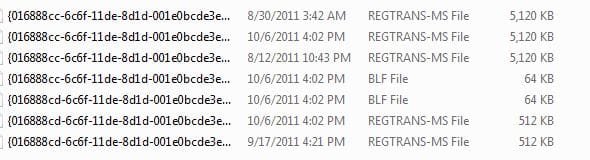
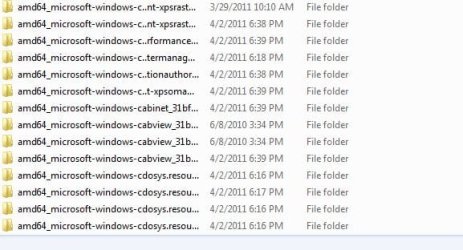
I am still having trouble deleting some of them. There are folders like this:

Each has 11,000 + files. It just seems to be old registry info? Inside are .dll/.mui programs/things.

I will delete what I can then go from there, I guess. Weird stuff. Well - ty all problem solved. If someone can tell me What the heck it is? What I did wrong/right. I will leave this question open.

Ty ty
 

Attachments

  • WhatTHE.JPG
    WhatTHE.JPG
    43.3 KB · Views: 25

My Computer My Computer

At a glance

Win 7 64 BitAsus
Computer Manufacturer/Model Number
CyberPower
OS
Win 7 64 Bit
Memory
Asus
Not at all. This folder full of fragment files is yours to do with as you please...I'm glad chkdsk did save these files for you :)
So, chkdsk saved these? I did need them...
That's exactly where chkdsk is most useful. For whatever reason, the contents of your hard drive had become scrambled and made no sense to the Windows file structure. chkdsk saves the stuff for you even though it really doesn't know exactly what to do with it. Since you do know what to do with it your stuff is still there.

Now might be a good time to mention Backups - you're making them, right? ;)
 

My Computer My Computer

At a glance

Main - Windows 7 Pro SP1 64-Bit; 2nd - Window...Main - Core i7 2600K; 2nd - Core i7 920Main - 16GB Corsair Vengeance; 2nd - 12GB Cor...Main - XFX Radeon 6870 1GB; 2nd - XFX Radeon ...
Computer Manufacturer/Model Number
Self
OS
Main - Windows 7 Pro SP1 64-Bit; 2nd - Windows Server 2008 R2
CPU
Main - Core i7 2600K; 2nd - Core i7 920
Motherboard
Main - Asus P8Z68-V Pro/Gen3; 2nd - Gigabyte GA-EX58-UDR3
Memory
Main - 16GB Corsair Vengeance; 2nd - 12GB Corsair Vengeance
Graphics Card(s)
Main - XFX Radeon 6870 1GB; 2nd - XFX Radeon 4870 1GB
Sound Card
Both: Onboard Realtek Azalia
Monitor(s) Displays
Main - Hann 25" + I-INC 25" + Acer 23"; 2nd - Upgrading Soon
Screen Resolution
Main - 1920x1080 (All Three Monitors); 2nd - Upgrading Soon
Hard Drives
Main - (1) Crucial M4 128GB (Boot)
Main - (1) Seagate 2TB 64MB Cache (Data)
Main - (1) Seagate 2TB 64MB Cache (Data Backup)
2nd - (1) Intel X25-M SSD 80GB (Boot)
2nd - (3) Seagate 1TB 32MB Cache (Data Backup)
2nd - (1) Seagate 320GB (Because)
PSU
Main - OCZ 600W Modular; 2nd - OCZ 600W
Case
Main - Thermaltake Element G; 2nd - NZXT something or other
Cooling
Main - Corsair H80; 2nd - Prolimatech Megahalems
Keyboard
Main - Razer Reclusa; 2nd - Old MS Keyboard
Mouse
Main - Logitech MX Revolution; 2nd - Old MS Mouse
Internet Speed
20Mbps Time-Warner Cable
Those folders (with really long names) in your last screenshots are definitely the contents of the winsxs folder from your previous Windows installation. Since they're not part of the new, active system, it's safe to delete them all.
 

My Computer My Computer

At a glance

Windows 7 Professional SP1 32-bitIntel Core 2 Duo E6600 2.4GHz4GB DDR2-667 (4x1GB in dual-channel config)nVidia GeForce 9800 GT
Computer type
PC/Desktop
Computer Manufacturer/Model Number
Custom-built
OS
Windows 7 Professional SP1 32-bit
CPU
Intel Core 2 Duo E6600 2.4GHz
Motherboard
Asus PL5D2
Memory
4GB DDR2-667 (4x1GB in dual-channel config)
Graphics Card(s)
nVidia GeForce 9800 GT
Sound Card
Creative X-Fi XtremeMusic
Monitor(s) Displays
Acer P236H
Screen Resolution
1920x1200 (DVI)
Hard Drives
OCZ SSD Vertex Plus 60GB SATA (Firmware 3.55), 64MB cache
Hitachi HD321KJ SATA, 320GB, 7200rpm, 16MB cache
PSU
Antec TruePower 2.0
Case
Cooler Master Centurion
Cooling
Too many fans
Keyboard
Standard
Mouse
Microsoft wireless optical mouse
Internet Speed
AT&T U-verse (18mbit/sec)
Antivirus
Microsoft Security Essentials
Browser
Firefox
Other Info
Other devices:
Compaq CQ-60 laptop
Google Nexus 7 (2012) tablet
Nvidia SHIELD tablet (US/LTE)
Hardkernel ODROID-XU single-board computer (Samsung Exynos 5420)
Back
Top