FPS is bad if I leave my computer on for days.

Doctoral

New member
Member
Local time
2:44 PM
Messages
65
So I leave my computer on 24/7 for certain reasons that I'm sure you'd all be mad at me for so I'll just shut up.

Anyways, if I leave it on for a couple of days and then I try to play a game, my FPS will be very low. At 10 - 30. Some of you might be saying "Wow, 30 fps is a lot! Stop complaining" but to you I say, 60 FPS or don't game at all.

Even if I put the graphics settings all the way down, the FPS will still be bad. It happens to every game I try, and overclocking does nothing either. It's not my computer overheating at all, seeing as It's always at 30 - 40C.

To fix this, I restart my computer. But it's very bothersome to restart my computer and if I can fix this problem somehow, that would be great. Although it's not a serious issue.. why not try to fix something that bothers you if you can afford to? :p
 

My Computer My Computer

At a glance

Windows 7 64-BitAMD Phenom II X4 975 3.60 GHzCorsair Vengeance DDR3 1600 8GBEVGA GTS 450
Computer Manufacturer/Model Number
Custom Build by me
OS
Windows 7 64-Bit
CPU
AMD Phenom II X4 975 3.60 GHz
Motherboard
ASRock 970 Extreme3
Memory
Corsair Vengeance DDR3 1600 8GB
Graphics Card(s)
EVGA GTS 450
Sound Card
ASRock 970 Extreme3 Motherboard
Monitor(s) Displays
Acer G235HAbd 23'
Screen Resolution
1920x1080
Hard Drives
360 GB 7200 RPM HDD
PSU
CORSAIR CX600W ATX12V
Case
Antec 300 w/ Leds
Cooling
Antec 300 Stock
Keyboard
eMachines keyboard from 2004
Mouse
Microsoft Sidewinder X8
Internet Speed
6MB / 1MB
I leave mine on most of the time too, but I try to remember to at least reboot it on a regular basis to clear its mind. :-) Every so often I actually turn it off for the night and let it think it's having a rest. I also let the hard drives go to sleep and the monitor goes on stand-by. I don't hibernate it.
But I think most of the geeky sort of people I know leave them on at least a lot.:sleep:
 

My Computer My Computer

At a glance

Windows 7 Ultimate x64Intel Core i7 930Gskill 2x3 GB RamSapphire ATI Radeon HD 5870
Computer Manufacturer/Model Number
Custom self assembled
OS
Windows 7 Ultimate x64
CPU
Intel Core i7 930
Motherboard
Gigabyte GA X58A UD7
Memory
Gskill 2x3 GB Ram
Graphics Card(s)
Sapphire ATI Radeon HD 5870
Monitor(s) Displays
LG 24MP88 24" LED Monitor
Screen Resolution
1920 X 1080
Hard Drives
Seagate barracuda 1 TB
PSU
Corsair GS 600W
Case
Cooler Master 690 II Plus
Cooling
Cooler Master Hyper 212X
Keyboard
Logitech G15 Gaming keyboard
Mouse
Logitech MX518 Gaming Mouse
Internet Speed
Broadband 50 Mbps speed [Hathway]
Other Info
Xbox 360 Wired Controller (x2)
AverMedia TV tuner Card [Internal]
Logitech HD C110 Web Camera
Netgear WGR614 Wireless-N 150 Router
Razer Goliathus Fragged Alpha Control Edition Mouse Pad
I leave mine on most of the time too, but I try to remember to at least reboot it on a regular basis to clear its mind. :-) Every so often I actually turn it off for the night and let it think it's having a rest. I also let the hard drives go to sleep and the monitor goes on stand-by. I don't hibernate it.
But I think most of the geeky sort of people I know leave them on at least a lot.:sleep:

If I put it to sleep the same problem happens with the FPS, so I don't do it too often unless I'm leaving for a very long period of time >.>
 

My Computer My Computer

At a glance

Windows 7 64-BitAMD Phenom II X4 975 3.60 GHzCorsair Vengeance DDR3 1600 8GBEVGA GTS 450
Computer Manufacturer/Model Number
Custom Build by me
OS
Windows 7 64-Bit
CPU
AMD Phenom II X4 975 3.60 GHz
Motherboard
ASRock 970 Extreme3
Memory
Corsair Vengeance DDR3 1600 8GB
Graphics Card(s)
EVGA GTS 450
Sound Card
ASRock 970 Extreme3 Motherboard
Monitor(s) Displays
Acer G235HAbd 23'
Screen Resolution
1920x1080
Hard Drives
360 GB 7200 RPM HDD
PSU
CORSAIR CX600W ATX12V
Case
Antec 300 w/ Leds
Cooling
Antec 300 Stock
Keyboard
eMachines keyboard from 2004
Mouse
Microsoft Sidewinder X8
Internet Speed
6MB / 1MB
Just reboot it at least like every 3 days or so or when ever it gets jerky to clear out the cache on the ram. It gets a memory leak effect after a couple days. I myself though shut it down everyday since i like leaving my machine take a break but other ppl like leaving it on so all personal choice.
 

My Computer My Computer

At a glance

Windows 10 64bitAMD Phenom II X4 925 (Deneb)(2.8GHz) OC 3.4GHzCorsair Vengeance DDR3 4GBX2 (8192MB)XFX HD 6870 1GB (OC)- 940MHz core, mem 1150MHz
Computer type
PC/Desktop
Computer Manufacturer/Model Number
custom build
OS
Windows 10 64bit
CPU
AMD Phenom II X4 925 (Deneb)(2.8GHz) OC 3.4GHz
Motherboard
M5A78L-MLX Plus
Memory
Corsair Vengeance DDR3 4GBX2 (8192MB)
Graphics Card(s)
XFX HD 6870 1GB (OC)- 940MHz core, mem 1150MHz
Monitor(s) Displays
Vizio 26' 1920x1080 / Acer 1336x768
Screen Resolution
1920x1080 60Hz /1336x768
Hard Drives
Kingston Digital 60GB SSDNow V300/500gb HDD Western Digital 7200rpm (/WD 160GB HDD 7200rpm
PSU
CORSAIR CX600 600w
Case
AZZA Orion 202 EVO
Cooling
cooler master hyper TX3 cpu cooler
Keyboard
Razer DeathStalker
Mouse
Logitech Optical Gaming Mouse G400
Antivirus
Defualt on win 10
Browser
Firefox
Other Info
cpu is overclocked in bios
everyone will experience this problem, it's just the RAM cache, it needs to be flushed, just like going to the toilet (excuse the scenario), but you can't keep going without flushing otherwise you'll cause a blockage, so a good flush often helps (restarting I mean).
 

My Computer My Computer

At a glance

Windows 7 Ultimate x64 SP1Intel Q6600 @ 2.6Ghz4Gb DDR2 Corsair Dominator @ 800Mhz 5-5-5-15EVGA 560 GTX SC FTW 1GB
Computer type
PC/Desktop
Computer Manufacturer/Model Number
Custom Build
OS
Windows 7 Ultimate x64 SP1
CPU
Intel Q6600 @ 2.6Ghz
Motherboard
Evga NF78-CK-132-A 3-Way SLI
Memory
4Gb DDR2 Corsair Dominator @ 800Mhz 5-5-5-15
Graphics Card(s)
EVGA 560 GTX SC FTW 1GB
Sound Card
Realtek HD 7.1 Audio, Plantronics GameCom780 7.1 Headset
Monitor(s) Displays
Dell S2409W
Screen Resolution
1920 x 1080
Hard Drives
SanDisk SDSSDHII-120G-G25 120GB SSD
Samsung 7200RPM 750Gb SATA
Samsung 850 EVO 120GB SSD
Western Digital Green 1TB 7200RPM
PSU
Xigmatek 750W Quad sli quad core 80% eff
Case
Antec 900 Gaming Case
Cooling
Zalman CNPS9700-NT NVIDIA Tritium
Keyboard
Logitech generic keyboard, MS wireless keyboard
Mouse
Razor Lachesis Banshee V2 Blue, 4000DPI, MS wireless mouse
Internet Speed
152Mb Virgin Media Fibre Optic
Antivirus
Microsoft Security Essentials
Browser
Google Chrome
Other Info
Wireless Gaming Receiver for Windows, Wireless Xbox 360 Pad
everyone will experience this problem, it's just the RAM cache, it needs to be flushed, just like going to the toilet (excuse the scenario), but you can't keep going without flushing otherwise you'll cause a blockage, so a good flush often helps (restarting I mean).

That's a Crappy way of putting it... see what I did there? ;) :D

That has always happened to me and I have never found a good answer for it so I just turn it off every night or every time my rig coughs... is there no other way to flush the cache w/o having to restart? :eek:
 

My Computer My Computer

At a glance

Windows 7 x64 (Ultimate)Intel i5-4670K8GBs Ripjaws 2133MhzAsus GTX660 (2GBs)
Computer type
PC/Desktop
Computer Manufacturer/Model Number
Custom Built... Intel/Nvidia/ASRock
OS
Windows 7 x64 (Ultimate)
CPU
Intel i5-4670K
Motherboard
ASRock Z87 Extreme 6
Memory
8GBs Ripjaws 2133Mhz
Graphics Card(s)
Asus GTX660 (2GBs)
Sound Card
Onboard Realtek HD
Monitor(s) Displays
Acer AL2216W
Screen Resolution
1680 x 1050
Hard Drives
Samsung 840 SSD 120GBs
Samsung 750GB 32MB cache
1.5 TB
PSU
PC Cooling 750w Silencer
Case
Thermaltake Spedo Advance
Cooling
Std Cooler
Keyboard
Logitech G15
Mouse
Logitech G9
Internet Speed
Comcast 20Mbit
Antivirus
Avast
Browser
Firefox
I don't understand the fear of shutting off a computer. It will not vaporize. You just restart it and Windows will play a little tune, (hi I'm back) and you can get on with your computing needs.
 

My Computer My Computer

At a glance

Windows 10 Pro. 64/ version 1709 Windows 7 Pr...Intel i7-6800K @ 4.3Corsair Platinum 16 gig @2400EVGA GTX 1070 OC
Computer type
PC/Desktop
Computer Manufacturer/Model Number
Home made Desktop
OS
Windows 10 Pro. 64/ version 1709 Windows 7 Pro/64
CPU
Intel i7-6800K @ 4.3
Motherboard
ASUS X-99 Deluxe II
Memory
Corsair Platinum 16 gig @2400
Graphics Card(s)
EVGA GTX 1070 OC
Monitor(s) Displays
Asus 27" LED LCD/VE278Q
Screen Resolution
1920-1080 or 1280-720 HDMI
Hard Drives
INTEL SSD 730-240 Gb Sata 3.0/
PSU
EVGA Platium 1200W
Case
Phanteks Luxe Tempered Glass 8 fans/ one radiator
Cooling
XSPC/ Water Cooled CPU
Keyboard
Das 4 Professional
Mouse
Logitech M705/MX Anywhere 2-S
Internet Speed
100 mbits
Antivirus
Microsoft Security Essentials/ Malwarebytes Premium 3.0/ SAS
Browser
I.E. 11 default/Firefox/ ISP Time Warner Cable/Spectrum
Other Info
LG BluRay Burner/
Sound system-KLipsch-THX/
Icy Dock ssd Hot Swap bays.
I left my PC for more than 2 weeks last year without even restarting but i never had any problem with low frames in any game at all... this might be some other issue i guess... i like to leave my PC on all the times unless there's no power outage which happens now on daily basis in my area.
 

My Computer My Computer

At a glance

Windows 10 ProCore i5 9600KCorsair Vengeance Pro 2x 8GB (16GB) 3200MHz DDR4MSI GTX 1070 Gaming X 8GB
Computer type
PC/Desktop
Computer Manufacturer/Model Number
Self Built
OS
Windows 10 Pro
CPU
Core i5 9600K
Motherboard
ASUS ROG Strix Z390-F Gaming
Memory
Corsair Vengeance Pro 2x 8GB (16GB) 3200MHz DDR4
Graphics Card(s)
MSI GTX 1070 Gaming X 8GB
Sound Card
ASRock A-Style Purity Sound
Monitor(s) Displays
ASUS VX239H IPS
Screen Resolution
1920x1080
Hard Drives
XPG SPECTRIX S40G 2566GB M.2 NVMe | Patriot P210 512GB SSD | Seagate BarraCuda 4TB 5400RPM
PSU
Thermaltake Smart 600w RGB 80Plus
Case
NZXT H500 with 3x Corsair HD120 RGB w/Node Pro
Cooling
Cryorig H7
Keyboard
Corsair K70 RapidFire RGB (Cherry MX Speed)
Mouse
Logitech G402 Hyperion Fury
Internet Speed
20MB Cable Broadband
Browser
Chrome
Other Info
Corsair MM300 Extended Anti-Fray Mouse Pad | Edifier C2 2.1ch Sound System | XBOX One S Controller | XBOX 360 Wireless Controller for Windows | APC SUA1000i Smart-UPS | PS4 Slim 500GB [Region 1 - USA]
I agree with boogieboy. I have a netbook running as a tiny server (simply put, my download speed sucks) and it stays on 24/7 to do its job (really, all an atom 450 is really able to do), never had such issues.

Maybe there is something else that as time goes accumulates nonsense somewhere and this slows down the machine.

Is there any program running?
 

My Computer My Computer

At a glance

Win 7 Pro 64-bit 7601AMD Phenom 9650 QuadCore, revision DR-B35 GB yes I run 2x 2GB and 1x 1GB, different b...NVIDIA GeForce 9800 GT 512 Mb, unknown manufa...
Computer type
PC/Desktop
Computer Manufacturer/Model Number
custom built
OS
Win 7 Pro 64-bit 7601
CPU
AMD Phenom 9650 QuadCore, revision DR-B3
Motherboard
ASUS M4A78
Memory
5 GB yes I run 2x 2GB and 1x 1GB, different brand, spank me.
Graphics Card(s)
NVIDIA GeForce 9800 GT 512 Mb, unknown manufacturer.
Sound Card
Crappy Realtek Integrated Audio
Monitor(s) Displays
Fujitsu Siemens P19-3P
Screen Resolution
1280 x 1024 x 32 bits @ 60 Hz Oh yeah, 4:3 rocks!
Hard Drives
(1) MAXTOR S TM3320613AS SATA Disk Device (2) STM35004 18AS SATA Disk Device (3) TOSHIBA USB 2.5"-HDD
PSU
whatever, around 450w
Case
Scavenged from old company PC, 10+ years old
Cooling
CPU fan, GPU fan, case fan, nothing fancy
Keyboard
Microsoft, PS/2, white.
Mouse
Optical, logitec.
Internet Speed
effective max speeds: 70-ish kB/s down 30-ish kB/s up
Antivirus
Avira, free edition.
Browser
Firefox with FXChrome to make it look like Google Chrome :P
Other Info
Was discarded by previous owner due to "horrible performance".
Was running Win Xp from a IDE drive. Yeah. Was a pain.
SATA II drive and Win7 and it zips away! Yay!
I agree with boogieboy. I have a netbook running as a tiny server (simply put, my download speed sucks) and it stays on 24/7 to do its job (really, all an atom 450 is really able to do), never had such issues.

Maybe there is something else that as time goes accumulates nonsense somewhere and this slows down the machine.

Is there any program running?

Yes actually, lots of programs. Not any "Active" ones, but I leave things like IntelliJ IDE open pretty much all the time. Sometimes even chrome.
 

My Computer My Computer

At a glance

Windows 7 64-BitAMD Phenom II X4 975 3.60 GHzCorsair Vengeance DDR3 1600 8GBEVGA GTS 450
Computer Manufacturer/Model Number
Custom Build by me
OS
Windows 7 64-Bit
CPU
AMD Phenom II X4 975 3.60 GHz
Motherboard
ASRock 970 Extreme3
Memory
Corsair Vengeance DDR3 1600 8GB
Graphics Card(s)
EVGA GTS 450
Sound Card
ASRock 970 Extreme3 Motherboard
Monitor(s) Displays
Acer G235HAbd 23'
Screen Resolution
1920x1080
Hard Drives
360 GB 7200 RPM HDD
PSU
CORSAIR CX600W ATX12V
Case
Antec 300 w/ Leds
Cooling
Antec 300 Stock
Keyboard
eMachines keyboard from 2004
Mouse
Microsoft Sidewinder X8
Internet Speed
6MB / 1MB
ok, close them all and let it run overnight, then try if there are still issues. If there are no issues, add one program at a time, run overnight, see for FPS issues. This way you should find out what is the offending program that you must close before gaming.

I'm personally betting on Chrome and on any program that has a "autosave after a few minutes" feature.

Anyway, if you post a list of them, others may tell you more.
 

My Computer My Computer

At a glance

Win 7 Pro 64-bit 7601AMD Phenom 9650 QuadCore, revision DR-B35 GB yes I run 2x 2GB and 1x 1GB, different b...NVIDIA GeForce 9800 GT 512 Mb, unknown manufa...
Computer type
PC/Desktop
Computer Manufacturer/Model Number
custom built
OS
Win 7 Pro 64-bit 7601
CPU
AMD Phenom 9650 QuadCore, revision DR-B3
Motherboard
ASUS M4A78
Memory
5 GB yes I run 2x 2GB and 1x 1GB, different brand, spank me.
Graphics Card(s)
NVIDIA GeForce 9800 GT 512 Mb, unknown manufacturer.
Sound Card
Crappy Realtek Integrated Audio
Monitor(s) Displays
Fujitsu Siemens P19-3P
Screen Resolution
1280 x 1024 x 32 bits @ 60 Hz Oh yeah, 4:3 rocks!
Hard Drives
(1) MAXTOR S TM3320613AS SATA Disk Device (2) STM35004 18AS SATA Disk Device (3) TOSHIBA USB 2.5"-HDD
PSU
whatever, around 450w
Case
Scavenged from old company PC, 10+ years old
Cooling
CPU fan, GPU fan, case fan, nothing fancy
Keyboard
Microsoft, PS/2, white.
Mouse
Optical, logitec.
Internet Speed
effective max speeds: 70-ish kB/s down 30-ish kB/s up
Antivirus
Avira, free edition.
Browser
Firefox with FXChrome to make it look like Google Chrome :P
Other Info
Was discarded by previous owner due to "horrible performance".
Was running Win Xp from a IDE drive. Yeah. Was a pain.
SATA II drive and Win7 and it zips away! Yay!
some particular components might heat up due to that long RUN . . .And you know that you cant check the temperature of every component on the mobo ! ! I think that is the problem :eek:
 

My Computer My Computer

At a glance

Windows 7 Ultimate x64DUAL CORE e57004GB ddr3 kingston9500gt IGB ddr2
Computer Manufacturer/Model Number
INTEL
OS
Windows 7 Ultimate x64
CPU
DUAL CORE e5700
Motherboard
DG41Wv
Memory
4GB ddr3 kingston
Graphics Card(s)
9500gt IGB ddr2
Sound Card
Built-in realteck
Monitor(s) Displays
SAMSUNG sync 73
Screen Resolution
1024x768
Hard Drives
80GB
PSU
400W Enermax
Case
SV
Cooling
Stock
Keyboard
-
Mouse
DELL
Internet Speed
1Mbps
Other Info
WHAT U WANNA KNOW !!!
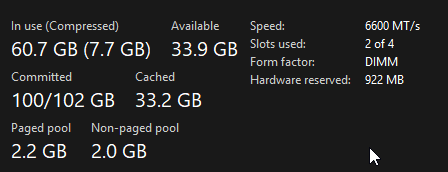
Guys, I have resolved this issue: EMyT911.png I just kinda threw a lot of money at it and it works better... :D
 

My Computer My Computer

At a glance

Windows 7 64-BitAMD Phenom II X4 975 3.60 GHzCorsair Vengeance DDR3 1600 8GBEVGA GTS 450
Computer Manufacturer/Model Number
Custom Build by me
OS
Windows 7 64-Bit
CPU
AMD Phenom II X4 975 3.60 GHz
Motherboard
ASRock 970 Extreme3
Memory
Corsair Vengeance DDR3 1600 8GB
Graphics Card(s)
EVGA GTS 450
Sound Card
ASRock 970 Extreme3 Motherboard
Monitor(s) Displays
Acer G235HAbd 23'
Screen Resolution
1920x1080
Hard Drives
360 GB 7200 RPM HDD
PSU
CORSAIR CX600W ATX12V
Case
Antec 300 w/ Leds
Cooling
Antec 300 Stock
Keyboard
eMachines keyboard from 2004
Mouse
Microsoft Sidewinder X8
Internet Speed
6MB / 1MB
Back
Top