Free drive image program from Easeus - TODO

SIW2

YTS GEEK
Guru
Gold Member
SF Team
Local time
3:34 AM
Messages
16,784
"TODO" is the new free program from Easeus.

It offers drive/partition imaging, cloning, and the ability to mount images and restore individual files/folders as needed.

I tested it on Windows 7x64.

It imaged a 25gb o/s partition in about 20 mins and the image size was around 9gb.

Mounting the image and extracting files was successful.

I have not ( yet) tried to restore the image.
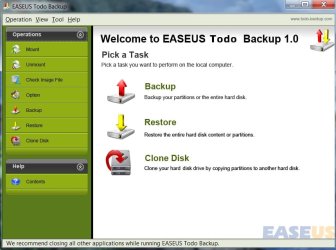
TODO-1-2009-08-16_044645.jpg

http://www.todo-backup.com/


Macrium Reflect Free offers drive/partition imaging, scheduling, and the ability to mount images and restore individual files as needed.

It is certainly faster than TODO - and compression is slightly better. It does not have a cloning function, but does provide scheduling.

I have restored numerous images successfully with the Macrium on x64 o/s.
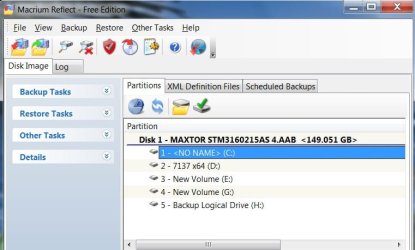
MACRIUM -1-2009-08-16_044752.jpg

http://www.macrium.com/reflectfree.asp
 

My Computers

System One System Two

  • Computer type
    PC/Desktop
    OS
    7 X64
    CPU
    i5 8400
    Motherboard
    gigabyte b365m ds3h
    Memory
    2x8gb 3200mhz
    Hard Drives
    various
    PSU
    pure power 11 400w cm
    Case
    Coolermaster
    Cooling
    cryorig m9i
  • Computer type
    PC/Desktop
    OS
    7x64
    CPU
    g5400
    Motherboard
    ga b365m ds3h
    Memory
    8gb ddr4 2400
    PSU
    xfx pro 450w
Thanks for the links. Good finds like this are always nice for the toolbox. i tried to rep you, but it won't let me rep you again until I rep others.
 

My Computer

Computer Manufacturer/Model Number
Self-Built in July 2009
OS
Windows 7 Ultimate x64
CPU
Intel Q9550 2.83Ghz OC'd to 3.40Ghz
Motherboard
Gigabyte GA-EP45-UD3R rev. 1.1, F12 BIOS
Memory
8GB G.Skill PI DDR2-800, 4-4-4-12 timings
Graphics Card(s)
EVGA 1280MB Nvidia GeForce GTX570
Sound Card
Realtek ALC899A 8 channel onboard audio
Monitor(s) Displays
23" Acer x233H
Screen Resolution
1920x1080
Hard Drives
Intel X25-M 80GB Gen 2 SSD
Western Digital 1TB Caviar Black, 32MB cache. WD1001FALS
PSU
Corsair 620HX modular
Case
Antec P182
Cooling
stock
Keyboard
ABS M1 Mechanical
Mouse
Logitech G9 Laser Mouse
Internet Speed
15/2 cable modem
Other Info
Windows and Linux enthusiast. Logitech G35 Headset.
You're welcome pp.

Todo did a pretty good job in my very limited look at it. It appears to be slow from the above example, but that was because there was little space on the target partition.

You need to go to Properties>Compatibility and set it to run as admin, either on the shortcut or .exe.

I have used Macrium a lot and it is excellent.
 

My Computers

System One System Two

  • Computer type
    PC/Desktop
    OS
    7 X64
    CPU
    i5 8400
    Motherboard
    gigabyte b365m ds3h
    Memory
    2x8gb 3200mhz
    Hard Drives
    various
    PSU
    pure power 11 400w cm
    Case
    Coolermaster
    Cooling
    cryorig m9i
  • Computer type
    PC/Desktop
    OS
    7x64
    CPU
    g5400
    Motherboard
    ga b365m ds3h
    Memory
    8gb ddr4 2400
    PSU
    xfx pro 450w
Thanks SIW2, I've been on the lookout for a good backup/imaging program.
Added to your rep! :)
 

My Computer

Computer Manufacturer/Model Number
Lenovo ThinkPad E520 / MacBook Pro 17" (mid 2010)
OS
Windows 7 Professional (64-bit) / OS X Snow Leopard
CPU
Core i5 / Core i7
Memory
4 GB / 8 GB
Sound Card
built-in
Monitor(s) Displays
internal & Samsung SyncMaster 191T / internal
Screen Resolution
1366x768 & 1280 x 1024 /1920x1200
Hard Drives
2 WD Raptors (74 G)
1 WD Caviar (250 G)
1 HP Personal Media Drive (USB, 300 G)
etc.
Cooling
none
Keyboard
built-in
Mouse
generic mouse / Wacom Intuos 3 tablet
Internet Speed
(very variable) high-speed cable
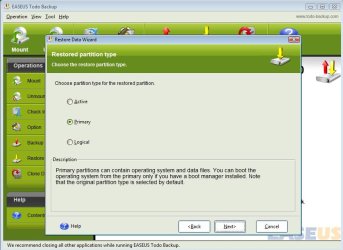
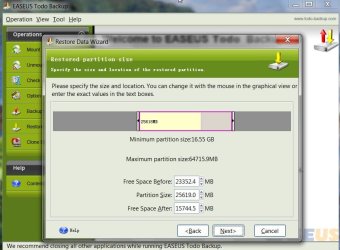
It also allows selecting the type of partition to restore, and resizing:

TODO RESTORE 2009-08-17_163713.jpg

TODO RESTORE -2-2009-08-17_175903.jpg

On balance, I still prefer the Macrium free, but others may prefer Todo - the UI is very good.

TODO has the additional cloning function, which Macrium doesn't.

Macrium has a scheduling function, which TODO doesn't.

It seems to have come out of nowhere and is remarkable given it is v1. Will be interesting to see where Easeus take it from here.

They may include scheduling in v2 - that would make it the best free imaging app.

Or , they may do a paid version with scheduling, file/folder backup, incremental and differential options.

They are capable of bringing it in at a much lower price than the competition - could be interesting to see where they are going with this.
 

My Computers

System One System Two

  • Computer type
    PC/Desktop
    OS
    7 X64
    CPU
    i5 8400
    Motherboard
    gigabyte b365m ds3h
    Memory
    2x8gb 3200mhz
    Hard Drives
    various
    PSU
    pure power 11 400w cm
    Case
    Coolermaster
    Cooling
    cryorig m9i
  • Computer type
    PC/Desktop
    OS
    7x64
    CPU
    g5400
    Motherboard
    ga b365m ds3h
    Memory
    8gb ddr4 2400
    PSU
    xfx pro 450w
can this be able to deplay the image of a laptop hdd via ethernet cable from my desktop?
 
Last edited:

My Computer

OS
Windows 7 PRO x64
CPU
Phenom II 1090T @ 4.00GHz
Motherboard
Crosshair IV Formula
Memory
8gb DDR3
Graphics Card(s)
1x ATI Diamond 5850
Monitor(s) Displays
50in HDTV (HDMI)
Screen Resolution
1080P
Hard Drives
2x 1TB barracuda
1x 1TB WD Black
1x 2TB WD
1x OCZ Vertex 2 40GB
PSU
1000w Xion
Case
Armor+ VH6000BWS
Cooling
W/C
Internet Speed
60Mbps down, 7 up

My Computers

System One System Two

  • Computer type
    PC/Desktop
    OS
    7 X64
    CPU
    i5 8400
    Motherboard
    gigabyte b365m ds3h
    Memory
    2x8gb 3200mhz
    Hard Drives
    various
    PSU
    pure power 11 400w cm
    Case
    Coolermaster
    Cooling
    cryorig m9i
  • Computer type
    PC/Desktop
    OS
    7x64
    CPU
    g5400
    Motherboard
    ga b365m ds3h
    Memory
    8gb ddr4 2400
    PSU
    xfx pro 450w
Nice find. Works great on Windows 7 64bit.
 

My Computer

Computer Manufacturer/Model Number
Samsung NP530U4B-S02IN
OS
Windows® 8 Pro (64-bit)
CPU
Intel® Core™ i5 Processor 2467M (1.60GHz, 3MB L3 Cache)
Motherboard
Samsung Electronics
Memory
6GB DDR3 System Memory at 1,333MHz (on BD 4GB + 2GB x 1)
Graphics Card(s)
AMD Radeon™ HD7550M 1GB DDR3 (Ext. Graphic)
Sound Card
Realtek High Definition Audio
Monitor(s) Displays
35.56cm (14.0) SuperBright 300nit HD LED Display
Screen Resolution
1366x768
Hard Drives
1TB S-ATA II Hard Drive (5400RPM) with ExpressCache 16GB SSD
Internet Speed
sucks
Antivirus
Microsoft Security Essentials
Browser
Google Chrome (Sync enabled)
Back
Top