FREE Great Programs for Windows 7

Status
Not open for further replies.
Nice little Tool, thanks, rebs
 

My Computer

Computer Manufacturer/Model Number
HP m8000n
OS
Windows 7 Ultimate x86
CPU
DualCore AMD Athlon 64 X2, 2600 MHz 5200+
Motherboard
Asus M2N68-LA (Narra)
Memory
Samsung 2GB DDR2
Graphics Card(s)
Onboard NVIDIA GeForce 6150SE nForce 430
Sound Card
Onboard nVIDIA nForce 6100-430 (MCP61P)
Monitor(s) Displays
Westinghouse 19" LED
Screen Resolution
1280x1024
Hard Drives
SATA II Seagate Barracuda 500GB
USB II WD Elements 500GB
USB II WD My Book 1TB
USB II WD My Book 2TB
PSU
Stock (HP)
Case
Stock (HP)
Cooling
Stock
Keyboard
Logitech Classic KB 200
Mouse
Standard HP opticle USB mouse
Hi Ciara,

You were right to bring that up.

Paragon BR free 11 is the only 3rd party app. to create correctly aligned partitions in accordance with windows 7 partitioning rules.


My Computers

System One System Two

  • Computer type
    PC/Desktop
    OS
    7 X64
    CPU
    i5 8400
    Motherboard
    gigabyte b365m ds3h
    Memory
    2x8gb 3200mhz
    Hard Drives
    various
    PSU
    pure power 11 400w cm
    Case
    Coolermaster
    Cooling
    cryorig m9i
  • Computer type
    PC/Desktop
    OS
    7x64
    CPU
    g5400
    Motherboard
    ga b365m ds3h
    Memory
    8gb ddr4 2400
    PSU
    xfx pro 450w
I recently did a new blog post for the company I work for. I'm sure a fair amount of you have already heard of most of these programs, but on the off chance you haven't, could be worth taking a look, eh? ^_^"
All of these I have used, or am currently using with Windows 7, and they're pretty useful.


Tis all freeware [links and descriptions are in the post]
List [To save you time if you know of them all already]:
-Avast
-Microsoft SE
-CCleaner
-Recuva
-Hamachi
-ObjectDock
-Rainmeter
-Pidgin
-KMplayer [Not really too much need for this one with Win7. They did a great job with Windows Media Player.]
I can vouch for ObjectDock. I've been using it for a few years, and it's a wonderful shortcut tool with rss feed, weather feed, and you can add any shortcut to it that you want.
It works perfectly with Windows 7, and there are thousands and thousands of icons and icon packages for it. Enough to match virtually any wallpaper that you're likely to use.

All available from Stardock for free.


I've got to add a caveat for that KMPlayer though. It's NOT 64 bit ready.
Very buggy.
 

My Computer

OS
Win 7 Ultimate x64
Freemake Video Downloader

I found this video (youtube, etc) downloader accidentally. I have a license key for Save2PC which is a similar program but actually Freemake is much better. Save2PC is very buggy and will often hang either downloading or converting videos. Not any problems with Freemake so far.

Freemake has also released a video converter but I can't tell how good it is, but I assume it is based on some of the same codebase as the downloader.
 

My Computer

OS
Windows 7 Home Premium x64
Here is a little gem that lets you edit the title and certain Metadata of a PDF (Yes I mean the Title not the Filename ;).
Thats very important for certain readers like Moby or my Sony since those readers don't use the filename but the internal description/Title which might be something completely different depending om how good the guy was who created the PDF.
In my periodicals it's so bad that the files are out of order and all I can see from those very long names would be "Microsoft Document -" Quite useless as you will understand. Some others again have no title at all. That's why I was looking for a solution:D

BeCyHome: BeCyPDFMetaEdit

-DG
 
Last edited:

My Computer

Computer Manufacturer/Model Number
HP m8000n
OS
Windows 7 Ultimate x86
CPU
DualCore AMD Athlon 64 X2, 2600 MHz 5200+
Motherboard
Asus M2N68-LA (Narra)
Memory
Samsung 2GB DDR2
Graphics Card(s)
Onboard NVIDIA GeForce 6150SE nForce 430
Sound Card
Onboard nVIDIA nForce 6100-430 (MCP61P)
Monitor(s) Displays
Westinghouse 19" LED
Screen Resolution
1280x1024
Hard Drives
SATA II Seagate Barracuda 500GB
USB II WD Elements 500GB
USB II WD My Book 1TB
USB II WD My Book 2TB
PSU
Stock (HP)
Case
Stock (HP)
Cooling
Stock
Keyboard
Logitech Classic KB 200
Mouse
Standard HP opticle USB mouse
Ext2Read is an explorer like utility to explore ext2/ext3/ext4 files. It now supports LVM2 and EXT4 extents. It can be used to view and copy files and folders. It can recursively copy entire folders. It can also be used to view and copy disk and file.

dbimage.php


Download
 

My Computer

Computer type
PC/Desktop
Computer Manufacturer/Model Number
Custom Build
OS
Windows 10 Pro x64
CPU
Intel Core i5 4440 @Stock
Motherboard
Gigabyte Z97 D3H
Memory
4 x 4GB HyperX Fury DDR3
Graphics Card(s)
Gigabyte GTX 1050Ti O4G
Sound Card
Integrated
Monitor(s) Displays
Dell P2417H
Screen Resolution
1920 x 1080
Hard Drives
Samsung EVO 850 120GB / Toshiba DT01ACA050 1TB 7200prm 32MB
PSU
Riotoro Onyx 750W
Case
NZXT H500 Black-Red
Cooling
Stock CPU + NZXT 120mm + 2x120mm red fans
Keyboard
Modecom Volcano Lanparty
Mouse
Asus ROG Gladius / DeepCool E-Pad Plus
Internet Speed
DOCSIS 50/3 Mbit
Browser
Google Chrome
Other Info
Asus K55VJ(i5 3210M, GT635M / 2GB, 8GB DDR3, 500GB HDD)
Ext2Read is an explorer like utility to explore ext2/ext3/ext4 files. It now supports LVM2 and EXT4 extents. It can be used to view and copy files and folders. It can recursively copy entire folders. It can also be used to view and copy disk and file.

dbimage.php


Download
Thanks StalkeR this works great
Jerry
 

My Computer

Computer type
Laptop
Computer Manufacturer/Model Number
Sager NP9170
OS
Win 7 Pro x64 / Win 10 Pro
CPU
Intel(R) Core(TM) i7-3630QM CPU @ 2.40GHz
Motherboard
CLEVO P170EM
Memory
12 GB
Graphics Card(s)
(1) Intel(R) HD Graphics 4000 (2) NVIDIA GeForce GTX 675M
Sound Card
(1) Realtek High Definition Audio (2) Intel(R) Display Aud
Monitor(s) Displays
17.3
Screen Resolution
1920x1080
Hard Drives
(1) Samsung 860 EVO 500GB(OS) (1) Samsung 860 EVO 500GB(Data)
Keyboard
Backlite
Antivirus
MSE, Malwarebytes Pro
Browser
Firefox
Other Info
DESKTOP: Custom-built.
OS: Win 10 Pro x64.
CASE: Rosewill R5.
CPU: Intel I5 4670K CPU @ 3.40GHz.
CPU COOLER: Cool Master Hyper 212 EVO.
MOTHERBOARD: Asus Z87-A.
MEMORY: Kingston HyperX 2x4 GB.
GPU: Nvidia Geforce 650 TI.
PSU: Corsair TX750.
DRIVES: (1) Samsung 840 120 GB SSD (2) Western Digital blue 500 GB 7200 RPM.
Close All Open Windows

Close All Open Windows with a Single Click

This program lets you close all running applications with just a single click. It doesn’t use system resources because it only flashes a ‘close’ signal to all open applications on the desktop and then ceases. Just create a shortcut to the tool in the Start Menu, Quick Launch, Windows 7 Taskbar or elsewhere.


closeall_taskbar-2.png
Close All on Windows 7 Taskbar/Superbar
You can always add a hotkey to this shortcut. It is really very handy if you are running ~20 applications and want them all to quit instantly. It works just as if you were pressing the close button for each application.


Close All Open Windows with a Single Click - NTWind Software
 

My Computer

Computer Manufacturer/Model Number
Dell Studio 530S
OS
7 Ultimate 64
CPU
E8200
Motherboard
Who Knows
Memory
4 GB
Graphics Card(s)
Ati Raedon HD 4550 512MB
Sound Card
On Board
Monitor(s) Displays
LG Flatron W2261V
Screen Resolution
1920 1080 HD
Hard Drives
Samsung HD401LJ 400GB
Samsung HD204UI 2TB
PSU
It works
Case
Silver White Dell OEM
Cooling
Yes please
Keyboard
Logitech diNovo Edge
Mouse
Logitech Performance MX
Internet Speed
30MB Fibre
Other Info
Love my PC

My Computer

Computer type
PC/Desktop
Computer Manufacturer/Model Number
Custom Build
OS
Windows 10 Pro x64
CPU
Intel Core i5 4440 @Stock
Motherboard
Gigabyte Z97 D3H
Memory
4 x 4GB HyperX Fury DDR3
Graphics Card(s)
Gigabyte GTX 1050Ti O4G
Sound Card
Integrated
Monitor(s) Displays
Dell P2417H
Screen Resolution
1920 x 1080
Hard Drives
Samsung EVO 850 120GB / Toshiba DT01ACA050 1TB 7200prm 32MB
PSU
Riotoro Onyx 750W
Case
NZXT H500 Black-Red
Cooling
Stock CPU + NZXT 120mm + 2x120mm red fans
Keyboard
Modecom Volcano Lanparty
Mouse
Asus ROG Gladius / DeepCool E-Pad Plus
Internet Speed
DOCSIS 50/3 Mbit
Browser
Google Chrome
Other Info
Asus K55VJ(i5 3210M, GT635M / 2GB, 8GB DDR3, 500GB HDD)
AIMP is a full-featured free music player designed with sound quality and wide,
customizable functionality in mind. Over twenty audio formats are supported.
Audio is processed in 32-bit for crystal-clear sound. The player features a 18-band
graphics equalizer with extra built-in sound effects. You can extend the existing
functionality adding Input, DSP and Gen plug-ins from Winamp. All local and global
hotkeys are customizable. Full Unicode support. You can convert AudioCD to MP3,
OGG, WAV or WMA. Similarly, you can grab sound from any audio device on your
PC to MP3, OGG, WAV or WMA formats.
Read CNET editors' review

aimp2.gif


ADVANTAGES OF AIMP:

  • totally FREE
  • Support for a large number of music formats
    MP1, MP2, MP3, MPC / MP+, AAC, AC3, Ogg, FLAC,APE, WavPack, Speex, WAV, CDA, WMA, S3M, XM, MOD, IT, MO3, MTM, UMX
  • Great functionality and intuitive interface
  • 18-band EQ and built-in sound effects
    Reverb, Flanger, Chorus, Pitch, Tempo, Echo, Speed
  • 32-bit audio processing
    to achieve the best quality
  • Usage of multiple playlists at once
  • Support for functionality enhancement modules
    You can add new features and expand existing, connect such plugins as Input, Gen, DSP from Winamp
  • Shutting down the computer
    You can sleep under favorite music, setting the timer to switch off the computer.
  • Online radio
    Listen and save!
  • Creation of bookmarks and playback queue
  • Hot keys
    Set up local and global hotkeys to your taste!
  • Multilingual interface
  • Multiuser mode
    Several users are using one computer? That's not a problem.
  • Full Unicode support
  • File search
    Search files on all open playlists
  • Flexible program settings
  • Small size of program distribution
  • Audio Converter
    Allows you to convert music from a variety of formats to wma, mp3, wav, ogg
  • Audio Grabber
    You can convert AudioCD (CDA) in MP3, OGG, WAV or WMA
  • Soung Recorder
    Allows you to write sound from any audio device in your system and save as mp3, ogg, wav and wma files
  • Tag Editor
    You can easily edit tags of audio files, rename group of files, sort out by required template or apply tags' values to a group of files.
  • Audio Library
    Represents the organizer of music files, which allows you to easily sort your music, mark listened audios.
Download
 

My Computer

Computer type
PC/Desktop
Computer Manufacturer/Model Number
Custom Build
OS
Windows 10 Pro x64
CPU
Intel Core i5 4440 @Stock
Motherboard
Gigabyte Z97 D3H
Memory
4 x 4GB HyperX Fury DDR3
Graphics Card(s)
Gigabyte GTX 1050Ti O4G
Sound Card
Integrated
Monitor(s) Displays
Dell P2417H
Screen Resolution
1920 x 1080
Hard Drives
Samsung EVO 850 120GB / Toshiba DT01ACA050 1TB 7200prm 32MB
PSU
Riotoro Onyx 750W
Case
NZXT H500 Black-Red
Cooling
Stock CPU + NZXT 120mm + 2x120mm red fans
Keyboard
Modecom Volcano Lanparty
Mouse
Asus ROG Gladius / DeepCool E-Pad Plus
Internet Speed
DOCSIS 50/3 Mbit
Browser
Google Chrome
Other Info
Asus K55VJ(i5 3210M, GT635M / 2GB, 8GB DDR3, 500GB HDD)
Not sure if it's been suggested yet, but Syncback Freeware http://www.2brightsparks.com is a great program. I'm using it to replace Synctoy which for me missed a lot. I think it should be on the list.
 

My Computer

Computer type
PC/Desktop
Computer Manufacturer/Model Number
Dell Studio XPS 8100, Dell XPS 15 laptop
OS
Windows 10 Home, 64 bit
CPU
Intel Core i7 860 @ 2.8 GHz
Motherboard
Dell 0T568R (CPU1)
Memory
8.0 GB Dual Channel DDR3 @ 664 MHz (9-9-9-24)
Graphics Card(s)
nVidia GeForce GTS 240
Sound Card
M-Audio Delta Audiophile 2496
Monitor(s) Displays
Dell 2407WFP
Screen Resolution
1920x1200
Hard Drives
977 GB Western Digital WDC WD1001FAES-75W7A0 (SCSI)
Antivirus
Windows Defender, MalwareBytes Anti-Malware, AdwCleaner
Browser
Firefox, occasionally IE and Edge
Other Info
Mozilla Firefox, Mozilla Thunderbird. Western Digital Passport 250 GB external HD, two Mushkin Enhanced Mulholland 32GB USB flash drives, AKG K240 Studio headphones, Asus AC-1900 dual band wireless router.

My Computer

Computer type
PC/Desktop
Computer Manufacturer/Model Number
Airbot 2.0
OS
Windows 7 Ultimate x64 SP1
CPU
Core i7 920 (D0) @ 4Ghz, *26c idle *65c full load on air
Motherboard
Asus P6X58D Premium - Sata 6Gb/s - USB 3.0
Memory
12GB DDR3 Corsair Dominator -CMD12GX3M6A1600C8 at 1600MHz
Graphics Card(s)
Zotac Geforce GTX 770
Sound Card
ASUS Xonar D2X
Monitor(s) Displays
1 LG 24" Flatron W2453V-PF 1 Samsung 24" P2450H both 2ms RT
Screen Resolution
1920x1080@60hz
Hard Drives
1 Samsung 250GB 840 Evo SSD
1 OCZ Vertex2 180GB SSD
1 TB Samsung Spinpoint F1 7200RPM 32MB cache
2 500GB WD Caviar Blacks 7200RPM 32MB cache (WD5001AALS)

Pioneer DVD Burner DVR-S18M
PSU
Corsair HX1000W
Case
Cooler Master HAF 932
Cooling
Case Fans *3 230mm, *1 140mm/CPU - *Tuniq Tower 120 Extreme
Keyboard
Logitech Wireless MK700
Mouse
Logitech Wireless MK700
Internet Speed
DL 15 Mbps UL 0.98 Mbps
Antivirus
None
Browser
Firefox Nightly
Other Info
Processor-7.7 *RAM- 7.9 *Graphics-7.9 *Gaming Graphics- 7.9 *SSD- 7.8 W.E.I final score= 7.7
*Phone- LG Nexus 5
AIMP is a full-featured free music player designed with sound quality and wide, customizable functionality in mind. Over twenty audio formats are supported. Audio is processed in 32-bit for crystal-clear sound.

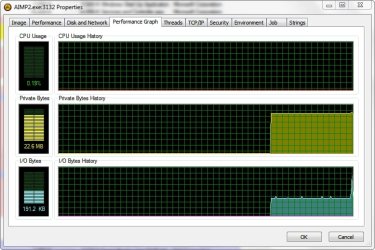
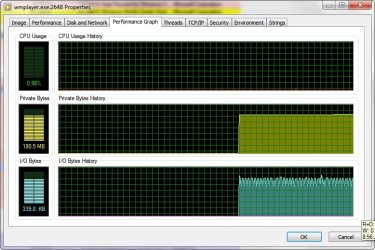
What a great Recommendation from StalkeR! Not only does AIMP 2 sound and look great, but it uses a small fraction of the system resources that WMP does while doing it...

~Maxx~

AIMP2Logo.png
 

Attachments

  • AIMP Properties.jpg
    AIMP Properties.jpg
    77.5 KB · Views: 16
  • WMP Properties.jpg
    WMP Properties.jpg
    79.8 KB · Views: 15

My Computer

Computer Manufacturer/Model Number
HP HPE 270f
OS
Windows 7 x64 Home Premium
CPU
Intel Core i7 930 @ 2.8 Ghz Socket 1366 LGA
Motherboard
Pegatron Truckee v1.04E41
Memory
8 GB 1366 Mhz DDR3 (PC3-10700) RAM
Graphics Card(s)
ATI Radeon 5770 1 GB DDR5 RAM
Sound Card
Realtech High Definition
Monitor(s) Displays
32" Sony Bravia
Screen Resolution
1366 X 768
Hard Drives
Intel 25nm 120 GB Series 320 SSD HD Tune- 265 MBps Read/ 130 MBps Write

LaCie 1TB + 1TB RAID 0 eSATA Drive HD Tune- 160 MBps Read/ 90 MBps Write
Keyboard
Logitech Illuminated
Mouse
Logitech MX Revolution
Internet Speed
36.4 Mbps Maximum on a 37 Mbps Motorola SB501 Modem
Yeah,AIMP2 is great. I'm using it already 2 years. :)
 

My Computer

Computer type
PC/Desktop
Computer Manufacturer/Model Number
Custom Build
OS
Windows 10 Pro x64
CPU
Intel Core i5 4440 @Stock
Motherboard
Gigabyte Z97 D3H
Memory
4 x 4GB HyperX Fury DDR3
Graphics Card(s)
Gigabyte GTX 1050Ti O4G
Sound Card
Integrated
Monitor(s) Displays
Dell P2417H
Screen Resolution
1920 x 1080
Hard Drives
Samsung EVO 850 120GB / Toshiba DT01ACA050 1TB 7200prm 32MB
PSU
Riotoro Onyx 750W
Case
NZXT H500 Black-Red
Cooling
Stock CPU + NZXT 120mm + 2x120mm red fans
Keyboard
Modecom Volcano Lanparty
Mouse
Asus ROG Gladius / DeepCool E-Pad Plus
Internet Speed
DOCSIS 50/3 Mbit
Browser
Google Chrome
Other Info
Asus K55VJ(i5 3210M, GT635M / 2GB, 8GB DDR3, 500GB HDD)
Another Free Antimalware with real time scanning and Automatic Updates
Orbitech
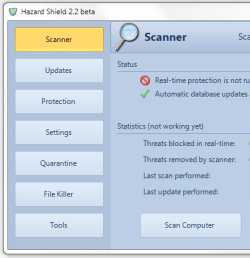
Hazard Shield is a free anti-spyware program designed to detect, remove, and prevent spyware, trojans, backdoors, adware, rootkits, and many other threats. Hazard Shield includes features found in many paid security applications, such as scheduled scans and automatic updates. Hazard Shield also has powerful real-time protection that can prevent the installation of malicious programs. Free tech support is also available at any time, should you ever have any problems.
Features


  • Fast multi-threaded scanning engine
  • Automatic, incremental database updates
  • Free real-time protection that blocks malicious programs
  • File killer with secure shredder
  • Alternate data stream (ADS) scanner
  • Process manager shows full process paths and modules
  • Hosts file manager with suspicious entry detection
  • Fully supports Windows XP, Vista, and 7
139785d1298390840-what-security-setup-do-you-have-capture.png
 

My Computer

Computer type
PC/Desktop
Computer Manufacturer/Model Number
Custom Build
OS
Windows 10 Pro x64, Arch Linux
CPU
Intel Core 2 Quad Q8200 OC'd 3.08GHz
Motherboard
Asus Rampage formula LGA775
Memory
8GB DDR2 900Mhz
Graphics Card(s)
MSI GT730 2GB GDDR5 (Kepler)
Sound Card
Supreme FX2
Monitor(s) Displays
Samsung LS22F350 LED
Screen Resolution
1080P
Hard Drives
Kingston SSDNow UV400 120GB, 500GB Hitachi, 2TB Samsung, 500GB Seagate FreeAgent, 640GB Samsung, 160GB Toshiba (Arch)
PSU
AeroCool 500W Bronze
Cooling
Cooler Master V6 + 3X fans
Keyboard
Prolink keyboard
Mouse
Logitech M705
Internet Speed
1MiB/s
Browser
Chrome Beta
Added to the list. :)

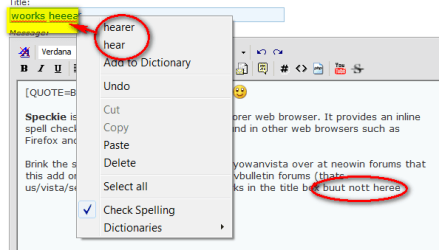
Speckie is an add-on to the Internet Explorer web browser. It provides an inline spell checking capability similar to that found in other web browsers such as Firefox and Chrome.

Brink the 1st snip below was posted by our yowanvista over at neowin forums that this add on wont work in the reply box on vbulletin forums (thats us/vista/seven/eight forums) and only works in the title box (see 2nd screenshot as test by me).

speckie.png2011-02-26_064310.png
 

My Computer

Computer type
PC/Desktop
Computer Manufacturer/Model Number
My own abomination, I call it the Money Pit
OS
Windows 10 Pro x 2/Windows 11 Home
CPU
Intel i7 2600K @ 3.40 GHz
Motherboard
ASUS Sabertooth P67
Memory
Corsair Vengeance 16GB DDR3 1600MHz CL8 Dual Channel Kit
Graphics Card(s)
EVGA GeForce RTX 3080 XC3 ULTRA GAMING 10GB GDDR6X
Sound Card
Onboard Realtek or Nvidia High Definition Audio (HDMI)
Monitor(s) Displays
Samsung JS7000 50" SUHD TV or Samsung 27" FHD 60Hz 8ms GTG V
Screen Resolution
1920 x 1080
Hard Drives
1 x Samsung 870 EVO 250 GB SSD (Windows 10 Pro), 1 x Samsung 850 EVO 250 GB SSD (Windows 10 Pro)
PSU
Corsair AX860 - 860W Modular Power Supply
Case
Phanteks Enthoo Luxe Full Tower Case - Black
Cooling
CORSAIR Hydro Series H150i PRO RGB 360mm Liquid CPU Cooler
Keyboard
Logitech K830 Illuminated Living-Room Keyboard
Mouse
Logitech MX Anywhere 2S Wireless Mouse
Internet Speed
100 Mbps
Antivirus
ESET Internet Security
Browser
Latest Version Of Firefox & Microsoft Edge Chromium Stable
Other Info
LG Super Multi Blue Internal Blu-ray Disk Rewriter - BH10LS30
6x2 HDMI Switcher (6 inputs, 2 outputs) so I can send the output of my Cable Box, Roku, or any my 4 computers to either my TV or Monitor separately or simultaneously.
Thank you sir. Removed. :(
 

My Computer

Computer type
PC/Desktop
Computer Manufacturer/Model Number
Self built custom
OS
64-bit Windows 11 Pro for Workstations
CPU
Intel i7-8700K OC'd to 5 GHz
Motherboard
ASUS ROG Maximus XI Formula Z390
Memory
64 GB (4x16GB) G.SKILL TridentZ RGB DDR4 3600 MHz
Graphics Card(s)
ASUS ROG-STRIX-GTX1080TI-O11G-GAMING
Sound Card
Integrated
Monitor(s) Displays
2 x Samsung Odyssey G7 27"
Screen Resolution
2560x1440
Hard Drives
1TB Samsung 990 PRO M.2,
4TB Samsung 990 PRO PRO M.2,
TerraMaster F8 SSD Plus NAS
PSU
Seasonic Prime Titanium 850W
Case
Thermaltake Core P3
Cooling
Corsair Hydro H115i
Keyboard
Logitech wireless K800
Mouse
Logitech MX Master 4
Internet Speed
2 Gb/s Download and 100 Mb/s Upload
Antivirus
Malwarebyte Anti-Malware Premium
Browser
Google Chrome
Other Info
Logitech Z625 speaker system,
Logitech BRIO 4K Pro webcam,
HP Color LaserJet Pro MFP M477fdn,
APC SMART-UPS RT 1000 XL - SURT1000XLI,
Galaxy S23 Plus phone
I have found a good free screen capture program called PicPick that is free for home users and has tons of features. (see link)

PicPick is user friendly and full of features for creating your image, suitable for software developers, graphic designers and home user.

It is an all-in-one program that provides full-featured screen capture tool, intuitive image editor, color picker, color palette, pixel ruler, protractor, crosshair and even whiteboard.

It has not only everything what you need, but it loads fast, sits quietly in the system tray until needed.

This software is provided as freeware for only personal use. In this case, you are granted the right to use this program free of charge.
For All Windows (Fully support Windows 7)

Note: The Scrolling Window feature works perfectly on IE 9 RC and also works on FF 3.6.13 (although scrolls slowly).

The only successful way I have found to use the
Scrolling Window feature in FF beta 12 is to right click PicPick icon then navigate to > screen capture > show capture bar. After you see capture bar enable full screen in FF beta 12. On the screen capture bar select Scrolling Window move hand to bottom of screen and click to begin capture.

Otherwise all of the rest of the features seem to work well.
 
Last edited:

My Computer

Computer type
PC/Desktop
Computer Manufacturer/Model Number
My own abomination, I call it the Money Pit
OS
Windows 10 Pro x 2/Windows 11 Home
CPU
Intel i7 2600K @ 3.40 GHz
Motherboard
ASUS Sabertooth P67
Memory
Corsair Vengeance 16GB DDR3 1600MHz CL8 Dual Channel Kit
Graphics Card(s)
EVGA GeForce RTX 3080 XC3 ULTRA GAMING 10GB GDDR6X
Sound Card
Onboard Realtek or Nvidia High Definition Audio (HDMI)
Monitor(s) Displays
Samsung JS7000 50" SUHD TV or Samsung 27" FHD 60Hz 8ms GTG V
Screen Resolution
1920 x 1080
Hard Drives
1 x Samsung 870 EVO 250 GB SSD (Windows 10 Pro), 1 x Samsung 850 EVO 250 GB SSD (Windows 10 Pro)
PSU
Corsair AX860 - 860W Modular Power Supply
Case
Phanteks Enthoo Luxe Full Tower Case - Black
Cooling
CORSAIR Hydro Series H150i PRO RGB 360mm Liquid CPU Cooler
Keyboard
Logitech K830 Illuminated Living-Room Keyboard
Mouse
Logitech MX Anywhere 2S Wireless Mouse
Internet Speed
100 Mbps
Antivirus
ESET Internet Security
Browser
Latest Version Of Firefox & Microsoft Edge Chromium Stable
Other Info
LG Super Multi Blue Internal Blu-ray Disk Rewriter - BH10LS30
6x2 HDMI Switcher (6 inputs, 2 outputs) so I can send the output of my Cable Box, Roku, or any my 4 computers to either my TV or Monitor separately or simultaneously.
CursorFX

Don't know if it can enter into this category but I can suggest the CursorFX tool from Stardock, which give the possibility to replace Windows cursors by custom animated cursors.

The program is free but there is a pro version which gives you more features such as adding sounds to the clicks, adding custom trails, etc...

Stardock.com - Your Edge In Software

Besides, I've created a cursor pack which contains Mario hand cursors:
Stardock.com - Your Edge In Software
 

My Computer

Computer Manufacturer/Model Number
Mallowigi
OS
Windows 7 32bit
CPU
Mallowigi
Motherboard
Mallowigi
Memory
Mallowigi
Graphics Card(s)
Mallowigi
Sound Card
Mallowigi
Monitor(s) Displays
Mallowigi
Hard Drives
Mallowigi
PSU
Mallowigi
Case
Mallowigi
Cooling
Mallowigi
Hi All

As an alternative to Windows Media Player why not try XBMC Media player, it works well on Windows 7.
Site Link About | XBMC
Take a look...........

Abedrax
 

My Computer

OS
windows 7 ultimate 64 bit
CPU
Intel Celeron E3300 2.5GHz Dual core
Motherboard
ASUS P5G41C-M LX
Memory
4GB DDR3
Graphics Card(s)
Onboard Intel G41 Express Chipset
Monitor(s) Displays
AOC 2219 22" WS
Screen Resolution
1680 x 1050
Hard Drives
Maxtor 500GB sata
Seagate 500GB Ext
Internet Speed
20MG
Status
Not open for further replies.
Back
Top