FREE Great Programs for Windows 7

Status
Not open for further replies.

My Computer

Computer type
PC/Desktop
Computer Manufacturer/Model Number
Custom Build
OS
Windows 10 Pro x64
CPU
Intel Core i5 4440 @Stock
Motherboard
Gigabyte Z97 D3H
Memory
4 x 4GB HyperX Fury DDR3
Graphics Card(s)
Gigabyte GTX 1050Ti O4G
Sound Card
Integrated
Monitor(s) Displays
Dell P2417H
Screen Resolution
1920 x 1080
Hard Drives
Samsung EVO 850 120GB / Toshiba DT01ACA050 1TB 7200prm 32MB
PSU
Riotoro Onyx 750W
Case
NZXT H500 Black-Red
Cooling
Stock CPU + NZXT 120mm + 2x120mm red fans
Keyboard
Modecom Volcano Lanparty
Mouse
Asus ROG Gladius / DeepCool E-Pad Plus
Internet Speed
DOCSIS 50/3 Mbit
Browser
Google Chrome
Other Info
Asus K55VJ(i5 3210M, GT635M / 2GB, 8GB DDR3, 500GB HDD)
evernote

hmm cool, I'm gonna have to check it out again...
 

My Computer

Computer Manufacturer/Model Number
ASUS G60JX Republic of Gamers
OS
Windows 7 Professional 64-bit
CPU
Intel i5 430m
Memory
4 GB DDR3
Graphics Card(s)
nvidia Geforce GTS 360M Cuda 1GB
Sound Card
EAX Advanced HD 4.0
Screen Resolution
1366 x 768
Hard Drives
460 GB 7200 RPM built in
Internet Speed
Too slow :-( 160kbs
FYI: Eset SysInspector

Just a friendly warning to anyone thinking of using this to help diag someones PC through forums.

It is a good tool to have for self diagnosing systems and seeing everything that is going on.
By no means is this a put down on the app itself. It can come in quite handy and one that I had forgotten about, to some extent.

It is HIGHLY Advisable that you do not post any logs from this application on the internet.

It can and most likely will reveal what applications are listening on what IP addresses and which ports are open.
Everything that a good net/port scanner will do.
As long as you are behind a decent firewall/router, your system should not produce this information to potential hackers.

Among other sensitive information.

Just something I personally would be cautious about.

Using the tool as a diagnostics is fine, just don't publish your logs on line.
 

My Computer

Computer Manufacturer/Model Number
Self Built
OS
Win 7 Ultimate 32bit
CPU
C2D E6600 2.4Ghz
Motherboard
Intel D965WH
Memory
4G Kingston KHX5400D2
Graphics Card(s)
EVGA GTX 570 HD SC (012-P3-1573-KR)
Sound Card
On-Board
Monitor(s) Displays
Samsung 226BW
Screen Resolution
1680 x 1050
Hard Drives
2 x 250 Seagate Barracuda
2 x 500 Seagate Barracuda (Raid1)
PSU
Corsair TX750W
Case
In-Win C589
Cooling
Stock Intel Cooling
That's definitely good to know there. Tepid I've seen other free system info programs that will also tend to reveal personal as well as product information you don't want out on the web.
 

My Computers

System One System Two

  • Computer type
    PC/Desktop
    Computer Manufacturer/Model Number
    Custom builds = 2
    OS
    W7 Ultimate x64/W10 Pro x64/W11 Pro Triple Boot - Main PC W7 Remote PC Micro ATX W7 Pro x64/W11 Pro
    CPU
    AMD Phenom II X4 975 Deneb 3.6ghz - 965 2nd remote pc
    Motherboard
    Gigabyte GA-790XTA-UD4-Gigabyte GA-880GM-D2H remote pc
    Memory
    Kingston Hyper X DDR3 1600 1.5v 16gb - Hyper X Fury 8gb 2nd
    Graphics Card(s)
    MSI HD Radeon 5750 1gb - MSI HD Radeon 6450 on mini tower
    Sound Card
    Creative Labs X-Fi Xtreme Audio P - Realtek onooard 2nd case
    Monitor(s) Displays
    ASUS VW199T-P 19" HP 2082a Main-HP 2082a 20" remote pc
    Screen Resolution
    Asus 1440x900 - HP 1600x900
    Hard Drives
    WD Black 1TB HD per OS W7, W10, and pending W11 presently on 500gb OS Drive - Pending Triple 1TB HDs for Spanned Storage/backup volume
    Single 2TB external USB enclosure, single 1TB System 7 Host/Boot drive, Pending 8TB external HD for system image b
    PSU
    Corsair 750TX - primary / Corsair CX600 - second
    Case
    Antec 900-2 - SSD compatible / NZXT Vulcan mini tower
    Cooling
    Zalman CNPS9900A
    Keyboard
    AZIO L70 Backlit Letters Gaming - ONN Cordless/USB
    Mouse
    MSI DS200 Programmable, Logitech Cordless
    Internet Speed
    30mbps upgrade - primary hard wired - mini tower usb WiFi
    Antivirus
    GFI VIPRE Internet Security 2014 on W7 2016 beta on W10,
    Browser
    Cyberfox, WaterFox 64bit FF variants, FireFox x64, Pale Moon
    Other Info
    Accomdata fan cooled usb 2.0 PIDE/Sata II, III external enclosure.
    Sambient usb/eSata PATA/Sata II, III external enclosure.
  • Computer type
    PC/Desktop
    System Manufacturer/Model Number
    CUSTOM ASSEMBLY
    OS
    W7 Pro x64/W11 Pro
    CPU
    AMD Deneb 3.6ghz - 965
    Motherboard
    Gigabyte GA-880GM-D2H remote pc
    Memory
    Kingston Hyper X Fury 8gb
    Graphics Card(s)
    MSI HD Radeon 6450 DVI Output
    Sound Card
    Realtek onooard Creative or Other separate PENDING
    Monitor(s) Displays
    VIZIO 32" LCD TV Separate LCD Pending
    Screen Resolution
    1600x1080
    Hard Drives
    WD 500GB OS Host/Boot WD Green 1TB Storage/Backup
    PSU
    Corsair 600W - THERMALTAKE 600W spare case
    Case
    NZXT Vulcan mini tower
    Cooling
    Twin 120mm Top Fans - 240mm Side Cover
    Keyboard
    ONN Cordless/USB Logitech Cordless
    Mouse
    ONN USB/Cordless - Logitech Cordless
    Internet Speed
    DSL 5G
    Browser
    MS Edge, FireFox, WaterFox x64, FireFox Nightly
    Other Info
    OS Testing-Remote Access to Main TeamViewer

My Computer

Computer type
PC/Desktop
Computer Manufacturer/Model Number
Dell XPS 420
OS
Windows 10, Home Clean Install
CPU
Intel Core2 processsor Q8200(2.33Ghz 1333FSB) Quad Core Tech
Motherboard
Dell
Memory
6 gb
Graphics Card(s)
ATI Radeon 256MB HD3650
Sound Card
Intergrated 7.1 Channel Audio
Monitor(s) Displays
Dell SP2009W 20"
Hard Drives
640 GB Serial ATA Hard drive
Cooling
Fan
Keyboard
Dell USB Keyboard
Mouse
Dell Premium Optical USB
Internet Speed
DSL 2.85
I just stumbled across a good free graphics editing program Chasys Draw IES.

Really like it so far.

This is very chatty software!

~Maxx~

ComodoFirewallLogo.png
 

My Computer

Computer Manufacturer/Model Number
HP HPE 270f
OS
Windows 7 x64 Home Premium
CPU
Intel Core i7 930 @ 2.8 Ghz Socket 1366 LGA
Motherboard
Pegatron Truckee v1.04E41
Memory
8 GB 1366 Mhz DDR3 (PC3-10700) RAM
Graphics Card(s)
ATI Radeon 5770 1 GB DDR5 RAM
Sound Card
Realtech High Definition
Monitor(s) Displays
32" Sony Bravia
Screen Resolution
1366 X 768
Hard Drives
Intel 25nm 120 GB Series 320 SSD HD Tune- 265 MBps Read/ 130 MBps Write

LaCie 1TB + 1TB RAID 0 eSATA Drive HD Tune- 160 MBps Read/ 90 MBps Write
Keyboard
Logitech Illuminated
Mouse
Logitech MX Revolution
Internet Speed
36.4 Mbps Maximum on a 37 Mbps Motorola SB501 Modem
hi all hope this is ok posting here
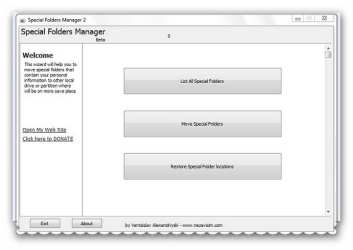
found this program today called Special Folders Manager 2(save me)

Description: Special Folders Manager 2 is your ultimate manager of Wondows special folders. Some of Windows special folders contain user's data and therefore it is important user to decide where to place its files. For now Save Me 2 lists, redirects, copy and restores folders that can be redirected. List of folders that can be moved includes folders like - My Documents, Desktop, Contacts, Downloads, Saved Games, My Pictures, Favorites, Links and so on

FROM addictivetips
Windows special folders must be backed up before installing a fresh copy of Windows on the system, as they may contain important files, saved preferences, application logs, game saves, music libraries, and many other types of items which you can’t afford to lose at any cost. These folders are generally referred to as folders which are created and managed by Windows, including, My Documents, My Music, My Videos, Common Files, Music Library, Games, Common Startup Menu, My Music, ProgramData and many others. Backing up these folders manually is quite a hectic task, as one has to locate them and then manually move them. Special Folders Manager is a backup utility which capitalizes solely on backing up and restoring Windows special folders.

With this application, you wont have to search for special folders, just launch it, specify folders which you want to move, and start the backup process. It will backup all the folders in one go, saving you a lot of precious time and effort. Apart from creating backup, it allows you to instantly restore backed up special folders to their original locations, so freshly installed Windows can detect and fetch contained data automatically. more from this link >>> Backup Windows 7 Special Folders And Restore On Fresh Windows Installation

WEBSITE >>> NEZAVISIM.COM - software, tips, consulting services and business optimization

DOWNLOAD >>> http://www.nezavisim.com/download/SaveMe2beta2.zip
 

Attachments

  • brys snap ?14 ?March ?2011 16h58m27s.png
    brys snap ?14 ?March ?2011 16h58m27s.png
    34.8 KB · Views: 18

My Computer

Computer Manufacturer/Model Number
packard bell IXTREME M5722
OS
Operating System : Windows 7 Home Premium Edition 6.01.7600 SP1 (x64)
CPU
Processor : Intel Core 2 Quad Q8300 @ 2500 MHz
Motherboard
Mainboard : Packard Bell (Acer EG43M )
Memory
Physical Memory :8GB Corsair4x 2GB 800MHz C5 DDR2
Graphics Card(s)
Video Card : XFX 6700 AMD
Monitor(s) Displays
Maestro 234DL - BenQ V2220 - BenQ VW2420H
Screen Resolution
Current Display :1920x1080p pixels at 60 Hz in HD LED
Hard Drives
Hard Disks : WDC (1000 GB)
Drive C: (Hard Disk) : 428 GB available on 491 GB
Drive D: (Hard Disk) : 426 GB available on 492 GB
SAMSUNG spinpoint HD103SJ 1000.2 GB
(X 2) KINGSTON SSD NOW V 30GB
PSU
XFX ProSeries 550W PSU
Case
PACKARD BELL IXTREME
Cooling
System Blower Current: 150mA Air Flow16CFM ;Akasa 90mm rear
Keyboard
Gigabyte Aivia K8100
Mouse
TRUST-Wireless Laser Mouse - Carbon edition MI-7770C
Internet Speed
TP-LINK > TL-WN951N / AV500 Gigabit Powerline Adapters
Browser
chrome dev
Other Info
EXTRA COOLING>(FAN CONTROLLER) PC Bay Cooler 3 x 40mm fans; Akasa AK-HD-BL Blue hard drive cooler 2 x 40 mm fan 4500 rpm 29.7 dBA
Bios> American Megatrends Inc.
Version : P01-A1
Date : 08/31/2009
This tool was posted by Corrine in one thread here on SF,but I didn't find it here,so I'll post it.

TFC - Temp File Cleaner by OldTimer


TFC (Temp File Cleaner) will clear out all temp folders for all user accounts (temp, IE temp, java, FF, Opera, Chrome, Safari), including Administrator, All Users, LocalService, NetworkService, and any other accounts in the user folder. It also cleans out the %systemroot%\temp folder and checks for .tmp files in the %systemdrive% root folder, %systemroot%, and the system32 folder (both 32bit and 64bit on 64bit OSs). It shows the amount removed for each location found (in bytes) and the total removed (in MB). Before running it will stop Explorer and all other running apps. When finished, if a reboot is required the user must reboot to finish clearing any in-use temp files.


TFC only cleans temp folders. TFC will not clean URL history, prefetch, or cookies. Depending on how often someone cleans their temp folders, their system hardware, and how many accounts are present, it can take anywhere from a few seconds to a minute or more. TFC will completely clear all temp files where other temp file cleaners may fail. TFC requires a reboot immediately after running. Be sure to save any unsaved work before running TFC.
index.php


Download
 

My Computer

Computer type
PC/Desktop
Computer Manufacturer/Model Number
Custom Build
OS
Windows 10 Pro x64
CPU
Intel Core i5 4440 @Stock
Motherboard
Gigabyte Z97 D3H
Memory
4 x 4GB HyperX Fury DDR3
Graphics Card(s)
Gigabyte GTX 1050Ti O4G
Sound Card
Integrated
Monitor(s) Displays
Dell P2417H
Screen Resolution
1920 x 1080
Hard Drives
Samsung EVO 850 120GB / Toshiba DT01ACA050 1TB 7200prm 32MB
PSU
Riotoro Onyx 750W
Case
NZXT H500 Black-Red
Cooling
Stock CPU + NZXT 120mm + 2x120mm red fans
Keyboard
Modecom Volcano Lanparty
Mouse
Asus ROG Gladius / DeepCool E-Pad Plus
Internet Speed
DOCSIS 50/3 Mbit
Browser
Google Chrome
Other Info
Asus K55VJ(i5 3210M, GT635M / 2GB, 8GB DDR3, 500GB HDD)
This tool was posted by Corrine in one thread here on SF,but I didn't find it here,so I'll post it.

TFC - Temp File Cleaner by OldTimer


TFC (Temp File Cleaner) will clear out all temp folders for all user accounts (temp, IE temp, java, FF, Opera, Chrome, Safari), including Administrator, All Users, LocalService, NetworkService, and any other accounts in the user folder. It also cleans out the %systemroot%\temp folder and checks for .tmp files in the %systemdrive% root folder, %systemroot%, and the system32 folder (both 32bit and 64bit on 64bit OSs). It shows the amount removed for each location found (in bytes) and the total removed (in MB). Before running it will stop Explorer and all other running apps. When finished, if a reboot is required the user must reboot to finish clearing any in-use temp files.


TFC only cleans temp folders. TFC will not clean URL history, prefetch, or cookies. Depending on how often someone cleans their temp folders, their system hardware, and how many accounts are present, it can take anywhere from a few seconds to a minute or more. TFC will completely clear all temp files where other temp file cleaners may fail. TFC requires a reboot immediately after running. Be sure to save any unsaved work before running TFC.
index.php


Download

looks ok i may give it a try i use Auslogics Disk Defrag (3.1.10.165) Download Auslogics Disk Defrag for free and it has a optional function to clear temp files before it defrags.
 

My Computer

Computer Manufacturer/Model Number
packard bell IXTREME M5722
OS
Operating System : Windows 7 Home Premium Edition 6.01.7600 SP1 (x64)
CPU
Processor : Intel Core 2 Quad Q8300 @ 2500 MHz
Motherboard
Mainboard : Packard Bell (Acer EG43M )
Memory
Physical Memory :8GB Corsair4x 2GB 800MHz C5 DDR2
Graphics Card(s)
Video Card : XFX 6700 AMD
Monitor(s) Displays
Maestro 234DL - BenQ V2220 - BenQ VW2420H
Screen Resolution
Current Display :1920x1080p pixels at 60 Hz in HD LED
Hard Drives
Hard Disks : WDC (1000 GB)
Drive C: (Hard Disk) : 428 GB available on 491 GB
Drive D: (Hard Disk) : 426 GB available on 492 GB
SAMSUNG spinpoint HD103SJ 1000.2 GB
(X 2) KINGSTON SSD NOW V 30GB
PSU
XFX ProSeries 550W PSU
Case
PACKARD BELL IXTREME
Cooling
System Blower Current: 150mA Air Flow16CFM ;Akasa 90mm rear
Keyboard
Gigabyte Aivia K8100
Mouse
TRUST-Wireless Laser Mouse - Carbon edition MI-7770C
Internet Speed
TP-LINK > TL-WN951N / AV500 Gigabit Powerline Adapters
Browser
chrome dev
Other Info
EXTRA COOLING>(FAN CONTROLLER) PC Bay Cooler 3 x 40mm fans; Akasa AK-HD-BL Blue hard drive cooler 2 x 40 mm fan 4500 rpm 29.7 dBA
Bios> American Megatrends Inc.
Version : P01-A1
Date : 08/31/2009
hi all hope this is ok posting here
found this program today called Special Folders Manager 2(save me)

Description: Special Folders Manager 2 is your ultimate manager of Wondows special folders. Some of Windows special folders contain user's data and therefore it is important user to decide where to place its files. For now Save Me 2 lists, redirects, copy and restores folders that can be redirected. List of folders that can be moved includes folders like - My Documents, Desktop, Contacts, Downloads, Saved Games, My Pictures, Favorites, Links and so on

FROM addictivetips
Windows special folders must be backed up before installing a fresh copy of Windows on the system, as they may contain important files, saved preferences, application logs, game saves, music libraries, and many other types of items which you can’t afford to lose at any cost. These folders are generally referred to as folders which are created and managed by Windows, including, My Documents, My Music, My Videos, Common Files, Music Library, Games, Common Startup Menu, My Music, ProgramData and many others. Backing up these folders manually is quite a hectic task, as one has to locate them and then manually move them. Special Folders Manager is a backup utility which capitalizes solely on backing up and restoring Windows special folders.

With this application, you wont have to search for special folders, just launch it, specify folders which you want to move, and start the backup process. It will backup all the folders in one go, saving you a lot of precious time and effort. Apart from creating backup, it allows you to instantly restore backed up special folders to their original locations, so freshly installed Windows can detect and fetch contained data automatically. more from this link >>> Backup Windows 7 Special Folders And Restore On Fresh Windows Installation

WEBSITE >>> NEZAVISIM.COM - software, tips, consulting services and business optimization

DOWNLOAD >>> http://www.nezavisim.com/download/SaveMe2beta2.zip

Always weary about installing software when the English has mistakes in it...
 

My Computer

Computer Manufacturer/Model Number
Toshiba Satellite L500
OS
Windows 7 Home Premium x64 OEM --> RTM clean install
CPU
Intel T4400
Motherboard
? - laptop inbuilt ?
Memory
4Gb
Graphics Card(s)
? - Mobile Intel(R) 4 Series Express Chipset Family ?
Sound Card
Realtek
Monitor(s) Displays
? + extended to a 42" LG55PC plasma tele!
Screen Resolution
1366 * 768
Hard Drives
320Gb 5500rpm
PSU
?
Case
?
Cooling
?
Internet Speed
3Meg, when it works.
Other Info
A LOWLY LAPTOP!
@allend66
is there a typo mistake?
 

My Computer

Computer Manufacturer/Model Number
packard bell IXTREME M5722
OS
Operating System : Windows 7 Home Premium Edition 6.01.7600 SP1 (x64)
CPU
Processor : Intel Core 2 Quad Q8300 @ 2500 MHz
Motherboard
Mainboard : Packard Bell (Acer EG43M )
Memory
Physical Memory :8GB Corsair4x 2GB 800MHz C5 DDR2
Graphics Card(s)
Video Card : XFX 6700 AMD
Monitor(s) Displays
Maestro 234DL - BenQ V2220 - BenQ VW2420H
Screen Resolution
Current Display :1920x1080p pixels at 60 Hz in HD LED
Hard Drives
Hard Disks : WDC (1000 GB)
Drive C: (Hard Disk) : 428 GB available on 491 GB
Drive D: (Hard Disk) : 426 GB available on 492 GB
SAMSUNG spinpoint HD103SJ 1000.2 GB
(X 2) KINGSTON SSD NOW V 30GB
PSU
XFX ProSeries 550W PSU
Case
PACKARD BELL IXTREME
Cooling
System Blower Current: 150mA Air Flow16CFM ;Akasa 90mm rear
Keyboard
Gigabyte Aivia K8100
Mouse
TRUST-Wireless Laser Mouse - Carbon edition MI-7770C
Internet Speed
TP-LINK > TL-WN951N / AV500 Gigabit Powerline Adapters
Browser
chrome dev
Other Info
EXTRA COOLING>(FAN CONTROLLER) PC Bay Cooler 3 x 40mm fans; Akasa AK-HD-BL Blue hard drive cooler 2 x 40 mm fan 4500 rpm 29.7 dBA
Bios> American Megatrends Inc.
Version : P01-A1
Date : 08/31/2009
I'd say so, wouldn't you?
 

Attachments

  • Capture.JPG
    Capture.JPG
    22 KB · Views: 1

My Computer

Computer Manufacturer/Model Number
Toshiba Satellite L500
OS
Windows 7 Home Premium x64 OEM --> RTM clean install
CPU
Intel T4400
Motherboard
? - laptop inbuilt ?
Memory
4Gb
Graphics Card(s)
? - Mobile Intel(R) 4 Series Express Chipset Family ?
Sound Card
Realtek
Monitor(s) Displays
? + extended to a 42" LG55PC plasma tele!
Screen Resolution
1366 * 768
Hard Drives
320Gb 5500rpm
PSU
?
Case
?
Cooling
?
Internet Speed
3Meg, when it works.
Other Info
A LOWLY LAPTOP!
This tool was posted by Corrine in one thread here on SF,but I didn't find it here,so I'll post it.

TFC - Temp File Cleaner by OldTimer


TFC (Temp File Cleaner) will clear out all temp folders for all user accounts (temp, IE temp, java, FF, Opera, Chrome, Safari), including Administrator, All Users, LocalService, NetworkService, and any other accounts in the user folder. It also cleans out the %systemroot%\temp folder and checks for .tmp files in the %systemdrive% root folder, %systemroot%, and the system32 folder (both 32bit and 64bit on 64bit OSs). It shows the amount removed for each location found (in bytes) and the total removed (in MB). Before running it will stop Explorer and all other running apps. When finished, if a reboot is required the user must reboot to finish clearing any in-use temp files.


TFC only cleans temp folders. TFC will not clean URL history, prefetch, or cookies. Depending on how often someone cleans their temp folders, their system hardware, and how many accounts are present, it can take anywhere from a few seconds to a minute or more. TFC will completely clear all temp files where other temp file cleaners may fail. TFC requires a reboot immediately after running. Be sure to save any unsaved work before running TFC.
index.php


Download

looks ok i may give it a try i use Auslogics Disk Defrag (3.1.10.165) Download Auslogics Disk Defrag for free and it has a optional function to clear temp files before it defrags.

AS an added note,, Auslogics will not do as good a job as this TFC.
The reason is, the Killing of explorer should cause a lot of the locked files to become unlocked and then deleted. Then on reboot, anything that could not be deleted should be upon using (most likely) the run once key prior to windows loading to delete remaining files before they get locked as in use.

Auslogics and many other temp cleaners do not do that.
 

My Computer

Computer Manufacturer/Model Number
Self Built
OS
Win 7 Ultimate 32bit
CPU
C2D E6600 2.4Ghz
Motherboard
Intel D965WH
Memory
4G Kingston KHX5400D2
Graphics Card(s)
EVGA GTX 570 HD SC (012-P3-1573-KR)
Sound Card
On-Board
Monitor(s) Displays
Samsung 226BW
Screen Resolution
1680 x 1050
Hard Drives
2 x 250 Seagate Barracuda
2 x 500 Seagate Barracuda (Raid1)
PSU
Corsair TX750W
Case
In-Win C589
Cooling
Stock Intel Cooling
This tool was posted by Corrine in one thread here on SF,but I didn't find it here,so I'll post it.

TFC - Temp File Cleaner by OldTimer


TFC (Temp File Cleaner) will clear out all temp folders for all user accounts (temp, IE temp, java, FF, Opera, Chrome, Safari), including Administrator, All Users, LocalService, NetworkService, and any other accounts in the user folder. It also cleans out the %systemroot%\temp folder and checks for .tmp files in the %systemdrive% root folder, %systemroot%, and the system32 folder (both 32bit and 64bit on 64bit OSs). It shows the amount removed for each location found (in bytes) and the total removed (in MB). Before running it will stop Explorer and all other running apps. When finished, if a reboot is required the user must reboot to finish clearing any in-use temp files.


TFC only cleans temp folders. TFC will not clean URL history, prefetch, or cookies. Depending on how often someone cleans their temp folders, their system hardware, and how many accounts are present, it can take anywhere from a few seconds to a minute or more. TFC will completely clear all temp files where other temp file cleaners may fail. TFC requires a reboot immediately after running. Be sure to save any unsaved work before running TFC.
index.php


Download

looks ok i may give it a try i use Auslogics Disk Defrag (3.1.10.165) Download Auslogics Disk Defrag for free and it has a optional function to clear temp files before it defrags.

While i use CCleaner as it not only clean all the temp files also Internet Cache & also old registry key as well. Using a single apps for only 1 purpose means that 1 has to install "n"number of other apps to get it done.
-----------------------------------------------------------------------------------------------------------------------------------------

There is another program Windows 7 Manager by Yamicsoft but its not free :( That is 1 Hell of program that can achieve multiple objectives like Optimizer, Cleaner, Customization, Security, Utilities etc.
 

My Computer

Computer type
Laptop
OS
Windows 7 Ultimate
hi all :)
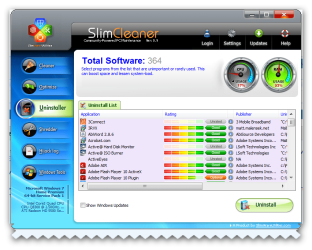
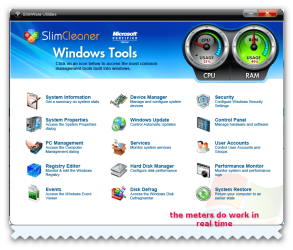
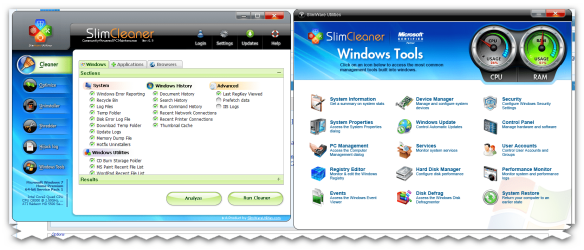
in my newsletter from addictivetips they reviewed this program SlimCleaner its like ccleaner but the user interface is rather swish and colourful im testing it out right now (so far so good) :)

Many users prefer using CCleaner for getting rid of unnecessary files from temporary file directories. However, many apps like CCleaner are not very effective and leave behind clutter from many directories (e.g. the log files and Temp from the Windows directory, Prefect files and even the Temp in user profiles). A better alternative to CCleaner can be the previously reviewed Xleaner. However, if you would like to have a software that contains the attributes of the robust Xleaner and provides the ability to identify and removed toolbars, applications and the like that hijack your system components, then you should try SlimCleaner. It cleans and optimizes Windows systems using a crowd-sourced approach, as well as provides configuration options for programs, startups and service settings. Moreover, it provides information and removal options for applications and services that take over system tasks and unnecessarily consume system memory and strain the CPU.


The Cleaner tab provides detailed options regarding the selection of Windows directories, applications and browsers that you wish to clean clutter from. Select the desired options and click on Run Cleaner to start the cleaning process.

Please note that this software is still in its beta stage and therefore, you may face some bugs or functionality problems. Although we did not experience any of them during testing.


ADDICTIVETIPS >>> Clean Clutter And Remove Hijacking Programs With SlimCleaner
 

Attachments

  • brys snap ?17 ?March ?2011 18h27m00s.png
    brys snap ?17 ?March ?2011 18h27m00s.png
    164.3 KB · Views: 17
  • brys snap ?17 ?March ?2011 18h28m54s.png
    brys snap ?17 ?March ?2011 18h28m54s.png
    77.8 KB · Views: 21
  • brys snap ?17 ?March ?2011 18h29m45s.png
    brys snap ?17 ?March ?2011 18h29m45s.png
    94 KB · Views: 17
Last edited by a moderator:

My Computer

Computer Manufacturer/Model Number
packard bell IXTREME M5722
OS
Operating System : Windows 7 Home Premium Edition 6.01.7600 SP1 (x64)
CPU
Processor : Intel Core 2 Quad Q8300 @ 2500 MHz
Motherboard
Mainboard : Packard Bell (Acer EG43M )
Memory
Physical Memory :8GB Corsair4x 2GB 800MHz C5 DDR2
Graphics Card(s)
Video Card : XFX 6700 AMD
Monitor(s) Displays
Maestro 234DL - BenQ V2220 - BenQ VW2420H
Screen Resolution
Current Display :1920x1080p pixels at 60 Hz in HD LED
Hard Drives
Hard Disks : WDC (1000 GB)
Drive C: (Hard Disk) : 428 GB available on 491 GB
Drive D: (Hard Disk) : 426 GB available on 492 GB
SAMSUNG spinpoint HD103SJ 1000.2 GB
(X 2) KINGSTON SSD NOW V 30GB
PSU
XFX ProSeries 550W PSU
Case
PACKARD BELL IXTREME
Cooling
System Blower Current: 150mA Air Flow16CFM ;Akasa 90mm rear
Keyboard
Gigabyte Aivia K8100
Mouse
TRUST-Wireless Laser Mouse - Carbon edition MI-7770C
Internet Speed
TP-LINK > TL-WN951N / AV500 Gigabit Powerline Adapters
Browser
chrome dev
Other Info
EXTRA COOLING>(FAN CONTROLLER) PC Bay Cooler 3 x 40mm fans; Akasa AK-HD-BL Blue hard drive cooler 2 x 40 mm fan 4500 rpm 29.7 dBA
Bios> American Megatrends Inc.
Version : P01-A1
Date : 08/31/2009
It looks good brianzion. I'll try it. Thanks!
 

My Computer

Computer type
PC/Desktop
Computer Manufacturer/Model Number
Custom Build
OS
Windows 10 Pro x64
CPU
Intel Core i5 4440 @Stock
Motherboard
Gigabyte Z97 D3H
Memory
4 x 4GB HyperX Fury DDR3
Graphics Card(s)
Gigabyte GTX 1050Ti O4G
Sound Card
Integrated
Monitor(s) Displays
Dell P2417H
Screen Resolution
1920 x 1080
Hard Drives
Samsung EVO 850 120GB / Toshiba DT01ACA050 1TB 7200prm 32MB
PSU
Riotoro Onyx 750W
Case
NZXT H500 Black-Red
Cooling
Stock CPU + NZXT 120mm + 2x120mm red fans
Keyboard
Modecom Volcano Lanparty
Mouse
Asus ROG Gladius / DeepCool E-Pad Plus
Internet Speed
DOCSIS 50/3 Mbit
Browser
Google Chrome
Other Info
Asus K55VJ(i5 3210M, GT635M / 2GB, 8GB DDR3, 500GB HDD)
thanks StalkeR its ok works fine and the interface is nice if you like colour its easy to use gives you options what to clean etc post back with your views :)
 

My Computer

Computer Manufacturer/Model Number
packard bell IXTREME M5722
OS
Operating System : Windows 7 Home Premium Edition 6.01.7600 SP1 (x64)
CPU
Processor : Intel Core 2 Quad Q8300 @ 2500 MHz
Motherboard
Mainboard : Packard Bell (Acer EG43M )
Memory
Physical Memory :8GB Corsair4x 2GB 800MHz C5 DDR2
Graphics Card(s)
Video Card : XFX 6700 AMD
Monitor(s) Displays
Maestro 234DL - BenQ V2220 - BenQ VW2420H
Screen Resolution
Current Display :1920x1080p pixels at 60 Hz in HD LED
Hard Drives
Hard Disks : WDC (1000 GB)
Drive C: (Hard Disk) : 428 GB available on 491 GB
Drive D: (Hard Disk) : 426 GB available on 492 GB
SAMSUNG spinpoint HD103SJ 1000.2 GB
(X 2) KINGSTON SSD NOW V 30GB
PSU
XFX ProSeries 550W PSU
Case
PACKARD BELL IXTREME
Cooling
System Blower Current: 150mA Air Flow16CFM ;Akasa 90mm rear
Keyboard
Gigabyte Aivia K8100
Mouse
TRUST-Wireless Laser Mouse - Carbon edition MI-7770C
Internet Speed
TP-LINK > TL-WN951N / AV500 Gigabit Powerline Adapters
Browser
chrome dev
Other Info
EXTRA COOLING>(FAN CONTROLLER) PC Bay Cooler 3 x 40mm fans; Akasa AK-HD-BL Blue hard drive cooler 2 x 40 mm fan 4500 rpm 29.7 dBA
Bios> American Megatrends Inc.
Version : P01-A1
Date : 08/31/2009
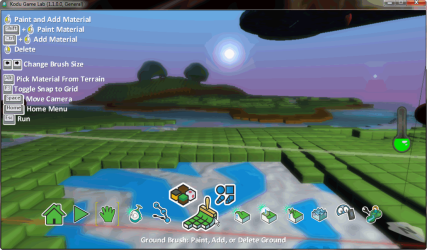
According to Microsoft, Kodu is a visual programming language made specifically for creating games. Accessible for children and enjoyable for anyone.

Although aimed for children and teenagers, Kodu is fun for us adults, too!

Programming as a Creative Medium

Kodu provides an end-to-end creative environment for designing, building, and playing your own new games. The core of the Kodu project is the programming user interface. The language is simple and entirely icon-based. Programs are composed of pages, which are broken down into rules, which are further divided into conditions and actions. Conditions are evaluated simultaneously. For a full technical grammar of the Kodu language, read Kodu Language Specification and Grammar.

Kodu, available for XBox since 2009, now also for Windows. Download Kodu Game Lab RC for Windows directly from Microsoft Fuse Labs: What is Kodu | Projects | Fuse Labs

Games you create can be shared over XBox Live.

Kari

Kodu.png
 

My Computer

Computer type
Laptop
Computer Manufacturer/Model Number
HP ENVY 17-1150eg
OS
Windows 10 Pro x64 EN-GB
CPU
1.6 GHz Intel Core i7-720QM Processor
Memory
6 GB
Graphics Card(s)
ATI Mobility Radeon HD 5850 Graphics
Sound Card
Beats sound system with integrated subwoofer
Monitor(s) Displays
17" laptop display, 22" LED and 32" Full HD TV through HDMI
Screen Resolution
1600*900 (1), 1920*1080 (2&3)
Hard Drives
Internal: 2 x 500 GB SATA Hard Disk Drive 7200 rpm
External: 2TB for backups, 3TB USB3 network drive for media
Cooling
As Envy runs a bit warm, I have it on a Cooler Master pad
Keyboard
Logitech diNovo Media Desktop Laser (bluetooth)
Mouse
Logitech Performance Mouse MX
Internet Speed
50/10 Mbps VDSL
Antivirus
Windows Defender 4.3.9431.0
Browser
Maxthon 3.5.2., IE11
Status
Not open for further replies.
Back
Top