FREE Great Programs for Windows 7

Status
Not open for further replies.
Lol, yeah, I saw that after making my post - forogt to mention that I saw it though...
 

My Computers

System One System Two

  • Computer type
    PC/Desktop
    Computer Manufacturer/Model Number
    The Beast Model A (homebrew)
    OS
    Windows 11 21H2 Current build
    CPU
    AMD Ryzen 9 3950X
    Motherboard
    MSI MEG X570 GODLIKE
    Memory
    4 * 32 GB - Corsair Vengeance 3600 MHz
    Graphics Card(s)
    EVGA GeForce RTX 3080 Ti XC3 ULTRA GAMING (12G-P5-3955-KR)
    Sound Card
    Realtek® ALC1220 Codec
    Monitor(s) Displays
    2x Eve Spectrum ES07D03 4K Gaming Monitor (Matte) | Eve Spec
    Screen Resolution
    3x 3840 x 2160
    Hard Drives
    3x Samsung 980 Pro NVMe PCIe 4 M.2 2 TB SSD (MZ-V8P2T0B/AM) } 3x Sabrent Rocket NVMe 4.0 1 TB SSD
    PSU
    PC Power & Cooling’s Silencer Series 1050 Watt, 80 Plus Plat
    Case
    Fractal Design Define 7 XL Dark ATX Full Tower Case
    Cooling
    SteelSeries Apex Pro Wired Gaming Keyboard
    Keyboard
    SteelSeries Apex Pro
    Mouse
    Logitech MX Master 3S | MX Master 3 for business
    Internet Speed
    AT&T LightSpeed Gigabit Duplex Ftth
    Antivirus
    Windows Defender + MB 3
    Browser
    Nightly (default) + Firefox (stable),Chrome, Edge
  • Computer type
    PC/Desktop
    System Manufacturer/Model Number
    Dell Latitude E5470
    OS
    ChromeOS Flex Dev Channel (current)
    CPU
    Intel(R) Core(TM) i5-6300U CPU @ 2.40GHz, 2501 Mhz, 2 Core(s), 4 Logical Processor(s)
    Motherboard
    Dell
    Memory
    16 GB
    Graphics Card(s)
    Intel(R) HD Graphics 520
    Sound Card
    Intel(R) HD Graphics 520 + RealTek Audio
    Monitor(s) Displays
    Dell laptop display 15"
    Screen Resolution
    1920 * 1080
    Hard Drives
    Toshiba 128GB M.2 22300 drive
    INTEL Cherryville 520 Series SSDSC2CW180A 180 GB SATA III SSD
    PSU
    Dell
    Case
    Dell
    Cooling
    Dell
    Keyboard
    Dell
    Mouse
    Logitech MX Master 3S (shared w. Sys 1) | Dell TouchPad
    Internet Speed
    AT&T LightSpeed Gigabit Duplex Ftth
ISOBuddy

Lets say you have to convert a lesser known CD/DVD file format to ISO and cannot find a tool to do it. ISOBuddy can help. It can convert GI, NRG, CDI, MDF, IMG, B5I, B6I, DMG, PDI, BIN and CCD to ISO image, erase CD/DVD and burn ISO image files to CD/DVD.

That's a Lot of formats! I came across this while searching for a way to convert my Mac OSX Snow Leopard Server DVD from DMG to ISO for install on a virtual machine.

It's fast and easy. Good to keep in your toolbox of tricks for those odd formats.

Works on Windows 7 32 and 64 bit.

ISOBuddy | DVD-Ranger
 

My Computer

Computer Manufacturer/Model Number
Compaq Presario CQ61 411WM
OS
Windows 7 64bit Home Premium Enhanced
CPU
2.1GHz AMD Sempron M120 Processor
Motherboard
Hewlett-Packard 363F with Insyde Software F.13 Bios
Memory
2x 2048MB 400.0 MHz PC2-6400 DDR2-SDRAM Micron Tech (4Gig)
Graphics Card(s)
ATI Mobility RADEON HD4200 336 MB DDR2 share 1.2 Gigs 494Mhz
Sound Card
ATI SB600-IDT High Definition Audio Controller
Monitor(s) Displays
AUO B156XW01 V2 15.6 in 1366x768 @ 60Hz Aspect Ratio 16:9
Hard Drives
Hitachi HTS725025A9A364 250 GB 7200 RPM
I've been looking for a simple utility that is able to extract the contents of .iso files, with the proviso that it is both free and simple to use.

ExtractNow is a simple utility that allows you to extract multiple archives quickly and easily. ExtractNow is not a complete archival solution. It's main purpose it to allow the user to extract multiple archives easily.

ExtractNow - Extract multiple archives easily
 

My Computer

Computer type
PC/Desktop
Computer Manufacturer/Model Number
Dwarf Dwf/11/2012 r09/2013
OS
Windows 8.1 Pro RTM x64
CPU
Intel Core-i5-3570K 4-core @ 3.4GHz (Ivy Bridge) (OC 4.4GHz)
Motherboard
ASRock Z77 Extreme4-M
Memory
4 x 4GB DDR3-1600 Corsair Vengeance CMZ8GX3M2A1600C9B (16GB)
Graphics Card(s)
MSI GeForce GTX770 Gaming OC 2GB
Sound Card
Realtek High Definition on board solution (ALC 898)
Monitor(s) Displays
ViewSonic VA1912w Widescreen (VGA)
Screen Resolution
1440x900
Hard Drives
OCZ Agility 3 SSD 120GB SATA III x2 (RAID 0)
Samsung HD501LJ 500GB SATA II x2
Hitachi HDS721010CLA332 1TB SATA II
Iomega 1.5TB Ext USB 2.0
WD 2.0TB Ext USB 3.0
PSU
XFX Pro Series 850W Semi-Modular
Case
Gigabyte IF233
Cooling
1 x 120mm Front Inlet 1 x 120mm Rear Exhaust
Keyboard
Microsoft Comfort Curve Keyboard 3000 (USB)
Mouse
Microsoft Comfort Mouse 3000 for Business (USB)
Internet Speed
NetGear DG834Gv3 ADSL Modem/Router (Ethernet) ~4.0 Mb/s (O2)
Antivirus
Avast! 8.0.1497
Browser
IE 11
Other Info
Optical Drive: HL-DT-ST BD-RE BH10LS30 SATA Bluray
Lexmark S305 Printer/Scanner/Copier (USB)
WEI Score: 8.1/8.1/8.5/8.5/8.25
Asus Eee PC 1011PX Netbook (Windows 7 x86 Starter)
ISOBuddy

Lets say you have to convert a lesser known CD/DVD file format to ISO and cannot find a tool to do it. ISOBuddy can help. It can convert GI, NRG, CDI, MDF, IMG, B5I, B6I, DMG, PDI, BIN and CCD to ISO image, erase CD/DVD and burn ISO image files to CD/DVD.

That's a Lot of formats! I came across this while searching for a way to convert my Mac OSX Snow Leopard Server DVD from DMG to ISO for install on a virtual machine.

It's fast and easy. Good to keep in your toolbox of tricks for those odd formats.

Works on Windows 7 32 and 64 bit.

ISOBuddy | DVD-Ranger


Sorry, but since it does this below it cannot be added. :(

......places DVD-Ranger (DVD-Ranger | Quality Craft Transcoder) on the top of all DVD Copy Software.
 

My Computer

Computer type
PC/Desktop
Computer Manufacturer/Model Number
Self built custom
OS
64-bit Windows 11 Pro for Workstations
CPU
Intel i7-8700K OC'd to 5 GHz
Motherboard
ASUS ROG Maximus XI Formula Z390
Memory
64 GB (4x16GB) G.SKILL TridentZ RGB DDR4 3600 MHz
Graphics Card(s)
ASUS ROG-STRIX-GTX1080TI-O11G-GAMING
Sound Card
Integrated
Monitor(s) Displays
2 x Samsung Odyssey G7 27"
Screen Resolution
2560x1440
Hard Drives
1TB Samsung 990 PRO M.2,
4TB Samsung 990 PRO PRO M.2,
TerraMaster F8 SSD Plus NAS
PSU
Seasonic Prime Titanium 850W
Case
Thermaltake Core P3
Cooling
Corsair Hydro H115i
Keyboard
Logitech wireless K800
Mouse
Logitech MX Master 4
Internet Speed
2 Gb/s Download and 100 Mb/s Upload
Antivirus
Malwarebyte Anti-Malware Premium
Browser
Google Chrome
Other Info
Logitech Z625 speaker system,
Logitech BRIO 4K Pro webcam,
HP Color LaserJet Pro MFP M477fdn,
APC SMART-UPS RT 1000 XL - SURT1000XLI,
Galaxy S23 Plus phone
I've been looking for a simple utility that is able to extract the contents of .iso files, with the proviso that it is both free and simple to use.

ExtractNow is a simple utility that allows you to extract multiple archives quickly and easily. ExtractNow is not a complete archival solution. It's main purpose it to allow the user to extract multiple archives easily.

ExtractNow - Extract multiple archives easily

Thank you Dward. Added. :)

7-Zip will also extract the contents ISO files if one prefered it instead.
 

My Computer

Computer type
PC/Desktop
Computer Manufacturer/Model Number
Self built custom
OS
64-bit Windows 11 Pro for Workstations
CPU
Intel i7-8700K OC'd to 5 GHz
Motherboard
ASUS ROG Maximus XI Formula Z390
Memory
64 GB (4x16GB) G.SKILL TridentZ RGB DDR4 3600 MHz
Graphics Card(s)
ASUS ROG-STRIX-GTX1080TI-O11G-GAMING
Sound Card
Integrated
Monitor(s) Displays
2 x Samsung Odyssey G7 27"
Screen Resolution
2560x1440
Hard Drives
1TB Samsung 990 PRO M.2,
4TB Samsung 990 PRO PRO M.2,
TerraMaster F8 SSD Plus NAS
PSU
Seasonic Prime Titanium 850W
Case
Thermaltake Core P3
Cooling
Corsair Hydro H115i
Keyboard
Logitech wireless K800
Mouse
Logitech MX Master 4
Internet Speed
2 Gb/s Download and 100 Mb/s Upload
Antivirus
Malwarebyte Anti-Malware Premium
Browser
Google Chrome
Other Info
Logitech Z625 speaker system,
Logitech BRIO 4K Pro webcam,
HP Color LaserJet Pro MFP M477fdn,
APC SMART-UPS RT 1000 XL - SURT1000XLI,
Galaxy S23 Plus phone
ISOBuddy

Lets say you have to convert a lesser known CD/DVD file format to ISO and cannot find a tool to do it. ISOBuddy can help. It can convert GI, NRG, CDI, MDF, IMG, B5I, B6I, DMG, PDI, BIN and CCD to ISO image, erase CD/DVD and burn ISO image files to CD/DVD.

That's a Lot of formats! I came across this while searching for a way to convert my Mac OSX Snow Leopard Server DVD from DMG to ISO for install on a virtual machine.

It's fast and easy. Good to keep in your toolbox of tricks for those odd formats.

Works on Windows 7 32 and 64 bit.

ISOBuddy | DVD-Ranger


Sorry, but since it does this below it cannot be added. :(

......places DVD-Ranger (DVD-Ranger | Quality Craft Transcoder) on the top of all DVD Copy Software.

What do you mean when you say it puts DVD-Ranger on top of all DVD Copy Software? Does it replace the other drivers? Hopefully any damage it has done will be removed by uninstalling ISOBuddy.
 

My Computer

OS
Windows 7 Professional x64 x86 VISTA XP 98SE 95 3.x
CPU
Intel(R) Core(TM)2 Quad CPU Q9400 @ 2.66GHz
Memory
8 GB
Screen Resolution
1920 x 1200
PSU
OCZ Fatal1ty OCZ550FTY 550W ATX12V v2.2 25A on each rail
Hello Patrick,

I did not use the program for that reason in it's description at it's site. I'm assuming that it's some sort of forced advertisement of their pay for version of the program that the free (nagware) version of the program places on any DVD that it copies, and only the pay for version wouldn't have this.
 

My Computer

Computer type
PC/Desktop
Computer Manufacturer/Model Number
Self built custom
OS
64-bit Windows 11 Pro for Workstations
CPU
Intel i7-8700K OC'd to 5 GHz
Motherboard
ASUS ROG Maximus XI Formula Z390
Memory
64 GB (4x16GB) G.SKILL TridentZ RGB DDR4 3600 MHz
Graphics Card(s)
ASUS ROG-STRIX-GTX1080TI-O11G-GAMING
Sound Card
Integrated
Monitor(s) Displays
2 x Samsung Odyssey G7 27"
Screen Resolution
2560x1440
Hard Drives
1TB Samsung 990 PRO M.2,
4TB Samsung 990 PRO PRO M.2,
TerraMaster F8 SSD Plus NAS
PSU
Seasonic Prime Titanium 850W
Case
Thermaltake Core P3
Cooling
Corsair Hydro H115i
Keyboard
Logitech wireless K800
Mouse
Logitech MX Master 4
Internet Speed
2 Gb/s Download and 100 Mb/s Upload
Antivirus
Malwarebyte Anti-Malware Premium
Browser
Google Chrome
Other Info
Logitech Z625 speaker system,
Logitech BRIO 4K Pro webcam,
HP Color LaserJet Pro MFP M477fdn,
APC SMART-UPS RT 1000 XL - SURT1000XLI,
Galaxy S23 Plus phone
UltraDefrag is a powerful Open Source Defragmentation tool for the Windows Platform. It can defragment any system files including registry hives and paging file. Also one of the main goals of UltraDefrag is doing the job as fast and reliable as possible...
is there any program you apart subordinates from windows ...
thanks in advance :):):):)
 

My Computer

OS
Windows 7 Ultimate x32 bit
Comment Explorer

On another board someone requested a means to see comments for files as you look through Explorer. Since I did some shell extensions for this in the past, and the user has a 64 bit system(32 bit shell extension won't work unless hosted in a 32 bit File Manager) I decided to write it as a simple Hotkey app that sits in the tray. By using the clipboard to get the selected file instead of an Explorer extension, it doesn't care if the OS is 64 or 32 bits.

It does require Scripting.Dictionary be on the machine. Afiak Scripting.Dictionary should be there for XP and later.

The way it works: sits in the Tray. When you use Up or Down Arrow keys in Explorer, a ToolTip shows by the Mouse cursor. If there is a comment for that file or folder, it is shown. If not, the file or folder name shows in the ToolTip. Press Shift-F11 to add a comment for the selected file.

It uses Scripting.Dictionary to look up the comment using the complete file path(e.g. C:\downloads\MyDownload.zip) If anything is changed in the path such as drive letter, the file is renamed etc.. the link is broken.

Comments for files should really be part of the file system. But since it isn't a kludge like this is better than nothing. :)

Download CommentExplorer

It's free for you to use at your own risk.

It uses the clipboard without saving the previous clipboard contents. For this reason you can double click the Tray Icon to toggle the active state. When disabled the tip for the Tray Icon will show "CommentExplorer =//=>" when Enabled it will show "CommentExplorer ==>". Just more convenient than loading and unloading to avoid clipboard conflict. If you had something bulky in the clipboard like a large graphic image, shifting it back and forth with every arrow key press would just bog it down.

edit: btw the download includes AutoHotkey_L source code. AHK_L still tends to show a lot of false positives in AV apps. You can download AHK_L and compile CommentExplorer yourself. That way you know what's in the .exe file.

edit2: Updated to v. 1.4.1.0. Now the ToolTip is shown at top left corner of active Explorer window. This gets it out of the way of mouse tooltips generated by Windows. Also the ToolTip is only shown if there is a comment available. The ToolTip will time out after so many seconds if neither Up nor Down Key is pressed. TimeOut setting in the .ini file adjusts this. Valid range is 1000 to 10000 milliseconds(1 to 10 seconds.) The default value is 5000 for 5 seconds.

It's coming together well enough now I think I'll use it myself. :)


edit3: Now clipboard text is preserved while using Up and Down keys in Explorer. Renaming files selected with the arrow keys should work normally now. btw I always use Details View. I haven't tried the app any other way. :)

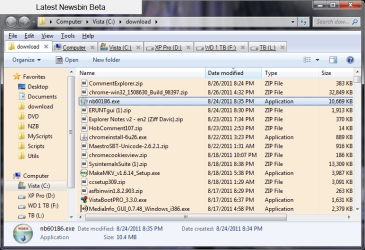
edit4: Here's a screen shot showing ToolTip when Arrow key selects a file that has a comment:

ToolTip.png

edit5: now you can select multiple files/folders for comment.

edit6: v. 1.8.0.0 Added Control-F11 Hotkey to copy comments. Also added a Quick Start section to the top of the Readme.


edit7: v. 1.9.1.0 Comments display when you click a file in Explorer now. I got rid of the time out as it was causing bogging. Now just press Esc to get rid of hanging ToolTip.

edit8: v. 2.1.0.0 Added Progressbar to Comment Compaction routine.
Includes Taskbar Progress on Windows Seven.
 
Last edited:

My Computer

Computer Manufacturer/Model Number
HP Media Center
OS
Windows 7 32 bit
CPU
AMD 5200+ dual core
Memory
2 GB
Graphics Card(s)
NVidia GeForce 6150SE 128 MB
Monitor(s) Displays
CRT
Screen Resolution
1280x1024
Hard Drives
500 GB Sata internal :

SIIG USB 3.0 docking stations w/WD Caviar Black 6 Gb/s drives
Keyboard
PS/2
Mouse
PS/2 Wheel Mouse
Other Info
SIIG USB 3.0 PCIexpress card.
Last edited by a moderator:

My Computer

Computer type
PC/Desktop
Computer Manufacturer/Model Number
ASUS K53S
OS
MS Windows 7 Home Premium 64-bit SP1
CPU
Intel Core i7 2670QM @ 2.20GHZ
Motherboard
ASUSTeK Computer Inc. K53SV (CPU 1)
Memory
8.00 GB Dual-Channel DDR3 @ 665MHz
Graphics Card(s)
2047MB GeForce GT 540M (ASUStek Computer Inc)
Sound Card
Realtek High Definition Audio
Monitor(s) Displays
1
Hard Drives
596GB Hitachi HTS547564A9E384 (SATA)
Internet Speed
29,5 MBPS DOWNL AND 6 UPLOAD
Antivirus
Microsoft Security Essentials, SUPERANTISPYWARE
Browser
CHROME,IE
Other Info
i love to travel also
i have lived in Hungary & Ireland & Germany and Belgium
and worked in the Netherlands as i used to live in a bordertown.....
Hi all
God bless
Peace
New Folder 1.0

A simple Hotkey app to create a New Folder when you press F7 function key. It works if either the Desktop or an Explorer Folder Window is the "active window."

It should work on Vista and Windows Seven.
Note that my programs are only tested on English Language versions of Windows.
They may work on other Windows flavors but I have no way to test them.

Edit: New Folder has been rewritten as New Folder 2

Now it uses 2 cooperating processes to ensure that keys are passed on to application windows properly.

Edit2: updated to NewFolder2 v. 2.2.1.0. Added hotkey Shift-NumPadSub to show the "home folder" of the active window. IOW, if EditPadLite editor is the active window, pressing Shift and the minus key on the Numberpad, should open the folder where EditPadLite.exe is. Just convenient to see where an app is installed or to navigate to a subfolder for that app.

If Shift-NumPadSub hotkey is successfully set, it will show in the About Box. If not, another app already owns the hotkey.

It's free for you to use at your own risk:

Hotkeys
 
Last edited:

My Computer

Computer Manufacturer/Model Number
HP Media Center
OS
Windows 7 32 bit
CPU
AMD 5200+ dual core
Memory
2 GB
Graphics Card(s)
NVidia GeForce 6150SE 128 MB
Monitor(s) Displays
CRT
Screen Resolution
1280x1024
Hard Drives
500 GB Sata internal :

SIIG USB 3.0 docking stations w/WD Caviar Black 6 Gb/s drives
Keyboard
PS/2
Mouse
PS/2 Wheel Mouse
Other Info
SIIG USB 3.0 PCIexpress card.
A simple Hotkey app to create a New Folder when you press F7 function key. It works if either the Desktop or an Explorer Window is the "active window."

It should work on Vista and Windows Seven.
Note that my programs are only tested on English Language versions of Windows.
They may work on other Windows flavors but I have no way to test them.


It's free for you to use at your own risk:

Hotkeys
This would be very handy, except that I don't use Windows Explorer, I use Free Commander instead. It would still be useful for making a folder on the desktop, and moving it where needed, but do you have any idea if it would work with my preferred file manager?
 

My Computer

Computer Manufacturer/Model Number
DIY
OS
W7x64 Pro, SuSe 12.1/** W7 x64 Pro, XP MCE
CPU
Phenom II 1090T w/Noctua NH-D14 /**4400+ X2 w/CM Hyper TX 3
Motherboard
ASRock 890FX Deluxe 4/**A8N-SLI
Memory
2 x 2GB Patriot PGS34g1600LLKA/**4x1GB Corsair VS
Graphics Card(s)
EVGA GTX460 SC/**EVGA 8800GTS
Sound Card
Asus Xonar D2X/**Xonar D1
Monitor(s) Displays
Acer X233H, Dell E152FPc /**LG M237-WD
Screen Resolution
1920x1080 & 1024x768/**1980x1080
Hard Drives
WDC 2TB, 1.5TB, 1TB, 500GB,Seagate 500GB , Maxtor 80GB /**500GB Seagate & WDC 1TB Black
PSU
CM RS600 w/ APC BX1000G/**Antec 500 TP w/ APC BX1000
Case
HAF922/**Antec 1040IIB
Cooling
3x200mm, 1x140 and 1x120mm/**5x80mm fans
Keyboard
Logitech Media USB/**Saitek Eclipse
Mouse
Cordless Trackman Wheel/**Ditto
Internet Speed
3.3Mbps
Other Info
SB 560 5.1 w/ Sennheiser RS140/**Creative T20 speakers, Dvico FusionHDTV7 Gold RT, Cisco E3000, HP 5510V AIO, Linksys E3000, Belkin F5U237 hub and **F5D8055 adapter
(** = 2nd rig)
A simple Hotkey app to create a New Folder when you press F7 function key. It works if either the Desktop or an Explorer Window is the "active window."

It should work on Vista and Windows Seven.
Note that my programs are only tested on English Language versions of Windows.
They may work on other Windows flavors but I have no way to test them.


It's free for you to use at your own risk:

Hotkeys
This would be very handy, except that I don't use Windows Explorer, I use Free Commander instead. It would still be useful for making a folder on the desktop, and moving it where needed, but do you have any idea if it would work with my preferred file manager?

I have been using FreeCommander myself for a number of years. F7 new folder is already built into FC. In my program, if Desktop or Explorer is not the active window, it passes the Hotkey on. So if you leave it at the default F7 then when FreeCommaner has the focus, FreeCommander's New Folder should still work.
 

My Computer

Computer Manufacturer/Model Number
HP Media Center
OS
Windows 7 32 bit
CPU
AMD 5200+ dual core
Memory
2 GB
Graphics Card(s)
NVidia GeForce 6150SE 128 MB
Monitor(s) Displays
CRT
Screen Resolution
1280x1024
Hard Drives
500 GB Sata internal :

SIIG USB 3.0 docking stations w/WD Caviar Black 6 Gb/s drives
Keyboard
PS/2
Mouse
PS/2 Wheel Mouse
Other Info
SIIG USB 3.0 PCIexpress card.
Foxit

I finally took the plunge and got rid of the execrable Adobe Reader. I replaced it with Foxit as suggested in this thread. It's much better.
 

My Computer

Computer type
Laptop
Computer Manufacturer/Model Number
Hewlett-Packard/G62-107SA Notebook
OS
Microsoft Windows 7 Home Premium 64-bit Service Pack 1
CPU
Intel(R) Core(TM) i3 CPU M 330 @ 2.13GHz
Motherboard
Hewlett-Packard 1425
Memory
8 GB DDR3
Graphics Card(s)
Intel(R) HD Graphics
Sound Card
Realtek High Definition Audio
Monitor(s) Displays
Builtin
Screen Resolution
1366 x 768 x 32 bits (4294967296 colors) @ 60 Hz
Hard Drives
250 GB SATA Hard Disk Drive 7200 rpm
2TB Seagate GoFlex USB 2 Drive
1TB Iomega Prestige USB 2 Drive
1.5TB Iomega Prestige USB 2 Drive (Samsung)
2TB WD MyBook Live NAS.
Mouse
Logitech Anywhere MX
Internet Speed
152 Mbs download 10 Mbs upload
Antivirus
Norton 360
Browser
Chrome
+1 I don't miss Adobe Reader a bit although Foxit Reader does try to call home every time it is used.

~Maxx~

WMC_F_Small.png
 

My Computer

Computer Manufacturer/Model Number
HP HPE 270f
OS
Windows 7 x64 Home Premium
CPU
Intel Core i7 930 @ 2.8 Ghz Socket 1366 LGA
Motherboard
Pegatron Truckee v1.04E41
Memory
8 GB 1366 Mhz DDR3 (PC3-10700) RAM
Graphics Card(s)
ATI Radeon 5770 1 GB DDR5 RAM
Sound Card
Realtech High Definition
Monitor(s) Displays
32" Sony Bravia
Screen Resolution
1366 X 768
Hard Drives
Intel 25nm 120 GB Series 320 SSD HD Tune- 265 MBps Read/ 130 MBps Write

LaCie 1TB + 1TB RAID 0 eSATA Drive HD Tune- 160 MBps Read/ 90 MBps Write
Keyboard
Logitech Illuminated
Mouse
Logitech MX Revolution
Internet Speed
36.4 Mbps Maximum on a 37 Mbps Motorola SB501 Modem
+1 I don't miss Adobe Reader a bit although Foxit Reader does try to call home every time it is used.

~Maxx~

WMC_F_Small.png
It doesn't get the chance to call home when I use it. I have it on my netbook, and I use it at a friend's house with the wireless disabled.:geek:
 

My Computer

Computer type
PC/Desktop
Computer Manufacturer/Model Number
Gigabyte Technology Co., Ltd.
OS
Win 7 Ultimate 64-bit SP1 (desktop)
CPU
Intel Core 2 Duo E8400
Motherboard
Gigabyte GA-EP35-DS3R
Memory
2x 2GB OCZ DDR II SDRAM PC2-6400
Graphics Card(s)
NVIDIA GeForce 9400GT
Monitor(s) Displays
HP 2009m(primary), Acer P191W
Screen Resolution
1600x900, 1440x900
Hard Drives
Internal:WD Caviar Black 640GB 32MB cache 7200RPM
External:Samsung Story Station 1TB HDD desktop drive
500GB Toshiba portable drive
PSU
Antec Earthwatts EA500D
Case
Antec Sonata III
Cooling
4 fans
Keyboard
Logitech Wave
Mouse
Logitech M-SBF90
Internet Speed
Slow due to home Wireless-G router
Antivirus
MSE, Hitman Pro, Malwarebytes
Browser
Chrome and Palemoon
Other Info
Laptop....Acer 5750Z-4835
15.6" HD Widescreen CineCrystal™ LED-backlit LCD Display: (1366x768 resolution, 16:9 aspect ratio)
Intel® Pentium® Processor B940 (2.0GHz, 2MB L3 cache)
Windows® 7 Home Premium,500GB Hard Drive,4GB DDR3 RAM, Intel® HD Graphics,8X DVD-Super Multi Double-Layer Drive
Multi-in-1 Digital Media Card Reader,802.11b/g/n Wi-Fi
Chrome and Palemoon, MSE, Hitman Pro
Check out Nitro as Alternative to Adobe Reader ;) does everything I Need :)

Nitro PDF Reader
 

My Computers

System One System Two

  • Computer type
    PC/Desktop
    Computer Manufacturer/Model Number
    ChillBlast - Custom to my design
    OS
    Windows 11 Pro x64 [Latest Release and Release Preview]
    CPU
    Ryzen 9 5950X, 3.8 - 5.2 MHz
    Motherboard
    Asus Prime X570-Pro
    Memory
    64GB [2 x 32GB] DDR4 3200MHz
    Graphics Card(s)
    4GB NVIDIA GEFORCE GTX 1650 Ti
    Sound Card
    On-board SPDIF to 5.1 System + HDMI [5.1 system]
    Monitor(s) Displays
    32" UHD 32 Bit HDR Monitor + 43" UHD 4K 32Bit HDR TV
    Screen Resolution
    2 x 3840 x 2160 @60Hz
    Hard Drives
    1TB M2 SSD OS, 500GB Fast Access SSD, 2 x 8TB Data + Various Externals from 1TB to 4TB, 10TB NAS
    PSU
    NZXT C750 80 PLUS Gold 750W Modular PSU
    Case
    Workstation Case [Matt Black]
    Cooling
    NZXT Kraken X63 280mm CPU Cooler +2x Quiet Case fans
    Keyboard
    Logitech Wireless MX Keys & K400 + others
    Mouse
    Logitech Wireless MX Master 3S
    Internet Speed
    920 MB Down 50 MB Up
    Antivirus
    BitDefender Total Security Pro
    Browser
    Chrome (always run latest Non-Beta)
    Other Info
    Also run ...
    Laptop - Quad 8GB - Windows 10 Pro x64
    Nexus 7 Android tablet x2
    Samsung 10.2" tablet
    Blackview TAB 8 4G Android Tablet c/w Keyboard
    Wacom Intuos Pro Medium Pen Pad
    Wacom Intuos Pro Small Pen Pad
    Wacom Expresskeys Remote
    Loopdeck+ Graphics Controller
    Shuttle Pro v2 Control
  • Computer type
    Laptop
    System Manufacturer/Model Number
    Dell XPS 17 10750H
    OS
    Windows 11 Pro x64 Latest RP
    CPU
    Intel I7 10750H 5.0GHz
    Motherboard
    Dell XPS
    Memory
    32GB [2x16GB] DDR4 2933 MHz
    Graphics Card(s)
    nVidia GTX1650Ti 4 GB GDDR6
    Sound Card
    Stock [Realtek] 4 Speaker
    Monitor(s) Displays
    17" IPS UHD+ Infinity Edge Touchscreen
    Screen Resolution
    3840 x 2400
    Hard Drives
    2TB M2 NVMe, 4TB External + various 500GB & 1TB External NVMe (also have access to spinner HDD from
    PSU
    Stock
    Case
    Stock XPS Aluminium & Carbon Fibre
    Cooling
    Stock - Active Fan Control
    Keyboard
    Backlit + Various Logitech
    Mouse
    Stock Track Pad + Logitech MX Trackball
    Internet Speed
    72 MB Down 18MB Up
    Browser
    Chrome
    Other Info
    Also run ...
    Laptop - Quad 8GB - Windows 10 Pro x64
    Nexus 7 Android tablet x2
    10.2" tablet
    Sony Z3 Android Smartphone
    Wacom Intuos Pro Medium Pen Pad
    Wacom Intuos Pro Small Pen Pad
    Wacom Expresskeys Remote
    Loopdeck+ Graphics Controller
    Shuttle Pro v2 Control Pad
    10TB NAS
Plus you can get an old version of Foxit when it was lean and mean:
Download Foxit PDF Reader

Not sure about Windows Seven compatibility though.
Maybe if you set it as XP SP2.
 

My Computer

Computer Manufacturer/Model Number
HP Media Center
OS
Windows 7 32 bit
CPU
AMD 5200+ dual core
Memory
2 GB
Graphics Card(s)
NVidia GeForce 6150SE 128 MB
Monitor(s) Displays
CRT
Screen Resolution
1280x1024
Hard Drives
500 GB Sata internal :

SIIG USB 3.0 docking stations w/WD Caviar Black 6 Gb/s drives
Keyboard
PS/2
Mouse
PS/2 Wheel Mouse
Other Info
SIIG USB 3.0 PCIexpress card.

My Computer

Computer type
Laptop
Computer Manufacturer/Model Number
Hewlett-Packard/G62-107SA Notebook
OS
Microsoft Windows 7 Home Premium 64-bit Service Pack 1
CPU
Intel(R) Core(TM) i3 CPU M 330 @ 2.13GHz
Motherboard
Hewlett-Packard 1425
Memory
8 GB DDR3
Graphics Card(s)
Intel(R) HD Graphics
Sound Card
Realtek High Definition Audio
Monitor(s) Displays
Builtin
Screen Resolution
1366 x 768 x 32 bits (4294967296 colors) @ 60 Hz
Hard Drives
250 GB SATA Hard Disk Drive 7200 rpm
2TB Seagate GoFlex USB 2 Drive
1TB Iomega Prestige USB 2 Drive
1.5TB Iomega Prestige USB 2 Drive (Samsung)
2TB WD MyBook Live NAS.
Mouse
Logitech Anywhere MX
Internet Speed
152 Mbs download 10 Mbs upload
Antivirus
Norton 360
Browser
Chrome
+1 I don't miss Adobe Reader a bit although Foxit Reader does try to call home every time it is used.
I moved to Foxit some time ago after hanging onto Adobe for ages and still like it. I wonder if the "phone home" is just an auto update check? I should check if the portable version does the same thing.
Foxit doesn't seem to have an OCR - maybe Nitro does?
 

My Computer

Computer type
PC/Desktop
Computer Manufacturer/Model Number
Own build
OS
Windows 7x64 Home Premium SP1
CPU
Intel i7 2600k
Motherboard
ASUS P8Z68 Deluxe
Memory
G.Skill Ripjaws (DDR3-1600) 2x4GB
Graphics Card(s)
Nvidia GeForce GTS 450; Intel HD Graphics 3000(GT2+)
Monitor(s) Displays
Dell Ultrasharp IPS panel U2311H, Samsung SyncMaster P2350
Screen Resolution
1920x1080
Hard Drives
Samsung 850 Pro SSD 256GB, Samsung SSD 840 120GB, Seagates 1TB Barracuda ST31000528AS x2
PSU
Seasonic M12II 520W
Case
Lian Li Lancool PC-K60
Cooling
Case: 1x120mm, 3x140mm CPU: Hyper 212+
Keyboard
Logitech MK520 (wireless)
Mouse
Logitech MK520
Internet Speed
6-7 Mbps
Antivirus
Norton Security Premium, Malwarebytes on 2 (MSE on 3rd PC)
Browser
FireFox
Other Info
Audio: Logitech Z523 2.1
Status
Not open for further replies.
Back
Top