FREE Great Programs for Windows 7

Status
Not open for further replies.
WinGuard Pro whats dis program for is it any good????
 

My Computer

Computer Manufacturer/Model Number
gigabyte
OS
windows 7 64bit
CPU
intel core 2 duo E8600 @3.33ghz
Motherboard
gigabyte ep45-ds5 (socket 775)
Memory
8.0gb dual-channel DDR2 @400mhz (6-6-6-18
Graphics Card(s)
2X ATI Radeon HD 4800 series (sapphire) crossfire
Sound Card
realtek high definition audio
Monitor(s) Displays
benq E2200w (digital)
Screen Resolution
1680 x 1050
Hard Drives
1 313GB Western digital WDC
WinGuard Pro whats dis program for is it any good????

Personally, I wouldn't use it.
All of those things (or a very large majority) can be done without the software.
Yes, you have to learn how to configure windows and use Permissions, which is a good thing.

Trying to use a 3rd party software like this to do what windows does natively is only asking for trouble.

I should stress,, what this program does is take over some of the Rights (Permissions) work.
This can work out to be a very bad thing if anything goes wrong. You could lose everything.

The encryption stuff can be achieved with Trusted sources such as TrueCrypt and through Windows Encrypted File System.
 

My Computer

Computer Manufacturer/Model Number
Self Built
OS
Win 7 Ultimate 32bit
CPU
C2D E6600 2.4Ghz
Motherboard
Intel D965WH
Memory
4G Kingston KHX5400D2
Graphics Card(s)
EVGA GTX 570 HD SC (012-P3-1573-KR)
Sound Card
On-Board
Monitor(s) Displays
Samsung 226BW
Screen Resolution
1680 x 1050
Hard Drives
2 x 250 Seagate Barracuda
2 x 500 Seagate Barracuda (Raid1)
PSU
Corsair TX750W
Case
In-Win C589
Cooling
Stock Intel Cooling
Suggestion for the list. Could we might set this list into different categories for each subject matter.....Like a section for maintenance for utilities software, one for bugs to include spyware, adware, malware and viruses....and so on. I think it would make posting a link to this page with a direct subject title for that particular section for members who looking for such apps easier to find. Instead of having to scroll threw the list all willy nilly. Just a thought....

That would be a good suggestion if that was the raison d'être for the forum. But Brink already does 10,000 other things. If only interested in a category, search. You should get hits in the descriptions.. as in "editor" or "syntax highlighting editor" or "firewall" or other area of interest.

The point was to categorize the list. So that when the list was referred to for help, it could be referred to a specific area of the list. That's all I was trying to suggest.

I got the point. Why don't you volunteer to do it then?
I'm sure the mods can always use a hand.
 

My Computer

Computer Manufacturer/Model Number
HP Media Center
OS
Windows 7 32 bit
CPU
AMD 5200+ dual core
Memory
2 GB
Graphics Card(s)
NVidia GeForce 6150SE 128 MB
Monitor(s) Displays
CRT
Screen Resolution
1280x1024
Hard Drives
500 GB Sata internal :

SIIG USB 3.0 docking stations w/WD Caviar Black 6 Gb/s drives
Keyboard
PS/2
Mouse
PS/2 Wheel Mouse
Other Info
SIIG USB 3.0 PCIexpress card.
That would be a good suggestion if that was the raison d'être for the forum. But Brink already does 10,000 other things. If only interested in a category, search. You should get hits in the descriptions.. as in "editor" or "syntax highlighting editor" or "firewall" or other area of interest.

The point was to categorize the list. So that when the list was referred to for help, it could be referred to a specific area of the list. That's all I was trying to suggest.

I got the point. Why don't you volunteer to do it then?
I'm sure the mods can always use a hand.

That's correct, if some of us can do this, very good, other wise let's just enjoy this forum and all the good things from it.
 

My Computer

OS
Windows 7 ultimate 32
your a legend..... thx a lot :grouphug:
 

My Computer

Computer Manufacturer/Model Number
Nova Data
OS
MS Windows 7 Home Premium 64-bit
CPU
Intel Core i7 870 @ 2.93GHz (Quad Core)
Motherboard
Intel Corporation DH55TC (XU1)
Memory
12.0GB Dual-Channel DDR3 @ 664MHz (9-9-9-24)
Graphics Card(s)
NVIDIA GeForce GTS 450
Sound Card
Realtek High Definition Audio (on board)
Monitor(s) Displays
Samsung
Hard Drives
1465GB Seagate ST31500341AS ATA Device
PSU
650W low noice
HxD Hex Editor and Disk Editor

"HxD is a fast hex editor which, additionally to raw disk editing and modifying of main memory (RAM), handles files of any size.
The easy to use interface offers features such as searching and replacing, exporting, checksums/digests, insertion of byte patterns, a file shredder, concatenation or splitting of files, statistics and much more.
Editing works like in a text editor with a focus on a simple and task-oriented operation, as such functions were streamlined to hide differences that are purely technical."
I have used this for a while now and found it very useful. You can explore disks as physical or logical (partitions). I'm running Win7x64 program is 32 bit.

HxD

PS: I have since noticed HxD raised elsewhere on Forum.
Brink: I think at least one, not necessarily this one, Hex editor should be on the free list.
 
Last edited:

My Computer

Computer type
PC/Desktop
Computer Manufacturer/Model Number
Own build
OS
Windows 7x64 Home Premium SP1
CPU
Intel i7 2600k
Motherboard
ASUS P8Z68 Deluxe
Memory
G.Skill Ripjaws (DDR3-1600) 2x4GB
Graphics Card(s)
Nvidia GeForce GTS 450; Intel HD Graphics 3000(GT2+)
Monitor(s) Displays
Dell Ultrasharp IPS panel U2311H, Samsung SyncMaster P2350
Screen Resolution
1920x1080
Hard Drives
Samsung 850 Pro SSD 256GB, Samsung SSD 840 120GB, Seagates 1TB Barracuda ST31000528AS x2
PSU
Seasonic M12II 520W
Case
Lian Li Lancool PC-K60
Cooling
Case: 1x120mm, 3x140mm CPU: Hyper 212+
Keyboard
Logitech MK520 (wireless)
Mouse
Logitech MK520
Internet Speed
6-7 Mbps
Antivirus
Norton Security Premium, Malwarebytes on 2 (MSE on 3rd PC)
Browser
FireFox
Other Info
Audio: Logitech Z523 2.1
Hi all see what you think of this free program :)

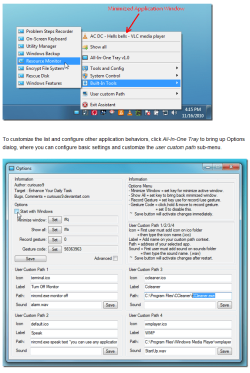
All-In-One Tray

extract from AddictiveTips

All-In-One Tray is a portable application to launch Windows build-in tools and functions right from the system tray. It is built on very simple yet interesting idea of having all the shortcuts of important system elements – catering to generic system management and administration along with Windows build-in network tools, system controls, etc., in system tray, so users can launch them anytime without having to roam around and search through different locations. The application encompasses more 50 different Windows tools and functions which can be accessed from their respective menus and sub-menus, be it system tools & security tools, Maintenance tools, Device controls, utility manager, anything which you possibly need can be brought up through its application’s menu.

download here :ar: http://curiouso9.deviantart.com/art/All-In-One-Tray-177936694
 

Attachments

  • all in one tray.PNG
    all in one tray.PNG
    99 KB · Views: 45

My Computer

Computer Manufacturer/Model Number
packard bell IXTREME M5722
OS
Operating System : Windows 7 Home Premium Edition 6.01.7600 SP1 (x64)
CPU
Processor : Intel Core 2 Quad Q8300 @ 2500 MHz
Motherboard
Mainboard : Packard Bell (Acer EG43M )
Memory
Physical Memory :8GB Corsair4x 2GB 800MHz C5 DDR2
Graphics Card(s)
Video Card : XFX 6700 AMD
Monitor(s) Displays
Maestro 234DL - BenQ V2220 - BenQ VW2420H
Screen Resolution
Current Display :1920x1080p pixels at 60 Hz in HD LED
Hard Drives
Hard Disks : WDC (1000 GB)
Drive C: (Hard Disk) : 428 GB available on 491 GB
Drive D: (Hard Disk) : 426 GB available on 492 GB
SAMSUNG spinpoint HD103SJ 1000.2 GB
(X 2) KINGSTON SSD NOW V 30GB
PSU
XFX ProSeries 550W PSU
Case
PACKARD BELL IXTREME
Cooling
System Blower Current: 150mA Air Flow16CFM ;Akasa 90mm rear
Keyboard
Gigabyte Aivia K8100
Mouse
TRUST-Wireless Laser Mouse - Carbon edition MI-7770C
Internet Speed
TP-LINK > TL-WN951N / AV500 Gigabit Powerline Adapters
Browser
chrome dev
Other Info
EXTRA COOLING>(FAN CONTROLLER) PC Bay Cooler 3 x 40mm fans; Akasa AK-HD-BL Blue hard drive cooler 2 x 40 mm fan 4500 rpm 29.7 dBA
Bios> American Megatrends Inc.
Version : P01-A1
Date : 08/31/2009
Hi. Not sure whether has this been posted yet but here is what I have got.

AMIP
AMIP stands for Advanced mIRC Integration Plug-in.
Present AMIP features;
-- Take "now playing" song information from all major music media players (Winamp, iTunes, MediaMonkey, QMP (QCD), foobar2000, etc)
-- Pass "now playing" song details to almost any application (IRC clients: mIRC, jIRCii, Bersirc; IM clients: Miranda, Trillian, MSN Messenger; E-mail clients: The Bat!, Outlook, Thunderbird; Web browsers, blogging tools, windows clipboard and so on)

Reason for me using: I use MediaMonkey and would like my Windows Live Messenger to display what songs am I playing so that's why I find this program useful.

Wireshark
Present Wireshark features;
-- Deep inspection of hundreds of protocols, with more being added all the time
-- Live capture and offline analysis
-- Standard three-pane packet browser
-- Multi-platform: Runs on Windows, Linux, OS X, Solaris, FreeBSD, NetBSD, and many others
-- Captured network data can be browsed via a GUI, or via the TTY-mode TShark utility
-- The most powerful display filters in the industry
-- Rich VoIP analysis

 

My Computer

Computer type
PC/Desktop
OS
Microsoft Windows 7 Ultimate (x64) Build 7601
CPU
Intel Core i5-3570K
Motherboard
MSI Z77A-G45
Memory
Corsair Vengeance 1600.9 (4GB x 3)
Graphics Card(s)
MSI GeForce GTX-560Ti Twin Frozr II (OC Edition)
Monitor(s) Displays
Dell U2312HM
Screen Resolution
1920 x 1080
Hard Drives
Intel 330 SSD - 120GB, WD Black HDD - 1TB & WD Green HDD - 500GB
PSU
Seasonic S12II (620W)
Case
Corsair Carbide 400R
Cooling
Cooler Master Hyper 612 PWM
Keyboard
Logitech Gaming Keyboard G110
Mouse
Razer DeathAdder 3.5G
Antivirus
Kaspersky Internet Security 2013
Browser
Chrome
Other Info
Mouse Pad: Razer Goliathus Speed Edition - Medium: 355mm x 254mm x 3mm
Gamepad: Logitech Wireless Gamepad F710
Speaker: SonicGear Evo 7 Pro
Headset: SteelSeries Siberia V2 USB
Webcam: Logitech Webcam C170

My Computer

Computer type
PC/Desktop
Computer Manufacturer/Model Number
Dell XPS 420
OS
Windows 10, Home Clean Install
CPU
Intel Core2 processsor Q8200(2.33Ghz 1333FSB) Quad Core Tech
Motherboard
Dell
Memory
6 gb
Graphics Card(s)
ATI Radeon 256MB HD3650
Sound Card
Intergrated 7.1 Channel Audio
Monitor(s) Displays
Dell SP2009W 20"
Hard Drives
640 GB Serial ATA Hard drive
Cooling
Fan
Keyboard
Dell USB Keyboard
Mouse
Dell Premium Optical USB
Internet Speed
DSL 2.85

My Computer

Computer type
Laptop
Computer Manufacturer/Model Number
Sager NP9170
OS
Win 7 Pro x64 / Win 10 Pro
CPU
Intel(R) Core(TM) i7-3630QM CPU @ 2.40GHz
Motherboard
CLEVO P170EM
Memory
12 GB
Graphics Card(s)
(1) Intel(R) HD Graphics 4000 (2) NVIDIA GeForce GTX 675M
Sound Card
(1) Realtek High Definition Audio (2) Intel(R) Display Aud
Monitor(s) Displays
17.3
Screen Resolution
1920x1080
Hard Drives
(1) Samsung 860 EVO 500GB(OS) (1) Samsung 860 EVO 500GB(Data)
Keyboard
Backlite
Antivirus
MSE, Malwarebytes Pro
Browser
Firefox
Other Info
DESKTOP: Custom-built.
OS: Win 10 Pro x64.
CASE: Rosewill R5.
CPU: Intel I5 4670K CPU @ 3.40GHz.
CPU COOLER: Cool Master Hyper 212 EVO.
MOTHERBOARD: Asus Z87-A.
MEMORY: Kingston HyperX 2x4 GB.
GPU: Nvidia Geforce 650 TI.
PSU: Corsair TX750.
DRIVES: (1) Samsung 840 120 GB SSD (2) Western Digital blue 500 GB 7200 RPM.

Thanks rich! I'd seen Object Dock and Rocket Dock, but Nexus Dock is completely new to me!

~Maxx~
.
Win7_50.png
 

My Computer

Computer Manufacturer/Model Number
HP HPE 270f
OS
Windows 7 x64 Home Premium
CPU
Intel Core i7 930 @ 2.8 Ghz Socket 1366 LGA
Motherboard
Pegatron Truckee v1.04E41
Memory
8 GB 1366 Mhz DDR3 (PC3-10700) RAM
Graphics Card(s)
ATI Radeon 5770 1 GB DDR5 RAM
Sound Card
Realtech High Definition
Monitor(s) Displays
32" Sony Bravia
Screen Resolution
1366 X 768
Hard Drives
Intel 25nm 120 GB Series 320 SSD HD Tune- 265 MBps Read/ 130 MBps Write

LaCie 1TB + 1TB RAID 0 eSATA Drive HD Tune- 160 MBps Read/ 90 MBps Write
Keyboard
Logitech Illuminated
Mouse
Logitech MX Revolution
Internet Speed
36.4 Mbps Maximum on a 37 Mbps Motorola SB501 Modem

My Computer

Computer type
Laptop
Computer Manufacturer/Model Number
Sager NP9170
OS
Win 7 Pro x64 / Win 10 Pro
CPU
Intel(R) Core(TM) i7-3630QM CPU @ 2.40GHz
Motherboard
CLEVO P170EM
Memory
12 GB
Graphics Card(s)
(1) Intel(R) HD Graphics 4000 (2) NVIDIA GeForce GTX 675M
Sound Card
(1) Realtek High Definition Audio (2) Intel(R) Display Aud
Monitor(s) Displays
17.3
Screen Resolution
1920x1080
Hard Drives
(1) Samsung 860 EVO 500GB(OS) (1) Samsung 860 EVO 500GB(Data)
Keyboard
Backlite
Antivirus
MSE, Malwarebytes Pro
Browser
Firefox
Other Info
DESKTOP: Custom-built.
OS: Win 10 Pro x64.
CASE: Rosewill R5.
CPU: Intel I5 4670K CPU @ 3.40GHz.
CPU COOLER: Cool Master Hyper 212 EVO.
MOTHERBOARD: Asus Z87-A.
MEMORY: Kingston HyperX 2x4 GB.
GPU: Nvidia Geforce 650 TI.
PSU: Corsair TX750.
DRIVES: (1) Samsung 840 120 GB SSD (2) Western Digital blue 500 GB 7200 RPM.

My Computer

Computer Manufacturer/Model Number
packard bell IXTREME M5722
OS
Operating System : Windows 7 Home Premium Edition 6.01.7600 SP1 (x64)
CPU
Processor : Intel Core 2 Quad Q8300 @ 2500 MHz
Motherboard
Mainboard : Packard Bell (Acer EG43M )
Memory
Physical Memory :8GB Corsair4x 2GB 800MHz C5 DDR2
Graphics Card(s)
Video Card : XFX 6700 AMD
Monitor(s) Displays
Maestro 234DL - BenQ V2220 - BenQ VW2420H
Screen Resolution
Current Display :1920x1080p pixels at 60 Hz in HD LED
Hard Drives
Hard Disks : WDC (1000 GB)
Drive C: (Hard Disk) : 428 GB available on 491 GB
Drive D: (Hard Disk) : 426 GB available on 492 GB
SAMSUNG spinpoint HD103SJ 1000.2 GB
(X 2) KINGSTON SSD NOW V 30GB
PSU
XFX ProSeries 550W PSU
Case
PACKARD BELL IXTREME
Cooling
System Blower Current: 150mA Air Flow16CFM ;Akasa 90mm rear
Keyboard
Gigabyte Aivia K8100
Mouse
TRUST-Wireless Laser Mouse - Carbon edition MI-7770C
Internet Speed
TP-LINK > TL-WN951N / AV500 Gigabit Powerline Adapters
Browser
chrome dev
Other Info
EXTRA COOLING>(FAN CONTROLLER) PC Bay Cooler 3 x 40mm fans; Akasa AK-HD-BL Blue hard drive cooler 2 x 40 mm fan 4500 rpm 29.7 dBA
Bios> American Megatrends Inc.
Version : P01-A1
Date : 08/31/2009
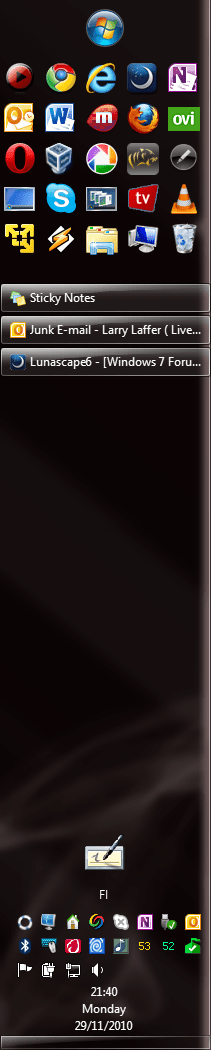
Trying to use a Windows built-in alternative always when possible, I have noticed I do not need any docks. Quick Launch toolbar works for me, with big icons it's clear, easy to use and uses almost no resources.

Kari

Taskbar_1.PNG
 

My Computer

Computer type
Laptop
Computer Manufacturer/Model Number
HP ENVY 17-1150eg
OS
Windows 10 Pro x64 EN-GB
CPU
1.6 GHz Intel Core i7-720QM Processor
Memory
6 GB
Graphics Card(s)
ATI Mobility Radeon HD 5850 Graphics
Sound Card
Beats sound system with integrated subwoofer
Monitor(s) Displays
17" laptop display, 22" LED and 32" Full HD TV through HDMI
Screen Resolution
1600*900 (1), 1920*1080 (2&3)
Hard Drives
Internal: 2 x 500 GB SATA Hard Disk Drive 7200 rpm
External: 2TB for backups, 3TB USB3 network drive for media
Cooling
As Envy runs a bit warm, I have it on a Cooler Master pad
Keyboard
Logitech diNovo Media Desktop Laser (bluetooth)
Mouse
Logitech Performance Mouse MX
Internet Speed
50/10 Mbps VDSL
Antivirus
Windows Defender 4.3.9431.0
Browser
Maxthon 3.5.2., IE11
Trying to use a Windows built-in alternative always when possible, I have noticed I do not need any docks. Quick Launch toolbar works for me, with big icons it's clear, easy to use and uses almost no resources.

Kari

View attachment 118858

I made a folder on the desktop with subfolders to categorize most of my utilities, then hid the folder inside Documents.

The "old new thing" of Windows insisting on being C: allows you to just copy it over the network to other machines using Vista or 7(or XP it the OS happens to be on C:,) if you install all the utils in the same spots. Most portable apps I just have under C:\Utils in a folder named for the app. Using it as a ToolBar on the taskbar is not smooth because that requires right click then mouse over each subfolder which folds open like a menu. Rather tedious for me. Using each subfolder as an icon for a dock is smooth though. I made a custom icon for each category.

On another board there's a dude with a super gigantic QuickLaunch. I mean this guy must have 8 rows of stuff. Sets the taskbar to auto-hide. It's freaky to see screen shots. But after long use he knows where every icon is and what it does. I hate things that disappear when I mouse over 'em so I couldn't deal with it. :)

Also I hope he has image restore because I'd hate to redo that mess!! :)
 
Last edited:

My Computer

Computer Manufacturer/Model Number
HP Media Center
OS
Windows 7 32 bit
CPU
AMD 5200+ dual core
Memory
2 GB
Graphics Card(s)
NVidia GeForce 6150SE 128 MB
Monitor(s) Displays
CRT
Screen Resolution
1280x1024
Hard Drives
500 GB Sata internal :

SIIG USB 3.0 docking stations w/WD Caviar Black 6 Gb/s drives
Keyboard
PS/2
Mouse
PS/2 Wheel Mouse
Other Info
SIIG USB 3.0 PCIexpress card.

My Computer

Computer type
PC/Desktop
Computer Manufacturer/Model Number
Dell XPS 420
OS
Windows 10, Home Clean Install
CPU
Intel Core2 processsor Q8200(2.33Ghz 1333FSB) Quad Core Tech
Motherboard
Dell
Memory
6 gb
Graphics Card(s)
ATI Radeon 256MB HD3650
Sound Card
Intergrated 7.1 Channel Audio
Monitor(s) Displays
Dell SP2009W 20"
Hard Drives
640 GB Serial ATA Hard drive
Cooling
Fan
Keyboard
Dell USB Keyboard
Mouse
Dell Premium Optical USB
Internet Speed
DSL 2.85
Soluto – Anti-Frustration Software
Fast bootup, Must try for XP & Vista users

Q: Do I have to be connected to the Internet to use Soluto Beta?
A: Yes. In order for Soluto Beta to work properly, you must be connected to the Internet. Every action executed by every user of the boot feature is gathered anonymously into the PCGenome database. In turn, Soluto Beta uses the information contained in the PCGenome to generate its advice about applications and services, its community statistics, and its recommendations. You must be connected to the Internet to retrieve the most up-to-date information from the PCGenome servers.
Uhhh,, No. I'm just sayin'.
 

My Computer

Computer Manufacturer/Model Number
Self Built
OS
Win 7 Ultimate 32bit
CPU
C2D E6600 2.4Ghz
Motherboard
Intel D965WH
Memory
4G Kingston KHX5400D2
Graphics Card(s)
EVGA GTX 570 HD SC (012-P3-1573-KR)
Sound Card
On-Board
Monitor(s) Displays
Samsung 226BW
Screen Resolution
1680 x 1050
Hard Drives
2 x 250 Seagate Barracuda
2 x 500 Seagate Barracuda (Raid1)
PSU
Corsair TX750W
Case
In-Win C589
Cooling
Stock Intel Cooling
SAConv : command line text subtitle converter

I found this free Windows command line text subtitle converter called SAConv.

Subtitles Converter | Download Subtitles Converter software for free at SourceForge.net

I tried it on Windows7 32 bit. It's good for batch conversions. I tried the .ass to .srt and it worked ok for me. I didn't write it. It's a SourceForge project. If you find any bugs you can report them on the SourceForge project page for the software.

There's not much in the way of documentation. It uses a .NET subtitle API library. But it doesn't specify what the .NET dependencies are. I guess if you have a need for batch subtitle conversion you may want to give it a try.

More than 3 or 4 subtitle files, loading in a Gui converter and doing SaveAs gets tedious. This could be convenient when you have a folder full of text subs to convert.

Running it in a command prompt with no arguments should display usage info.
 

My Computer

Computer Manufacturer/Model Number
HP Media Center
OS
Windows 7 32 bit
CPU
AMD 5200+ dual core
Memory
2 GB
Graphics Card(s)
NVidia GeForce 6150SE 128 MB
Monitor(s) Displays
CRT
Screen Resolution
1280x1024
Hard Drives
500 GB Sata internal :

SIIG USB 3.0 docking stations w/WD Caviar Black 6 Gb/s drives
Keyboard
PS/2
Mouse
PS/2 Wheel Mouse
Other Info
SIIG USB 3.0 PCIexpress card.
I found this program while surfing to internet...
ShellMenuView
Description
ShellMenuView is a small utility that display the list of static menu items that appeared in the context menu when you right-click a file/folder on Windows Explorer, and allows you to easily disable unwanted menu items.
System Requirements
ShellMenuView works properly on Windows 2000, Windows XP, Windows Server 2003/2008, and Windows 7/Vista. You can also use ShellMenuView on Windows 98 for viewing the menu items list, but the disable/enable feature won't work on this version of Windows. (The disabling feature is achieved by adding 'LegacyDisable' key to the desired menu item in the Registry, and this Registry key is not supported by Windows 98)
It's working on Windows 7 x32 bit.
 

My Computer

Computer type
PC/Desktop
Computer Manufacturer/Model Number
Custom Build
OS
Windows 10 Pro x64
CPU
Intel Core i5 4440 @Stock
Motherboard
Gigabyte Z97 D3H
Memory
4 x 4GB HyperX Fury DDR3
Graphics Card(s)
Gigabyte GTX 1050Ti O4G
Sound Card
Integrated
Monitor(s) Displays
Dell P2417H
Screen Resolution
1920 x 1080
Hard Drives
Samsung EVO 850 120GB / Toshiba DT01ACA050 1TB 7200prm 32MB
PSU
Riotoro Onyx 750W
Case
NZXT H500 Black-Red
Cooling
Stock CPU + NZXT 120mm + 2x120mm red fans
Keyboard
Modecom Volcano Lanparty
Mouse
Asus ROG Gladius / DeepCool E-Pad Plus
Internet Speed
DOCSIS 50/3 Mbit
Browser
Google Chrome
Other Info
Asus K55VJ(i5 3210M, GT635M / 2GB, 8GB DDR3, 500GB HDD)
Status
Not open for further replies.
Back
Top