RunInTrayMod 1.0
RunInTrayMod 1.0 I found an AutoIt3 utility to run a client app minimized to tray here:
RunInTray
I made several modifications and included a tool to generate a shortcut from the client app's shortcut. The shortcut generator optionally runs the client to capture the exact window title for inclusion in the shortcut.
I call my mod RunInTrayMod. The modified version with shortcut generator may be downloaded here:
Faves Downloads
Since AutoIt3 creates a Tray Icon by default, RunInTray substituted the icon from the client exe for it's own tray icon. Double clicking the tray icon toggled show/hide of the client app. The program depended on the Window Title for all window manipulation.
RunInTrayMod is set up to toggle window hide/show just by left clicking the Tray Icon.
RunInTrayMod gets the title in most cases from the executable process
name. Once the client window is recognized, a window handle is stored
for window manipulations. This allows the window caption to change
without breaking the connection to the window. Also windows are
closed rather than killed. Less chance of lost data.
Another modification is the short name to the client application is
associated with the tray icon as a ToolTip. For example if Notepad.exe
is the client, hovering the mouse on the tray icon should show "notepad"
in the ToolTip.
Note that if you have several Trayed shortcuts in StartUp Folder it may be advisable to space them out with a startup delay utility. A lot of window creation goes on at logon. A client app that minimized to tray fine when tested alone may have problems with window detection or hiding on startup. Spacing out the opens and using exact window titles should minimize(pun intended) errors.
Also not every app is compatible. Some will leave orphaned Taskbar icons after being hidden etc.. Some apps such as DVD Flick that have a splash screen may work if the exact window title is specified during shortcut creation. Otherwise what you get is toggle of the splash screen show/hide.

I recommend putting a shortcut to StartMinShortcut shortcut generator in your SendTo Folder. That way you may right click on any app shortcut and select it from SendTo rather than the tedious process of navigating with the FileOpenDialog.
edit: Update:
I didn't update the version number. But I added a call to EmptyWorkingSet() every minute in the idle loop. It seems to cut down the memory shown in Task Manager to less than a MB. Should be acceptable for running several apps Trayed.
edit2: The client app should be one that can run with no arguments. The shortcut generator can create a shortcut with executable path, starting folder and window title. But command line switches are not transferred from the shortcut. Also the source shortcut should be to an executable. Not a URL or batch file.
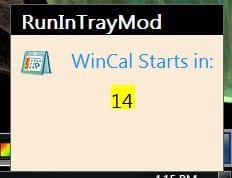
edit3: Updated to 1.3. Thanks to Melba23 on AutoIt3 forums "Toast" utility I added a Tray Delay Splash when the client app is started with a delay.
example splash is below










 ).
).


