FREE Great Programs for Windows 7

Status
Not open for further replies.
I don't see this one on the list :

Marxio File Checksum Verifier : Marxio File Checksum Verifier - portable tool to calculate many file checksum types

Great portable app to compare the checksums of 2 files. It can install/uninstall shell integration as well.
Suggested this one here:

Post #381 in this thread.

Sadly, it seems to have been ignored.

I was using it for a very long time, both on Vista and Win7 (RC [7100] and 7229), but I find that it occasionally tends to produce inaccurate checksums.
 
Last edited:

My Computers

System One System Two

  • Computer type
    Laptop
    Computer Manufacturer/Model Number
    Custom
    OS
    Windows 10 Professional 64-Bit
    CPU
    Intel Core i7 8700K
    Motherboard
    Asus Maximus X Code
    Memory
    G.Skill TridentZ RGB DDR4 4000 F4-4000C18D-16GTZR
    Graphics Card(s)
    Zotac GeForce GTX-1660 Ti AMP 6GB
    Sound Card
    ROG SupremeFX S1220 (Onboard)
    Monitor(s) Displays
    Dell UP2716D
    Screen Resolution
    2560x1440
    Hard Drives
    Samsung 980 Pro PCIe NVMe 500GB
    Samsung 970 Evo PCIe NVMe 250GB
    Samsung 860 Evo SATA III 2TB
    WD Black WD2003FZEX 2TB x 3
    ODD - GH24NSC0
    PSU
    Coolermaster V1000
    Case
    Corsair Obsidian 450D
    Cooling
    Corsair H115i - Corsair SP140 Red x 2
    Keyboard
    Logitech G213
    Mouse
    Logitech G102
    Internet Speed
    100 Mbps (Supposedly) - Asianet India FTTH
    Antivirus
    Avast Free!
    Browser
    Maxthon Cloud Browser 5.xx
    Other Info
    Asus FX-553VD (960 Evo, 860 Evo, 16GB)
    Samsung Galaxy C9 Pro
    Canon EOS 70D
  • Computer type
    Laptop
    System Manufacturer/Model Number
    Asus FX503VD
    OS
    Windows 10 Pro x64
    CPU
    Intel Core i7 7700HQ
    Memory
    2 x 8GB Samsung DDR4 2400
    Graphics Card(s)
    GTX 1050
    Screen Resolution
    1920 x 1080
    Hard Drives
    Samsung 960 Evo PCIe NVMe 250GB Boot
    Samsung 840 Pro Series 256 GB SSD (MZ-7PD256BW);
it is updated quite often, so if there were major problems, might have been fixed by now, I've had no problems with it so far.

let's hope it won't get ignored this time.
 

My Computer

OS
Windows 7 Ultimate x64 build 7600
I see its been updated to 1.5.1. Just installed it again, and seems to be working perfectly this time around.

Yup, let's hope it's added to the list. Great little program to have.
 

My Computers

System One System Two

  • Computer type
    Laptop
    Computer Manufacturer/Model Number
    Custom
    OS
    Windows 10 Professional 64-Bit
    CPU
    Intel Core i7 8700K
    Motherboard
    Asus Maximus X Code
    Memory
    G.Skill TridentZ RGB DDR4 4000 F4-4000C18D-16GTZR
    Graphics Card(s)
    Zotac GeForce GTX-1660 Ti AMP 6GB
    Sound Card
    ROG SupremeFX S1220 (Onboard)
    Monitor(s) Displays
    Dell UP2716D
    Screen Resolution
    2560x1440
    Hard Drives
    Samsung 980 Pro PCIe NVMe 500GB
    Samsung 970 Evo PCIe NVMe 250GB
    Samsung 860 Evo SATA III 2TB
    WD Black WD2003FZEX 2TB x 3
    ODD - GH24NSC0
    PSU
    Coolermaster V1000
    Case
    Corsair Obsidian 450D
    Cooling
    Corsair H115i - Corsair SP140 Red x 2
    Keyboard
    Logitech G213
    Mouse
    Logitech G102
    Internet Speed
    100 Mbps (Supposedly) - Asianet India FTTH
    Antivirus
    Avast Free!
    Browser
    Maxthon Cloud Browser 5.xx
    Other Info
    Asus FX-553VD (960 Evo, 860 Evo, 16GB)
    Samsung Galaxy C9 Pro
    Canon EOS 70D
  • Computer type
    Laptop
    System Manufacturer/Model Number
    Asus FX503VD
    OS
    Windows 10 Pro x64
    CPU
    Intel Core i7 7700HQ
    Memory
    2 x 8GB Samsung DDR4 2400
    Graphics Card(s)
    GTX 1050
    Screen Resolution
    1920 x 1080
    Hard Drives
    Samsung 960 Evo PCIe NVMe 250GB Boot
    Samsung 840 Pro Series 256 GB SSD (MZ-7PD256BW);
Added. ;)
 

My Computer

Computer type
PC/Desktop
Computer Manufacturer/Model Number
Self built custom
OS
64-bit Windows 11 Pro for Workstations
CPU
Intel i7-8700K OC'd to 5 GHz
Motherboard
ASUS ROG Maximus XI Formula Z390
Memory
64 GB (4x16GB) G.SKILL TridentZ RGB DDR4 3600 MHz
Graphics Card(s)
ASUS ROG-STRIX-GTX1080TI-O11G-GAMING
Sound Card
Integrated
Monitor(s) Displays
2 x Samsung Odyssey G7 27"
Screen Resolution
2560x1440
Hard Drives
1TB Samsung 990 PRO M.2,
4TB Samsung 990 PRO PRO M.2,
TerraMaster F8 SSD Plus NAS
PSU
Seasonic Prime Titanium 850W
Case
Thermaltake Core P3
Cooling
Corsair Hydro H115i
Keyboard
Logitech wireless K800
Mouse
Logitech MX Master 4
Internet Speed
2 Gb/s Download and 100 Mb/s Upload
Antivirus
Malwarebyte Anti-Malware Premium
Browser
Google Chrome
Other Info
Logitech Z625 speaker system,
Logitech BRIO 4K Pro webcam,
HP Color LaserJet Pro MFP M477fdn,
APC SMART-UPS RT 1000 XL - SURT1000XLI,
Galaxy S23 Plus phone
Thx :D

It really is worth the while.
 

My Computers

System One System Two

  • Computer type
    Laptop
    Computer Manufacturer/Model Number
    Custom
    OS
    Windows 10 Professional 64-Bit
    CPU
    Intel Core i7 8700K
    Motherboard
    Asus Maximus X Code
    Memory
    G.Skill TridentZ RGB DDR4 4000 F4-4000C18D-16GTZR
    Graphics Card(s)
    Zotac GeForce GTX-1660 Ti AMP 6GB
    Sound Card
    ROG SupremeFX S1220 (Onboard)
    Monitor(s) Displays
    Dell UP2716D
    Screen Resolution
    2560x1440
    Hard Drives
    Samsung 980 Pro PCIe NVMe 500GB
    Samsung 970 Evo PCIe NVMe 250GB
    Samsung 860 Evo SATA III 2TB
    WD Black WD2003FZEX 2TB x 3
    ODD - GH24NSC0
    PSU
    Coolermaster V1000
    Case
    Corsair Obsidian 450D
    Cooling
    Corsair H115i - Corsair SP140 Red x 2
    Keyboard
    Logitech G213
    Mouse
    Logitech G102
    Internet Speed
    100 Mbps (Supposedly) - Asianet India FTTH
    Antivirus
    Avast Free!
    Browser
    Maxthon Cloud Browser 5.xx
    Other Info
    Asus FX-553VD (960 Evo, 860 Evo, 16GB)
    Samsung Galaxy C9 Pro
    Canon EOS 70D
  • Computer type
    Laptop
    System Manufacturer/Model Number
    Asus FX503VD
    OS
    Windows 10 Pro x64
    CPU
    Intel Core i7 7700HQ
    Memory
    2 x 8GB Samsung DDR4 2400
    Graphics Card(s)
    GTX 1050
    Screen Resolution
    1920 x 1080
    Hard Drives
    Samsung 960 Evo PCIe NVMe 250GB Boot
    Samsung 840 Pro Series 256 GB SSD (MZ-7PD256BW);
Only of use to Excel users, but I can attest that it works perfectly regardless of version, and in Windows 7 (32-bit or 64-bit).
Its the best excel addon I have ever seen or used,

ASAP-Utilities
 

My Computers

System One System Two

  • Computer type
    Laptop
    Computer Manufacturer/Model Number
    Custom
    OS
    Windows 10 Professional 64-Bit
    CPU
    Intel Core i7 8700K
    Motherboard
    Asus Maximus X Code
    Memory
    G.Skill TridentZ RGB DDR4 4000 F4-4000C18D-16GTZR
    Graphics Card(s)
    Zotac GeForce GTX-1660 Ti AMP 6GB
    Sound Card
    ROG SupremeFX S1220 (Onboard)
    Monitor(s) Displays
    Dell UP2716D
    Screen Resolution
    2560x1440
    Hard Drives
    Samsung 980 Pro PCIe NVMe 500GB
    Samsung 970 Evo PCIe NVMe 250GB
    Samsung 860 Evo SATA III 2TB
    WD Black WD2003FZEX 2TB x 3
    ODD - GH24NSC0
    PSU
    Coolermaster V1000
    Case
    Corsair Obsidian 450D
    Cooling
    Corsair H115i - Corsair SP140 Red x 2
    Keyboard
    Logitech G213
    Mouse
    Logitech G102
    Internet Speed
    100 Mbps (Supposedly) - Asianet India FTTH
    Antivirus
    Avast Free!
    Browser
    Maxthon Cloud Browser 5.xx
    Other Info
    Asus FX-553VD (960 Evo, 860 Evo, 16GB)
    Samsung Galaxy C9 Pro
    Canon EOS 70D
  • Computer type
    Laptop
    System Manufacturer/Model Number
    Asus FX503VD
    OS
    Windows 10 Pro x64
    CPU
    Intel Core i7 7700HQ
    Memory
    2 x 8GB Samsung DDR4 2400
    Graphics Card(s)
    GTX 1050
    Screen Resolution
    1920 x 1080
    Hard Drives
    Samsung 960 Evo PCIe NVMe 250GB Boot
    Samsung 840 Pro Series 256 GB SSD (MZ-7PD256BW);
I prefer 7-Zip as well. :)

nope i prefer Izarc... when using 7-zip i just felt personally that it felt inferior

ohwell .. :)
 

My Computer

OS
Windows 7 64-bit
CPU
Intel Quad Q8800
Memory
4gb
Graphics Card(s)
GeForce
Hard Drives
800gb
Cooling
3 x Ultra silent 100mm + fan controller
Internet Speed
Sky Max

My Computer

Computer Manufacturer/Model Number
self built
OS
Windows 7 Professional 64-bit
CPU
Intel E8400 3GHz
Motherboard
Intel DX48BT2
Memory
Kingston PC3-10700H 4Gb
Graphics Card(s)
XFX Radeon HD 5850 BlackEd.
Sound Card
Asus Xonar DG
Monitor(s) Displays
2x Samsung SM-T220HD 22"
Screen Resolution
1680x1050 on two monitors
Hard Drives
OCZ Vertex 2 120gb 3.5" (OS)
Seagate Momentus XT 500gb
Samsung F3 1Tb (games)
2x Samsung F1 1Tb
PSU
Thermaltake ToughPower 850w
Case
Thermaltake Armor
Cooling
Scythe Mugen II
Keyboard
Microsoft Comfort Curve USB
Mouse
Razer Diamondback 3G
Internet Speed
8128/443
PAF 5.2 - Personal Ancestral File a great free genealogy program available from FamilySearch.org - Family History and Genealogy Records works brilliantly with Windows 7 even with text and icons set at 125% or greater scale (something which causes other programs to lose icons)

KompoZer, in my view one of the best free web page editors works just fine in the 32 bit version of Win7. It's available from KompoZer - Easy web authoring
 
Last edited by a moderator:

My Computer

Computer Manufacturer/Model Number
Dell Inspiron 1720
OS
Vista Ultimate / Win 7 rc1
Hello all!

I just found this forum yesterday, late at night. It's good to have this, for most of us (i think) will run in to some troubles at some point! :)

Now, i downloaded the newest version of Daemon Tools Lite. It installed, but when i booted Windows the next time, it told me that this program is not compatible. I tried to use it anyway and then it told me that "You need local administrator priviledges to run for the first time". I am an administrator or at least so it says under my user name in User Accounts window. I haven't made any other accounts.

I'm confused on how to get this working? :confused:

EDIT: Just found a way! I was looking at another thread and there was this thing called "Run as administrator". Then i was able to use Daemon Tools for the first time.
 

My Computer

Computer type
PC/Desktop
OS
Windows 7 Home Premium 64-bit
CPU
Intel Core i7 920
Motherboard
Asus P6T Deluxe V2
Memory
DDR3 1333Mhz 6gb
Graphics Card(s)
Nvidia MSI 560Ti Twin Frozr II
Sound Card
Integrated & ESI ESP 1010e
Monitor(s) Displays
BenQ E2420HD 24"
Screen Resolution
1980x1080
Hard Drives
OCZ Agility 3 120gb
+ 3 HD's
PSU
Corsair AX850 Gold
Case
Sorsair Carbide Series 500r
Cooling
Stock
Keyboard
Razer Tarantula
Mouse
Razer Lachesis
Internet Speed
100mb
Antivirus
Avast
Browser
Chrome
Hello all!

I just found this forum yesterday, late at night. It's good to have this, for most of us (i think) will run in to some troubles at some point! :)

Now, i downloaded the newest version of Daemon Tools Lite. It installed, but when i booted Windows the next time, it told me that this program is not compatible. I tried to use it anyway and then it told me that "You need local administrator priviledges to run for the first time". I am an administrator or at least so it says under my user name in User Accounts window. I haven't made any other accounts.

I'm confused on how to get this working? :confused:

EDIT: Just found a way! I was looking at another thread and there was this thing called "Run as administrator". Then i was able to use Daemon Tools for the first time.

I would suggest not using any programs not compatible with win7, especially running them as admins. The reason for this page is to help people find safe compatible programs for win7. Take it from me, using programs not compatible or safe with windows 7 can be a nightmare. All of us have programs we want to use but there haven't been releases for windows 7 compatibility and though it may suck, its better to live with it then find a backdoor to use it. Just my thoughts, good luck with it and Welcome to Windows Seven Forums :D

-stang
 

My Computer

Computer Manufacturer/Model Number
Dell XPS M1530
OS
Windows 7 Build 7229 x86
CPU
Intel Core 2 Duo T7250 (2.0GHz/800Mhz FSB 2M L2 Cache)
Memory
4.00 GB DDR2, 667MHz 2 Dimm
Graphics Card(s)
128MB NVIDIA GeForce 8400M G
Sound Card
SigmaTel High Definition Audio
Monitor(s) Displays
15.4 inch Wide Screen WSXGA+ TrueLife; 31.5'" HDTV
Screen Resolution
1680 X 1050
Hard Drives
200G 7200RPM SATA Hard Drive Free Fall Sensor
Keyboard
Logitech Cordless Desktop MX5500 Revolution Bluetooth
Mouse
Logitech Cordless Desktop MX5500 Revolution Bluetooth
Internet Speed
100 mbps
Hello all!

I just found this forum yesterday, late at night. It's good to have this, for most of us (i think) will run in to some troubles at some point! :)

Now, i downloaded the newest version of Daemon Tools Lite. It installed, but when i booted Windows the next time, it told me that this program is not compatible. I tried to use it anyway and then it told me that "You need local administrator priviledges to run for the first time". I am an administrator or at least so it says under my user name in User Accounts window. I haven't made any other accounts.

I'm confused on how to get this working? :confused:

EDIT: Just found a way! I was looking at another thread and there was this thing called "Run as administrator". Then i was able to use Daemon Tools for the first time.

Hello Nuu, and welcome to SevenForums :party::party:

There were issues with older versions of this software in the early days of Windows 7 (pre-Beta), but this is apparently fixed with the latest driver for use with the program. If you do a search of the forums or have a look on the Daemon Tools website you should be able to ensure you have a fully compatible version :)
 

My Computers

System One System Two

  • Computer type
    PC/Desktop
    Computer Manufacturer/Model Number
    ChillBlast - Custom to my design
    OS
    Windows 11 Pro x64 [Latest Release and Release Preview]
    CPU
    Ryzen 9 5950X, 3.8 - 5.2 MHz
    Motherboard
    Asus Prime X570-Pro
    Memory
    64GB [2 x 32GB] DDR4 3200MHz
    Graphics Card(s)
    4GB NVIDIA GEFORCE GTX 1650 Ti
    Sound Card
    On-board SPDIF to 5.1 System + HDMI [5.1 system]
    Monitor(s) Displays
    32" UHD 32 Bit HDR Monitor + 43" UHD 4K 32Bit HDR TV
    Screen Resolution
    2 x 3840 x 2160 @60Hz
    Hard Drives
    1TB M2 SSD OS, 500GB Fast Access SSD, 2 x 8TB Data + Various Externals from 1TB to 4TB, 10TB NAS
    PSU
    NZXT C750 80 PLUS Gold 750W Modular PSU
    Case
    Workstation Case [Matt Black]
    Cooling
    NZXT Kraken X63 280mm CPU Cooler +2x Quiet Case fans
    Keyboard
    Logitech Wireless MX Keys & K400 + others
    Mouse
    Logitech Wireless MX Master 3S
    Internet Speed
    920 MB Down 50 MB Up
    Antivirus
    BitDefender Total Security Pro
    Browser
    Chrome (always run latest Non-Beta)
    Other Info
    Also run ...
    Laptop - Quad 8GB - Windows 10 Pro x64
    Nexus 7 Android tablet x2
    Samsung 10.2" tablet
    Blackview TAB 8 4G Android Tablet c/w Keyboard
    Wacom Intuos Pro Medium Pen Pad
    Wacom Intuos Pro Small Pen Pad
    Wacom Expresskeys Remote
    Loopdeck+ Graphics Controller
    Shuttle Pro v2 Control
  • Computer type
    Laptop
    System Manufacturer/Model Number
    Dell XPS 17 10750H
    OS
    Windows 11 Pro x64 Latest RP
    CPU
    Intel I7 10750H 5.0GHz
    Motherboard
    Dell XPS
    Memory
    32GB [2x16GB] DDR4 2933 MHz
    Graphics Card(s)
    nVidia GTX1650Ti 4 GB GDDR6
    Sound Card
    Stock [Realtek] 4 Speaker
    Monitor(s) Displays
    17" IPS UHD+ Infinity Edge Touchscreen
    Screen Resolution
    3840 x 2400
    Hard Drives
    2TB M2 NVMe, 4TB External + various 500GB & 1TB External NVMe (also have access to spinner HDD from
    PSU
    Stock
    Case
    Stock XPS Aluminium & Carbon Fibre
    Cooling
    Stock - Active Fan Control
    Keyboard
    Backlit + Various Logitech
    Mouse
    Stock Track Pad + Logitech MX Trackball
    Internet Speed
    72 MB Down 18MB Up
    Browser
    Chrome
    Other Info
    Also run ...
    Laptop - Quad 8GB - Windows 10 Pro x64
    Nexus 7 Android tablet x2
    10.2" tablet
    Sony Z3 Android Smartphone
    Wacom Intuos Pro Medium Pen Pad
    Wacom Intuos Pro Small Pen Pad
    Wacom Expresskeys Remote
    Loopdeck+ Graphics Controller
    Shuttle Pro v2 Control Pad
    10TB NAS
Not sure if this has been mentioned before but looks like it may be of use to some ...

IObit Launches Game Booster to Accelerate PC Games for Free

Direct developer Link ...

Game Booster | Better Play Experience | Game Accelerator

Shawn, Not sure if this is better here or in gaming or news Feel free to tidy up and move as you see fit :)

Allright, a problem i have been searching up on has now been resolved it seems.
IObit Game-booster had some false flags directed towards it when it comes to
virus protection and hazardous warnings. I found out that this was related to a
earlier version and has now recently been solved by the GameBooster dev.

I really like the idea behind the software and are very happy
to report this.
(Link to the post i base this information on)
 

My Computer

OS
vista, windows 7
CPU
AMD Phenom 9850
Motherboard
ASUS M3N-HT Deluxe
Memory
Kingston ddr2 2x2gb
Graphics Card(s)
Nvidia Gforce 8600gt
Sound Card
M-audio Audiophile USB
Monitor(s) Displays
BenQ 22"
Screen Resolution
1680x1050
Hard Drives
2x750gb samsung
1x350gb ^^
Case
Antech Coolmaster
Keyboard
Microsoft Sidewinder x4
Mouse
Logitech Mx620 / Oscar X7 gaming mouse.
Internet Speed
10mb fiber
Selector 1.1

Selector 1.1 is one of my Windows Hotkey Utilities. I've tried it on Windows 7 32 bit build 7077, Vista64 Home Premium SP1 and XP Pro SP2.

The default Hotkey is Shift-NumPadDiv but you can change it via the Tray Icon Menu.

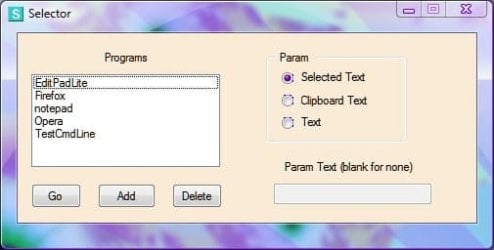
The main application of the utility is to launch a browser with selected text or clipboard text as command line parameter. Instead of installing a plugin in each of your browsers to open links or the current page in another browser, just drag & drop shortcuts to all your browsers onto the Selector ListBox.

Or you can add individual items via the popup window Add button.

Example usages:

To open the current page in another browser, click the address bar to highlight the url, hit the Selector hotkey, double click the browser in the list.

To open a link in another browser, right click the link, use "copy link location" or equivalent command to put the url in the clipboard, hit the hotkey, select "Clipboard Text" Radio Button, double click the browser in the list.

You can add any program that would benefit by having selected text or clipboard text as a command line parameter. You can also click the "Text" Radio Button and leave the input blank to launch with no command line params.

Add any program or shortcut and use as a quicky launcher.

In the clipboard handling, I try to get the current clipboard text and save it before copying selected text, then I put the original clip text back in the clipboard. This is to attempt to avoid interfering with your work if you are using the clipboard for editing text or whatnot. If images or other non text data is in the clipboard, it's not preserved.

Selector is free for you to use at your own risk. It may be downloaded from this page:
Hotkeys

edit: btw I should note that it requires the MS Scripting.Dictionary be on the machine. I believe if you have .NET 2.0 or later it's already there. In any case I'm sure you can download from MS site if you need to.

Here's a screen shot.
 

Attachments

  • Selector.jpg
    Selector.jpg
    17.9 KB · Views: 16

My Computer

Computer Manufacturer/Model Number
HP Media Center
OS
Windows 7 32 bit
CPU
AMD 5200+ dual core
Memory
2 GB
Graphics Card(s)
NVidia GeForce 6150SE 128 MB
Monitor(s) Displays
CRT
Screen Resolution
1280x1024
Hard Drives
500 GB Sata internal :

SIIG USB 3.0 docking stations w/WD Caviar Black 6 Gb/s drives
Keyboard
PS/2
Mouse
PS/2 Wheel Mouse
Other Info
SIIG USB 3.0 PCIexpress card.
WSCC - KLS SOFT - WSCC - Windows System Control Center

WSCC is a free, portable program that allows you to install, update, execute and organize the utilities from various system utility suites. WSCC is only an interface, you need to download and install the utilities separately. Alternatively, WSCC can use the http protocol to download and run the programs.

The included Update Manager can check for newer versions of the utilities already installed and can download and install the missing items.

The setup packages are downloaded from the author's website!

WSCC - Console

WSCC uses the included WSCC Console to execute command line applications.

WSCC is portable, installation is not required. Extract the content of the downloaded zip archive to any directory on your computer.

This edition of WSCC supports the following utility suites:

* Windows Sysinternals Suite (including support for Sysinternals Live service)
* NirSoft Utilities

I used Nir Sofer's ZipInstaller to 'install' WSCC to the Program Files tree, and now I use WSCC to load all my Sysinternals and NirSoft utilities.
 

My Computers

System One System Two

  • Computer type
    PC/Desktop
    Computer Manufacturer/Model Number
    The Beast Model A (homebrew)
    OS
    Windows 11 21H2 Current build
    CPU
    AMD Ryzen 9 3950X
    Motherboard
    MSI MEG X570 GODLIKE
    Memory
    4 * 32 GB - Corsair Vengeance 3600 MHz
    Graphics Card(s)
    EVGA GeForce RTX 3080 Ti XC3 ULTRA GAMING (12G-P5-3955-KR)
    Sound Card
    Realtek® ALC1220 Codec
    Monitor(s) Displays
    2x Eve Spectrum ES07D03 4K Gaming Monitor (Matte) | Eve Spec
    Screen Resolution
    3x 3840 x 2160
    Hard Drives
    3x Samsung 980 Pro NVMe PCIe 4 M.2 2 TB SSD (MZ-V8P2T0B/AM) } 3x Sabrent Rocket NVMe 4.0 1 TB SSD
    PSU
    PC Power & Cooling’s Silencer Series 1050 Watt, 80 Plus Plat
    Case
    Fractal Design Define 7 XL Dark ATX Full Tower Case
    Cooling
    SteelSeries Apex Pro Wired Gaming Keyboard
    Keyboard
    SteelSeries Apex Pro
    Mouse
    Logitech MX Master 3S | MX Master 3 for business
    Internet Speed
    AT&T LightSpeed Gigabit Duplex Ftth
    Antivirus
    Windows Defender + MB 3
    Browser
    Nightly (default) + Firefox (stable),Chrome, Edge
  • Computer type
    PC/Desktop
    System Manufacturer/Model Number
    Dell Latitude E5470
    OS
    ChromeOS Flex Dev Channel (current)
    CPU
    Intel(R) Core(TM) i5-6300U CPU @ 2.40GHz, 2501 Mhz, 2 Core(s), 4 Logical Processor(s)
    Motherboard
    Dell
    Memory
    16 GB
    Graphics Card(s)
    Intel(R) HD Graphics 520
    Sound Card
    Intel(R) HD Graphics 520 + RealTek Audio
    Monitor(s) Displays
    Dell laptop display 15"
    Screen Resolution
    1920 * 1080
    Hard Drives
    Toshiba 128GB M.2 22300 drive
    INTEL Cherryville 520 Series SSDSC2CW180A 180 GB SATA III SSD
    PSU
    Dell
    Case
    Dell
    Cooling
    Dell
    Keyboard
    Dell
    Mouse
    Logitech MX Master 3S (shared w. Sys 1) | Dell TouchPad
    Internet Speed
    AT&T LightSpeed Gigabit Duplex Ftth
Selector and WSCC added. Thank you. :)
 

My Computer

Computer type
PC/Desktop
Computer Manufacturer/Model Number
Self built custom
OS
64-bit Windows 11 Pro for Workstations
CPU
Intel i7-8700K OC'd to 5 GHz
Motherboard
ASUS ROG Maximus XI Formula Z390
Memory
64 GB (4x16GB) G.SKILL TridentZ RGB DDR4 3600 MHz
Graphics Card(s)
ASUS ROG-STRIX-GTX1080TI-O11G-GAMING
Sound Card
Integrated
Monitor(s) Displays
2 x Samsung Odyssey G7 27"
Screen Resolution
2560x1440
Hard Drives
1TB Samsung 990 PRO M.2,
4TB Samsung 990 PRO PRO M.2,
TerraMaster F8 SSD Plus NAS
PSU
Seasonic Prime Titanium 850W
Case
Thermaltake Core P3
Cooling
Corsair Hydro H115i
Keyboard
Logitech wireless K800
Mouse
Logitech MX Master 4
Internet Speed
2 Gb/s Download and 100 Mb/s Upload
Antivirus
Malwarebyte Anti-Malware Premium
Browser
Google Chrome
Other Info
Logitech Z625 speaker system,
Logitech BRIO 4K Pro webcam,
HP Color LaserJet Pro MFP M477fdn,
APC SMART-UPS RT 1000 XL - SURT1000XLI,
Galaxy S23 Plus phone
Here are some from software items that I use with no problems on my Win 7 RTM x64 machines:

Fast Stone Resizer: image resizer, just like the name says. FastStone Image Viewer, Screen Capture, Photo Resizer ...

FxFloorboard: Editor application for Boss GT-10 guitar multi-effects unit: GTx FxFloorBoard - Home Page

Handbrake: Video file transcoder and format converter. HandBrake

Nhancer: Advanced Control Panel and Profile Editor for NVIDIA cards: nHancer - Advanced Control Panel for nVidia Cards

Vuze: Bittorrent client: Vuze: The most powerful bittorrent app in the world.
 

My Computer

Computer Manufacturer/Model Number
Self-Built
OS
Win 7 RTM 7600 Ultimate 64-bit
CPU
E8500 SLAPK Q814A161
Motherboard
Gigabyte EP35-DS3R
Memory
4GB Gskill PI PC2-8500CL5D
Graphics Card(s)
XFX 8800GTS Extreme 640MB
Sound Card
Creative X-Fi XtremeGamer
Monitor(s) Displays
Samsung 213T
Screen Resolution
1600x1200
Hard Drives
1 x Western Digital SATA 500GB
1 x Maxtor SATA 320GB
Case
Antec Nine Hundred
Cooling
CPU: Xigmatek HDT-S1283
Keyboard
Saitek Eclipse
Mouse
Trackman Marble
Internet Speed
6 Mbps down cable
I don't see Winamp on the list, have they approved it for Win7 yet?
 

My Computer

Computer Manufacturer/Model Number
Zen Productions
OS
Windows 7 Ultimate x64
CPU
Intel i7-860
Motherboard
Gigabyte GA-P55A-UD4P
Memory
Corsair Dominator 1600Mhz, 8-8-8-24 1.65v 2x2GB
Graphics Card(s)
ATI Radeon 5770 HD
Sound Card
Intel High Definition Sound
Monitor(s) Displays
Samsung P2570HD
Screen Resolution
1920x1080
Hard Drives
Western Digital Caviar Black 500gb
PSU
Corsair CMPSU-750HX 750W
Case
Antec p183
Cooling
Corsair H50 Water Cooler
Keyboard
Logitech G110
Mouse
Logitech MX Revolution
Internet Speed
768 mb/s
Is Hulu Desktop in here yet? Except for some delay in getting new episodes of the Daily Show et cetera, I am loving Hulu Desktop.
 
Status
Not open for further replies.
Back
Top