Free Space in C: drive is Changing..

sam66

New member
Local time
8:34 AM
Messages
2
It seems like every day recently my leftover free space changes, sometimes it increasing 85 GB sometimes decreasing( 65 GM). I havent downloaded many files or deleted many files recently, and it fluxes about 20 GB. are there reasons why my comp would do this?

Also,when I go to desk management to shrink my c: deriver .... it shows that i just have 7 MB to shrink . My C drive Capacity is 160 GM ..I have 80 GM free on it .!!...so what is the problem

Regards
 

My Computer My Computer

At a glance

Windows 7intel(R) core 2 CPU1 GB
Computer Manufacturer/Model Number
HP
OS
Windows 7
CPU
intel(R) core 2 CPU
Memory
1 GB
Hard Drives
160 GB
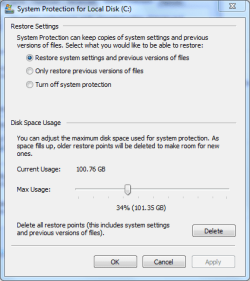
Hey man, welcome to the forums! First off, I'd suggest it might be System Restore hogging all your space. What you do is go to START, right click COMPUTER, go to PROPERTIES, then in the left corner, SYSTEM PROTECTION, click Local Disk C: System, then click CONFIGURE. It should look like the attachment. I'll use mine for example. When the system restore uses all its allocated space, it deletes most of it, for some reason to make room for more restore points. Then thats when your memory will be larger. Lemme know how it goes, and I'll see about the rest.
EDIT: Windows seven should use about 12GB btw, so thats where it goes, the more you update, the bigger that gets. Empty your recycle bin, too. Mine collects up to 30GB in a week.
 

Attachments

  • Capturehelp.PNG
    Capturehelp.PNG
    14.1 KB · Views: 23

My Computer My Computer

At a glance

64 bit Windows seven home premium2.7 GhZ AMD Athlon x2 x644GBNVIDIA GeForce GT 220 1GB
Computer Manufacturer/Model Number
Custom Built
OS
64 bit Windows seven home premium
CPU
2.7 GhZ AMD Athlon x2 x64
Motherboard
Gigabyte M61PME-S2P
Memory
4GB
Graphics Card(s)
NVIDIA GeForce GT 220 1GB
Sound Card
Internal Realtek high quality
Monitor(s) Displays
1 LCD ViewSonic Model VS10047
Screen Resolution
1280 x 1024
Hard Drives
298 GB SATA (Local)
18.6 GB IDE (Extra)
PSU
Blue Sonic 400W Peak Power
Case
Blue Sonic
Cooling
PSU, processor, graphics card, back panel, side panel.
Keyboard
Logitech wireless PS3 keyboard with trackpad
Mouse
DELL USB four button laser mouse
Internet Speed
Wifi (1Mbps), Wired (10Mbps)
Other Info
WACOM Fun tablet and mouse, Logitech dual action gamepad, Belkin N52TE game controller.
In addition to the explanation that was given above, you can only shrink your partition by about 50% - regardless whether the space is free or not. Reason is the MFT (Master File Table) that sits about in the middle of the partition and cannot be moved (at least not with the windows facilities). Here is some more explanations about this phenomenon and what you can do about it.
 

My Computer My Computer

At a glance

Vista, Windows7, Mint Mate, Zorin, Windows 8from 1.6GHz Duo to i7
Computer Manufacturer/Model Number
HP, Dell, Gateway, Toshiba - 4 laptops and 2 desktops
OS
Vista, Windows7, Mint Mate, Zorin, Windows 8
CPU
from 1.6GHz Duo to i7
Monitor(s) Displays
2x HP w2207
Hard Drives
5x HDD, 7x SSD, 12x Externals
Keyboard
with trackball - no mices
Mouse
Trackball mice
Internet Speed
DSL 6000

My Computer My Computer

At a glance

Windows 7 Ultimate 64-bitAMD Athlon II X2 M3004GBAMD M880G with ATI Mobility Radeon HD 4200
Computer Manufacturer/Model Number
Gateway NV5378u
OS
Windows 7 Ultimate 64-bit
CPU
AMD Athlon II X2 M300
Motherboard
Gateway SJV50TR 0100
Memory
4GB
Graphics Card(s)
AMD M880G with ATI Mobility Radeon HD 4200
Sound Card
Conexant High Definition Audio
Monitor(s) Displays
Generic PnP Monitor
Screen Resolution
15.6" 16:9 HD LED LCD
Hard Drives
Hitachi HTS545050B9A300 Disk Device 500GB

My Computer My Computer

At a glance

Windows 7intel(R) core 2 CPU1 GB
Computer Manufacturer/Model Number
HP
OS
Windows 7
CPU
intel(R) core 2 CPU
Memory
1 GB
Hard Drives
160 GB
Is it ok to turn off the system protection on the C partition ? Or it's safer to allocate 5GB only,but at least it's on ?
 

My Computer My Computer

At a glance

XP SP3 / Windows 7 x64Intel Core 2 Duo E72004GBDDR2 CorsairGeforce 9600GT 512MB
OS
XP SP3 / Windows 7 x64
CPU
Intel Core 2 Duo E7200
Motherboard
GA-P35-DS3L (Rev. 2.0 ) F9
Memory
4GBDDR2 Corsair
Graphics Card(s)
Geforce 9600GT 512MB
Sound Card
Audigy SE moded to X-FI Extreme Audio
Monitor(s) Displays
22 inch Horizon
Hard Drives
Western Digital 500GB and soon a Western Digital 1TB Black Caviar
Case
Antec 300
Is it ok to turn off the system protection on the C partition ? Or it's safer to allocate 5GB only,but at least it's on ?

If you turn it off, you should do frequent imaging. Else you have no way to bail yourself out in case of an infection or a crash. And 5GB for shadowstorage are not a lot. Each shadow is between 250MB and 1GB (more likely 1GB). If you install a lot (programs or updates), that can be full in 1 day.
 

My Computer My Computer

At a glance

Vista, Windows7, Mint Mate, Zorin, Windows 8from 1.6GHz Duo to i7
Computer Manufacturer/Model Number
HP, Dell, Gateway, Toshiba - 4 laptops and 2 desktops
OS
Vista, Windows7, Mint Mate, Zorin, Windows 8
CPU
from 1.6GHz Duo to i7
Monitor(s) Displays
2x HP w2207
Hard Drives
5x HDD, 7x SSD, 12x Externals
Keyboard
with trackball - no mices
Mouse
Trackball mice
Internet Speed
DSL 6000
Thanks,well then i'll disable the system protection ( system restore ) on the other 2 partitions and i'll live it ON on my C partition.
 

My Computer My Computer

At a glance

XP SP3 / Windows 7 x64Intel Core 2 Duo E72004GBDDR2 CorsairGeforce 9600GT 512MB
OS
XP SP3 / Windows 7 x64
CPU
Intel Core 2 Duo E7200
Motherboard
GA-P35-DS3L (Rev. 2.0 ) F9
Memory
4GBDDR2 Corsair
Graphics Card(s)
Geforce 9600GT 512MB
Sound Card
Audigy SE moded to X-FI Extreme Audio
Monitor(s) Displays
22 inch Horizon
Hard Drives
Western Digital 500GB and soon a Western Digital 1TB Black Caviar
Case
Antec 300
Thanks,well then i'll disable the system protection ( system restore ) on the other 2 partitions and i'll live it ON on my C partition.

That sounds reasonable. I would still do backups from time to time of the other 2 partitions.
 

My Computer My Computer

At a glance

Vista, Windows7, Mint Mate, Zorin, Windows 8from 1.6GHz Duo to i7
Computer Manufacturer/Model Number
HP, Dell, Gateway, Toshiba - 4 laptops and 2 desktops
OS
Vista, Windows7, Mint Mate, Zorin, Windows 8
CPU
from 1.6GHz Duo to i7
Monitor(s) Displays
2x HP w2207
Hard Drives
5x HDD, 7x SSD, 12x Externals
Keyboard
with trackball - no mices
Mouse
Trackball mice
Internet Speed
DSL 6000
Back
Top