
Hello to everyone who might see this.
I had a problem when I decided to remove Ubuntu from a dual-boot system. When I removed GRUB and deleted the blank named partitions that were in Disk Management, the equivalent space of those two was shown as 'Free Space'. I proceeded to delete it, but the option was greyed out. I read in another thread that making a new volume out of this free space and then deleting that may resolve the issue, but it just won't happen.
What I did was make a Simple Volume from the free space and then deleting it. This made it go back to free space, but still the 'Delete Volume' option was greyed out.
Also, I tried slow formatting the Simple Volume and then deleting it to see if it helped, but that too isn't any help.
Another thing is that when I decided to shrink a different volume to add that space on to another partition I had, even that free space is undeletable.
I am not at all used to work with hard drives and partitions, so can some one please steer me in the right direction?
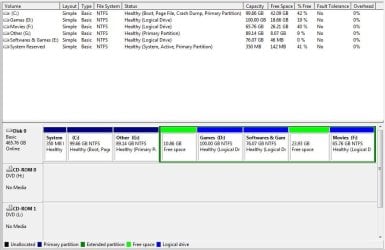
By the way, I attached a snap of my Disk Management window along with this message. The 10.86 GB free space is the one made after deleting the Ubuntu volumes, and the 23.93 GB one was created after I shrunk a separate volume, and as I typed before, both of these are undeletable.
I'll appreciate any help you can give. Thank you!
I had a problem when I decided to remove Ubuntu from a dual-boot system. When I removed GRUB and deleted the blank named partitions that were in Disk Management, the equivalent space of those two was shown as 'Free Space'. I proceeded to delete it, but the option was greyed out. I read in another thread that making a new volume out of this free space and then deleting that may resolve the issue, but it just won't happen.
What I did was make a Simple Volume from the free space and then deleting it. This made it go back to free space, but still the 'Delete Volume' option was greyed out.
Also, I tried slow formatting the Simple Volume and then deleting it to see if it helped, but that too isn't any help.
Another thing is that when I decided to shrink a different volume to add that space on to another partition I had, even that free space is undeletable.
I am not at all used to work with hard drives and partitions, so can some one please steer me in the right direction?
By the way, I attached a snap of my Disk Management window along with this message. The 10.86 GB free space is the one made after deleting the Ubuntu volumes, and the 23.93 GB one was created after I shrunk a separate volume, and as I typed before, both of these are undeletable.
I'll appreciate any help you can give. Thank you!
Attachments
My Computer
At a glance
Windows 7 Ultimate 32bit
- Computer type
- PC/Desktop
- OS
- Windows 7 Ultimate 32bit


