Free up Ram?

doomie22

New member
Local time
1:13 PM
Messages
13
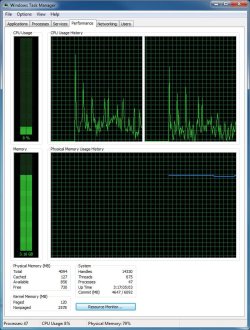
After running W7 for 3 days with a single reboot my ram usage has hit a highnote of ~3.15GB(as shown in the attachment below) so my question is this, is there anyway to free up the allocated ram that isn't being used anymore? I know you can do this on an iMac but I don't know if this is possible on a PC.

Why would W7 eat up ~3.16GB of ram when I do not have any programs open? Is this because of the SuperFetch service?

Thanks for your help guys.
 

Attachments
  • capture_19082009_192811.jpg
    capture_19082009_192811.jpg
    125 KB · Views: 139

My Computer My Computer

OS
WinXp
Now, this is not an indication of the SuperFetch service. If that were the case, in your screenshot the available and cached RAM amounts would be higher than what they are.

In your case, something is actually eating the RAM. You will have to look at the system resource monitor and see if you can determine what is taking up the memory. For example, there was a problem with the ATI driver and the Nvidia driver both with memory leaks.
 

My Computer My Computer

Computer Manufacturer/Model Number
Self-Built in July 2009
OS
Windows 7 Ultimate x64
CPU
Intel Q9550 2.83Ghz OC'd to 3.40Ghz
Motherboard
Gigabyte GA-EP45-UD3R rev. 1.1, F12 BIOS
Memory
8GB G.Skill PI DDR2-800, 4-4-4-12 timings
Graphics Card(s)
EVGA 1280MB Nvidia GeForce GTX570
Sound Card
Realtek ALC899A 8 channel onboard audio
Monitor(s) Displays
23" Acer x233H
Screen Resolution
1920x1080
Hard Drives
Intel X25-M 80GB Gen 2 SSD
Western Digital 1TB Caviar Black, 32MB cache. WD1001FALS
PSU
Corsair 620HX modular
Case
Antec P182
Cooling
stock
Keyboard
ABS M1 Mechanical
Mouse
Logitech G9 Laser Mouse
Internet Speed
15/2 cable modem
Other Info
Windows and Linux enthusiast. Logitech G35 Headset.
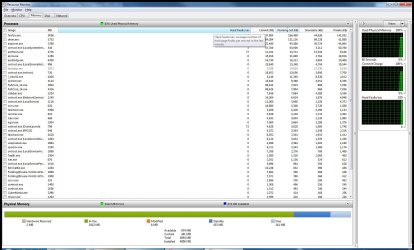
I'm not too sure what I'm looking for but here is a screen of the resource monitor. I guess I'll have to do a reboot to free up some memory.
 

Attachments

  • capture_19082009_211535.jpg
    capture_19082009_211535.jpg
    168.4 KB · Views: 149

My Computer My Computer

OS
WinXp
According to your first screenshot, the kernel is using 2.7GB. Most of that is unpaged (i.e., physical RAM) (well, it's normal for most kernel memory to be unpaged). It's impossible to tell for sure, but if I had to guess, I would say that one of your device drivers has a memory leak.

As a point of reference, my system that hasn't been rebooted for a month is using only 100MB of kernel memory. 2.7GB is waaaaaaaaay out there.
 

My Computer My Computer

OS
Windows 7 Pro (MSDN)
Just as a reference, my kernel total is 267, 144 of which is paged and 123 which is non-paged. My laptop has been running now for 32 hours.
 

My Computer My Computer

Computer Manufacturer/Model Number
Self-Built in July 2009
OS
Windows 7 Ultimate x64
CPU
Intel Q9550 2.83Ghz OC'd to 3.40Ghz
Motherboard
Gigabyte GA-EP45-UD3R rev. 1.1, F12 BIOS
Memory
8GB G.Skill PI DDR2-800, 4-4-4-12 timings
Graphics Card(s)
EVGA 1280MB Nvidia GeForce GTX570
Sound Card
Realtek ALC899A 8 channel onboard audio
Monitor(s) Displays
23" Acer x233H
Screen Resolution
1920x1080
Hard Drives
Intel X25-M 80GB Gen 2 SSD
Western Digital 1TB Caviar Black, 32MB cache. WD1001FALS
PSU
Corsair 620HX modular
Case
Antec P182
Cooling
stock
Keyboard
ABS M1 Mechanical
Mouse
Logitech G9 Laser Mouse
Internet Speed
15/2 cable modem
Other Info
Windows and Linux enthusiast. Logitech G35 Headset.
Wow. That is some battery. ;)
lmao...you and your details...to attest to the others I have never had my RAM usage on 7 hit 3.2GB and that is with PS and GTAIV open
 

My Computer My Computer

Computer Manufacturer/Model Number
Compal JFT02 (Custom Build Laptop)
OS
Windows 7 Home Premium x64 - Mac OS X 10.6.4 x64
CPU
Intel Core 2 Duo T9300 2.5 GHz
Motherboard
JFT02
Memory
4GB Kingston DDR2-800
Graphics Card(s)
NVIDIA Geforce 8600M GT (512MB Model)
Sound Card
Realtek HD Audio
Monitor(s) Displays
WUXGA Standard Laptop Display
Screen Resolution
1680*1050
Hard Drives
Toshiba 320GB 5400RPM Laptop HD
PSU
Standard Laptop Power Supply
Case
Standard Laptop Case
Cooling
Standard Laptop Cooling
Keyboard
Standard Laptop 105 Key-Keyboard
Mouse
Synaptics Touchpad
Internet Speed
Verizion Online DSL 3360/864 kbs (dl/up)
Back
Top