Free vs. Fee: Free and Paid Antivirus Programs Compared

malexous

New member
Guru
VIP
Local time
8:57 PM
Messages
622
Location
Ireland
Can free antivirus software protect you? Or is it worth paying for a full-blown A/V app? We look at the benefits--and pitfalls--of free and paid antivirus products.

Depending on whom you ask, paying for antivirus software is either a good investment or a total ripoff. In reality, neither viewpoint is accurate. You can find plenty of good reasons to choose a paid antivirus product, and plenty of good reasons to go with a freebie.

We teamed up with security testing company AV-Test, to find out what you get--or don't get--with free antivirus, and when it makes sense to subscribe annually to a fee-based program.
...
Free vs. Fee: Free and Paid Antivirus Programs Compared - PCWorld
 

My Computer My Computer

At a glance

Arch Linux 64-bit
OS
Arch Linux 64-bit
I think this is a question you can only answer yourself. You'll get a different story from each person you ask. I've known people who say they only have free anti-virus and have never had a problem. Personally, because I do banking online (many people say thats stupid) I like the protection of Norton Internet Security. Even the experts disagree. Good Luck.
 

My Computer My Computer

At a glance

Windows 7 Home Premium 64 bit SP1AMD Athlon 64 processor TF-20 1.6 GHz. 1 Core3 GB (2.75 available)ATI Radion HD 3200
Computer Manufacturer/Model Number
Acer Aspire 5532
OS
Windows 7 Home Premium 64 bit SP1
CPU
AMD Athlon 64 processor TF-20 1.6 GHz. 1 Core
Motherboard
MB.PGY02.001/MBPGY02001
Memory
3 GB (2.75 available)
Graphics Card(s)
ATI Radion HD 3200
Sound Card
Realtek High Definition Audio
Monitor(s) Displays
Generic PnP 15.6"
Screen Resolution
1366 x 768
Hard Drives
250 GB HDD (220 available)
PSU
?
Case
?
Cooling
Single cycling fan, on cooling stand
Keyboard
PNP Device ID ACPI\PNP0303\4&12734F14&0
Mouse
Microsoft Laser 7000
Internet Speed
Ultra high speed download 2500 kb/s upload 720 kb/s
Other Info
Norton Internet Security 2011
Sorry but this is the best I could do.
I used the tutorial for finding the missing info but still could not find it. Special Thanks to PooMan UK and DocBrown for their help in filling out these specs.
An interesting read. I have used NIS for a few years but when time came to renew I opted to go with MSE. I haven't noticed a difference in protection for my needs.
 

My Computer My Computer

At a glance

Windows 7 Professional 64bitIntel Celeron 2.4 GH4 GBNVidia GeForce 9800GT
Computer Manufacturer/Model Number
MSI
OS
Windows 7 Professional 64bit
CPU
Intel Celeron 2.4 GH
Memory
4 GB
Graphics Card(s)
NVidia GeForce 9800GT
Sound Card
ATI HDMI Audio
Monitor(s) Displays
Acer S231HL Dual Monitors
Hard Drives
Hitachi 300GB ATA
Maxtor 300GB USB
Cooling
Standard
Keyboard
Logitech wireless
Mouse
Logitech wireless
Internet Speed
Cable
I think this is a question you can only answer yourself. You'll get a different story from each person you ask.

In my case I paid $US50 for a fully blown AV Software and within 1 year my computer suffered infection via a completely undetected Downloading Trojan followed by two separate incidents of Hosts File Infections which the paid AV computer security allowed the second of which crashed the computer. After switching to a top testing free Computer Security Software nearly 2 years ago there have been no Malware detections or Hosts File infections on either of my computers.

I have left any security software brand names out of my statement since we are discussing the effectiveness of Paid vs Free computer security software and also to avoid contentions concerning brand loyalty.

~Maxx~
.
Win7_50.png
 

My Computer My Computer

At a glance

Windows 7 x64 Home PremiumIntel Core i7 930 @ 2.8 Ghz Socket 1366 LGA8 GB 1366 Mhz DDR3 (PC3-10700) RAMATI Radeon 5770 1 GB DDR5 RAM
Computer Manufacturer/Model Number
HP HPE 270f
OS
Windows 7 x64 Home Premium
CPU
Intel Core i7 930 @ 2.8 Ghz Socket 1366 LGA
Motherboard
Pegatron Truckee v1.04E41
Memory
8 GB 1366 Mhz DDR3 (PC3-10700) RAM
Graphics Card(s)
ATI Radeon 5770 1 GB DDR5 RAM
Sound Card
Realtech High Definition
Monitor(s) Displays
32" Sony Bravia
Screen Resolution
1366 X 768
Hard Drives
Intel 25nm 120 GB Series 320 SSD HD Tune- 265 MBps Read/ 130 MBps Write

LaCie 1TB + 1TB RAID 0 eSATA Drive HD Tune- 160 MBps Read/ 90 MBps Write
Keyboard
Logitech Illuminated
Mouse
Logitech MX Revolution
Internet Speed
36.4 Mbps Maximum on a 37 Mbps Motorola SB501 Modem
I do online banking, ebay (a lot), since the first beta of MSE came out I've use it as my main AV software on all computers at home with no problem at all, just a great AV solution
 

My Computer My Computer

At a glance

7 Ultimate x64 RTM 7600.16385AMD Phenom 9550 @ 2.20ghz4x2GB DDR2 Patriot Viper 800mhzGeForce 9400 GT 512MB
Computer Manufacturer/Model Number
HP a6720f
OS
7 Ultimate x64 RTM 7600.16385
CPU
AMD Phenom 9550 @ 2.20ghz
Motherboard
Asus M2N78-LA
Memory
4x2GB DDR2 Patriot Viper 800mhz
Graphics Card(s)
GeForce 9400 GT 512MB
Sound Card
Onboard Realtek Hi-Definition ALC 888S chipset
Monitor(s) Displays
Samsung P2370HD 23" 1080P HDTV
Screen Resolution
1920x1080
Hard Drives
Western Digital 640GB; Samsung 1 TB; WD 500GB; Seagate Portable 250gb;
Keyboard
Logitech LX310 Wireless Internet Keyboard
Mouse
Logitech LX310 Wireless Laser Mouse
Internet Speed
7Mbps/384Kbps

My Computer My Computer

At a glance

Windows 7 Ultimate 32bit SP1Intel(R) Core(TM)2 Quad CPU @ 2.40GHz, 2400 MHz4 GBATI Radeon HD 2600 Pro
Computer type
PC/Desktop
Computer Manufacturer/Model Number
Bruce ... somewhere in his 40's
OS
Windows 7 Ultimate 32bit SP1
CPU
Intel(R) Core(TM)2 Quad CPU @ 2.40GHz, 2400 MHz
Motherboard
INTEL/D975XBX2
Memory
4 GB
Graphics Card(s)
ATI Radeon HD 2600 Pro
Monitor(s) Displays
Samsung SyncMaster 914v
Screen Resolution
1280 x 1024
Hard Drives
2/500GB each ... ST3500630AS ATA Device.
One is not connected
PSU
Rocketfish 700 W
Case
G.Skill Gigabyte Chassis
Keyboard
Standard PS/2 Keyboard
Mouse
Microsoft PS/2 Mouse
Internet Speed
DSL
Antivirus
Avira Internet Security
Browser
IE 11
Other Info
ATI HDMI Audio
how to protect your Hosts file...

Thanks for the links! My current freeware computer security program is doing a flawless job of protecting my computer's Hosts file unlike the $50 fiasco of a computer security program I paid for.

~Maxx~
.
Win7_50.png
 

My Computer My Computer

At a glance

Windows 7 x64 Home PremiumIntel Core i7 930 @ 2.8 Ghz Socket 1366 LGA8 GB 1366 Mhz DDR3 (PC3-10700) RAMATI Radeon 5770 1 GB DDR5 RAM
Computer Manufacturer/Model Number
HP HPE 270f
OS
Windows 7 x64 Home Premium
CPU
Intel Core i7 930 @ 2.8 Ghz Socket 1366 LGA
Motherboard
Pegatron Truckee v1.04E41
Memory
8 GB 1366 Mhz DDR3 (PC3-10700) RAM
Graphics Card(s)
ATI Radeon 5770 1 GB DDR5 RAM
Sound Card
Realtech High Definition
Monitor(s) Displays
32" Sony Bravia
Screen Resolution
1366 X 768
Hard Drives
Intel 25nm 120 GB Series 320 SSD HD Tune- 265 MBps Read/ 130 MBps Write

LaCie 1TB + 1TB RAID 0 eSATA Drive HD Tune- 160 MBps Read/ 90 MBps Write
Keyboard
Logitech Illuminated
Mouse
Logitech MX Revolution
Internet Speed
36.4 Mbps Maximum on a 37 Mbps Motorola SB501 Modem
I wouldn´t take this for granted. That will depend on what computer you are using ( a laptop or a desktop), where do you intend to plug it to the internet, and of course what kind of modem you have (cable, wireless).

We have more than 65.000 virtual doors in a computer and from 1024 up to 65.000, any can be used to send information about your passwords and credit card information among others. AV, Firewalls, Anti-spywares/malwares just capture what they know, using heuristic, comparison and so on. But what happens to what they don´t know?

So be damned careful when sending your information through the net. By the way, sorry for sticking my nose into other people´s talking.

zorg
 

My Computer My Computer

At a glance

win 7 ultimate
OS
win 7 ultimate
AV, Firewalls, Anti-spywares/malwares just capture what they know, using heuristic, comparison and so on. But what happens to what they don´t know?

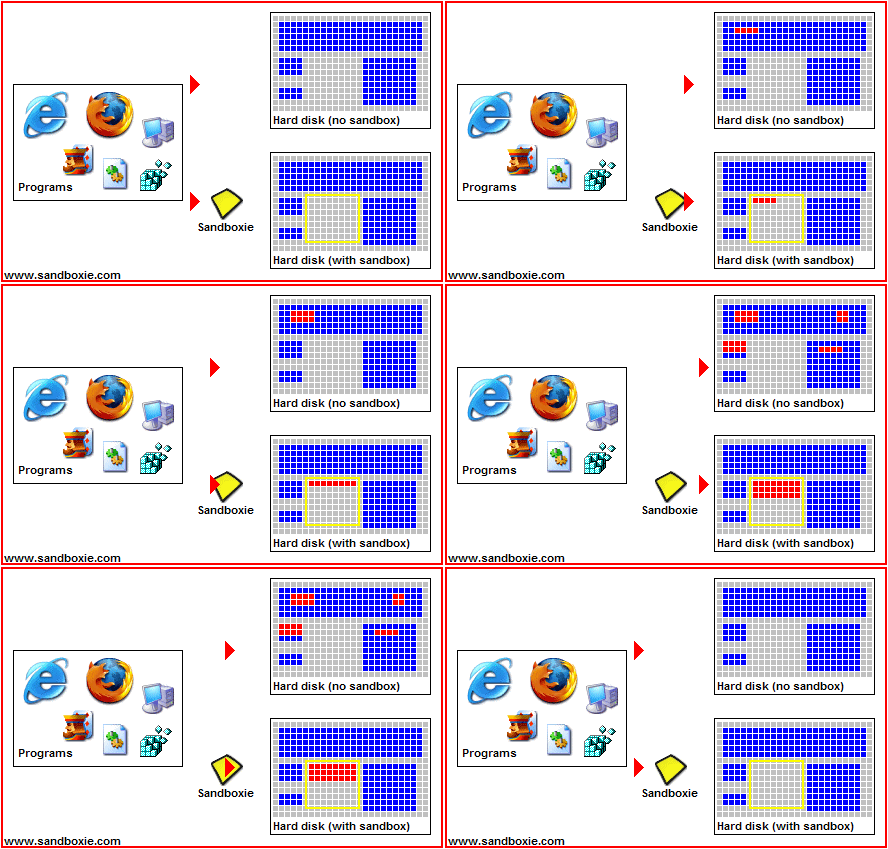
That's what Sandboxie is for...

SandboxieAnimation.gif


I've been running my browser in Sandboxie on my laptop and desktop computers for years without a single infection and without using black list Antivirus software.

~Maxx~

SBLogo.png
 

My Computer My Computer

At a glance

Windows 7 x64 Home PremiumIntel Core i7 930 @ 2.8 Ghz Socket 1366 LGA8 GB 1366 Mhz DDR3 (PC3-10700) RAMATI Radeon 5770 1 GB DDR5 RAM
Computer Manufacturer/Model Number
HP HPE 270f
OS
Windows 7 x64 Home Premium
CPU
Intel Core i7 930 @ 2.8 Ghz Socket 1366 LGA
Motherboard
Pegatron Truckee v1.04E41
Memory
8 GB 1366 Mhz DDR3 (PC3-10700) RAM
Graphics Card(s)
ATI Radeon 5770 1 GB DDR5 RAM
Sound Card
Realtech High Definition
Monitor(s) Displays
32" Sony Bravia
Screen Resolution
1366 X 768
Hard Drives
Intel 25nm 120 GB Series 320 SSD HD Tune- 265 MBps Read/ 130 MBps Write

LaCie 1TB + 1TB RAID 0 eSATA Drive HD Tune- 160 MBps Read/ 90 MBps Write
Keyboard
Logitech Illuminated
Mouse
Logitech MX Revolution
Internet Speed
36.4 Mbps Maximum on a 37 Mbps Motorola SB501 Modem
Hi there
Instead of Sandboxie a Virtual Machine IMO is a good way to protect a computer --and if it DOES get infected simply blow it away and re-load a fresh Virtual Machine.

For Online Banking etc I always use a Virtual machine for web access. Only if after decent tests do I think the application or whatever is SAFE do I then copy it to data on the REAL machine.

Virtual machine software is FREE and modern hardware - including even modest Netbooks can always run at least ONE Virtual Machine --remember you are only basically using it of Internet Access so it shouldn't consume significant Host resources either.

Finally a lot of the articles in magazines about AV software performance and detection are so out of date by the time they are inprint as to render them useless.

In any case it's the USER far more than the Machine that is likely to be the cause of any infection.

Cheers
jimbo
 

My Computer My Computer

At a glance

Linux CENTOS 7 / various Windows OS'es and se...Intel i7 Intel i58GB, 16GBOn Motherboard
Computer type
PC/Desktop
Computer Manufacturer/Model Number
Custom built, several laptops HP/ASUS
OS
Linux CENTOS 7 / various Windows OS'es and servers
CPU
Intel i7 Intel i5
Memory
8GB, 16GB
Graphics Card(s)
On Motherboard
Sound Card
Realtek HD audio
Monitor(s) Displays
Apple Cinema display, Samsung LCD
Screen Resolution
1920 X 1080
Hard Drives
4 X 1TB SATA
Mouse
Toshiba wireless laser
Internet Speed
> 20MB up
My current freeware computer security program is doing a flawless job of protecting my computer's Hosts file
How many times has it actually had to protect the hosts file that you are aware of?
 

My Computer My Computer

At a glance

Arch Linux 64-bit
OS
Arch Linux 64-bit
What level of protection you "need", in my opinion, comes down to what level of risk you put yourself at. Even though i do online banking and pay my credit card bills online using my computer..I don't visit adult sites, warez sites, torrent sites, keygen/cracks sites, P2P sites, etc....so my risk of infection is much lower. For any risky web surfing, I would either 1) use my Linux workstation 2). Use a virtual machine 3). Use sandboxie.

I have a router providing basic NAT firewalling, I leave the Windows firewall enabled, I leave UAC on, and I scan regularly with MalwareBytes and I use Spyware Blaster.

So, while I believe that a paid for app could provide better protection and certainly could be worth the price...i have no need whatsoever for it. So, the freebie stuff provides me with a suitable level of protection for the things I do on my computer.
 

My Computer My Computer

At a glance

Windows 7 Ultimate x64Intel Q9550 2.83Ghz OC'd to 3.40Ghz8GB G.Skill PI DDR2-800, 4-4-4-12 timingsEVGA 1280MB Nvidia GeForce GTX570
Computer Manufacturer/Model Number
Self-Built in July 2009
OS
Windows 7 Ultimate x64
CPU
Intel Q9550 2.83Ghz OC'd to 3.40Ghz
Motherboard
Gigabyte GA-EP45-UD3R rev. 1.1, F12 BIOS
Memory
8GB G.Skill PI DDR2-800, 4-4-4-12 timings
Graphics Card(s)
EVGA 1280MB Nvidia GeForce GTX570
Sound Card
Realtek ALC899A 8 channel onboard audio
Monitor(s) Displays
23" Acer x233H
Screen Resolution
1920x1080
Hard Drives
Intel X25-M 80GB Gen 2 SSD
Western Digital 1TB Caviar Black, 32MB cache. WD1001FALS
PSU
Corsair 620HX modular
Case
Antec P182
Cooling
stock
Keyboard
ABS M1 Mechanical
Mouse
Logitech G9 Laser Mouse
Internet Speed
15/2 cable modem
Other Info
Windows and Linux enthusiast. Logitech G35 Headset.
Hi there
Instead of Sandboxie a Virtual Machine IMO is a good way to protect a computer
My preference is Sandboxie over a virtual machine. It can protect a computer just as well and it will use a lot less resources; almost none. On any computer, it is usually unnoticable.
_

The most important thing to realise is that no one solution is perfect. Everyone should be using a layered security approach. There is a lot of choice out there. Free and paid.
 

My Computer My Computer

At a glance

Arch Linux 64-bit
OS
Arch Linux 64-bit
Sandboxie confused me so I deleted it immediately
 

My Computer My Computer

At a glance

Windows 7 Home Premium x64AMD Athlon II X4 6204.00GB Dual Channel DDR3 @ 666Mhz (9-9-9-24)HD Radeon 4200 (Integrated)
Computer Manufacturer/Model Number
HP p6270z
OS
Windows 7 Home Premium x64
CPU
AMD Athlon II X4 620
Motherboard
Foxconn ALOE (CPU 1)
Memory
4.00GB Dual Channel DDR3 @ 666Mhz (9-9-9-24)
Graphics Card(s)
HD Radeon 4200 (Integrated)
Sound Card
Realtek High Definition Audio
Monitor(s) Displays
HP 2311 (1920x1080) @ 60Hz
Screen Resolution
1920x1080
Hard Drives
488GB Seagate ST3500418AS SCSI Disk Device (RAID)
Sandboxie confused me so I deleted it immediately

When you load sandboxie...you end up with an icon on your desktop called Sandboxed Browser. You run this browser instead of your normal browser and it runs in a sectioned off part of your hard drive. It's "logically" secluded from the rest of your system. Whatever you do in this environment, is within that environment only and not on your actual PC. So, if you launch the sandboxed browser and change your home page and bookmark 10 new pages....it only happens in the sandboxed browser. If you simply launch your regular browser, your home page will not be different, nor will the 10 new bookmarks appear.

That's all there really is to it. Just a safer environment to prevent malware and such from actually installing "onto" your actual system. Hopefully that helps clear up some of the confusion.
 

My Computer My Computer

At a glance

Windows 7 Ultimate x64Intel Q9550 2.83Ghz OC'd to 3.40Ghz8GB G.Skill PI DDR2-800, 4-4-4-12 timingsEVGA 1280MB Nvidia GeForce GTX570
Computer Manufacturer/Model Number
Self-Built in July 2009
OS
Windows 7 Ultimate x64
CPU
Intel Q9550 2.83Ghz OC'd to 3.40Ghz
Motherboard
Gigabyte GA-EP45-UD3R rev. 1.1, F12 BIOS
Memory
8GB G.Skill PI DDR2-800, 4-4-4-12 timings
Graphics Card(s)
EVGA 1280MB Nvidia GeForce GTX570
Sound Card
Realtek ALC899A 8 channel onboard audio
Monitor(s) Displays
23" Acer x233H
Screen Resolution
1920x1080
Hard Drives
Intel X25-M 80GB Gen 2 SSD
Western Digital 1TB Caviar Black, 32MB cache. WD1001FALS
PSU
Corsair 620HX modular
Case
Antec P182
Cooling
stock
Keyboard
ABS M1 Mechanical
Mouse
Logitech G9 Laser Mouse
Internet Speed
15/2 cable modem
Other Info
Windows and Linux enthusiast. Logitech G35 Headset.
My current freeware computer security program is doing a flawless job of protecting my computer's Hosts file
How many times has it actually had to protect the hosts file that you are aware of?

My computer security always protects the Hosts file although it does not alert me to as to how many unsuccessful attempts are made to infect the Hosts file, but the computer does let me know when the Hosts file has been successfully infected and that has only happened twice both times while I was using Norton Internet Security which I paid $50 for. After I switched to a top testing totally free computer security software nearly 2 years ago there has not been one single instance of a Hosts file infection or any other Malware infection on any of my computers.

I do not mean any malice towards NIS as I learned a lot during the time that it took me to completely restore my computer to its former state after it unexpectedly crashed while using NIS, but this was the only experience I have ever ever had with paid computer security software and so it is the only story that I can relate on the subject of Paid vs. Free computer security.

~Maxx~
.
Win7_50.png
 
Last edited:

My Computer My Computer

At a glance

Windows 7 x64 Home PremiumIntel Core i7 930 @ 2.8 Ghz Socket 1366 LGA8 GB 1366 Mhz DDR3 (PC3-10700) RAMATI Radeon 5770 1 GB DDR5 RAM
Computer Manufacturer/Model Number
HP HPE 270f
OS
Windows 7 x64 Home Premium
CPU
Intel Core i7 930 @ 2.8 Ghz Socket 1366 LGA
Motherboard
Pegatron Truckee v1.04E41
Memory
8 GB 1366 Mhz DDR3 (PC3-10700) RAM
Graphics Card(s)
ATI Radeon 5770 1 GB DDR5 RAM
Sound Card
Realtech High Definition
Monitor(s) Displays
32" Sony Bravia
Screen Resolution
1366 X 768
Hard Drives
Intel 25nm 120 GB Series 320 SSD HD Tune- 265 MBps Read/ 130 MBps Write

LaCie 1TB + 1TB RAID 0 eSATA Drive HD Tune- 160 MBps Read/ 90 MBps Write
Keyboard
Logitech Illuminated
Mouse
Logitech MX Revolution
Internet Speed
36.4 Mbps Maximum on a 37 Mbps Motorola SB501 Modem
That's all there really is to it. Just a safer environment to prevent malware and such from actually installing "onto" your actual system.

Great explanation! I haven't had so much as the detection of a single tracking cookie since I started running my browser in the virtual space of Sandboxie.

~Maxx~

SBLogo.png
 

My Computer My Computer

At a glance

Windows 7 x64 Home PremiumIntel Core i7 930 @ 2.8 Ghz Socket 1366 LGA8 GB 1366 Mhz DDR3 (PC3-10700) RAMATI Radeon 5770 1 GB DDR5 RAM
Computer Manufacturer/Model Number
HP HPE 270f
OS
Windows 7 x64 Home Premium
CPU
Intel Core i7 930 @ 2.8 Ghz Socket 1366 LGA
Motherboard
Pegatron Truckee v1.04E41
Memory
8 GB 1366 Mhz DDR3 (PC3-10700) RAM
Graphics Card(s)
ATI Radeon 5770 1 GB DDR5 RAM
Sound Card
Realtech High Definition
Monitor(s) Displays
32" Sony Bravia
Screen Resolution
1366 X 768
Hard Drives
Intel 25nm 120 GB Series 320 SSD HD Tune- 265 MBps Read/ 130 MBps Write

LaCie 1TB + 1TB RAID 0 eSATA Drive HD Tune- 160 MBps Read/ 90 MBps Write
Keyboard
Logitech Illuminated
Mouse
Logitech MX Revolution
Internet Speed
36.4 Mbps Maximum on a 37 Mbps Motorola SB501 Modem
I think buying a personal copy then the one that was given free has alot more advantages for the simple fact you are not prompted after a scan to buy the product to remove the infections also

I have a guarantee by the service provided wasn't met I would get some kind of compensation as the old anology goes you get what you pay for.

Even though some may say it works fine but they probally do the basic and really don't venture out on the web that much

Just my opinion :eek:
 

My Computer My Computer

At a glance

Windows 10 Home Premium 64bit sp1Intel I7-6700K @ 4.6 Ghz 1.344 volts everyday OC32GB G-Skill TridentZ 3200mhz 16-18-18-38 DDR4Sli Gigabyte Windforce GTX 980 G1
Computer type
PC/Desktop
Computer Manufacturer/Model Number
CoreI7-6700K MrFingerIII Special Builds
OS
Windows 10 Home Premium 64bit sp1
CPU
Intel I7-6700K @ 4.6 Ghz 1.344 volts everyday OC
Motherboard
Asrock Fatality K6 Z170 Socket 1151
Memory
32GB G-Skill TridentZ 3200mhz 16-18-18-38 DDR4
Graphics Card(s)
Sli Gigabyte Windforce GTX 980 G1
Sound Card
AC97 Creative Rage Tactic 3D Headphones Bluetooth
Monitor(s) Displays
27" Asus ROG Swift PG278Q G-Sync 48" Vizio Smart HD TV
Screen Resolution
2560x1440p 27"- 48" Currently Gaming at 2560x1440p Res 2K
Hard Drives
250GB Samsung Evo840SSD Seagate baracuda 500 GB WD Mybook 500Gb 1TB Seagate Barracuda
PSU
HX1050w Corsair Silver 80plus certified crosfire/sli
Case
Enthod Pro Full Tower
Cooling
Corsair H110i GT 280 mm High Performance WaterBlock
Keyboard
Logitech wireless keyboard
Mouse
Logitech wireless mouse
Internet Speed
Cox Cable 100+ mb
Antivirus
WebRoot Spysweeper with Antivirus
Browser
IE-10, Chrome, Opera
Other Info
My Other Rig is a AMD FX8320E @4.6Ghz 16GB Ballistic Sport Ram
Mobo Asrock Fatality 990FX 120GB OCZ SSD 1TB Seagate Barracuda Corsair H75 Cooling PSU Corsair CX750
GPU GTX Gigabyte 970G1
Well. maybe my logic is little bit weird, but my opinion is that the first step, layer, should be imaging. After that, there are plenty of free AV's around to begin with. There is absolutely no need for paying for AV's. In every thread that starts "my PC is infected" there are recommendations, scan with this or this...which is fine of course, but, how you can be 100% sure that after the scanning/cleaning the PC is clean? Well, you can't. If there is something that can be called safest, that would be having an image. Don't get me wrong here, I'm not saying one should do whatever he wants to just because he has image somewhere on external drive, PBKC are too common actually. Now, for online banking or working with some sensitive financial (or other) data, what would be the best approach, I really don't know.

P.S And how AV's are working actually? I mean, how fast they should update virus definitions to keep us safe? I'm sorry if I sound stupid, but how they know that there is a new malware, virus or whatever? Someone needs to be infected first. The question is, how big the lag is between the new viruses and new definitions? And yes, I know about heuristic detections and all that Antivirus software - Wikipedia, the free encyclopedia
At the end, its always starts and ends with the user, and how much he/she is tech savvy

cheers
 

My Computer My Computer

At a glance

Windows 7 Ultimate x32DualCore Intel Pentium E2200, 2218 MHz (11 x ...2 GB DDR2-800 DDR2 SDRAMnVIDIA GeForce 9500GT 1GB
Computer Manufacturer/Model Number
Micro-Star International/MS-7529
OS
Windows 7 Ultimate x32
CPU
DualCore Intel Pentium E2200, 2218 MHz (11 x 202)
Motherboard
MSI G31M3 V2 (MS-7529) (2 PCI, 1 PCI-E x16,2 DDR2 DIMM)
Memory
2 GB DDR2-800 DDR2 SDRAM
Graphics Card(s)
nVIDIA GeForce 9500GT 1GB
Sound Card
Realtek ALC888/1200 @ Intel 82801GB ICH7
Monitor(s) Displays
Samsung SyncMaster 2253BW (Digital) 22'' LCD
Screen Resolution
1680x1050
Hard Drives
SAMSUNG HD322IJ ATA Device (298 GB , IDE)
Imaging is just fine....however if you get your box infected and then your identity is stolen or compromised....it doesn't do a lick of good if you can restore your previous image onto your computer.
 

My Computer My Computer

At a glance

Windows 7 Ultimate x64Intel Q9550 2.83Ghz OC'd to 3.40Ghz8GB G.Skill PI DDR2-800, 4-4-4-12 timingsEVGA 1280MB Nvidia GeForce GTX570
Computer Manufacturer/Model Number
Self-Built in July 2009
OS
Windows 7 Ultimate x64
CPU
Intel Q9550 2.83Ghz OC'd to 3.40Ghz
Motherboard
Gigabyte GA-EP45-UD3R rev. 1.1, F12 BIOS
Memory
8GB G.Skill PI DDR2-800, 4-4-4-12 timings
Graphics Card(s)
EVGA 1280MB Nvidia GeForce GTX570
Sound Card
Realtek ALC899A 8 channel onboard audio
Monitor(s) Displays
23" Acer x233H
Screen Resolution
1920x1080
Hard Drives
Intel X25-M 80GB Gen 2 SSD
Western Digital 1TB Caviar Black, 32MB cache. WD1001FALS
PSU
Corsair 620HX modular
Case
Antec P182
Cooling
stock
Keyboard
ABS M1 Mechanical
Mouse
Logitech G9 Laser Mouse
Internet Speed
15/2 cable modem
Other Info
Windows and Linux enthusiast. Logitech G35 Headset.
Back
Top