Frequently getting different kinds of BSODs

DoubtGin

New member
Local time
11:00 AM
Messages
25
Hi, I've had this problem a few months ago which was apparently caused by my WLAN driver but that shouldn't be the case now. The BSOD seem to be different this time around, as well.


Additional Info:

w2lnys6c.png
ttxsrdvx.png
ykwxbt8b.png
b6n64nze.png
vxhnmre3.png
lonoximp.png


9lnaj9ma.png


Probably another useless info but I want to include everything just to be sure:

------------------

Machine name: USER-PC
Operating System: Windows 7 Home Premium 64-bit (6.1, Build 7601) Service Pack 1 (7601.win7sp1_gdr.130828-1532)
BIOS: BIOS Date: 08/24/11 14:48:54 Ver: 04.06.04
Processor: Intel(R) Core(TM) i7-2600K CPU @ 3.40GHz (8 CPUs), ~3.4GHz
Memory: 8192MB RAM
Available OS Memory: 8104MB RAM
Page File: 5848MB used, 10359MB available
DirectX Version: DirectX 11
DX Setup Parameters: Not found
User DPI Setting: Using System DPI
System DPI Setting: 96 DPI (100 percent)
DWM DPI Scaling: Disabled
DxDiag Version: 6.01.7601.17514 32bit Unicode
Card name: NVIDIA GeForce GTX 570
Driver Name: nvd3dumx.dll,nvwgf2umx.dll,nvwgf2umx.dll,nvd3dum,nvwgf2um,nvwgf2um

guy9xi2n.png


Thanks in advance.
 

My Computer My Computer

At a glance

Windows 7 Home Premium 64-bit
Computer type
PC/Desktop
OS
Windows 7 Home Premium 64-bit
Additionally, most of the time, ntoskrnl.exe seems to be the cause.
 

My Computer My Computer

At a glance

Windows 7 Home Premium 64-bit
Computer type
PC/Desktop
OS
Windows 7 Home Premium 64-bit
bump

got a few more Bluescreens in the last few days, had no problems the days before

for some reason most Bluescreens don't get "saved" (no data saved on bluescreenview), sometimes it just freezes without the blue screen appearing.

Last BSOD that I actually get infos from displayed "ntoskrnl.exe" and "cfosspeed6.sys" as the causes.
 

My Computer My Computer

At a glance

Windows 7 Home Premium 64-bit
Computer type
PC/Desktop
OS
Windows 7 Home Premium 64-bit
I will look at the previous files, in the mean time can you post up the latest files using the tool?
 

My Computer My Computer

At a glance

Windows 8.1 Pro x64Intel Core i5-4570 CPU @ 3.20GHz8GB DDR3-1596 - Dual ChannelNVIDIA GeForce GTX 750 Ti SC
Computer type
PC/Desktop
Computer Manufacturer/Model Number
Custom
OS
Windows 8.1 Pro x64
CPU
Intel Core i5-4570 CPU @ 3.20GHz
Motherboard
Gigabyte Z87-D3HP-CF
Memory
8GB DDR3-1596 - Dual Channel
Graphics Card(s)
NVIDIA GeForce GTX 750 Ti SC
Sound Card
Onboard
Monitor(s) Displays
Samsung
Screen Resolution
1920x1080
Hard Drives
SSD - 120GB
Second - 1TB
Antivirus
MSE
Browser
Chrome
Ok, here it is (last minidump only).
 

My Computer My Computer

At a glance

Windows 7 Home Premium 64-bit
Computer type
PC/Desktop
OS
Windows 7 Home Premium 64-bit
The last BSOD was caused by cFosSpeed for faster Internet connections
(c:\windows\system32\drivers\cfosspeed6.sys)
Code:
BugCheck D1, {fffff880034889b0, 2, 0, fffff880034889b0}

*** WARNING: Unable to verify timestamp for cfosspeed6.sys
*** ERROR: Module load completed but symbols could not be loaded for cfosspeed6.sys
[COLOR=Red]Probably caused by : cfosspeed6.sys[/COLOR] ( cfosspeed6+30e09 )

Followup: MachineOwner
---------
I would suggest you to uninstall it, as it is a problem wherever it is installed.

Daemon Tools, Alcohol 120% and Power Archiver Pro uses SCSI Pass Through Direct (SPTD), which is a well known BSOD causer. Uninstall Daemon Tools at first. Then download SPTD standalone installer from Disk-Tools.com, and execute the downloaded file as guided below :

  • Double click to open it.
  • Click this button only:
  • 2012-12-13_224441.jpg
  • If it is grayed out, as in the picture, there is no more SPTD in your system, and you just close the window.
Free up the startup. Windows does not need any other program to auto start with it, but the auto start programs often conflicts and causes various problems including BSODs.

  1. Click on the Start button
  2. Type “msconfig (without quotes), click the resulting link. It will open the System Configuration window.
  3. Select the “Startup” tab.
  4. Deselect all items other than the antivirus.
  5. Apply > OK
  6. Accept then restart.
Let us know the results.
 

My Computer My Computer

At a glance

Microsoft Windows 10 Pro Insider Preview 64-bitIntel(R) Core(TM) i3-4130 CPU @ 3.40GHzCorsair Vengence 4GB x2 (8.00GB Dual-Channel ...2047MB GeForce GTS 450 (ZOTAC International)
Computer type
PC/Desktop
Computer Manufacturer/Model Number
Self Assembled
OS
Microsoft Windows 10 Pro Insider Preview 64-bit
CPU
Intel(R) Core(TM) i3-4130 CPU @ 3.40GHz
Motherboard
Gigabyte Technology Co., Ltd. B85M-D3H
Memory
Corsair Vengence 4GB x2 (8.00GB Dual-Channel DDR3 @ 798MHz)
Graphics Card(s)
2047MB GeForce GTS 450 (ZOTAC International)
Sound Card
Onboard (Realtek High Definition Audio)
Monitor(s) Displays
LG Flatron E2040T
Screen Resolution
1600x900
Hard Drives
Western Digital 1 TB
Seagate 500 GB
PSU
Corsair VS550
Case
Cooler Master K380
Cooling
Cooler Master Seidon 120V Plus
Keyboard
Logitech MK260r
Mouse
Logitech MK260r
Internet Speed
PMPL Broadband
Antivirus
Windows Defender + MBAM
Browser
Firefox
Other Info
Dell Studio 15" Laptop
Thanks, I've done all of that now. I'll report back if there's another BSOD (or if the problem is solved).
 

My Computer My Computer

At a glance

Windows 7 Home Premium 64-bit
Computer type
PC/Desktop
OS
Windows 7 Home Premium 64-bit
Bump

Got another one just minutes ago.
 

My Computer My Computer

At a glance

Windows 7 Home Premium 64-bit
Computer type
PC/Desktop
OS
Windows 7 Home Premium 64-bit
Code:
[COLOR=Red]BugCheck 7F[/COLOR], {[COLOR=Blue][B]8[/B][/COLOR], 80050031, 406f8, fffff8000327ff3a}

Probably caused by : ntkrnlmp.exe ( nt!KiDoubleFaultAbort+b2 )

Followup: MachineOwner
---------
Hi. It indicates a double fault. It may be caused either by a kernel stack overflow or by a hardware issue.

The first step to troubleshoot this issue would be to perform a clean install using a genuine media, and activating that installation by a legit key. The key that is in use is not legit for a retail ASRock motherboard, but for a Packard OEM.
_______________________
Code:
BaseBoardManufacturer = ASRock
BaseBoardProduct = Z68 Pro3 Gen3
Code:
*****-OEM-8992687-00006
 

My Computer My Computer

At a glance

Microsoft Windows 10 Pro Insider Preview 64-bitIntel(R) Core(TM) i3-4130 CPU @ 3.40GHzCorsair Vengence 4GB x2 (8.00GB Dual-Channel ...2047MB GeForce GTS 450 (ZOTAC International)
Computer type
PC/Desktop
Computer Manufacturer/Model Number
Self Assembled
OS
Microsoft Windows 10 Pro Insider Preview 64-bit
CPU
Intel(R) Core(TM) i3-4130 CPU @ 3.40GHz
Motherboard
Gigabyte Technology Co., Ltd. B85M-D3H
Memory
Corsair Vengence 4GB x2 (8.00GB Dual-Channel DDR3 @ 798MHz)
Graphics Card(s)
2047MB GeForce GTS 450 (ZOTAC International)
Sound Card
Onboard (Realtek High Definition Audio)
Monitor(s) Displays
LG Flatron E2040T
Screen Resolution
1600x900
Hard Drives
Western Digital 1 TB
Seagate 500 GB
PSU
Corsair VS550
Case
Cooler Master K380
Cooling
Cooler Master Seidon 120V Plus
Keyboard
Logitech MK260r
Mouse
Logitech MK260r
Internet Speed
PMPL Broadband
Antivirus
Windows Defender + MBAM
Browser
Firefox
Other Info
Dell Studio 15" Laptop
Thanks a ton. I haven't understood much of it, though (since I'm not knowledgable in this field). Especially the info you provided that is in quotes.

What am I supposed to install? What is a "genuine media"? Where to get a "legit key"?

I assume the key that I currently use is not the correct one?

Thanks in advance again.
 

My Computer My Computer

At a glance

Windows 7 Home Premium 64-bit
Computer type
PC/Desktop
OS
Windows 7 Home Premium 64-bit
What he means is buy a new installation of windows with a legit product key from a legit retailer.
Your Windows is counterfeit so it contains heavily modified code that can act in unexpected ways.

Back all of your important files up and wipe the drive clean, then install the genuine copy of windows and start from there.

Unfortunately Windows costs around £70 which is 85 euros.

If you get any issues after a clean install then we will help.

If you are unsure how to perform a clean installation then here's some instructions.

http://www.sevenforums.com/tutorials/1649-clean-install-windows-7-a.html#post16008
 

My Computer My Computer

Computer type
PC/Desktop
What am I supposed to install? What is a "genuine media"? Where to get a "legit key"?
You are supposed to install Windows; that is the Operating System.

A genuine media is the installation media that is obtained from Windows.

A legit key is a key that is for that particular installation media.

I assume the key that I currently use is not the correct one?
Yes, it is true. The key makes the installation counterfeit. And anything may happen there.
 

My Computer My Computer

At a glance

Microsoft Windows 10 Pro Insider Preview 64-bitIntel(R) Core(TM) i3-4130 CPU @ 3.40GHzCorsair Vengence 4GB x2 (8.00GB Dual-Channel ...2047MB GeForce GTS 450 (ZOTAC International)
Computer type
PC/Desktop
Computer Manufacturer/Model Number
Self Assembled
OS
Microsoft Windows 10 Pro Insider Preview 64-bit
CPU
Intel(R) Core(TM) i3-4130 CPU @ 3.40GHz
Motherboard
Gigabyte Technology Co., Ltd. B85M-D3H
Memory
Corsair Vengence 4GB x2 (8.00GB Dual-Channel DDR3 @ 798MHz)
Graphics Card(s)
2047MB GeForce GTS 450 (ZOTAC International)
Sound Card
Onboard (Realtek High Definition Audio)
Monitor(s) Displays
LG Flatron E2040T
Screen Resolution
1600x900
Hard Drives
Western Digital 1 TB
Seagate 500 GB
PSU
Corsair VS550
Case
Cooler Master K380
Cooling
Cooler Master Seidon 120V Plus
Keyboard
Logitech MK260r
Mouse
Logitech MK260r
Internet Speed
PMPL Broadband
Antivirus
Windows Defender + MBAM
Browser
Firefox
Other Info
Dell Studio 15" Laptop
Thank you guys.

Is that definitely the issue here? I'm thinking about acquiring Win 7 now, but is there a possibility that isn't actually the solution?
 

My Computer My Computer

At a glance

Windows 7 Home Premium 64-bit
Computer type
PC/Desktop
OS
Windows 7 Home Premium 64-bit
It is a must to do to continue with the troubleshooting process, as any issue is possible with a counterfeit installation.
 

My Computer My Computer

At a glance

Microsoft Windows 10 Pro Insider Preview 64-bitIntel(R) Core(TM) i3-4130 CPU @ 3.40GHzCorsair Vengence 4GB x2 (8.00GB Dual-Channel ...2047MB GeForce GTS 450 (ZOTAC International)
Computer type
PC/Desktop
Computer Manufacturer/Model Number
Self Assembled
OS
Microsoft Windows 10 Pro Insider Preview 64-bit
CPU
Intel(R) Core(TM) i3-4130 CPU @ 3.40GHz
Motherboard
Gigabyte Technology Co., Ltd. B85M-D3H
Memory
Corsair Vengence 4GB x2 (8.00GB Dual-Channel DDR3 @ 798MHz)
Graphics Card(s)
2047MB GeForce GTS 450 (ZOTAC International)
Sound Card
Onboard (Realtek High Definition Audio)
Monitor(s) Displays
LG Flatron E2040T
Screen Resolution
1600x900
Hard Drives
Western Digital 1 TB
Seagate 500 GB
PSU
Corsair VS550
Case
Cooler Master K380
Cooling
Cooler Master Seidon 120V Plus
Keyboard
Logitech MK260r
Mouse
Logitech MK260r
Internet Speed
PMPL Broadband
Antivirus
Windows Defender + MBAM
Browser
Firefox
Other Info
Dell Studio 15" Laptop
It is a must to do to continue with the troubleshooting process, as any issue is possible with a counterfeit installation.

Not only this, but according to forum rules we are not allowed to help if you are running a counterfeit version of windows.

-Gamer
 

My Computer My Computer

At a glance

Windows 8.1 Pro x64Intel Core i5-4570 CPU @ 3.20GHz8GB DDR3-1596 - Dual ChannelNVIDIA GeForce GTX 750 Ti SC
Computer type
PC/Desktop
Computer Manufacturer/Model Number
Custom
OS
Windows 8.1 Pro x64
CPU
Intel Core i5-4570 CPU @ 3.20GHz
Motherboard
Gigabyte Z87-D3HP-CF
Memory
8GB DDR3-1596 - Dual Channel
Graphics Card(s)
NVIDIA GeForce GTX 750 Ti SC
Sound Card
Onboard
Monitor(s) Displays
Samsung
Screen Resolution
1920x1080
Hard Drives
SSD - 120GB
Second - 1TB
Antivirus
MSE
Browser
Chrome
Alright, thanks. I didn't know it was such a version.

I didn't buy a finished pc, I had it build together (is that how it is called in English, sry it's not my first language) somewhere and I assumed they used a legit one there (I didn't install Win 7 myself).

Thanks again. I'll report back when I "clean install" Win 7.
 

My Computer My Computer

At a glance

Windows 7 Home Premium 64-bit
Computer type
PC/Desktop
OS
Windows 7 Home Premium 64-bit
bump

checkwindows7genuine_thumb.png


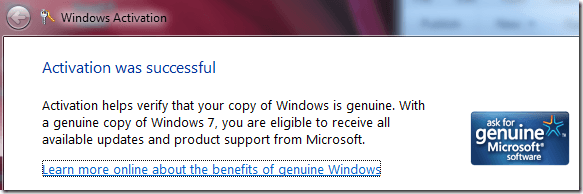
Hi again. I checked if my Win 7 is genuine or not and got this message (in German).

Or is the "counterfeit" product you talked about something completely different?
 

My Computer My Computer

At a glance

Windows 7 Home Premium 64-bit
Computer type
PC/Desktop
OS
Windows 7 Home Premium 64-bit
bump

checkwindows7genuine_thumb.png


Hi again. I checked if my Win 7 is genuine or not and got this message (in German).

Or is the "counterfeit" product you talked about something completely different?
With your existing product key, it is a "Successful Counterfeit Activation" which is illegal.
 

My Computer My Computer

At a glance

Microsoft Windows 10 Pro Insider Preview 64-bitIntel(R) Core(TM) i3-4130 CPU @ 3.40GHzCorsair Vengence 4GB x2 (8.00GB Dual-Channel ...2047MB GeForce GTS 450 (ZOTAC International)
Computer type
PC/Desktop
Computer Manufacturer/Model Number
Self Assembled
OS
Microsoft Windows 10 Pro Insider Preview 64-bit
CPU
Intel(R) Core(TM) i3-4130 CPU @ 3.40GHz
Motherboard
Gigabyte Technology Co., Ltd. B85M-D3H
Memory
Corsair Vengence 4GB x2 (8.00GB Dual-Channel DDR3 @ 798MHz)
Graphics Card(s)
2047MB GeForce GTS 450 (ZOTAC International)
Sound Card
Onboard (Realtek High Definition Audio)
Monitor(s) Displays
LG Flatron E2040T
Screen Resolution
1600x900
Hard Drives
Western Digital 1 TB
Seagate 500 GB
PSU
Corsair VS550
Case
Cooler Master K380
Cooling
Cooler Master Seidon 120V Plus
Keyboard
Logitech MK260r
Mouse
Logitech MK260r
Internet Speed
PMPL Broadband
Antivirus
Windows Defender + MBAM
Browser
Firefox
Other Info
Dell Studio 15" Laptop
Back
Top