
Fresh install, bootmgr missing

Leffe9

New member
Local time
9:42 AM
Messages
11
Hi, (first sorry, english isn't my native language, I'll do my best)

I just bough a seven pro setup via download, and as I don't have any dvd reader working, I thinked about a usb key boot setup.
Then I had the “Setup was unable to create a new system partition or locate an existing system partition.” prolem and nothing I was able to do then. (tryied to put sata as IDE in bios, disable every other drives, 2GB Ram,etc...)
I came to ask a friend some help, so we plugged my hard drive on his computer and saw exactly the same error. Then came the Idea of launching live setup (still from the same USB key), and it worked fine, his pc was able to boot on my seven partition... until I came home and get the "System boot fail, please replace system disk and press enter..."
1- Is it that when live setup is launched from an operating os, it updates existing bootmgr on the drive of the existing os ?
BTW I tryed to fix with repair tool but in the os choosing box nothing appears... Just like if no os has been installed... :sick:
I plugged my SATA drive as USB on another pc using XP (wich I'm using now) and replaced my \Windows\Boot folder with my friend's one but now I get the error : Bootmgr not present press ctrl+alt+del to reboot.
Seven setup repair tool then found an error but was unable to repair it.
2- Is there any way to fix that Bootmgr other then reinstalling ?
3- May I try setup oldschool with a dvd reader (I'm affraid to get the same "system partition" error) ?


Afer years of installing w95 - w98 - w2000 - wXP, I never had diffilculties...
I can't believe USB setup doesn't work properly in 2010...
Anyway thanks in advance for trying to help.
 

My Computer

OS
XP sp2 - Vista - Se7en
CPU
AMD Athlon 64 X2 Dual-Core 4600+
Motherboard
Asus M2N32-SLI Deluxe
Memory
4Go
Graphics Card(s)
MSI Radeon HD5770 HAWK
Sound Card
Sound Blaster X-Fi
Monitor(s) Displays
Hyundai 22" LCD 16:10
Hard Drives
1x80go IDE
1x160go SATA
1x500go SATA
2x1000go SATA
Case
Antec Nine hundred
Cooling
GPU:2x80mm / CPU:1x80mm / Case:4x120mm + 1x200mm
If you ran the install to your HD from your friend's own OS then it should have updated his MBR to Dual Boot both OS's. Does he still have a Dual Boot menu?

Now that you return your HD to your machine, it is possible it will start up and switch out all of its drivers, but you need to write to Win7 the System MBR first.

In order to do this Win7 needs to be marked Active first from the booted installer's Repair console Command Line: http://www.sevenforums.com/tutorials/71432-partition-mark-active.html

Now boot back into Repair console to run Startup Repair up to 3 separate times with reboots until WIn7 starts. http://www.sevenforums.com/tutorials/681-startup-repair.html?ltr=S

Once Win7 starts if it will run it needs to swap out all of the drivers installed while in your friend's hardware. It will request several restarts during this process. If it completes this then it should be good to go.

If the problem is that your USB flash stick will not boot, then you need to use another method to write the ISO to flash stick:
http://www.sevenforums.com/tutorials/31541-windows-7-usb-dvd-download-tool.html?filter[2]=General%20Tips
http://www.sevenforums.com/tutorials/2432-usb-windows-7-installation-key-drive-create.html
http://dottech.org/featured/9157
I use UltraISO trial version Bootable tab to Write Disk Image to stick using format button first.
 
If you ran the install to your HD from your friend's own OS then it should have updated his MBR to Dual Boot both OS's. Does he still have a Dual Boot menu?

Yes he still have. He already had 3 os in boot menu, now he has 4 os in there, even if my drive isn't plugged.

Flash disk is booting, I have the setup going until choosing hard drive window (partition error)...
As I said It only worked (no partition error) live while another os was running.

I also already marked partition as active in administration tools, isn't enough ?

Thanks for quick reply, I'll try anyway right now what you suggested.

Edit : Ok well I didn't read your links before posting and I've already done both activating partition and repairing startup, unsuccessfully... Messages are : Unable to backup startup options. And : The system reboot cannot repair automatically this computer. 1. Send infos 2. Don't send infos. +see details > Problem07 : MissingBootManager
I tryied with pasting my friends \Windows\Boot\ folder, as it also didn't work, I've pasted back my backed up Boot folder... But I think it wasn't a good Idea as now I have "No bootmgr" message everytime.
If it was the only way to fix bootmgr then I think I'm done for another fresh install. Will buy tomorrow a new DVD-RW hoping I don't get again this stunning "partition error" :/
 
Last edited:

My Computer

OS
XP sp2 - Vista - Se7en
CPU
AMD Athlon 64 X2 Dual-Core 4600+
Motherboard
Asus M2N32-SLI Deluxe
Memory
4Go
Graphics Card(s)
MSI Radeon HD5770 HAWK
Sound Card
Sound Blaster X-Fi
Monitor(s) Displays
Hyundai 22" LCD 16:10
Hard Drives
1x80go IDE
1x160go SATA
1x500go SATA
2x1000go SATA
Case
Antec Nine hundred
Cooling
GPU:2x80mm / CPU:1x80mm / Case:4x120mm + 1x200mm
Can you get into Repair Console?

Yes, if you mean the window where you can choose : "Repair Boot" / "Restore system" / "Backup system image" / "Memory test" / "Cmd"

Run Startup Repair up to 3 times until it starts, then watch what happens with the drivers.

Do you mean I need to run this repair tool 3times, if so, I did a dozens and I still get an error. Seems he can't repair bootmgr.

What is the exact wording of the error message?

Please, see my earlier post (edited) for error messages of seven repairing tool.

Your friend can remove your boot listing in msconfig>boot.

My boot listing ? You mean his ? He told me yesterday that he will, that's really not a problem !
 

My Computer

OS
XP sp2 - Vista - Se7en
CPU
AMD Athlon 64 X2 Dual-Core 4600+
Motherboard
Asus M2N32-SLI Deluxe
Memory
4Go
Graphics Card(s)
MSI Radeon HD5770 HAWK
Sound Card
Sound Blaster X-Fi
Monitor(s) Displays
Hyundai 22" LCD 16:10
Hard Drives
1x80go IDE
1x160go SATA
1x500go SATA
2x1000go SATA
Case
Antec Nine hundred
Cooling
GPU:2x80mm / CPU:1x80mm / Case:4x120mm + 1x200mm
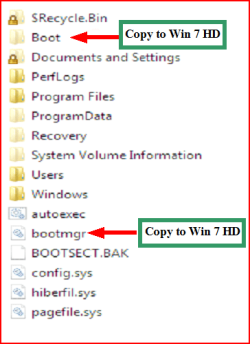
When you boot into the installer, on the second screen there is a "Repair My Computer" link. Is this what you are clicking to get into the Repair console? Is it finding any installation to repair?

If Startup Repair will not work when run 3 separate times with reboots, double check Win7 is marked active from the Repair console Command Line using DIskpart: http://www.sevenforums.com/tutorials/71432-partition-mark-active.html Then run Startup Repair again 3 times.

If the SYstem MBR cannot be written to Win7 it is likely due to other changes you have made. I would wipe the HD using Diskpart "Clean all" command and try install then: http://www.sevenforums.com/tutorials/52129-disk-clean-clean-all-diskpart-command.html

If you are able to boot the Win7 installer into "Repair My Computer" on second screen, then it is unlikely the installer is causing the problem. First you need to try cleaning the slate of old code which may interferre.
 
If you ran the install to your HD from your friend's own OS then it should have updated his MBR to Dual Boot both OS's. Does he still have a Dual Boot menu?

Yes he still have. He already had 3 os in boot menu, now he has 4 os in there, even if my drive isn't plugged.

Flash disk is booting, I have the setup going until choosing hard drive window (partition error)...
As I said It only worked (no partition error) live while another os was running.

I also already marked partition as active in administration tools, isn't enough ?

Thanks for quick reply, I'll try anyway right now what you suggested.

Edit : Ok well I didn't read your links before posting and I've already done both activating partition and repairing startup, unsuccessfully... Messages are : Unable to backup startup options. And : The system reboot cannot repair automatically this computer. 1. Send infos 2. Don't send infos. +see details > Problem07 : MissingBootManager
I tryied with pasting my friends \Windows\Boot\ folder, as it also didn't work, I've pasted back my backed up Boot folder... But I think it wasn't a good Idea as now I have "No bootmgr" message everytime.
If it was the only way to fix bootmgr then I think I'm done for another fresh install. Will buy tomorrow a new DVD-RW hoping I don't get again this stunning "partition error" :/

Do copy & paste both of those boot files?

Capture3.PNG
 

My Computer

OS
ME/XP/Vista/Win7
gregrocker said:
Is it finding any installation to repair?

When I click repair button on startup window in seven setup, it begins searching errors and finds an error in bootmgr and asks me if I want to repair it. When hitting yes, it shows me then the next errors : Unable to backup startup options. And : The system reboot cannot repair automatically this computer.
Os box is empty.

theog said:
Do copy & paste both of those boot files?

Nope !! Will try tomorrow when my friend will be awake, thanks !
Or will try now if anyone can share it (Se7en Pro 64 bootmgr).
 

My Computer

OS
XP sp2 - Vista - Se7en
CPU
AMD Athlon 64 X2 Dual-Core 4600+
Motherboard
Asus M2N32-SLI Deluxe
Memory
4Go
Graphics Card(s)
MSI Radeon HD5770 HAWK
Sound Card
Sound Blaster X-Fi
Monitor(s) Displays
Hyundai 22" LCD 16:10
Hard Drives
1x80go IDE
1x160go SATA
1x500go SATA
2x1000go SATA
Case
Antec Nine hundred
Cooling
GPU:2x80mm / CPU:1x80mm / Case:4x120mm + 1x200mm
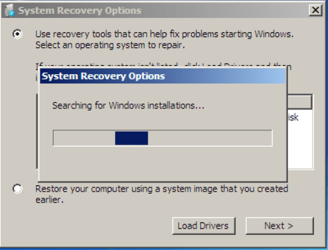
So when you select Repair My Computer on the second screen after booting the Installer, you then see this?
Capture2.PNG

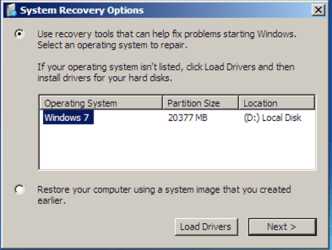
But there is no installation shown to repair?
Capture3.PNG

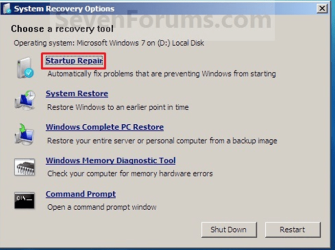
So you click through to Recovery Tools list to run Startup Repair here?
Capture.PNG

And even after running Startup Repair 3 separate times with reboots - ignoring any confusing messages - Win7 will still not start?

And you have confirmed with Diskpart it is marked Active? Partition - Mark as Active

theog - Startup Repair should write the boot critical files to any partition marked Active if they are not there.
 
theog - Startup Repair should write the boot critical files to any partition marked Active if they are not there.

1) Startup repair will mark a partition active.

2) if the boot folder & bootmgr.exe are not on the boot HD, Startup repair can not do any repairs.
 

My Computer

OS
ME/XP/Vista/Win7
theog - Startup Repair should write the boot critical files to any partition marked Active if they are not there.

1) Startup repair will mark a partition active.

2) if the boot folder & bootmgr.exe are not on the boot HD, Startup repair can not do any repairs.


1) If this is the case, then why will Startup Repair often derail the System MBR to data partitions which happen to be marked Active? As with the installer, it writes the System MBR to the first Active partition encountered. This requires that the WIn7 partition be marked Active, and any other partition marked Inactive if it blocks Startup Repair.

2) More than a hundred times we have used Startup Repair here to write the System MBR to Win7 after deleting XP or VIsta which had been System drive. This was done without copying over boot files, since that is something which Startup Repair apparently does.

Ask SIW2. He's the one who taught me, and has corrected me several times for failing to remember to mark Win7 active before repair.

Many have not caught up with the advancements in Win7 Startup Repair, including the automation of all former bootrec and bootsect commands.
 
So when you select Repair My Computer on the second screen after booting the Installer, you then see this?

And even after running Startup Repair 3 separate times with reboots - ignoring any confusing messages - Win7 will still not start?

And you have confirmed with Diskpart it is marked Active? Partition - Mark as Active

theog - Startup Repair should write the boot critical files to any partition marked Active if they are not there.

Yes I see all these except I don't have any OS shown in the "System recovery Options" box. I assume also I have already switched HD as Active in windows administrative tools, just checked : Online, Healthy, Active.

And also checked, no bootmgr file present in windows folder :/
(I assume I can see hidden & system files)
 

My Computer

OS
XP sp2 - Vista - Se7en
CPU
AMD Athlon 64 X2 Dual-Core 4600+
Motherboard
Asus M2N32-SLI Deluxe
Memory
4Go
Graphics Card(s)
MSI Radeon HD5770 HAWK
Sound Card
Sound Blaster X-Fi
Monitor(s) Displays
Hyundai 22" LCD 16:10
Hard Drives
1x80go IDE
1x160go SATA
1x500go SATA
2x1000go SATA
Case
Antec Nine hundred
Cooling
GPU:2x80mm / CPU:1x80mm / Case:4x120mm + 1x200mm
I tryied copying my friend's bootmgr file in windows folder but it didn't work. Error : Bootmgr not present, press ctrl+alt+del to reboot.
1- Any idea why doesn't seven repair tool writes those boot critical files has you said gregrocker ?
2- Isn't there any way to write those boot files in cmds ?

Btw I'll try a fresh dvd setup tomorrow.
 

My Computer

OS
XP sp2 - Vista - Se7en
CPU
AMD Athlon 64 X2 Dual-Core 4600+
Motherboard
Asus M2N32-SLI Deluxe
Memory
4Go
Graphics Card(s)
MSI Radeon HD5770 HAWK
Sound Card
Sound Blaster X-Fi
Monitor(s) Displays
Hyundai 22" LCD 16:10
Hard Drives
1x80go IDE
1x160go SATA
1x500go SATA
2x1000go SATA
Case
Antec Nine hundred
Cooling
GPU:2x80mm / CPU:1x80mm / Case:4x120mm + 1x200mm
I tryied copying my friend's bootmgr file in windows folder but it didn't work. Error : Bootmgr not present, press ctrl+alt+del to reboot.
1- Any idea why doesn't seven repair tool writes those boot critical files has you said gregrocker ?
2- Isn't there any way to write those boot files in cmds ?
Btw I'll try a fresh dvd setup tomorrow.

You can try manually running these commands from the DVD Command Line, as they will sometimes force the installer to discover an installation to repair:

bootrec.exe /fixboot
bootrec.exe /fixmbr

or if those don't work:
Bootsect.exe /nt60 all /force

Now see if Repair console discovers an installation to repair and run Startup Repair x3 if necessary.

If it will not discover the installation then it is damaged or irreparable in most cases.
 
You can try manually running these commands from the DVD Command Line, as they will sometimes force the installer to discover an installation to repair:

bootrec.exe /fixboot
bootrec.exe /fixmbr

or if those don't work:
Bootsect.exe /nt60 all /force

Didn't work ... I made it with dvd smoothly !

I don't think I messed up with usb flash boot, but sure, there's something wrong, as it is basicaly supposed to work, isn't it ?

Now I have a new issue with screen resolution, no 1680*1050 available...
I'll search over these forums :)
Thanks again.
 

My Computer

OS
XP sp2 - Vista - Se7en
CPU
AMD Athlon 64 X2 Dual-Core 4600+
Motherboard
Asus M2N32-SLI Deluxe
Memory
4Go
Graphics Card(s)
MSI Radeon HD5770 HAWK
Sound Card
Sound Blaster X-Fi
Monitor(s) Displays
Hyundai 22" LCD 16:10
Hard Drives
1x80go IDE
1x160go SATA
1x500go SATA
2x1000go SATA
Case
Antec Nine hundred
Cooling
GPU:2x80mm / CPU:1x80mm / Case:4x120mm + 1x200mm
Those drivers are obsolete (september 2009) known problem for this card.
I use latest catalyst (june 2010) instead, works fine.
But resolution issue wasn't resolved with drivers, it just disapeared as it appeared... strange...
 

My Computer

OS
XP sp2 - Vista - Se7en
CPU
AMD Athlon 64 X2 Dual-Core 4600+
Motherboard
Asus M2N32-SLI Deluxe
Memory
4Go
Graphics Card(s)
MSI Radeon HD5770 HAWK
Sound Card
Sound Blaster X-Fi
Monitor(s) Displays
Hyundai 22" LCD 16:10
Hard Drives
1x80go IDE
1x160go SATA
1x500go SATA
2x1000go SATA
Case
Antec Nine hundred
Cooling
GPU:2x80mm / CPU:1x80mm / Case:4x120mm + 1x200mm
Back
Top