Fresh install of windows 7 on two ssds

mcbgun

New member
Local time
11:00 PM
Messages
19
Hi all.
I started a thread regarding having to dual boot win 7 and 10 using f8 key to choose hard drive to boot.

It seems the pc doesnt like this and keeps asking to check disks on start up whichever OS I choose.

I now have decided I want to get rid of 10 and set up two users. ..on separate ssd drives to both hand windows 7.

My game plan is back up stuff on my third drive....format both ssds and install win 7.

Anyone see any glaring issues that might arise?
 

My Computer My Computer

At a glance

Windows 10 & Windows 7AMD FX8320 Black Edition 8 Core 3.5ghzCorsair Vengeance 8gbSapphire Dual-X R9 280X
Computer type
PC/Desktop
Computer Manufacturer/Model Number
Custom Build
OS
Windows 10 & Windows 7
CPU
AMD FX8320 Black Edition 8 Core 3.5ghz
Motherboard
Asus Sabertooth 990FX R2.0
Memory
Corsair Vengeance 8gb
Graphics Card(s)
Sapphire Dual-X R9 280X
Hard Drives
Samsung 850 Pro - 240gb
Kingston SSDNow V300 - 120GB
Hitachi - 1TB
PSU
Corsair CS750M 750W Hybrid Modular Power Supply
Case
NZXT Phantom 410
Cooling
Standard case fans
Keyboard
Wireless keyboard
Mouse
Wireless mouse

My Computers My Computers

  • At a glance

    Windows 7 HP 64i5 6600K - 800MHz to 4200MHz4+4G GSkill DDR4 3000IG - Intel 530
    Computer type
    PC/Desktop
    Computer Manufacturer/Model Number
    custom build
    OS
    Windows 7 HP 64
    CPU
    i5 6600K - 800MHz to 4200MHz
    Motherboard
    GA-Z170-HD3P
    Memory
    4+4G GSkill DDR4 3000
    Graphics Card(s)
    IG - Intel 530
    Monitor(s) Displays
    Samsung 226BW
    Screen Resolution
    1680x1050
    Hard Drives
    (1) -1 SM951 – 128GB M.2 AHCI PCIe SSD drive for Windows 7 and Lubuntu
    (2) -1 WD SATA 3 - 1T for Data
    (3) -1 WD SATA 3 - 1T for backup
    PSU
    Thermaltake 450W TR2 gold
    Keyboard
    Old and good Chicony mechanical keyboard
    Mouse
    Logitech mX performance - 9 buttons (had to disable some)
    Internet Speed
    500Mb/s
    Browser
    Firefox 64
    Other Info
    TinyWall firewall
  • At a glance

    Windows 7 Proi7-4500U 800MHz to 3.0GHz(4+4)G DDR3 1600IG intel 4400 + NVIDIA GeForce GT 745M
    Computer type
    Laptop
    System Manufacturer/Model Number
    Asus Q550LF
    OS
    Windows 7 Pro
    CPU
    i7-4500U 800MHz to 3.0GHz
    Motherboard
    Asus Q550LF
    Memory
    (4+4)G DDR3 1600
    Graphics Card(s)
    IG intel 4400 + NVIDIA GeForce GT 745M
    Sound Card
    Realtek
    Monitor(s) Displays
    LG Display LP156WF4-SPH1
    Screen Resolution
    1920 x 1080
    Hard Drives
    BX500 120G SSD for Windows and programs +
    1T HDD for data
    Internet Speed
    500 Mb/s
    Browser
    Firefox
    Other Info
    TinyWall firewall
If you do two separate installs of Windows 7 on the same computer, you are needlessly complicating your life:
  • You'll need two Windows 7 licenses. If your computer came with Windows 7 installed, you can use that license for one of them; but you'll need another license for the other one.
  • You will need to regularly reboot into each one and run Windows updates.
  • You'll need anti-virus on each one.
  • You'll need to install all software on each one (which may mean that you'll need multiple software licenses).
  • You'll need to do regular backups on each one.
Rather than do two installs, why not do one install, and then set up two separate user accounts in the one install?
You could use drive #2 for your data, and drive #3 for backups. This would greatly simplify backups: backup your data drive regularly (say, once per week), and backup your Windows drive occasionally (say, once every couple of months).

Also, if you take your computer in for service, you could remove drives #2 and #3, thereby keeping your data from possibly being stolen (if that is a concern to you).
 

My Computer My Computer

At a glance

Linux Mint 18.2 xfce 64-bit (VMWare host) / W...Haswell4 GB
Computer type
PC/Desktop
Computer Manufacturer/Model Number
Dell
OS
Linux Mint 18.2 xfce 64-bit (VMWare host) / Windows 8.1 Pro 32-bit (VMWare guest)
CPU
Haswell
Memory
4 GB
Monitor(s) Displays
Acer 23"
Screen Resolution
1920 x 1080
Hard Drives
Two hard drives, 1TB each: One for Linux, one for my data.
Keyboard
IBM Model M
Antivirus
Sophos (Linux), Trend Micro (Windows)
Browser
Firefox, Opera
Other Info
I use Samba to share my data drive with the other computers at my house and with my guest session in VMWare Workstation Player.
:ditto:

You need to set the default system you want to use as boot option #1 in the Bios, and disable any/all other drives.

Then set the other system as boot option #1 when you want to use it.

And keep both systems from seeing each other by removing it`s letter.

I don`t have any issues like you describe.

I have 7 and 10 on my X299, and that`s how I have it set up.

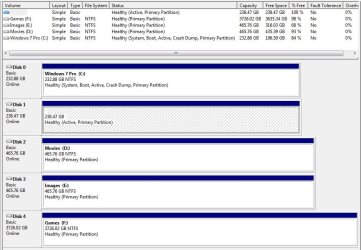
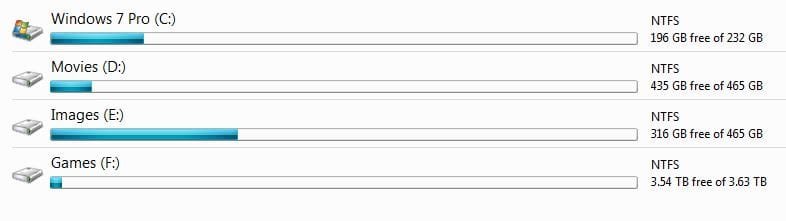
A shot of Disk Management from Windows 7, notice how I removed Disk 1`s letter. And also a shot of Explorer.
 

Attachments

  • Capture.JPG
    Capture.JPG
    92 KB · Views: 0
  • Capture1.JPG
    Capture1.JPG
    22.2 KB · Views: 0

My Computer My Computer

At a glance

Windows 10 Pro x64Intel Core i7 6700KGSkill TridentZ RGB 16GB 3600 16-16-16-36EVGA GTX 980 Ti SC x2
Computer type
PC/Desktop
Computer Manufacturer/Model Number
Skylake Special #666
OS
Windows 10 Pro x64
CPU
Intel Core i7 6700K
Motherboard
Asus Sabertooth Z170 Mark 1
Memory
GSkill TridentZ RGB 16GB 3600 16-16-16-36
Graphics Card(s)
EVGA GTX 980 Ti SC x2
Sound Card
Realtek High Definition
Monitor(s) Displays
AOC G2460PG
Screen Resolution
1920 x 1080 144Hz
Hard Drives
Samsung 860 Pro 256GB, Seagate Barracuda 4TB x2
PSU
EVGA 1000 P2, EVGA White Custom Braided Cables
Case
Corsair Vengeance C70 Gunmetal Black
Cooling
Corsair H100i v2, Corsair ML120 x2, Thermal Grizzly Kryonaut
Keyboard
Logitech G910 Orion Spectrum
Mouse
Logitech G700s
Internet Speed
Verizon Fios Quantum Gateway 75/75
Antivirus
Windows Defender, Malwarebytes Free 3.8.3
Browser
Chrome
Other Info
Corsair SP120 x4, LG Blu-ray Drive, Durabrand HT-395 100 Watt Dolby Digital Amp, Corsair H2100 Wireless 7.1 Headset
Interesting responses everyone...

I wanted to have my partner have a drive to herself and me my own one as she uses it for work and I mainly use it for gaming therefore I need the bigger hard drive.

In terms of cloning.....does that mean I can set up myself on one SSD then clone it to second hard drive and then edit the user account to show my partners details?
 

My Computer My Computer

At a glance

Windows 10 & Windows 7AMD FX8320 Black Edition 8 Core 3.5ghzCorsair Vengeance 8gbSapphire Dual-X R9 280X
Computer type
PC/Desktop
Computer Manufacturer/Model Number
Custom Build
OS
Windows 10 & Windows 7
CPU
AMD FX8320 Black Edition 8 Core 3.5ghz
Motherboard
Asus Sabertooth 990FX R2.0
Memory
Corsair Vengeance 8gb
Graphics Card(s)
Sapphire Dual-X R9 280X
Hard Drives
Samsung 850 Pro - 240gb
Kingston SSDNow V300 - 120GB
Hitachi - 1TB
PSU
Corsair CS750M 750W Hybrid Modular Power Supply
Case
NZXT Phantom 410
Cooling
Standard case fans
Keyboard
Wireless keyboard
Mouse
Wireless mouse
In terms of cloning.....does that mean I can set up myself on one SSD then clone it to second hard drive and then edit the user account to show my partners details?

Yes. If you don't want a user to see the other drive, do what Brien suggested(post #4). Set the other drive with no letter so it doesn't show on Explorer.
 

My Computers My Computers

  • At a glance

    Windows 7 HP 64i5 6600K - 800MHz to 4200MHz4+4G GSkill DDR4 3000IG - Intel 530
    Computer type
    PC/Desktop
    Computer Manufacturer/Model Number
    custom build
    OS
    Windows 7 HP 64
    CPU
    i5 6600K - 800MHz to 4200MHz
    Motherboard
    GA-Z170-HD3P
    Memory
    4+4G GSkill DDR4 3000
    Graphics Card(s)
    IG - Intel 530
    Monitor(s) Displays
    Samsung 226BW
    Screen Resolution
    1680x1050
    Hard Drives
    (1) -1 SM951 – 128GB M.2 AHCI PCIe SSD drive for Windows 7 and Lubuntu
    (2) -1 WD SATA 3 - 1T for Data
    (3) -1 WD SATA 3 - 1T for backup
    PSU
    Thermaltake 450W TR2 gold
    Keyboard
    Old and good Chicony mechanical keyboard
    Mouse
    Logitech mX performance - 9 buttons (had to disable some)
    Internet Speed
    500Mb/s
    Browser
    Firefox 64
    Other Info
    TinyWall firewall
  • At a glance

    Windows 7 Proi7-4500U 800MHz to 3.0GHz(4+4)G DDR3 1600IG intel 4400 + NVIDIA GeForce GT 745M
    Computer type
    Laptop
    System Manufacturer/Model Number
    Asus Q550LF
    OS
    Windows 7 Pro
    CPU
    i7-4500U 800MHz to 3.0GHz
    Motherboard
    Asus Q550LF
    Memory
    (4+4)G DDR3 1600
    Graphics Card(s)
    IG intel 4400 + NVIDIA GeForce GT 745M
    Sound Card
    Realtek
    Monitor(s) Displays
    LG Display LP156WF4-SPH1
    Screen Resolution
    1920 x 1080
    Hard Drives
    BX500 120G SSD for Windows and programs +
    1T HDD for data
    Internet Speed
    500 Mb/s
    Browser
    Firefox
    Other Info
    TinyWall firewall
I wanted to have my partner have a drive to herself and me my own one as she uses it for work and I mainly use it for gaming therefore I need the bigger hard drive.

You could have two data drives, in addition to your Windows drive -- one for you and one for her. But I would never recommend having two separate Windows installs on the same computer, because you are needlessly complicating your life by setting things up this way.

If your data drive is big enough, then there's no reason the one data drive couldn't be shared by both of you.

In terms of cloning.....does that mean I can set up myself on one SSD then clone it to second hard drive and then edit the user account to show my partners details?

If you are needing a big Windows drive for what you do, then get one big Windows drive which is shared by both of you. Cloning would be for making a backup copy of Windows, not for setting up your working copy of Windows.
 

My Computer My Computer

At a glance

Linux Mint 18.2 xfce 64-bit (VMWare host) / W...Haswell4 GB
Computer type
PC/Desktop
Computer Manufacturer/Model Number
Dell
OS
Linux Mint 18.2 xfce 64-bit (VMWare host) / Windows 8.1 Pro 32-bit (VMWare guest)
CPU
Haswell
Memory
4 GB
Monitor(s) Displays
Acer 23"
Screen Resolution
1920 x 1080
Hard Drives
Two hard drives, 1TB each: One for Linux, one for my data.
Keyboard
IBM Model M
Antivirus
Sophos (Linux), Trend Micro (Windows)
Browser
Firefox, Opera
Other Info
I use Samba to share my data drive with the other computers at my house and with my guest session in VMWare Workstation Player.
Why mess with having to enter boot options to choose the boot drive, I dual boot a couple of my machines, with default set to one and the other as option in Windows Boot Manager. Easy BCD is simple to set this up. FYI: if you dual boot Windows and Linux, I would recommend placing the grub boot loader and Linux on the same partition, then use Easy BCD to format Windows Boot manager. If you have issues, i.e. win update changes boot menu, it's an easier fix. If you install Linux to a system with windows on it, grub boot manager overwrites windows boot manager & you will most likely run into issues with windows updates.
 

My Computer My Computer

At a glance

Win 10 x64, Linux Lite, Win 7 x64, BlackArch,...
Computer type
PC/Desktop
Computer Manufacturer/Model Number
HP Desktop & Compaq Laptop
OS
Win 10 x64, Linux Lite, Win 7 x64, BlackArch, & Kali
Hard Drives
Samsung 850 Pro 256Gb,
Hitachi HDD 1Tb,
Crucial MX SSD 250Gb
Segate 3Tb USB 3.0 Ext. Backup HDD
Internet Speed
150Mbps dn, 20Mbps up
Antivirus
Avast Free, Malwarebytes Anti-Exploit & Anti-Ransomware
Browser
Firefox, Chrome, Opera, & VPN
Many thanks for all suggestions which I will take on board when setting up.
 

My Computer My Computer

At a glance

Windows 10 & Windows 7AMD FX8320 Black Edition 8 Core 3.5ghzCorsair Vengeance 8gbSapphire Dual-X R9 280X
Computer type
PC/Desktop
Computer Manufacturer/Model Number
Custom Build
OS
Windows 10 & Windows 7
CPU
AMD FX8320 Black Edition 8 Core 3.5ghz
Motherboard
Asus Sabertooth 990FX R2.0
Memory
Corsair Vengeance 8gb
Graphics Card(s)
Sapphire Dual-X R9 280X
Hard Drives
Samsung 850 Pro - 240gb
Kingston SSDNow V300 - 120GB
Hitachi - 1TB
PSU
Corsair CS750M 750W Hybrid Modular Power Supply
Case
NZXT Phantom 410
Cooling
Standard case fans
Keyboard
Wireless keyboard
Mouse
Wireless mouse
Back
Top