Fresh Install...Windows Update/Browser issue

BamaInArk

New member
Member
Local time
12:01 PM
Messages
41
I've updated the installation media using SIW2 method along with Simplex. Working fine. I've ran into a few slight issues and would like to tackle them one at a time.

The first one has to do with a fresh install of Win7 and then running Windows Update. Although WU is working fine years ago when you installed Win7 WU had an option for WU to also look at Other Updates along with MS updates. You clicked on a hyperlink which took you to a special page which uploaded a separate WU feature. This loaded some extra whatever to allow WU to not only look for Microsoft products but other hardware updates as well.

Now after a fresh install that hyperlink option still shows however the first time you click it you then get the notification to update to Edge which seems to throw the whole thing for a loop and that option for other hardware doesn't get installed. I attempted multiple test installs to try and figure it out but no matter what I tried I could not get Windows Update updated with this feature.

Hopefully I have explained this well enough. Perhaps I should have some screen shots but hopefully the experienced ones here will understand.

So although WU is working fine for Microsoft products I'm not quite sure it is working totally for all hardware connected. For things like monitor drivers, etc
 

My Computer

Computer type
PC/Desktop
Computer Manufacturer/Model Number
Custom Build
OS
Win7 Pro 64/Win10 Pro 64
CPU
Various
Motherboard
Various
MS doesn't support Win 7 any more. My suggestion is to set Services - Windows Update - Manual and on WU page set it to Never check.
Then run WU manually to find updates for Office etc and decide witch one to install.

To download Edge for Win 7 - MS Edge
To uninstall the telemetry, run cmd file to uninstall those KB files.
kb_spy.cmd.txt
Rename it as KB_Spy.cmd and run it.
 

My Computers

System One System Two

  • Computer type
    PC/Desktop
    Computer Manufacturer/Model Number
    custom build
    OS
    Windows 7 HP 64
    CPU
    i5 6600K - 800MHz to 4200MHz
    Motherboard
    GA-Z170-HD3P
    Memory
    4+4G GSkill DDR4 3000
    Graphics Card(s)
    IG - Intel 530
    Monitor(s) Displays
    Samsung 226BW
    Screen Resolution
    1680x1050
    Hard Drives
    (1) -1 SM951 – 128GB M.2 AHCI PCIe SSD drive for Windows 7 and Lubuntu
    (2) -1 WD SATA 3 - 1T for Data
    (3) -1 WD SATA 3 - 1T for backup
    PSU
    Thermaltake 450W TR2 gold
    Keyboard
    Old and good Chicony mechanical keyboard
    Mouse
    Logitech mX performance - 9 buttons (had to disable some)
    Internet Speed
    500Mb/s
    Browser
    Firefox 64
    Other Info
    TinyWall firewall
  • Computer type
    Laptop
    System Manufacturer/Model Number
    Asus Q550LF
    OS
    Windows 7 Pro
    CPU
    i7-4500U 800MHz to 3.0GHz
    Motherboard
    Asus Q550LF
    Memory
    (4+4)G DDR3 1600
    Graphics Card(s)
    IG intel 4400 + NVIDIA GeForce GT 745M
    Sound Card
    Realtek
    Monitor(s) Displays
    LG Display LP156WF4-SPH1
    Screen Resolution
    1920 x 1080
    Hard Drives
    BX500 120G SSD for Windows and programs +
    1T HDD for data
    Internet Speed
    500 Mb/s
    Browser
    Firefox
    Other Info
    TinyWall firewall
Default installation of Windows 7 SP1 comes with Internet Explorer 8 which is very limited and cannot open anything but Google. You must open Google, then search for Google Chrome and install it. You cannot download Microsoft Edge directly from IE8, the links don't work properly. So install Chrome, then download Microsoft Edge from Chrome. Make Edge the default browser to handle Windows Update links. Now you should be able to install Microsoft update, if not download it manually from Edge. After you install Microsoft update you should be able to update Office and other Microsoft applications from Windows Update.
You could also upgrade IE8 to IE11, but it is limited too, Edge is a better option.
 

My Computer

Computer type
PC/Desktop
Computer Manufacturer/Model Number
custom
OS
Windows 7 Ultimate 64-bit (now 11 24H2)
CPU
Intel Core-i3 3770 3.5GHz
Motherboard
Asus P8H61
Memory
16GB DDR3 1600Mhz
Graphics Card(s)
nVidia Geforce RTX 3050
Sound Card
Realtek HD audio
Monitor(s) Displays
Sony 19" LCD TV via VGA
Screen Resolution
1440x900
Hard Drives
WD 1TB SATA III SSD
PSU
unknown
Case
unknown
Cooling
Intel's provided with CPU
Antivirus
Windows Defender (Windows 11)
Browser
Microsoft Edge
Other Info
Previously Windows 7 Ultimate, now Windows 11 24H2
As you have a custom build, i would opt for drivers directly from manufacturers and ignore MS updates
 

My Computer

Computer type
PC/Desktop
Computer Manufacturer/Model Number
medionl/Aspire 6930G/acer x55a
OS
W7 home premium 32bit/W7HP 64bit/w10 tp insider ring
CPU
E5300 dual core
Motherboard
medion MS7366
Memory
3gb
Graphics Card(s)
Nvidia Geforce 7100 Nforce 630i
Monitor(s) Displays
avixc
Internet Speed
n (isp resticted to 72)
Antivirus
mse/pands
Browser
palemoon
Other Info
Belkin Fd7050 n USB using Railink RT2870 drivers, more upto date
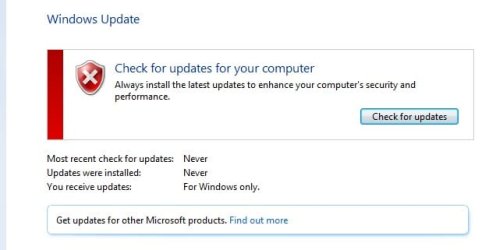
Win7UpdateDefault.jpg

I'm guessing, from the responses, there must not be a workaround for this issue. The attached image is what WU shows after initial installation. I further updated using the latest version of Edge(using the offline installer) and made sure it was the default browser before attempting to run WU.
As you can see WU shows "For Windows only." If you click the hyperlink at "find out more" you end up with a security warning which can be bypassed which takes you to /fe.updatesms.......... Where you end up on a page/graphic that says you can run Windows Update from Control Panel.

So it appears the Updater is not updated to be able to look for any other Microsoft Products. WU was able to update the driver for the monitor and usb connected Logitech wireless keyboard/mouse combo. I also tried to manually install an updated Windows Update Agent. Didn't seem to do anything.

This is not super critical at this point. I've left Win7 behind. But I do have one machine that dual boots Win7/Win10 that I am having issues with and might need to do a reinstall of Win7 to get it working again. I have that machine for a specific purpose.
 

My Computer

Computer type
PC/Desktop
Computer Manufacturer/Model Number
Custom Build
OS
Win7 Pro 64/Win10 Pro 64
CPU
Various
Motherboard
Various

My Computers

System One System Two

  • Computer type
    Laptop
    Computer Manufacturer/Model Number
    Toshiba satellite C650D
    OS
    Windows 7 Home Premium x64
    CPU
    AMD V120
    Memory
    4GB
    Internet Speed
    150 Mbps
    Antivirus
    MSE
    Browser
    IE11, Edge, Firefox
    Other Info
    I also have W7 Pro on my System Two, and several W7 Hyper-V VMs. My other machines run Windows 10/11. Their specs are in my Ten Forums & Eleven Forum profiles.
  • Computer type
    Laptop
    System Manufacturer/Model Number
    Lenovo Thinkpad T430
    OS
    Windows 7 Pro x64
    CPU
    Intel i5-3320M
    Memory
    8 GB
    Hard Drives
    250GB Samsung SSD 860 EVO
    Other Info
    Antivirus: MSE
I suggested to download and install Microsoft update add-on. This will enable Windows update to download other Microsoft applications. Drivers should be included in standard Windows update in the optional updates section, although it is preferable to download any drivers directly from manufacturer. You can also use Snappy Driver Installer to detect and install missing drivers for you. Again I prefer the official drivers from manufacturer.
 

My Computer

Computer type
PC/Desktop
Computer Manufacturer/Model Number
custom
OS
Windows 7 Ultimate 64-bit (now 11 24H2)
CPU
Intel Core-i3 3770 3.5GHz
Motherboard
Asus P8H61
Memory
16GB DDR3 1600Mhz
Graphics Card(s)
nVidia Geforce RTX 3050
Sound Card
Realtek HD audio
Monitor(s) Displays
Sony 19" LCD TV via VGA
Screen Resolution
1440x900
Hard Drives
WD 1TB SATA III SSD
PSU
unknown
Case
unknown
Cooling
Intel's provided with CPU
Antivirus
Windows Defender (Windows 11)
Browser
Microsoft Edge
Other Info
Previously Windows 7 Ultimate, now Windows 11 24H2
Back
Top