Fresh Installation of Windows 7 using ISO and OEM Key on Toshiba L450

Now, the SSD speed has nothing to do with whether Windows is cloned or clean-installed. It will depend mostly on the rest of the computer components. Quick look at L450 shows it to be on the low-end, so while you will see faster drive speeds, it's not going to make a gigantic difference in overall computing, so don't get your hopes up too high, you are running Core 2 Duo with 2GB of RAM... I personally would not be able to justify the SSD money for this particular laptop, but in the end the choice is yours.
Just make sure you go into bios and have the drive set to AHCI, and don't do any manual defragment.

Ps I put in 4gb RAM which is the max - just experimenting with an old.machine really... might try it on a new HP pavilion 15 later but def dont want to mess that up.
 
Last edited:

My Computer My Computer

At a glance

Windows 7 64 bitCeleron4gb
Computer type
Laptop
Computer Manufacturer/Model Number
Toshiba
OS
Windows 7 64 bit
CPU
Celeron
Memory
4gb
Hard Drives
160gb
Antivirus
Avanti, Malware Bytes
Browser
chrome
A new sticker ?

You`re not gonna get one of those from them.

That`s the problem with stickers on the bottom of a laptop :(
 

My Computer My Computer

At a glance

Windows 10 Pro x64Intel Core i7 6700KGSkill TridentZ RGB 16GB 3600 16-16-16-36EVGA GTX 980 Ti SC x2
Computer type
PC/Desktop
Computer Manufacturer/Model Number
Skylake Special #666
OS
Windows 10 Pro x64
CPU
Intel Core i7 6700K
Motherboard
Asus Sabertooth Z170 Mark 1
Memory
GSkill TridentZ RGB 16GB 3600 16-16-16-36
Graphics Card(s)
EVGA GTX 980 Ti SC x2
Sound Card
Realtek High Definition
Monitor(s) Displays
AOC G2460PG
Screen Resolution
1920 x 1080 144Hz
Hard Drives
Samsung 860 Pro 256GB, Seagate Barracuda 4TB x2
PSU
EVGA 1000 P2, EVGA White Custom Braided Cables
Case
Corsair Vengeance C70 Gunmetal Black
Cooling
Corsair H100i v2, Corsair ML120 x2, Thermal Grizzly Kryonaut
Keyboard
Logitech G910 Orion Spectrum
Mouse
Logitech G700s
Internet Speed
Verizon Fios Quantum Gateway 75/75
Antivirus
Windows Defender, Malwarebytes Free 3.8.3
Browser
Chrome
Other Info
Corsair SP120 x4, LG Blu-ray Drive, Durabrand HT-395 100 Watt Dolby Digital Amp, Corsair H2100 Wireless 7.1 Headset

My Computer My Computer

At a glance

Windows 7 64 bitCeleron4gb
Computer type
Laptop
Computer Manufacturer/Model Number
Toshiba
OS
Windows 7 64 bit
CPU
Celeron
Memory
4gb
Hard Drives
160gb
Antivirus
Avanti, Malware Bytes
Browser
chrome
A new sticker ?

You`re not gonna get one of those from them.

That`s the problem with stickers on the bottom of a laptop :(

Haha yeh thats a prob alright- had no idea!
 

My Computer My Computer

At a glance

Windows 7 64 bitCeleron4gb
Computer type
Laptop
Computer Manufacturer/Model Number
Toshiba
OS
Windows 7 64 bit
CPU
Celeron
Memory
4gb
Hard Drives
160gb
Antivirus
Avanti, Malware Bytes
Browser
chrome

My Computer My Computer

At a glance

Windows 10 Pro x64Intel Core i7 6700KGSkill TridentZ RGB 16GB 3600 16-16-16-36EVGA GTX 980 Ti SC x2
Computer type
PC/Desktop
Computer Manufacturer/Model Number
Skylake Special #666
OS
Windows 10 Pro x64
CPU
Intel Core i7 6700K
Motherboard
Asus Sabertooth Z170 Mark 1
Memory
GSkill TridentZ RGB 16GB 3600 16-16-16-36
Graphics Card(s)
EVGA GTX 980 Ti SC x2
Sound Card
Realtek High Definition
Monitor(s) Displays
AOC G2460PG
Screen Resolution
1920 x 1080 144Hz
Hard Drives
Samsung 860 Pro 256GB, Seagate Barracuda 4TB x2
PSU
EVGA 1000 P2, EVGA White Custom Braided Cables
Case
Corsair Vengeance C70 Gunmetal Black
Cooling
Corsair H100i v2, Corsair ML120 x2, Thermal Grizzly Kryonaut
Keyboard
Logitech G910 Orion Spectrum
Mouse
Logitech G700s
Internet Speed
Verizon Fios Quantum Gateway 75/75
Antivirus
Windows Defender, Malwarebytes Free 3.8.3
Browser
Chrome
Other Info
Corsair SP120 x4, LG Blu-ray Drive, Durabrand HT-395 100 Watt Dolby Digital Amp, Corsair H2100 Wireless 7.1 Headset
I just managed to check and realise the sticker is completely worn away.

Some people have been able to "read a worn COA sticker key".
I doubt you will be able to based on your description of the COA sticker, but here is ONE thread about this:
http://www.sevenforums.com/general-discussion/308585-recovering-windows-product-key.html

It's up to you if you want to spend the time and effort trying to read the worn COA sticker key.

I THINK some people have worked with MS to get a new key for a worn COA sticker key ...
I don't have any links to threads about those discussions.
If I find any, I'll post back with link(s).

If you can't read the COA key and MS doesn't give you a new key, you can't do a clean install unless you purchase a new key (license).
I'm assuming you are using the OEM SLP factory pre-installed key.

Is it worth contacting toshiba directly to get it or better to plough on with recovery disc. The recovery usb I made last year has a folder called HDDprep- doesnt sound appropriate for SSD

Even though the folder name sounds inappropriate, the factory recovery may work fine for an SSD.
I'll defer to Greg for better info on this !

If not, do a factory recovery to a HD, and then transfer that to an SSD.
Again, I'll defer to Greg for better info on this !
 

My Computer My Computer

At a glance

Multi-Boot W7_Pro_x64 W8.1_Pro_x64 W10_Pro_x6...AMD Athlon II x4 6206GB GSkill DDR2 800AMD 4670 GPU + AMD 4200 IGP
Computer type
PC/Desktop
Computer Manufacturer/Model Number
home built
OS
Multi-Boot W7_Pro_x64 W8.1_Pro_x64 W10_Pro_x64 +Linux_VMs +Chromium_VM
CPU
AMD Athlon II x4 620
Motherboard
Gigabyte GA-MA785G-UD3H
Memory
6GB GSkill DDR2 800
Graphics Card(s)
AMD 4670 GPU + AMD 4200 IGP
Sound Card
on board Realtek ALC889A
Monitor(s) Displays
RCA 40" LCD TV, Insignia 32" LCD TV, HP 15" LCD monitor
Screen Resolution
1680 x 1050
Hard Drives
OCZ Vertex 3 120GB,
Samsung F3 1TB (3),
Several others - WD, Seagate, Hitachi, ...
PSU
Corsair 500 W
Case
Rosewill mid tower
Cooling
CM 90mm rifle
Keyboard
Gyration wireless, Logitech wireless, Dell USB wired
Mouse
Gyration wireless, Logitech wireless, V7 USB wired
Internet Speed
Spectrum - 100Mbps D / 10Mbps U
Antivirus
Avast, MBAM3, EMET, WinPatrol
Browser
Pale Moon, Firefox, IE
Other Info
2 multi-boot PC's
Mainly HTPC/Office/Gen purpose (no gaming).
Trendnet USB KVM.
LG DVD burner/Blue Ray Player.
Tray system for removable SATA backup drives.

Not currently OCd, under-volted.
I use Hybrid sleep, rarely re-boot or shutdown.

Hauppauge HD-PVR, Avermedia PCIe TV Tuner, Hauppauge PCI TV Tuner.
Ah ok, got the MGAdiagnotic done, it says 'OEM SLP' and the key can be found online, so point-taken, clean install isn't going to happen (I guess I could make phone calls if determined...)
Just looking for the simplest way now - don't want to get in too deep using other programs. Was looking forward to doing this quickly just putting in the recovery USB and making small changes on booting. Need the quickest route really so will read the tutorial in depth to see how. Guess use the old HDD Recovery USB and then follow your tutorial instructions on how to make adjustments for the SSD afterwards. Its a shame to spend money on a new SSD and then not use to full potential. If it doesn't make enough difference to the Toshiba can I wipe (re-format?) the SSD, start over & use it on the HP Pavilion instead?
Excuse ignorance in all of this


Diagnostic Report (1.9.0027.0):
-----------------------------------------
Windows Validation Data-->

Validation Code: 0
Cached Online Validation Code: 0x0
Windows Product Key: *****-*****-BFF84-6GFC2-BWX77
Windows Product Key Hash: EkRG02noirn1etiserf2jJnVqlM=
Windows Product ID: 00359-OEM-8992687-00017
Windows Product ID Type: 2
Windows License Type: OEM SLP
Windows OS version: 6.1.7601.2.00010300.1.0.003
ID: {4E57675F-4D5F-44F9-A2D3-902B14055907}(1)
Is Admin: Yes
TestCab: 0x0
LegitcheckControl ActiveX: N/A, hr = 0x80070002
Signed By: N/A, hr = 0x80070002
Product Name: Windows 7 Home Premium
Architecture: 0x00000009
Build lab: 7601.win7sp1_gdr.141211-1742
TTS Error:
Validation Diagnostic:
Resolution Status: N/A
 

My Computer My Computer

At a glance

Windows 7 64 bitCeleron4gb
Computer type
Laptop
Computer Manufacturer/Model Number
Toshiba
OS
Windows 7 64 bit
CPU
Celeron
Memory
4gb
Hard Drives
160gb
Antivirus
Avanti, Malware Bytes
Browser
chrome
Wait for advice from Greg before making any changes.
He's the top guru and has the most installation experience i know of.

Yes, you can wipe the SSD and start over clean on a different PC

You can't use a Toshiba key on a HP.
OEM keys are tied to the original PC they are installed on, and can't be transferred.
You would need a RETAIL key to be able to transfer the key to a different PC.
 

My Computer My Computer

At a glance

Multi-Boot W7_Pro_x64 W8.1_Pro_x64 W10_Pro_x6...AMD Athlon II x4 6206GB GSkill DDR2 800AMD 4670 GPU + AMD 4200 IGP
Computer type
PC/Desktop
Computer Manufacturer/Model Number
home built
OS
Multi-Boot W7_Pro_x64 W8.1_Pro_x64 W10_Pro_x64 +Linux_VMs +Chromium_VM
CPU
AMD Athlon II x4 620
Motherboard
Gigabyte GA-MA785G-UD3H
Memory
6GB GSkill DDR2 800
Graphics Card(s)
AMD 4670 GPU + AMD 4200 IGP
Sound Card
on board Realtek ALC889A
Monitor(s) Displays
RCA 40" LCD TV, Insignia 32" LCD TV, HP 15" LCD monitor
Screen Resolution
1680 x 1050
Hard Drives
OCZ Vertex 3 120GB,
Samsung F3 1TB (3),
Several others - WD, Seagate, Hitachi, ...
PSU
Corsair 500 W
Case
Rosewill mid tower
Cooling
CM 90mm rifle
Keyboard
Gyration wireless, Logitech wireless, Dell USB wired
Mouse
Gyration wireless, Logitech wireless, V7 USB wired
Internet Speed
Spectrum - 100Mbps D / 10Mbps U
Antivirus
Avast, MBAM3, EMET, WinPatrol
Browser
Pale Moon, Firefox, IE
Other Info
2 multi-boot PC's
Mainly HTPC/Office/Gen purpose (no gaming).
Trendnet USB KVM.
LG DVD burner/Blue Ray Player.
Tray system for removable SATA backup drives.

Not currently OCd, under-volted.
I use Hybrid sleep, rarely re-boot or shutdown.

Hauppauge HD-PVR, Avermedia PCIe TV Tuner, Hauppauge PCI TV Tuner.
I think I've mentioned all of your available options above in addition to the Clean Reinstall which may not be avaiilable to you unless you can get Toshiba tech support to give you the Product Key as they sometimes will. Otherwise there's a method to back up the PC's present activation to reinstall after Clean Reinstall Windows 7 however we are not allowed to support it here because of the possibility of misuse, so you'll need to research it yourself.

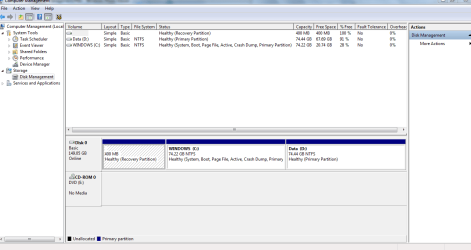
I mentioned that if you're happy with the present install you can transfer it to the SSD using an imaging program like the one we recommend most here Macrium Imaging - Windows 7 Help Forums. If you'll post back a screenshot of Disk Management - Post a Screen Capture Image we can advise you on which partitions will need to be included, normally the System partition and C if they are not the same.

If the present install is not performing as well as the way your PC arrived, then you can try using your Recovery media if it will boot and run on the SSD. I would immediately Clean Up Factory Bloatware especially turning off all of the Toshiba bloatware which throttles the OS unnecessarily since most of it is duplicating better utilties already built into Win7.

If you have any questions feel free to ask them back as you review these options including the more detailed tutorials linked earlier.
 
Thanks very much for all the advice- much appreciated.

What i really want to do is make the most of the new SSD and avoid this alignment problem.

I don't have much on the machine - all my files are on Google Drive, Onedrive and Dropbox, so I'm happy to wipe everything if need be. Windows 7 works fine - I got rid of a fair bit of the Toshiba bloatware, though some remains it seems from the Belarc report. I installed Office 2010 two months ago and its working well.

If Macrium avoids the alignment problem and makes the SSD work at its best then that's great - ready to have a go.

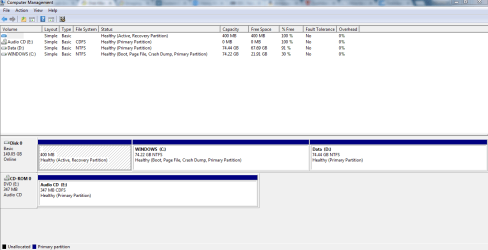
I attach the Disc Management report - could attach the Belarc report if useful.
Many thanks again for the advice!

(PS do I need to follow these instructions after using Macrium:
http://www.sevenforums.com/tutorials/113967-ssd-alignment.html)
 

Attachments

  • Toshiba L450 17K Disc Management.PNG
    Toshiba L450 17K Disc Management.PNG
    22.7 KB · Views: 3
Last edited:

My Computer My Computer

At a glance

Windows 7 64 bitCeleron4gb
Computer type
Laptop
Computer Manufacturer/Model Number
Toshiba
OS
Windows 7 64 bit
CPU
Celeron
Memory
4gb
Hard Drives
160gb
Antivirus
Avanti, Malware Bytes
Browser
chrome
Apparently the 400mb partition is booting Win7 since it's marked Active which is the flag that points to the intended System partition, but strangely its not marked System which is always a concern. So you can either move the Bootmgr - Move to C:\ with EasyBCD - Windows 7 Forums so that C is booting itself, or run Startup Repair - Run 3 Separate Times to see if the 400mb jumbo System partition will flag itself System. It may continue to boot correctly, but until one of those partitions is marked System it will never be correct.

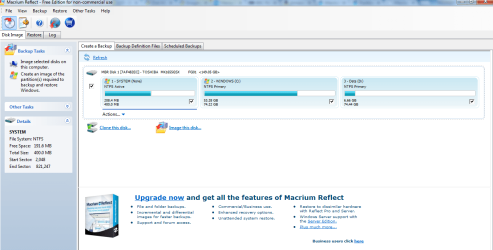
I'm assuming you have a jumbo System partition because it once serviced a Recovery partition you've since removed? If so you dont really need it so moving the Bootmgr - Move to C:\ with EasyBCD - Windows 7 Forums is an easy and effective way to get C booting itself so you only need to concern yourself with dragging it to the new SSD if it's going to be small. If it is plenty big you could drag all three partitions to it, then adjust their size as I described earlier can be done during Macrium imaging. But without a Recovery partition about 75% of the 400mb is wasted since it only needs the boot files which take 50mb. (The % Free shown above is incorrect since it's a hidden partition and won't report until it's unhidden in Folder Options>View to browse it).

Once you move the Bootmgr you can install Macrium Imaging, make its boot disk to use later to recover the image to SSD, save C to external. Power down, unplug all HD's, plug in SSD, boot Macrium Disk, browse to image and load it, choose destination SSD, drag C to SSD, click link below it to adjust size to take up full SSD unless you want to save space at the right end for another partition then adjust the right border as desired.

As you probably already know, data doesn't benefit from SSD speed so can afford to be stored on another HD linked to Win7 by moving it's User Folders - Change Default Location, or adding to Library - Include a Folder and Library - Set Save Folder .

I see you use cloud storage, so you might want to look over this method to Sync, Backup and Store your Files to the Cloud with OneDrive which has worked well for me for 3 years now. I strongly recommend you keep a hard copy on a local drive.

 
I'm not sure about the jumbo partition - I did a system restore last year and experimented moving things around the different drives more recently - but any changes were inadvertent.

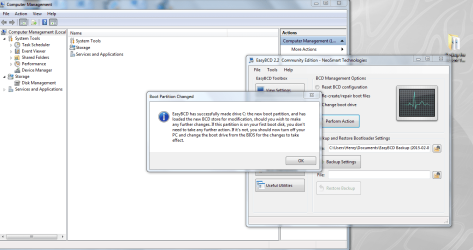
I actually installed Macrium before you answered and it brought up a page with a breakdown of the drives (below). I have since got and used the EasyBCD to change the boot drive to C as per the instructions in the thread you cited. I thought this wd affect the analysis on Disc Management and Macrium - I just checked both Disc Management and Macrium though and the figures all have stayed the same. I notice though that the 400mb partition is identified as 'System' by Macrium - does that help?
 

Attachments

  • Macrium Reflect for Toshiba.PNG
    Macrium Reflect for Toshiba.PNG
    49.8 KB · Views: 3

My Computer My Computer

At a glance

Windows 7 64 bitCeleron4gb
Computer type
Laptop
Computer Manufacturer/Model Number
Toshiba
OS
Windows 7 64 bit
CPU
Celeron
Memory
4gb
Hard Drives
160gb
Antivirus
Avanti, Malware Bytes
Browser
chrome
Did you have a Recovery partition which was replaced? How did you obtain your Recovery media?

Go to Control Panel>Folder Options>View and unhide Hidden and System files, assign a drive letter to 400mb partition in Disk Mgmt, then rightclick to Explore, post back a screenshot of the contents. There is something stored there if it has that much content as said by Macrium.

Are you sure you applied the change of Bootmgr - Move to C:\ with EasyBCD following the steps exactly as shown, then rebooted to check Disk Mgmt? Try it again and then let us see another screenshot.
 
I used the Toshiba Recovery disc creator as far as I recall. I have the USB stick here with me - I can post the contents of that too if any help.

How do I assign a letter to the 400MB partition? I have unhidden all system files etc now and rebooted.
 

My Computer My Computer

At a glance

Windows 7 64 bitCeleron4gb
Computer type
Laptop
Computer Manufacturer/Model Number
Toshiba
OS
Windows 7 64 bit
CPU
Celeron
Memory
4gb
Hard Drives
160gb
Antivirus
Avanti, Malware Bytes
Browser
chrome
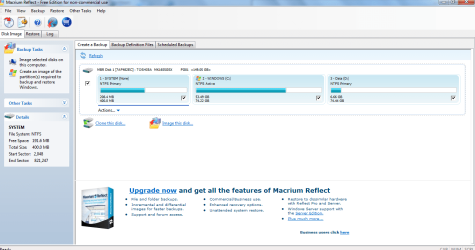
Ok so i now see that Drive C has 'system' and 'active' after it in Disc Management, and 'Active' after it in Macrium, so that's new.
I will now assign the letter and try to explore the 400 mb- thanks
 

Attachments

  • EasyBCD confirmation.PNG
    EasyBCD confirmation.PNG
    82.4 KB · Views: 2
  • New Macrium after EasyBCD.PNG
    New Macrium after EasyBCD.PNG
    55.4 KB · Views: 2
  • New Disc Management After EasyBCD.PNG
    New Disc Management After EasyBCD.PNG
    26.1 KB · Views: 1

My Computer My Computer

At a glance

Windows 7 64 bitCeleron4gb
Computer type
Laptop
Computer Manufacturer/Model Number
Toshiba
OS
Windows 7 64 bit
CPU
Celeron
Memory
4gb
Hard Drives
160gb
Antivirus
Avanti, Malware Bytes
Browser
chrome
Good work. C is now booting itself with the 400mb cut out, backup media created so you can do without it if you want since it appears to only be big enough to have generated recovery media off of C.

What I would do is only check C to image. A data partition can be backed up as data and then recreated if and where you want it.
 
Great- do I need a cable to put the image on the SSD? thanks again for the advice- getting there.
struggling to assign letter to the 400mb- disc management doesnt allow me to right click on the drives to assign letters even after entering instruction through Start as per the tutorial
 

My Computer My Computer

At a glance

Windows 7 64 bitCeleron4gb
Computer type
Laptop
Computer Manufacturer/Model Number
Toshiba
OS
Windows 7 64 bit
CPU
Celeron
Memory
4gb
Hard Drives
160gb
Antivirus
Avanti, Malware Bytes
Browser
chrome
As I detailed in post #31 you'll need to install Macrium to C to Create a Disk Image stored on external. Then power down to swap the drives, boot the Macrium boot disk you also create, and apply the image to the SSD. Only if you had a desktop could you plug in both drives internally to clone C over to the SSD.

If you have space and want to save the Recovery partition you can include it, but I would not waste SSD space for it since it's not needed now and really only could be used later to reconstruct the hard drive to boot Factory Recovery. But you don't need that since you made Recovery Media.

Be sure to read Macrium Imaging - Windows 7 Help Forums which illustrates all of this and also provides a download for boot disk to save time.

Here is Macrium help for How to create a disk image
 
I am just reading through the relevant pages. just wondering if I can save the image to a usb, and also if I can put the macriam boot disc on a usb (a different one I guess) - I only have usBs not cds handy
 

My Computer My Computer

At a glance

Windows 7 64 bitCeleron4gb
Computer type
Laptop
Computer Manufacturer/Model Number
Toshiba
OS
Windows 7 64 bit
CPU
Celeron
Memory
4gb
Hard Drives
160gb
Antivirus
Avanti, Malware Bytes
Browser
chrome
Back
Top