Fresh Installation of Windows 7 using ISO and OEM Key on Toshiba L450

How to create USB rescue media

An external drive is USB, but a flash stick is normally not large enough. C is 50gb+ now.

If you want to use your HD as external storage USB later you can save the image to it, swap the drives, put HD in external USB case then access the image on it from booted Macrium USB stick.

When I changed my laptop HDD for an SSD, I put my HDD in this case which is excellent: Amazon.com: Inateck 2.5 Inch USB 3.0 Hard Drive Disk HDD External Enclosure Case with usb 3.0 Cable for 9.5mm 7mm 2.5" SATA HDD and SSD, Tool-free HDD Installation, Compatible With Windows 2000/ XP /Vista/ 7/ 8, Mac OS 9.1/10.8.4: Computers & Accesso
 
OK i managed to borrow an external HD so will have a go...
 

My Computer My Computer

At a glance

Windows 7 64 bitCeleron4gb
Computer type
Laptop
Computer Manufacturer/Model Number
Toshiba
OS
Windows 7 64 bit
CPU
Celeron
Memory
4gb
Hard Drives
160gb
Antivirus
Avanti, Malware Bytes
Browser
chrome
The computer is taking an while to boot up right now. The desktop icons are flashing white two or three times before settling - bit worrying.
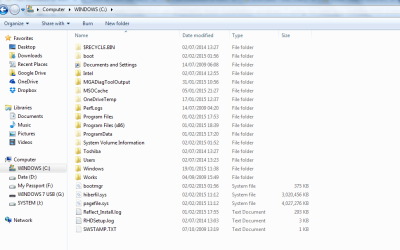
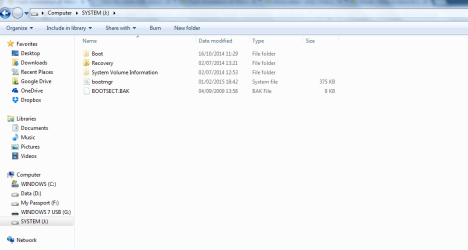
I managed to assign a letter to the 400mb and opened it using Windows Explorer. The contents of C are pasted below to compare. 'Boot' seems to be faded out on both - not sure what this means.
I have cleared all unwanted documents from the desktop/documents and am going to disconnect googledrive dropbox and onedrive before imaging.
 

Attachments

  • 400mb partition contents.PNG
    400mb partition contents.PNG
    25.6 KB · Views: 0
  • Contents of C.PNG
    Contents of C.PNG
    31.2 KB · Views: 0
Last edited:

My Computer My Computer

At a glance

Windows 7 64 bitCeleron4gb
Computer type
Laptop
Computer Manufacturer/Model Number
Toshiba
OS
Windows 7 64 bit
CPU
Celeron
Memory
4gb
Hard Drives
160gb
Antivirus
Avanti, Malware Bytes
Browser
chrome
Ok I've booted up using a USB and selected the image from the external HDD, and after a hitch when it was looking for the boot manager I downloaded the Win PE ISO again onto the USB and fiddled around and now the Macrium screen has booted and it allowed me to choose the Image off the external HDD to put onto the SSD. The only thing I forgot was to adjust the settings to make C take up the full SSD - I forgot to check the settings there - perhaps I can go back and do it later or do I have to do the whole process again? The imaging is now at 16% - I clicked on 'verify' image also - sounded reassuring - hopefully it will all work...
 

My Computer My Computer

At a glance

Windows 7 64 bitCeleron4gb
Computer type
Laptop
Computer Manufacturer/Model Number
Toshiba
OS
Windows 7 64 bit
CPU
Celeron
Memory
4gb
Hard Drives
160gb
Antivirus
Avanti, Malware Bytes
Browser
chrome
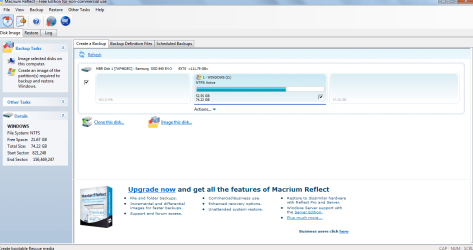
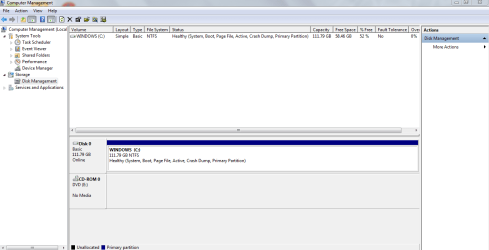
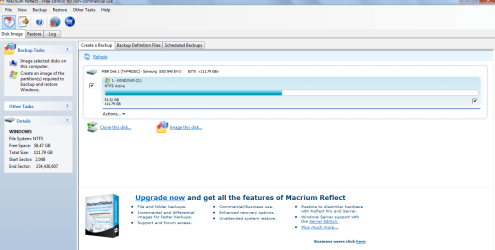
The SSD is up and running - I haven't sorted out the alignment issue yet but hoping to look at it. Looking at the new Disk Management page and the Macriam analysis I can see I may have missed the chance to extend C to take up the whole SSD - forgot that step. Perhaps should re-do the image transfer or is there a way to adjust the SSD at this point?
 

Attachments

  • New SSD in Disk Management.PNG
    New SSD in Disk Management.PNG
    25.7 KB · Views: 0
  • Macrium showing New SSD.PNG
    Macrium showing New SSD.PNG
    47.8 KB · Views: 0

My Computer My Computer

At a glance

Windows 7 64 bitCeleron4gb
Computer type
Laptop
Computer Manufacturer/Model Number
Toshiba
OS
Windows 7 64 bit
CPU
Celeron
Memory
4gb
Hard Drives
160gb
Antivirus
Avanti, Malware Bytes
Browser
chrome
You can resize the partition to use the whole SSD after restoring the image to the SSD, you don't have do the whole process over.
You can do it with Windows Disk Management, or Partition Wizard.
I prefer to not modify a disk/partition structure on the HD/SSD with the OS while Windows is running.
I prefer to use Partition Wizard bootable CD for making changes (i'm overly cautious), but expanding the partition with Disk Management should be fine.
Bootable Partition Manger | MiniTool Partition Wizard Bootable Edition
 

My Computer My Computer

At a glance

Multi-Boot W7_Pro_x64 W8.1_Pro_x64 W10_Pro_x6...AMD Athlon II x4 6206GB GSkill DDR2 800AMD 4670 GPU + AMD 4200 IGP
Computer type
PC/Desktop
Computer Manufacturer/Model Number
home built
OS
Multi-Boot W7_Pro_x64 W8.1_Pro_x64 W10_Pro_x64 +Linux_VMs +Chromium_VM
CPU
AMD Athlon II x4 620
Motherboard
Gigabyte GA-MA785G-UD3H
Memory
6GB GSkill DDR2 800
Graphics Card(s)
AMD 4670 GPU + AMD 4200 IGP
Sound Card
on board Realtek ALC889A
Monitor(s) Displays
RCA 40" LCD TV, Insignia 32" LCD TV, HP 15" LCD monitor
Screen Resolution
1680 x 1050
Hard Drives
OCZ Vertex 3 120GB,
Samsung F3 1TB (3),
Several others - WD, Seagate, Hitachi, ...
PSU
Corsair 500 W
Case
Rosewill mid tower
Cooling
CM 90mm rifle
Keyboard
Gyration wireless, Logitech wireless, Dell USB wired
Mouse
Gyration wireless, Logitech wireless, V7 USB wired
Internet Speed
Spectrum - 100Mbps D / 10Mbps U
Antivirus
Avast, MBAM3, EMET, WinPatrol
Browser
Pale Moon, Firefox, IE
Other Info
2 multi-boot PC's
Mainly HTPC/Office/Gen purpose (no gaming).
Trendnet USB KVM.
LG DVD burner/Blue Ray Player.
Tray system for removable SATA backup drives.

Not currently OCd, under-volted.
I use Hybrid sleep, rarely re-boot or shutdown.

Hauppauge HD-PVR, Avermedia PCIe TV Tuner, Hauppauge PCI TV Tuner.
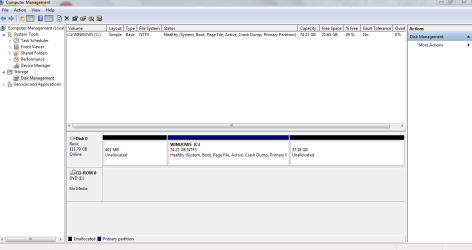
Ah ok i chose to extend volume on Disk Management to the maximum amount it said was available. It now looks like this (below) - but there is oddly a 400MB bit that is 'unallocated'.
I forgot to defrag before doing all this - but the HDD was defragged about six months ago so hope that isn't too bad.
Now trying to follow these instructions SSD Alignment but I get the message at the bottom.
 

Attachments

  • C Extended.PNG
    C Extended.PNG
    26.9 KB · Views: 1
  • alignment problem.PNG
    alignment problem.PNG
    2.5 KB · Views: 16

My Computer My Computer

At a glance

Windows 7 64 bitCeleron4gb
Computer type
Laptop
Computer Manufacturer/Model Number
Toshiba
OS
Windows 7 64 bit
CPU
Celeron
Memory
4gb
Hard Drives
160gb
Antivirus
Avanti, Malware Bytes
Browser
chrome
If you can't resize with Disk Management to use the 401 MB unallocated space, use PW bootable.
I would verify alignment before resizing to use the 401 MB unallocated space.
If it's not aligned correctly, post a screen print with alignment info.
See http://www.sevenforums.com/tutorials/113967-ssd-alignment.html

You don't want to defrag an SSD.
Make sure auto defrag is turned off for the SSD.
 

My Computer My Computer

At a glance

Multi-Boot W7_Pro_x64 W8.1_Pro_x64 W10_Pro_x6...AMD Athlon II x4 6206GB GSkill DDR2 800AMD 4670 GPU + AMD 4200 IGP
Computer type
PC/Desktop
Computer Manufacturer/Model Number
home built
OS
Multi-Boot W7_Pro_x64 W8.1_Pro_x64 W10_Pro_x64 +Linux_VMs +Chromium_VM
CPU
AMD Athlon II x4 620
Motherboard
Gigabyte GA-MA785G-UD3H
Memory
6GB GSkill DDR2 800
Graphics Card(s)
AMD 4670 GPU + AMD 4200 IGP
Sound Card
on board Realtek ALC889A
Monitor(s) Displays
RCA 40" LCD TV, Insignia 32" LCD TV, HP 15" LCD monitor
Screen Resolution
1680 x 1050
Hard Drives
OCZ Vertex 3 120GB,
Samsung F3 1TB (3),
Several others - WD, Seagate, Hitachi, ...
PSU
Corsair 500 W
Case
Rosewill mid tower
Cooling
CM 90mm rifle
Keyboard
Gyration wireless, Logitech wireless, Dell USB wired
Mouse
Gyration wireless, Logitech wireless, V7 USB wired
Internet Speed
Spectrum - 100Mbps D / 10Mbps U
Antivirus
Avast, MBAM3, EMET, WinPatrol
Browser
Pale Moon, Firefox, IE
Other Info
2 multi-boot PC's
Mainly HTPC/Office/Gen purpose (no gaming).
Trendnet USB KVM.
LG DVD burner/Blue Ray Player.
Tray system for removable SATA backup drives.

Not currently OCd, under-volted.
I use Hybrid sleep, rarely re-boot or shutdown.

Hauppauge HD-PVR, Avermedia PCIe TV Tuner, Hauppauge PCI TV Tuner.
Ok I turned off the defrag, and apparently the HDD was freshly defragged yesterday automatically i guess, so 0% fragmentation.
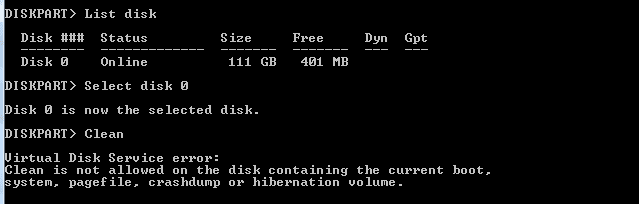
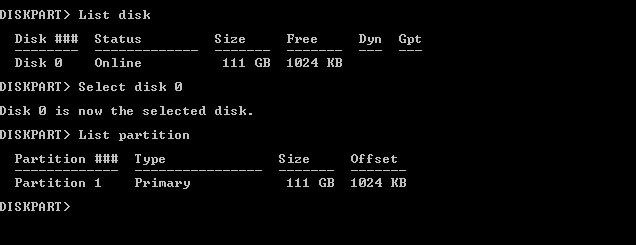
I can't follow the instructions for SSD Alignment- I get the error message as per below in Diskpart when I try to 'clean' Disk 0:
 

Attachments

  • alignment problem.PNG
    alignment problem.PNG
    2.5 KB · Views: 15

My Computer My Computer

At a glance

Windows 7 64 bitCeleron4gb
Computer type
Laptop
Computer Manufacturer/Model Number
Toshiba
OS
Windows 7 64 bit
CPU
Celeron
Memory
4gb
Hard Drives
160gb
Antivirus
Avanti, Malware Bytes
Browser
chrome
I haven't reviewed this whole thread, but you wouldn't run CLEAN in diskpart if you wanted to check alignment. That's the last thing you'd want to do.

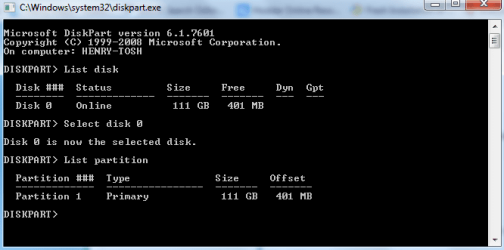
Try list part after selecting the disk.
 

My Computer My Computer

At a glance

Windows 7 Home Premium SP1, 64-bitIntel Skylake i5-6600K, not overclocked8 GB HyperX DDR4-2666 (2 x 4 GB)none; graphics are integrated on CPU
Computer type
PC/Desktop
Computer Manufacturer/Model Number
Ignatz Special; 4 speed manual gearbox; factory air conditioning; one of one
OS
Windows 7 Home Premium SP1, 64-bit
CPU
Intel Skylake i5-6600K, not overclocked
Motherboard
AsRock Z170M Extreme 4, micro ATX
Memory
8 GB HyperX DDR4-2666 (2 x 4 GB)
Graphics Card(s)
none; graphics are integrated on CPU
Sound Card
onboard: Realtek ALC1150; external: USB Behringer UF0-202
Monitor(s) Displays
Dell S2340M 23 inch IPS
Screen Resolution
1600 x 900
Hard Drives
System: Crucial MX100 series SSD, 128 GB;
Data: Samsung Spinpoint 103SJ, 1 TB;
Backup: WD Caviar Green WD30EZRX-00D8PB0, 3 TB
PSU
Rosewill SilentNight 500 watt fanless, semi-modular
Case
Antec Solo II
Cooling
Noctua NH-U12S; Noctua F12 intake, Noctua S12A exhaust
Keyboard
Microsoft 200 6JH-00001 USB
Mouse
Dell or Microsoft optical wired; USB
Antivirus
Microsoft Security Essentials and Malwarebytes Premium
Browser
Pale Moon
Other Info
All fans PWM; speeds at idle: CPU circa 500 rpm; intake circa 600 rpm; exhaust circa 600 rpm; CPU temps 27 idle and 47 C load in a warm room (27 C/81 F) when running Intel Extreme Tuning Utility stress test.
From the tutorial, this is what you want to verify alignment:

Verification

If you want to verify the alignment (e.g. for a SSD where you are not certain whether the proper alignment was done), you use the following commands.

Diskpart
List disk
Select disk n (where n is the number that was given for your SSD in List disk)
List partition

Now you should see a result like this.

Partition ### Type Size Offset
------------- ---------------- ------- -------
Partition 1 Primary 59 GB 1024 KB - but 64KB or any number divisible by 4 is also good

The offset (in KBs) has to be divisible by 4.


Note: Some readers and users of this tutorial got confused because the alignment numbers in a typical Windows7 installation are shown as:

1024KB for the 100MB partition
101MB for the next partition - which is most likely the C partition

They think that 101MB is not divisible by 4 and that there must be a problem. But that is not so. If you convert 101MBs into KBs (multiply by 1024), then the number is divisible by 4 and the partition is aligned.
 

My Computer My Computer

At a glance

Multi-Boot W7_Pro_x64 W8.1_Pro_x64 W10_Pro_x6...AMD Athlon II x4 6206GB GSkill DDR2 800AMD 4670 GPU + AMD 4200 IGP
Computer type
PC/Desktop
Computer Manufacturer/Model Number
home built
OS
Multi-Boot W7_Pro_x64 W8.1_Pro_x64 W10_Pro_x64 +Linux_VMs +Chromium_VM
CPU
AMD Athlon II x4 620
Motherboard
Gigabyte GA-MA785G-UD3H
Memory
6GB GSkill DDR2 800
Graphics Card(s)
AMD 4670 GPU + AMD 4200 IGP
Sound Card
on board Realtek ALC889A
Monitor(s) Displays
RCA 40" LCD TV, Insignia 32" LCD TV, HP 15" LCD monitor
Screen Resolution
1680 x 1050
Hard Drives
OCZ Vertex 3 120GB,
Samsung F3 1TB (3),
Several others - WD, Seagate, Hitachi, ...
PSU
Corsair 500 W
Case
Rosewill mid tower
Cooling
CM 90mm rifle
Keyboard
Gyration wireless, Logitech wireless, Dell USB wired
Mouse
Gyration wireless, Logitech wireless, V7 USB wired
Internet Speed
Spectrum - 100Mbps D / 10Mbps U
Antivirus
Avast, MBAM3, EMET, WinPatrol
Browser
Pale Moon, Firefox, IE
Other Info
2 multi-boot PC's
Mainly HTPC/Office/Gen purpose (no gaming).
Trendnet USB KVM.
LG DVD burner/Blue Ray Player.
Tray system for removable SATA backup drives.

Not currently OCd, under-volted.
I use Hybrid sleep, rarely re-boot or shutdown.

Hauppauge HD-PVR, Avermedia PCIe TV Tuner, Hauppauge PCI TV Tuner.
Ah ok, thanks! Really appreciate the help. Now have got to this screen - just trying to do the divisions but interested in how it looks to you
 

Attachments

  • New alignment cmdprmt.PNG
    New alignment cmdprmt.PNG
    11.1 KB · Views: 16

My Computer My Computer

At a glance

Windows 7 64 bitCeleron4gb
Computer type
Laptop
Computer Manufacturer/Model Number
Toshiba
OS
Windows 7 64 bit
CPU
Celeron
Memory
4gb
Hard Drives
160gb
Antivirus
Avanti, Malware Bytes
Browser
chrome
Doesn't look good to me.

401 is not evenly divisible by 4 where I come from.

Wait for confirmation from others.

You can adjust alignment. I think Partition Wizard is the right tool.

I don't know how much time you have invested in this install, but you could always start over rather than try to adjust existing alignment.
 

My Computer My Computer

At a glance

Windows 7 Home Premium SP1, 64-bitIntel Skylake i5-6600K, not overclocked8 GB HyperX DDR4-2666 (2 x 4 GB)none; graphics are integrated on CPU
Computer type
PC/Desktop
Computer Manufacturer/Model Number
Ignatz Special; 4 speed manual gearbox; factory air conditioning; one of one
OS
Windows 7 Home Premium SP1, 64-bit
CPU
Intel Skylake i5-6600K, not overclocked
Motherboard
AsRock Z170M Extreme 4, micro ATX
Memory
8 GB HyperX DDR4-2666 (2 x 4 GB)
Graphics Card(s)
none; graphics are integrated on CPU
Sound Card
onboard: Realtek ALC1150; external: USB Behringer UF0-202
Monitor(s) Displays
Dell S2340M 23 inch IPS
Screen Resolution
1600 x 900
Hard Drives
System: Crucial MX100 series SSD, 128 GB;
Data: Samsung Spinpoint 103SJ, 1 TB;
Backup: WD Caviar Green WD30EZRX-00D8PB0, 3 TB
PSU
Rosewill SilentNight 500 watt fanless, semi-modular
Case
Antec Solo II
Cooling
Noctua NH-U12S; Noctua F12 intake, Noctua S12A exhaust
Keyboard
Microsoft 200 6JH-00001 USB
Mouse
Dell or Microsoft optical wired; USB
Antivirus
Microsoft Security Essentials and Malwarebytes Premium
Browser
Pale Moon
Other Info
All fans PWM; speeds at idle: CPU circa 500 rpm; intake circa 600 rpm; exhaust circa 600 rpm; CPU temps 27 idle and 47 C load in a warm room (27 C/81 F) when running Intel Extreme Tuning Utility stress test.
Uh oh -- though 401MB in KB is 401000?
 

My Computer My Computer

At a glance

Windows 7 64 bitCeleron4gb
Computer type
Laptop
Computer Manufacturer/Model Number
Toshiba
OS
Windows 7 64 bit
CPU
Celeron
Memory
4gb
Hard Drives
160gb
Antivirus
Avanti, Malware Bytes
Browser
chrome
I'm not sure ...
I wonder if a new partition needs to be created in the unallocated space to see how that aligns ?????
That might show the alignment from the start of the SSD, and that should be KBs divisble by 4 ...
If it isn't, are all partitions after that mis-aligned ?????
:confused:
 

My Computer My Computer

At a glance

Multi-Boot W7_Pro_x64 W8.1_Pro_x64 W10_Pro_x6...AMD Athlon II x4 6206GB GSkill DDR2 800AMD 4670 GPU + AMD 4200 IGP
Computer type
PC/Desktop
Computer Manufacturer/Model Number
home built
OS
Multi-Boot W7_Pro_x64 W8.1_Pro_x64 W10_Pro_x64 +Linux_VMs +Chromium_VM
CPU
AMD Athlon II x4 620
Motherboard
Gigabyte GA-MA785G-UD3H
Memory
6GB GSkill DDR2 800
Graphics Card(s)
AMD 4670 GPU + AMD 4200 IGP
Sound Card
on board Realtek ALC889A
Monitor(s) Displays
RCA 40" LCD TV, Insignia 32" LCD TV, HP 15" LCD monitor
Screen Resolution
1680 x 1050
Hard Drives
OCZ Vertex 3 120GB,
Samsung F3 1TB (3),
Several others - WD, Seagate, Hitachi, ...
PSU
Corsair 500 W
Case
Rosewill mid tower
Cooling
CM 90mm rifle
Keyboard
Gyration wireless, Logitech wireless, Dell USB wired
Mouse
Gyration wireless, Logitech wireless, V7 USB wired
Internet Speed
Spectrum - 100Mbps D / 10Mbps U
Antivirus
Avast, MBAM3, EMET, WinPatrol
Browser
Pale Moon, Firefox, IE
Other Info
2 multi-boot PC's
Mainly HTPC/Office/Gen purpose (no gaming).
Trendnet USB KVM.
LG DVD burner/Blue Ray Player.
Tray system for removable SATA backup drives.

Not currently OCd, under-volted.
I use Hybrid sleep, rarely re-boot or shutdown.

Hauppauge HD-PVR, Avermedia PCIe TV Tuner, Hauppauge PCI TV Tuner.
I think I wrote out twice and possibly three times how there would be a link created under the C partition when you dragged it to the SSD using the Macrium Boot Disk, how by clicking that link you could adjust the sides of the C partition at least all the way to the left, and then set the right border wherever you wanted it depending on if you wanted a second partition.

Short of doing it over correctly you could use Partition Wizard to Resize Partition - Video Help. Drag the left border to the left, OK, Apply.

Then as also repeatedly linked check SSD Alignment - Windows 7 Forums
 
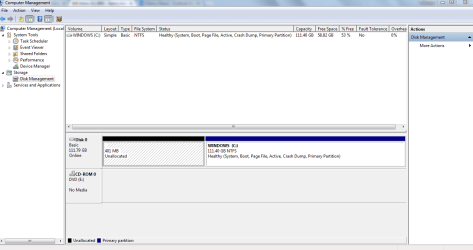
Ok, sorry, my mistake, i forgot that step, thanks so much for the quick fix - it looks like this now -- all advice much appreciated and hopefully that's it - also have followed tutorial advice on SSD tweaks and getting rid of bloatware - many thanks for all suggestions
 

Attachments

  • lastest disk management.PNG
    lastest disk management.PNG
    25 KB · Views: 2
  • latest diskpart.PNG
    latest diskpart.PNG
    1.4 KB · Views: 16
  • lastest macriam.PNG
    lastest macriam.PNG
    44.6 KB · Views: 1

My Computer My Computer

At a glance

Windows 7 64 bitCeleron4gb
Computer type
Laptop
Computer Manufacturer/Model Number
Toshiba
OS
Windows 7 64 bit
CPU
Celeron
Memory
4gb
Hard Drives
160gb
Antivirus
Avanti, Malware Bytes
Browser
chrome
Thanks for your help with this - glad its looking alright now.
On booting it takes 25 seconds to arrive at the password input screen, then 10 seconds to get to desktop, but a few seconds more of thinking and the desktop icons blinking once or twice to settle down. On launching Chrome, the taskbar icons disappeared apart from Chrome, which was a bit slow. Word and Powerpoint are almost instant - much faster than before. I hope there was no harm done from the first misaligned image - my mistake, but hopefully now fixed.
Perhaps it takes a few boots for everything to settle down.
The WEI score for the primary hard disk is now 7.8, though the overall score is brought down by the graphics and gaming graphics card (3.6, 3.3) - I hardly use games so can live with that I guess, but it'd be nice to see a higher score.
The next thing I'd like to try is to re-install the HD in the DVD bay in a caddy, - hope this'll work on a Toshiba- any thoughts on this very welcome. Then re-route the cloud services through the old HD. Just reading your tips on using Onedrive and hope to complete this task when next with computer in two days.
Thanks very much again for the step by step advice.
 
Last edited:

My Computer My Computer

At a glance

Windows 7 64 bitCeleron4gb
Computer type
Laptop
Computer Manufacturer/Model Number
Toshiba
OS
Windows 7 64 bit
CPU
Celeron
Memory
4gb
Hard Drives
160gb
Antivirus
Avanti, Malware Bytes
Browser
chrome
I have not relocated a HD in DVD bay though considered that on my laptop, but decided against the extra weight. Amazon has some quality choices for this which you can research to find the one that's best for you.

What is the installed Display device and driver in Device Manager? Are there any other drivers missing?

Did you import the PC's chipset? Compare it to the drivers for various chipset devices in Device Manager like SM Bus Controller and SATA controller.

I explain why I don't use Chrome or any installed Google in Clean Reinstall Windows 7.
I prefer Firefox with Google isolated in its Search box where it isn't allowed to spy.
 
Back
Top