Fresh Win7 install and previously full drives now 'unallocated'

tipsydog

New member
Local time
7:04 AM
Messages
6
Hi. I've done a few searches for my situation but any solutions seem to involve reformatting drives, which I cant do.

My system consisted of a C-drive on ssd and 2 other sata discs partitioned to give me drives D, E, F, K and V. I replaced my ssd with a larger ssd, and I in my innocence thought all I had to do was a new install of Win 7 (Home Premium 64b) on it and all would be hunky-dory (I had to do a new install rather than restore an image for reasons I wont go into now)

From those of you in the know, I sense tuts and rolling eyes!! My bios sees the discs for what they are (and sata in the bios is set to AHCI), but windows Disc Management sees one large unallocated drive. I'm unable to give them drive letters or check ownership as they're not visible in Windows Explorer.

As I already mentioned I cant do anything that will risk loosing information already on my sata drives, so how can I make them visible to Windows once again, with all their partitions and drive letters as they were previously???....please tell me I can:cry:
 

My Computer My Computer

At a glance

Win 7 Home Premium 64 bit
Computer type
PC/Desktop
Computer Manufacturer/Model Number
Dell xps 8300
OS
Win 7 Home Premium 64 bit
Post a screen shot of what you can see in Windows Disk Management.

You say "one unallocated drive", but you also earlier say "2 other sata discs".

Are these purely data drives that have no traces of an OS on them?

How exactly are you trying to give them drive letters?

Do you have any other PC to which these drives can be temporarily attached to confirm they can be seen and are not outright defective?
 

My Computer My Computer

At a glance

Windows 7 Home Premium SP1, 64-bitIntel Skylake i5-6600K, not overclocked8 GB HyperX DDR4-2666 (2 x 4 GB)none; graphics are integrated on CPU
Computer type
PC/Desktop
Computer Manufacturer/Model Number
Ignatz Special; 4 speed manual gearbox; factory air conditioning; one of one
OS
Windows 7 Home Premium SP1, 64-bit
CPU
Intel Skylake i5-6600K, not overclocked
Motherboard
AsRock Z170M Extreme 4, micro ATX
Memory
8 GB HyperX DDR4-2666 (2 x 4 GB)
Graphics Card(s)
none; graphics are integrated on CPU
Sound Card
onboard: Realtek ALC1150; external: USB Behringer UF0-202
Monitor(s) Displays
Dell S2340M 23 inch IPS
Screen Resolution
1600 x 900
Hard Drives
System: Crucial MX100 series SSD, 128 GB;
Data: Samsung Spinpoint 103SJ, 1 TB;
Backup: WD Caviar Green WD30EZRX-00D8PB0, 3 TB
PSU
Rosewill SilentNight 500 watt fanless, semi-modular
Case
Antec Solo II
Cooling
Noctua NH-U12S; Noctua F12 intake, Noctua S12A exhaust
Keyboard
Microsoft 200 6JH-00001 USB
Mouse
Dell or Microsoft optical wired; USB
Antivirus
Microsoft Security Essentials and Malwarebytes Premium
Browser
Pale Moon
Other Info
All fans PWM; speeds at idle: CPU circa 500 rpm; intake circa 600 rpm; exhaust circa 600 rpm; CPU temps 27 idle and 47 C load in a warm room (27 C/81 F) when running Intel Extreme Tuning Utility stress test.
Thanks for the reply. In work at present but will respond with screenshot as soon as I'm home.
 

My Computer My Computer

At a glance

Win 7 Home Premium 64 bit
Computer type
PC/Desktop
Computer Manufacturer/Model Number
Dell xps 8300
OS
Win 7 Home Premium 64 bit
Please tell me your other drives were unplugged when you installed Windows 7 ??????

All you then had to do was hook them back up and windows would have installed the drivers and given each partition or drive a letter, which you then change to your liking in Disk Management.

When you get home post the shot of Disk Management.
 

My Computer My Computer

At a glance

Windows 10 Pro x64Intel Core i7 6700KGSkill TridentZ RGB 16GB 3600 16-16-16-36EVGA GTX 980 Ti SC x2
Computer type
PC/Desktop
Computer Manufacturer/Model Number
Skylake Special #666
OS
Windows 10 Pro x64
CPU
Intel Core i7 6700K
Motherboard
Asus Sabertooth Z170 Mark 1
Memory
GSkill TridentZ RGB 16GB 3600 16-16-16-36
Graphics Card(s)
EVGA GTX 980 Ti SC x2
Sound Card
Realtek High Definition
Monitor(s) Displays
AOC G2460PG
Screen Resolution
1920 x 1080 144Hz
Hard Drives
Samsung 860 Pro 256GB, Seagate Barracuda 4TB x2
PSU
EVGA 1000 P2, EVGA White Custom Braided Cables
Case
Corsair Vengeance C70 Gunmetal Black
Cooling
Corsair H100i v2, Corsair ML120 x2, Thermal Grizzly Kryonaut
Keyboard
Logitech G910 Orion Spectrum
Mouse
Logitech G700s
Internet Speed
Verizon Fios Quantum Gateway 75/75
Antivirus
Windows Defender, Malwarebytes Free 3.8.3
Browser
Chrome
Other Info
Corsair SP120 x4, LG Blu-ray Drive, Durabrand HT-395 100 Watt Dolby Digital Amp, Corsair H2100 Wireless 7.1 Headset
No they were plugged up.....oops, have I really messed up and lost them or is it just a matter of going back and installing Win 7 again on the ssd with the other disks unplugged??? If that's what I've got to do and all my data is good, although a pain its a small price to pay.
 

My Computer My Computer

At a glance

Win 7 Home Premium 64 bit
Computer type
PC/Desktop
Computer Manufacturer/Model Number
Dell xps 8300
OS
Win 7 Home Premium 64 bit
No they were plugged up.....oops, have I really messed up and lost them or is it just a matter of going back and installing Win 7 again on the ssd with the other disks unplugged??? If that's what I've got to do and all my data is good, although a pain its a small price to pay.

Without any screen shots and no diagnostic report on the hard drives, it's hard to say what's wrong.

Installing Windows on a drive with other drives connected is begging for trouble and may be at the root of your issues.

A Windows installation normally takes less than an hour, plus whatever you need for updates and basic configuration. I'd probably start over with ONLY 1 drive connected, unless you want to post screen shots and try to diagnose that drive separately. Even if you get the drive recognized, you may discover that installing with other drives connected has caused some funky and unwanted partitioning.

Kinda your choice. I'd start over. If the unrecognized drives have been wiped or are defective in some way, re-installing Windows isn't going to further foul things up if they are now disconnected. As it is now, we have no way of knowing if your data is still good or not.
 

My Computer My Computer

At a glance

Windows 7 Home Premium SP1, 64-bitIntel Skylake i5-6600K, not overclocked8 GB HyperX DDR4-2666 (2 x 4 GB)none; graphics are integrated on CPU
Computer type
PC/Desktop
Computer Manufacturer/Model Number
Ignatz Special; 4 speed manual gearbox; factory air conditioning; one of one
OS
Windows 7 Home Premium SP1, 64-bit
CPU
Intel Skylake i5-6600K, not overclocked
Motherboard
AsRock Z170M Extreme 4, micro ATX
Memory
8 GB HyperX DDR4-2666 (2 x 4 GB)
Graphics Card(s)
none; graphics are integrated on CPU
Sound Card
onboard: Realtek ALC1150; external: USB Behringer UF0-202
Monitor(s) Displays
Dell S2340M 23 inch IPS
Screen Resolution
1600 x 900
Hard Drives
System: Crucial MX100 series SSD, 128 GB;
Data: Samsung Spinpoint 103SJ, 1 TB;
Backup: WD Caviar Green WD30EZRX-00D8PB0, 3 TB
PSU
Rosewill SilentNight 500 watt fanless, semi-modular
Case
Antec Solo II
Cooling
Noctua NH-U12S; Noctua F12 intake, Noctua S12A exhaust
Keyboard
Microsoft 200 6JH-00001 USB
Mouse
Dell or Microsoft optical wired; USB
Antivirus
Microsoft Security Essentials and Malwarebytes Premium
Browser
Pale Moon
Other Info
All fans PWM; speeds at idle: CPU circa 500 rpm; intake circa 600 rpm; exhaust circa 600 rpm; CPU temps 27 idle and 47 C load in a warm room (27 C/81 F) when running Intel Extreme Tuning Utility stress test.
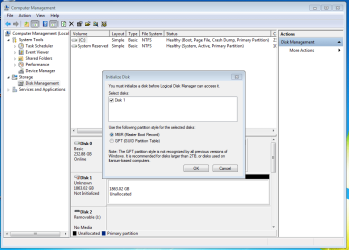
Various screenshots as you can see. This is what I get when I first select Disk Management. Disk 0 is my new ssd with the os, and Disk 1 is the other drive windows sees.

Grab 1.PNG

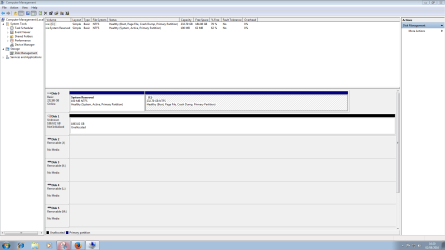
...and when I cancel that option, I see just one disk the combined size of the 2 disks that are actually there, aside from my C drive ssd.

Grab 2.PNG

In reality there are 2 discrete sata disks present each 950GB. They contain only data, with no other OS on them, and they were both working properly before I changed the original c drive ssd for a larger new ssd and went through the Win 7 installation on this, with both sata disks still plugged :confused:


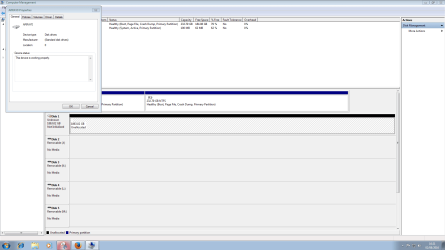
When I right click/properties on Disk 1 I get the info below

Grab 3 - right click-properties.PNG

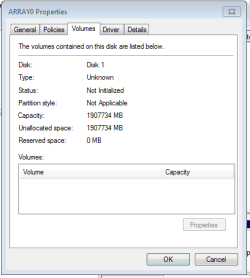
Grab 4.PNG

Thanks guys for your help with this.
 

My Computer My Computer

At a glance

Win 7 Home Premium 64 bit
Computer type
PC/Desktop
Computer Manufacturer/Model Number
Dell xps 8300
OS
Win 7 Home Premium 64 bit
Hmmm..........last pic says "Array0 properties".

Were these 2 discrete drives in a RAID setup?

And you reinstalled Windows when they were still in a RAID config, with both connected?

If so, I know nothing about RAID and can't help.

I have no idea if your data is there or not.
 

My Computer My Computer

At a glance

Windows 7 Home Premium SP1, 64-bitIntel Skylake i5-6600K, not overclocked8 GB HyperX DDR4-2666 (2 x 4 GB)none; graphics are integrated on CPU
Computer type
PC/Desktop
Computer Manufacturer/Model Number
Ignatz Special; 4 speed manual gearbox; factory air conditioning; one of one
OS
Windows 7 Home Premium SP1, 64-bit
CPU
Intel Skylake i5-6600K, not overclocked
Motherboard
AsRock Z170M Extreme 4, micro ATX
Memory
8 GB HyperX DDR4-2666 (2 x 4 GB)
Graphics Card(s)
none; graphics are integrated on CPU
Sound Card
onboard: Realtek ALC1150; external: USB Behringer UF0-202
Monitor(s) Displays
Dell S2340M 23 inch IPS
Screen Resolution
1600 x 900
Hard Drives
System: Crucial MX100 series SSD, 128 GB;
Data: Samsung Spinpoint 103SJ, 1 TB;
Backup: WD Caviar Green WD30EZRX-00D8PB0, 3 TB
PSU
Rosewill SilentNight 500 watt fanless, semi-modular
Case
Antec Solo II
Cooling
Noctua NH-U12S; Noctua F12 intake, Noctua S12A exhaust
Keyboard
Microsoft 200 6JH-00001 USB
Mouse
Dell or Microsoft optical wired; USB
Antivirus
Microsoft Security Essentials and Malwarebytes Premium
Browser
Pale Moon
Other Info
All fans PWM; speeds at idle: CPU circa 500 rpm; intake circa 600 rpm; exhaust circa 600 rpm; CPU temps 27 idle and 47 C load in a warm room (27 C/81 F) when running Intel Extreme Tuning Utility stress test.
Yes thats correct, they came as 2 discrete drives in a Raid setup. When the pc was ordered some years ago I had the option of this, or setup to be a Raid main and backup.
 

My Computer My Computer

At a glance

Win 7 Home Premium 64 bit
Computer type
PC/Desktop
Computer Manufacturer/Model Number
Dell xps 8300
OS
Win 7 Home Premium 64 bit
Did you changed SATA=RAID to SATA=AHCI previously installing Win 7 on the new SSD?
If you did, you may have ruined a RAID 0 array. As you still see only one drive on windows, there is a chance you can fix it.
Don't try to do anything on the drive.
On BIOS, set SATA back to RAID, save and reboot.
 

My Computers My Computers

  • At a glance

    Windows 7 HP 64i5 6600K - 800MHz to 4200MHz4+4G GSkill DDR4 3000IG - Intel 530
    Computer type
    PC/Desktop
    Computer Manufacturer/Model Number
    custom build
    OS
    Windows 7 HP 64
    CPU
    i5 6600K - 800MHz to 4200MHz
    Motherboard
    GA-Z170-HD3P
    Memory
    4+4G GSkill DDR4 3000
    Graphics Card(s)
    IG - Intel 530
    Monitor(s) Displays
    Samsung 226BW
    Screen Resolution
    1680x1050
    Hard Drives
    (1) -1 SM951 – 128GB M.2 AHCI PCIe SSD drive for Windows 7 and Lubuntu
    (2) -1 WD SATA 3 - 1T for Data
    (3) -1 WD SATA 3 - 1T for backup
    PSU
    Thermaltake 450W TR2 gold
    Keyboard
    Old and good Chicony mechanical keyboard
    Mouse
    Logitech mX performance - 9 buttons (had to disable some)
    Internet Speed
    500Mb/s
    Browser
    Firefox 64
    Other Info
    TinyWall firewall
  • At a glance

    Windows 7 Proi7-4500U 800MHz to 3.0GHz(4+4)G DDR3 1600IG intel 4400 + NVIDIA GeForce GT 745M
    Computer type
    Laptop
    System Manufacturer/Model Number
    Asus Q550LF
    OS
    Windows 7 Pro
    CPU
    i7-4500U 800MHz to 3.0GHz
    Motherboard
    Asus Q550LF
    Memory
    (4+4)G DDR3 1600
    Graphics Card(s)
    IG intel 4400 + NVIDIA GeForce GT 745M
    Sound Card
    Realtek
    Monitor(s) Displays
    LG Display LP156WF4-SPH1
    Screen Resolution
    1920 x 1080
    Hard Drives
    BX500 120G SSD for Windows and programs +
    1T HDD for data
    Internet Speed
    500 Mb/s
    Browser
    Firefox
    Other Info
    TinyWall firewall
I had noted some of the bios settings and for the old ssd SATA=AHCI, so its set the same with the new one.

I'll try as AddRAM suggested, and reinstall win 7 on the new ssd, but this time do it with the sata drives detached, then introduce them when windows is installed - thats my evening sorted!
 

My Computer My Computer

At a glance

Win 7 Home Premium 64 bit
Computer type
PC/Desktop
Computer Manufacturer/Model Number
Dell xps 8300
OS
Win 7 Home Premium 64 bit
As you had two drives that where working as one, you had a RAID 0 array. Reinstalling windows wont bring the array back. You MUST set SATA=RAID or you're going to ruin your array (if you haven't already done).
I know what I'm saying as I also have a RAID 0 and I once ruined my array when I updated my BIOS and SATA was set by default to AHCI
 
Last edited:

My Computers My Computers

  • At a glance

    Windows 7 HP 64i5 6600K - 800MHz to 4200MHz4+4G GSkill DDR4 3000IG - Intel 530
    Computer type
    PC/Desktop
    Computer Manufacturer/Model Number
    custom build
    OS
    Windows 7 HP 64
    CPU
    i5 6600K - 800MHz to 4200MHz
    Motherboard
    GA-Z170-HD3P
    Memory
    4+4G GSkill DDR4 3000
    Graphics Card(s)
    IG - Intel 530
    Monitor(s) Displays
    Samsung 226BW
    Screen Resolution
    1680x1050
    Hard Drives
    (1) -1 SM951 – 128GB M.2 AHCI PCIe SSD drive for Windows 7 and Lubuntu
    (2) -1 WD SATA 3 - 1T for Data
    (3) -1 WD SATA 3 - 1T for backup
    PSU
    Thermaltake 450W TR2 gold
    Keyboard
    Old and good Chicony mechanical keyboard
    Mouse
    Logitech mX performance - 9 buttons (had to disable some)
    Internet Speed
    500Mb/s
    Browser
    Firefox 64
    Other Info
    TinyWall firewall
  • At a glance

    Windows 7 Proi7-4500U 800MHz to 3.0GHz(4+4)G DDR3 1600IG intel 4400 + NVIDIA GeForce GT 745M
    Computer type
    Laptop
    System Manufacturer/Model Number
    Asus Q550LF
    OS
    Windows 7 Pro
    CPU
    i7-4500U 800MHz to 3.0GHz
    Motherboard
    Asus Q550LF
    Memory
    (4+4)G DDR3 1600
    Graphics Card(s)
    IG intel 4400 + NVIDIA GeForce GT 745M
    Sound Card
    Realtek
    Monitor(s) Displays
    LG Display LP156WF4-SPH1
    Screen Resolution
    1920 x 1080
    Hard Drives
    BX500 120G SSD for Windows and programs +
    1T HDD for data
    Internet Speed
    500 Mb/s
    Browser
    Firefox
    Other Info
    TinyWall firewall
:ditto: You must setup your Raid array again to get it back like it was.

Then, if you don`t want to use Raid anymore, backup your data, then format the storage drive/s and set the sata mode to AHCI in the bios.

No reason to reinstall windows again.
 

My Computer My Computer

At a glance

Windows 10 Pro x64Intel Core i7 6700KGSkill TridentZ RGB 16GB 3600 16-16-16-36EVGA GTX 980 Ti SC x2
Computer type
PC/Desktop
Computer Manufacturer/Model Number
Skylake Special #666
OS
Windows 10 Pro x64
CPU
Intel Core i7 6700K
Motherboard
Asus Sabertooth Z170 Mark 1
Memory
GSkill TridentZ RGB 16GB 3600 16-16-16-36
Graphics Card(s)
EVGA GTX 980 Ti SC x2
Sound Card
Realtek High Definition
Monitor(s) Displays
AOC G2460PG
Screen Resolution
1920 x 1080 144Hz
Hard Drives
Samsung 860 Pro 256GB, Seagate Barracuda 4TB x2
PSU
EVGA 1000 P2, EVGA White Custom Braided Cables
Case
Corsair Vengeance C70 Gunmetal Black
Cooling
Corsair H100i v2, Corsair ML120 x2, Thermal Grizzly Kryonaut
Keyboard
Logitech G910 Orion Spectrum
Mouse
Logitech G700s
Internet Speed
Verizon Fios Quantum Gateway 75/75
Antivirus
Windows Defender, Malwarebytes Free 3.8.3
Browser
Chrome
Other Info
Corsair SP120 x4, LG Blu-ray Drive, Durabrand HT-395 100 Watt Dolby Digital Amp, Corsair H2100 Wireless 7.1 Headset
Back
Top