
Sata not recognized on win7 install and black screen of death.

linuxftw

New member
Local time
6:02 PM
Messages
3
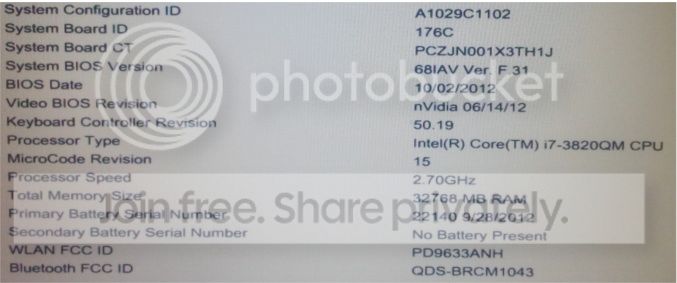
Hi all. I've been trying for several days now to fix a problem and I'm finally at my wits end. I can find a lot of threads with similar problems, but none of the solutions I've found there seem to work for me. I'm trying to install windows 7 ultimate onto a sata drive. I'm using an HP elitebook 8770w. The specs are here:

INFO

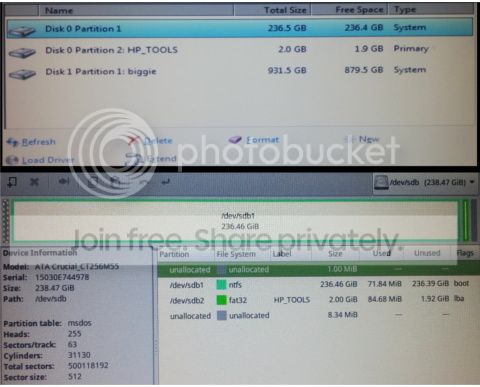
The comptuer has two hard drives, a 250gb sata and 1tb normal. The partitions are here, both in gparted and the windows 7 installer.

PARTITIONS

I first formatted both drives and then tried to install win7 onto the sata drive. It installed, but not properly. None of the computers hardware was recognized. In the devices manager "John-PC" had a little yellow error triangle next to the list of hardware right down the list; every option had an error.

I tried formatting the disks again and then I got a black screen of death after the first shut down of the installation process. No mouse, no logo, no blinking lights; nothing, though if I leave the USB in I get an option telling me to press any button to install from usb, and then it freezes there. If I remove the usb, it boots to the black screen of death with nothing. I tried every port for installation, including the two usb 3.0 ports, the two usb 2.0 ports and the sata port. I tried an iso usb with usb 3.0 drivers pre-loaded. No fix. I tried several different combinations in the BIOS including factory reset, IDE, AHCI, Legacy, UEFI, and various boot order combinations. I also tried a bios diagnostics test which indicated everything was fine.

I've tried using unetbootin, windows 7 usb creator, and rufus to format the bootable usb. On one of those occasions I tried putting a copy of xp on the bootable usb, and when I tried to install it, the win 7 installer opened up and finished the installation again like the first time through, but also again none of the drivers worked. To fix this I downloaded a multitude of drivers from the HP website and some of them worked, though one of them (a win7-64 driverpack update, I think) once again put the machine back to the black screen of death upon restarting and now I'm right back to where I was, not able to get past the BSOD.

I've tried reformatting the ssd to ntfs with gparted, win disk (something about cleaning the partition, I think), and the win 7 installer.

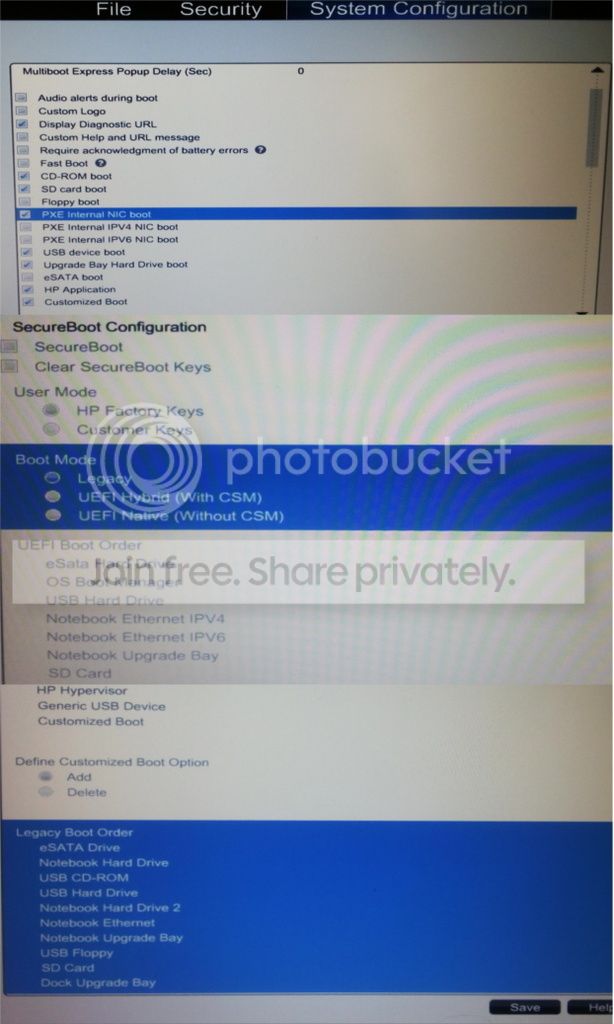
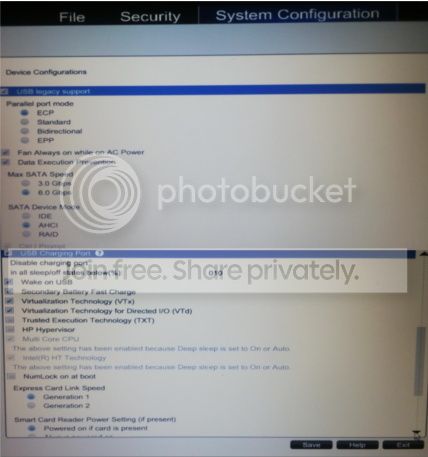
Here's what my BIOS settings look like as I'm trying to install.

BOOT MENU

DEVICES MENU

In the boot menu there is a section to organize the boot order, and I've set the sata drive at the very start of it. However, just before the BIOS comes up, there's an option to press f9 to set an override boot order. This is the boot order override screen when I press f9...
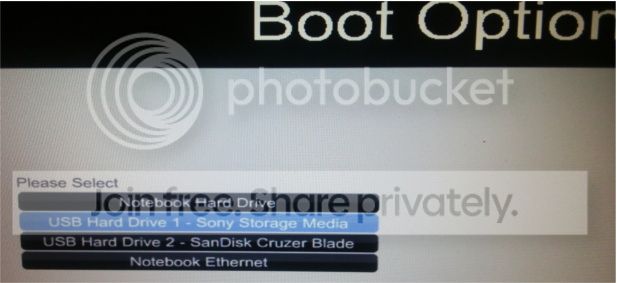


The usb's and the notebook harddrive both show up. Also, the HP_TOOLS partion has a system restore back up folder I made on the win 7 machine when it was working and I was installing the drivers, but I can't access that folder via the win 7 installer. I can access it on my linux mint live cd usb, though.

So, that's what I'm up to. It seems the windows installation isn't recognizing the sata drive, as it's absent no matter what settings I change in the BIOS, but that doesn't explain why the OS won't install on the 1tb drive, either. I get the BSOD when tring to install on either drive.

Please help!
 

My Computer My Computer

At a glance

Windows 7Intel core i7-3820QM32768 mbNvidia Quadro K4000M
Computer type
Laptop
Computer Manufacturer/Model Number
HP Elitebook 8770w
OS
Windows 7
CPU
Intel core i7-3820QM
Motherboard
Hewlett-Packard 176C PCZJN001X3TH1J KBC Version 50.1F
Memory
32768 mb
Graphics Card(s)
Nvidia Quadro K4000M
Screen Resolution
1920 x 1080
Hard Drives
standard AHCI 1.0 serial ata controller. 250gb
1 tb disk hdd
Welcome to the forum. The best way is to delete all partitions put the c drive on disk 0 remove other drives set BIOS to UEFI let windows create what it needs
 

My Computer My Computer

At a glance

win 8 32 bit
Computer type
PC/Desktop
OS
win 8 32 bit
Did you do the Factory recover disks before formatting the disk?

Remove the other drive (important)
Bios settings:
- Disable secure boot (win 7 isn't compatible) and clear secure boot keys.
- Disable ALL boot options leaving on only CD/DVD and USB device.
- Set Boot mode to UEFI hybrid with CSM
- Set boot order to HDD and USB device.
- Ser SATA = AHCI
- Make a UEFI Win 7 Installation disk on USB disk.
UEFI Bootable USB Flash Drive - Create in Windows

- Boot the Win 7 Installation disk in UEFI mode (important).
- Go to install - advanced - delete all partitions - create new.
- Windows will create 3 partitions:
- One UEFI - 100M Fat32
- One MSR - 120M RAW
- One large NTFS

Choose the large NTFS and proceed.
 

My Computers My Computers

  • At a glance

    Windows 7 HP 64i5 6600K - 800MHz to 4200MHz4+4G GSkill DDR4 3000IG - Intel 530
    Computer type
    PC/Desktop
    Computer Manufacturer/Model Number
    custom build
    OS
    Windows 7 HP 64
    CPU
    i5 6600K - 800MHz to 4200MHz
    Motherboard
    GA-Z170-HD3P
    Memory
    4+4G GSkill DDR4 3000
    Graphics Card(s)
    IG - Intel 530
    Monitor(s) Displays
    Samsung 226BW
    Screen Resolution
    1680x1050
    Hard Drives
    (1) -1 SM951 – 128GB M.2 AHCI PCIe SSD drive for Windows 7 and Lubuntu
    (2) -1 WD SATA 3 - 1T for Data
    (3) -1 WD SATA 3 - 1T for backup
    PSU
    Thermaltake 450W TR2 gold
    Keyboard
    Old and good Chicony mechanical keyboard
    Mouse
    Logitech mX performance - 9 buttons (had to disable some)
    Internet Speed
    500Mb/s
    Browser
    Firefox 64
    Other Info
    TinyWall firewall
  • At a glance

    Windows 7 Proi7-4500U 800MHz to 3.0GHz(4+4)G DDR3 1600IG intel 4400 + NVIDIA GeForce GT 745M
    Computer type
    Laptop
    System Manufacturer/Model Number
    Asus Q550LF
    OS
    Windows 7 Pro
    CPU
    i7-4500U 800MHz to 3.0GHz
    Motherboard
    Asus Q550LF
    Memory
    (4+4)G DDR3 1600
    Graphics Card(s)
    IG intel 4400 + NVIDIA GeForce GT 745M
    Sound Card
    Realtek
    Monitor(s) Displays
    LG Display LP156WF4-SPH1
    Screen Resolution
    1920 x 1080
    Hard Drives
    BX500 120G SSD for Windows and programs +
    1T HDD for data
    Internet Speed
    500 Mb/s
    Browser
    Firefox
    Other Info
    TinyWall firewall
Welcome to the forum. The best way is to delete all partitions put the c drive on disk 0 remove other drives set BIOS to UEFI let windows create what it needs

Hi Samuria. Thanks for your time. This option seems to have worked. I'm not prepared to call it a solution, but removing the hdd seems to allow the installation to complete and restart consistently. However, when I plug the hdd back into its slot after installating win7 onto the ssd, the computer goes back to black screen of death, no matter how I change the boot order in the bios. I know there must be a combination that works, but the trial and error part is annoying.

Did you do the Factory recover disks before formatting the disk?

I'm not sure I understand what you mean. The recovery options in the installation process don't provide much help. The options are there but they don't lead anywhere. I just get errors about incompatibility. If you mean factory reset in the bios, yeah I did that before formatting the disk.

Remove the other drive (important)
Bios settings:
- Disable secure boot (win 7 isn't compatible) and clear secure boot keys.
- Disable ALL boot options leaving on only CD/DVD and USB device.
- Set Boot mode to UEFI hybrid with CSM
- Set boot order to HDD and USB device.
- Ser SATA = AHCI
- Make a UEFI Win 7 Installation disk on USB disk.
UEFI Bootable USB Flash Drive - Create in Windows

- Boot the Win 7 Installation disk in UEFI mode (important).
- Go to install - advanced - delete all partitions - create new.
- Windows will create 3 partitions:
- One UEFI - 100M Fat32
- One MSR - 120M RAW
- One large NTFS

This is the clearest set of instructions I've seen so far. Thank you for taking the time to post them. I managed to complete the installation after removing the hdd, and I installed the missing drivers separately so the installation and the drivers are okay for now. What I really need is a way to make the hdd work without blocking the sdd from booting.

Any ideas?
 

My Computer My Computer

At a glance

Windows 7Intel core i7-3820QM32768 mbNvidia Quadro K4000M
Computer type
Laptop
Computer Manufacturer/Model Number
HP Elitebook 8770w
OS
Windows 7
CPU
Intel core i7-3820QM
Motherboard
Hewlett-Packard 176C PCZJN001X3TH1J KBC Version 50.1F
Memory
32768 mb
Graphics Card(s)
Nvidia Quadro K4000M
Screen Resolution
1920 x 1080
Hard Drives
standard AHCI 1.0 serial ata controller. 250gb
1 tb disk hdd
This is the clearest set of instructions I've seen so far. Thank you for taking the time to post them. I managed to complete the installation after removing the hdd, and I installed the missing drivers separately so the installation and the drivers are okay for now. What I really need is a way to make the hdd work without blocking the sdd from booting.

Any ideas?


Please edit your profile with ALL hardware specs.
Is your BIOS UEFI or Legacy?
Didn't understand what you want. Do you want to install Win 7 on the SSD and use the HDD for data? How big is your SSD?
Did you succeed on installing win 7 on the SSD? What did you mean with What I really need is a way to make the hdd work without blocking the sdd from booting.
 

My Computers My Computers

  • At a glance

    Windows 7 HP 64i5 6600K - 800MHz to 4200MHz4+4G GSkill DDR4 3000IG - Intel 530
    Computer type
    PC/Desktop
    Computer Manufacturer/Model Number
    custom build
    OS
    Windows 7 HP 64
    CPU
    i5 6600K - 800MHz to 4200MHz
    Motherboard
    GA-Z170-HD3P
    Memory
    4+4G GSkill DDR4 3000
    Graphics Card(s)
    IG - Intel 530
    Monitor(s) Displays
    Samsung 226BW
    Screen Resolution
    1680x1050
    Hard Drives
    (1) -1 SM951 – 128GB M.2 AHCI PCIe SSD drive for Windows 7 and Lubuntu
    (2) -1 WD SATA 3 - 1T for Data
    (3) -1 WD SATA 3 - 1T for backup
    PSU
    Thermaltake 450W TR2 gold
    Keyboard
    Old and good Chicony mechanical keyboard
    Mouse
    Logitech mX performance - 9 buttons (had to disable some)
    Internet Speed
    500Mb/s
    Browser
    Firefox 64
    Other Info
    TinyWall firewall
  • At a glance

    Windows 7 Proi7-4500U 800MHz to 3.0GHz(4+4)G DDR3 1600IG intel 4400 + NVIDIA GeForce GT 745M
    Computer type
    Laptop
    System Manufacturer/Model Number
    Asus Q550LF
    OS
    Windows 7 Pro
    CPU
    i7-4500U 800MHz to 3.0GHz
    Motherboard
    Asus Q550LF
    Memory
    (4+4)G DDR3 1600
    Graphics Card(s)
    IG intel 4400 + NVIDIA GeForce GT 745M
    Sound Card
    Realtek
    Monitor(s) Displays
    LG Display LP156WF4-SPH1
    Screen Resolution
    1920 x 1080
    Hard Drives
    BX500 120G SSD for Windows and programs +
    1T HDD for data
    Internet Speed
    500 Mb/s
    Browser
    Firefox
    Other Info
    TinyWall firewall
Please edit your profile with ALL hardware specs.

Okay I updated it.

Is your BIOS UEFI or Legacy?

In my bios settings there is an option to alternate between the two. My current OS is installed using the legacy setting. (You can see from the screen shots I provided).

Do you want to install Win 7 on the SSD and use the HDD for data?

Yes, exactly.

How big is your SSD?

250gb

Did you succeed on installing win 7 on the SSD? What did you mean with What I really need is a way to make the hdd work without blocking the sdd from booting.

Yes, I succeeded, but only after I removed the 1tb hdd from its slot. When I plug the hdd back into its slot (after the successful installation of the OS onto the ssd), the machine boots into the black screen of death, so the OS is there, but for some reason the hdd is blocking the ssd from booting first.

I've tried a wide variety of boot order combinations in the boot order section. You can see from the screeshot that the "eSATA" drive is listed in the boot order options as the first option, but it does not appear to actually boot first.
 

My Computer My Computer

At a glance

Windows 7Intel core i7-3820QM32768 mbNvidia Quadro K4000M
Computer type
Laptop
Computer Manufacturer/Model Number
HP Elitebook 8770w
OS
Windows 7
CPU
Intel core i7-3820QM
Motherboard
Hewlett-Packard 176C PCZJN001X3TH1J KBC Version 50.1F
Memory
32768 mb
Graphics Card(s)
Nvidia Quadro K4000M
Screen Resolution
1920 x 1080
Hard Drives
standard AHCI 1.0 serial ata controller. 250gb
1 tb disk hdd
"the machine boots into the black screen of death, so the OS is there, but for some reason the hdd is blocking the ssd from booting first."
That is because it is trying to boot from the HDD. Even if it doesn't have the OS, it still has the MBR active.
Look at the second image non post 1- The biggie is as System.

If you have a SSD and a HDD you should boot from the SSD, not from the HDD.
- Your SSD should be on SATA 0 and the HDD on SATA 1. (I think already is)
- You must set (on Boot options - Notebook disk drive there should me a sub menu) the SSD as the fist boot disk. Disable all other options.
- Once you have booted on the SSD with the HDD as second drive, open disk management and set the HDD to Inactive (to avoid it trying to boot from the HDD)
 

My Computers My Computers

  • At a glance

    Windows 7 HP 64i5 6600K - 800MHz to 4200MHz4+4G GSkill DDR4 3000IG - Intel 530
    Computer type
    PC/Desktop
    Computer Manufacturer/Model Number
    custom build
    OS
    Windows 7 HP 64
    CPU
    i5 6600K - 800MHz to 4200MHz
    Motherboard
    GA-Z170-HD3P
    Memory
    4+4G GSkill DDR4 3000
    Graphics Card(s)
    IG - Intel 530
    Monitor(s) Displays
    Samsung 226BW
    Screen Resolution
    1680x1050
    Hard Drives
    (1) -1 SM951 – 128GB M.2 AHCI PCIe SSD drive for Windows 7 and Lubuntu
    (2) -1 WD SATA 3 - 1T for Data
    (3) -1 WD SATA 3 - 1T for backup
    PSU
    Thermaltake 450W TR2 gold
    Keyboard
    Old and good Chicony mechanical keyboard
    Mouse
    Logitech mX performance - 9 buttons (had to disable some)
    Internet Speed
    500Mb/s
    Browser
    Firefox 64
    Other Info
    TinyWall firewall
  • At a glance

    Windows 7 Proi7-4500U 800MHz to 3.0GHz(4+4)G DDR3 1600IG intel 4400 + NVIDIA GeForce GT 745M
    Computer type
    Laptop
    System Manufacturer/Model Number
    Asus Q550LF
    OS
    Windows 7 Pro
    CPU
    i7-4500U 800MHz to 3.0GHz
    Motherboard
    Asus Q550LF
    Memory
    (4+4)G DDR3 1600
    Graphics Card(s)
    IG intel 4400 + NVIDIA GeForce GT 745M
    Sound Card
    Realtek
    Monitor(s) Displays
    LG Display LP156WF4-SPH1
    Screen Resolution
    1920 x 1080
    Hard Drives
    BX500 120G SSD for Windows and programs +
    1T HDD for data
    Internet Speed
    500 Mb/s
    Browser
    Firefox
    Other Info
    TinyWall firewall
Back
Top