Fresh Win7 install - boot on wrong partition and can't access
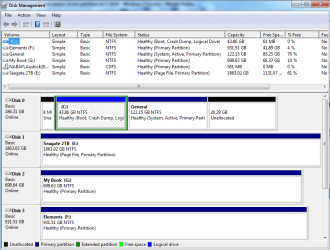
I upgraded from XP to Win 7 64 bit. I did what I thought was a clean install with the C drive reformatted. But alas no. The C drive was originally partitioned into 2 (C & E) with one holding the operating system and the other for general use. Now I find that the original partitions are still there. Win7 has installed onto the C partition and operates normally (however, when I boot up, I get the option for Win7 or original system - haven't clicked the other option for fear of screwing things up).
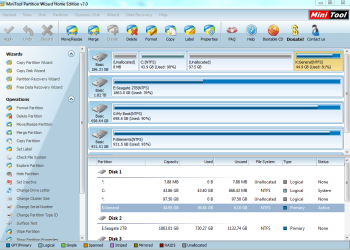
Big issue is the C (logical) drive is now full causing all sorts of dramas. The other partition E (Primary) is about 120 GB and I cannot expand the C partition into it. I tried simply deleting E with MiniTool Partition Wizard, but it screwed up the PC (from which it automatically recovered itself). In MiniTool, the C drive is listed as 'System' and the E drive as 'Active & Boot' which I assume is the issue.
So, how can I delete the E drive partition and expand the C drive? Thought simply deleting all in the E partition would allow me to expand C, but obviously as it is 'Boot', no can do. Can C become the 'Boot' too easily?
Also, in Explorer, E is unseen.
Any advice would be appreciated. Hopefully there is a solution that doesn't require a complete reinstall.
NB: After a bit more reading her, worked out it is the Boot drive being installed on the E partition and not the C. Can this be moved - or installed onto C and point the start-up to C? Then, how does the E become visible and accessible?
I upgraded from XP to Win 7 64 bit. I did what I thought was a clean install with the C drive reformatted. But alas no. The C drive was originally partitioned into 2 (C & E) with one holding the operating system and the other for general use. Now I find that the original partitions are still there. Win7 has installed onto the C partition and operates normally (however, when I boot up, I get the option for Win7 or original system - haven't clicked the other option for fear of screwing things up).
Big issue is the C (logical) drive is now full causing all sorts of dramas. The other partition E (Primary) is about 120 GB and I cannot expand the C partition into it. I tried simply deleting E with MiniTool Partition Wizard, but it screwed up the PC (from which it automatically recovered itself). In MiniTool, the C drive is listed as 'System' and the E drive as 'Active & Boot' which I assume is the issue.
So, how can I delete the E drive partition and expand the C drive? Thought simply deleting all in the E partition would allow me to expand C, but obviously as it is 'Boot', no can do. Can C become the 'Boot' too easily?
Also, in Explorer, E is unseen.
Any advice would be appreciated. Hopefully there is a solution that doesn't require a complete reinstall.
NB: After a bit more reading her, worked out it is the Boot drive being installed on the E partition and not the C. Can this be moved - or installed onto C and point the start-up to C? Then, how does the E become visible and accessible?
Last edited:
My Computer
At a glance
Windows 7 Home Premium 64bitIntel i5 2500k4GB Dual DDR3On board (HD Graphics 200 GT2)
- Computer Manufacturer/Model Number
- DIY
- OS
- Windows 7 Home Premium 64bit
- CPU
- Intel i5 2500k
- Motherboard
- Gigabyte Z68X-UD3H-B3
- Memory
- 4GB Dual DDR3
- Graphics Card(s)
- On board (HD Graphics 200 GT2)
- Sound Card
- On board
- Monitor(s) Displays
- 22" Fujitsu
- Hard Drives
- C: 200GB
E: 2TB Seagate
+ external drives
- PSU
- 450w
- Case
- Antec 300
- Cooling
- Standard