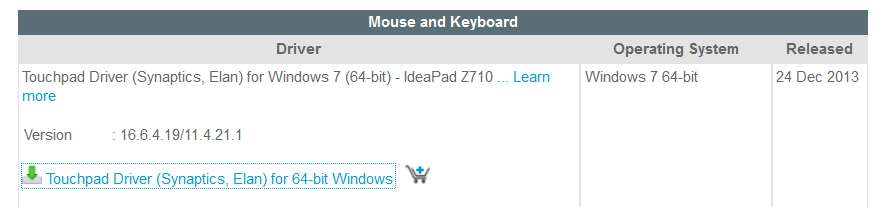
Just for closure (and not to nitpick, but to possibly help others who might have a similar issue in the future), the Lenovo driver download site for the Z710 does in fact name both Synaptics and Elan as the type of touchpad supported by the driver:
And the URL for that specific driver download was in fact provided by Solid_Cruver (Lenovo support specialist in the Philippines) post #9 in
the Lenovo forum thread I provided the link to earlier which I mentioned sounded pretty much like it was discussing your exact problem, or very much the same.
And in message #12 of that thread, it was Solid_Cruver who questioned the OP of that thread whether he knew if it was a Synaptics or an Elan touchpad that was causing the problem. It was this comment (in that Lenovo forum post #12) which prompted me to offer that same question here, in my own post #9 of this thread.
Although I don't have a Z710 (but instead have a W530 laptop which does truly have a Synaptics touchpad), I decided to duplicate your experience. I downloaded that Z710 driver file (for Synaptics/Elan), just to see what was in it (i.e. by running it to self-expand into the C:\Drivers folder, planning to un-check the final "install now" box which I expected to encounter at the end of the self-expansion.
And when I ran the file to the very last "finish" page, you are correct that the text shown has an "install now" checkbox shown which mentions only the Synaptics driver. There is no mention of the Elan, or what to do if you have one. This is certainly confusing, and very possibly misleading, as there is no further mention made of the Elan situation and what to do if that's your hardware... assuming you actually know. Mysterious, for sure.
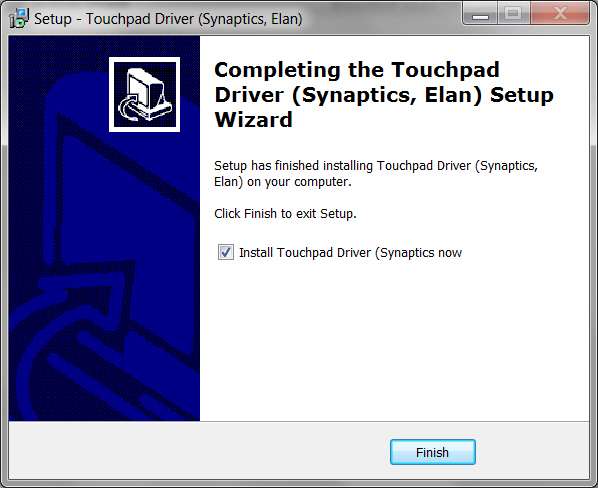
So, I un-checked that "install now" box, just so I could see the expanded installation folder(s) in C:\Drivers from the downloaded driver file TP161W764.EXE. Again, TP161W764.EXE is nothing more than a self-expanding file with an autorun option for SETUP.EXE (in the highest-level folder produced by the self-expansion one would assume). What gets self-expanded is simply the "installation folder" in which the actual driver installs can then proceed once the correct SETUP.EXE is run. Nevertheless, after un-checking the "install now" box and pushing the FINISH button the process wrapped up immediately so that I could now look into C:\Drivers to see what was going on.
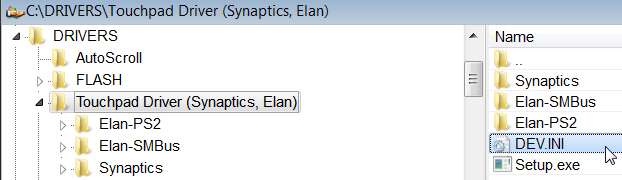
Well, the folder and sub-folders produced by the self-expanding TP161W764.EXE looks as follows:
This structure appears to be a top-level master folder, along with three sub-folders (one for Synaptics and two for Elan). Presumably the FINISH process would have run a SETUP.EXE that understood the hardware present, and picked the proper driver installer sub-folder below.
Note that there is a SETUP.EXE at the top level "C:\DRIVERS\Touchpad Driver (Synaptics, Elan)", so one would guess that this is the SETUP.EXE which would have been auto-launched if I'd left the "install now" box checked on the final page of the self-expansion process dialog (with the FINISH button, to then auto-launch SETUP.EXE to actually do the installation of the touchpad driver).
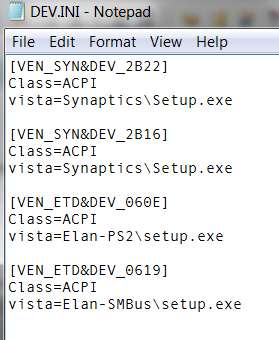
But furthermore, there is a DEV.INI file in that same folder which is suspiciously named and looks quite relevant. Looking at that INI file it contains the following:
Well, that's very interesting. It looks to be a list of the different types of touchpads which might be present: two different Synaptics hardware DEVICE_ID values (with SETUP/EXE for the driver install for both Synaptics devices coming from the one single \Synaptics sub-folder), and two different Elan hardware DEVICE_ID values (with two separate driver install sub-folders and two separate SETUP.EXE's to be run). I would have guessed that the related SETUP.EXE in this folder should have first accessed Device Manager to find out the precise DEVICE_ID associated with the touchpad, and then used this DEV.INI file to determine which of the THREE SEPARATE device driver installation folders would then be used to run the imbedded SETUP.EXE present in each of those three separate sub-folders:
(1) VEN_SYN&DEV_2B22 and VEN_SYN&DEV_2B16-> \Synaptics sub-folder, and Setup.exe within it
(2) VEN_ETD&DEV_060E -> \Elan-PS2 sub-folder, and Setup.exe within it
(3) VEN_ETD&DEV_0619 -> \Elan-SMBus sub-folder, and Setup.exe within it.
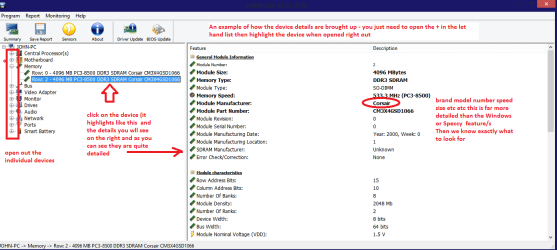
So, if you go into Device Manager on your Z710, and then go to the "System Devices" group item (not "mice") and expand that group, you will most probably see an item for your Elan touchpad (or, if it had been a Synaptics touchpad then that's what would have shown up). In my own case of my W530, the item which appears is as follows:
And then if you right-click on the item and select Properties, and then go to the Details tab in the Properties dialog, and then select Hardware ID from the drop-down list of detail info, you will see the actual DEVICE_ID value corresponding to your particular touchpad hardware in your particular Z710. In my own W530, the Hardware ID value looks like this:
I'm curious what your particular Z710 Device Manager Hardware ID is, if you can locate it and provide it. I'm certain it's one of the two Elan Device ID values I showed above.
So, back to your own Z710, in my opinion that top-level SETUP.EXE working in conjunction with the DEV.INI file contents, along with the Hardware ID value returned from Device Manager for you particular touchpad, well I would have guessed that all of this should have worked together automatically to then select which of the three subordinate driver installer sub-folders should have been selected, and then from which the SETUP.EXE in that particular sub-folder would have been automatically run... to complete the proper and correct and appropriate installation of the correct driver for the particular touchpad hardware device present on your particular Z710.
That's what I would have guessed. That this all should have tied together automatically as I described above, and that theoretically it shouldn't have been necessary to take any special installation steps (or manual overrides, and then manually run SETUP.EXE from anywhere)... if the top-level SETUP.EXE were working properly and the use of DEV.INI in that folder was interpreted and used as I deduced.
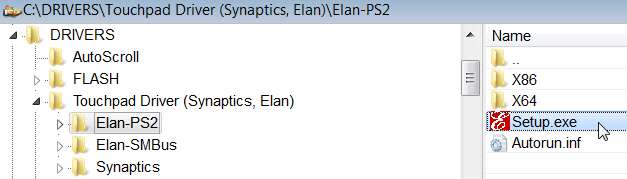
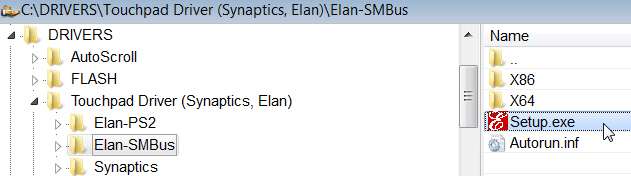
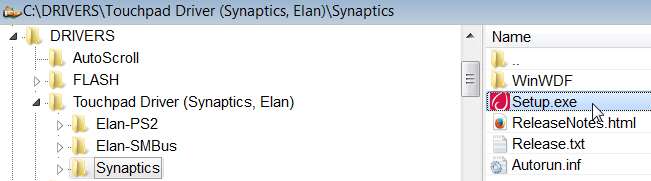
So, now looking inside each of the three separate driver installer sub-folders for (a) the one sub-folder for the two separate Synaptics Hardware ID devices, and (b) the two separate sub-folders for each of the two separate Elan Hardware ID devices, sure enough we see exactly what now would be expected:
Bottom line: if anything other than an automatically successful driver install for the PARTICULAR touchpad present on your Z710 occurred, it strongly suggests that the high-level SETUP.EXE is NOT correctly utilizing the DEV.INI present in that top-level folder in order to decide which of the three imbedded driver installer sub-folders to go to in order to then run that particular SETUP.EXE automatically.
Either that, or perhaps the specific Hardware ID value which Device Manager discovers on your specific Z710 is actually a THIRD ELAN VALUE!!! That would certainly explain why the two existing Elan-related Hardware ID's did not get used properly as expected, and perhaps SETUP.EXE was written to simply fall back and issue a "misleading" error message claiming "Synaptics device not found", where in fact the problem was that it was a new Elan touchpad device that was present... but Lenovo had not added the correct values to DEV.INI to support it.
Now it's quite possible (and apparently true) that whatever the Elan touchpad on your Z710 is (either one of the two values currently shown in DEV.INI, or perhaps one with the third Hardware ID as I am suggesting might be possible) might be fully supported by the existing Elan driver (either or both!), as suggested by your use of one of those two Elan sub-folders from which you ran SETUP.EXE manually. Obviously you ran SETUP.EXE yourself using one of those two sub-folders, so it was either a very good guess or you knew something you haven't revealed yet or both drivers are actually fully compatible with ALL Elan touchpads (including this possible third variant).
And that's how my analysis would go.
So I'm now very curious as to what the actual Hardware ID for the Elan touchpad is that is shown in Device Manager on your particular Z710, as this would bring a good deal of closure to fully understanding what's happening here.
Also, if my theory about the possibility of a new third variety of Elan touchpad is true, and it really is DEV.INI which is at fault, we really should notify Lenovo so that they can correct this.
There is, of course, yet one more possible explanation for the failure of the driver install on your Z710, and that is that the auto-run of SETUP.EXE which is triggered if you keep that "install now" checkbox checked on the FINISH page mistakenly is executing the SETUP.EXE specifically in the \Synaptics sub-folder, rather than running the SETUP.EXE (which presumably uses DEV.INI) in the top-level folder. Don't know, but this could be a reason for the "Synaptics device not found" error message and why you had to manually run SETUP.EXE from one of the two Elan folders in order to get the correct Elan driver installed (though they actually may be identical, in the two sub-folders, so that it didn't matter which one you chose if you didn't know the Hardware ID in advance).
Please provide that mysterious name and Hardware ID for your touchpad, in "System Devices" on your Z710.