from release to final?

149047

New member
Member
Local time
2:06 PM
Messages
57
sorry if this has been asked before, but can i upgrade the release candidate to the final version i will receive in a couple of days in my mail, or do i have to do a complete clean install?
regards,
markus

http://www.humanchaos.net
 

My Computer My Computer

At a glance

xp, w7q66002x 4gb kingston 1066, hyperx cl5x1950pro
OS
xp, w7
CPU
q6600
Motherboard
gigabyte p35 dq6
Memory
2x 4gb kingston 1066, hyperx cl5
Graphics Card(s)
x1950pro
sorry if this has been asked before, but can i upgrade the release candidate to the final version i will receive in a couple of days in my mail, or do i have to do a complete clean install?
regards,
markus
Microsoft essentially forces you to fresh install, and you probably should.

If you absolutely must upgrade, you can alter the cversion.ini file in the sources folder on the install media to allow a lower minimum build.

More info at the following if you need it:
http://www.howtogeek.com/howto/3075/how-to-upgrade-the-windows-7-rc-to-rtm/
 

My Computer My Computer

At a glance

Windows7
OS
Windows7
it would be a lot better if you did a clean install - i will be, and i'm sure a lot of others will be too...
 

My Computer My Computer

At a glance

ultimate 64 sp1i5 2500K [email protected]8 gigs GSkill Ripjaws 1600amd hd6950
Computer Manufacturer/Model Number
mickey megabyte 1234
OS
ultimate 64 sp1
CPU
i5 2500K [email protected]
Motherboard
MSI P67A-GD53
Memory
8 gigs GSkill Ripjaws 1600
Graphics Card(s)
amd hd6950
Sound Card
creative x-fi gamer
Monitor(s) Displays
samsung 24"
Screen Resolution
1920x1080
Hard Drives
ocz vertex 2e 60 gig, samsung f3 1tb, buffalo 2tb ext
PSU
antec 550
Case
antec three hundred
Cooling
i'm a cooling fan
Keyboard
saitek eclipse ii
Mouse
logitech g3
Internet Speed
about 4 Mbps
Other Info
i love win7
I upgraded just to do it, then did a clean install LOL.
 

My Computer My Computer

At a glance

Windows 7 Professional x64Intel(R) Core(TM) i7-3820 CPU, 4 Cores, 8 Log...32 GB DDR3 1600ATI Radeon HD 8950 3GB vDDR5 & ATI Radeon HD ...
Computer type
PC/Desktop
Computer Manufacturer/Model Number
Alienware Aurora-R4
OS
Windows 7 Professional x64
CPU
Intel(R) Core(TM) i7-3820 CPU, 4 Cores, 8 Logical Cores
Motherboard
Alienware
Memory
32 GB DDR3 1600
Graphics Card(s)
ATI Radeon HD 8950 3GB vDDR5 & ATI Radeon HD 7950 3GB vDDR5
Sound Card
Realtek 7.1 Audio
Monitor(s) Displays
Dell SP2309W 23 inch
Screen Resolution
2048x1152
Hard Drives
7.3 TB in 4 drives (Raid 0), 2TB NAS backup drive.
PSU
875w
Case
ALX Chasis with active venting
Cooling
Liquid cooled with active venting and fans.
Keyboard
Alienware TactX
Mouse
Alienware TactX
Internet Speed
15mb Cable
Antivirus
Malwarebytes
Browser
Pale Moon (Optimized Mozilla Based)
Other Info
http://www.y0himba.net
ok - so how would you go about having the software&applications&settings available you're using at the moment?
-> backup and then restore in the new win7 ?
or do i have to go all the way back to the start and install one after the other?
 

My Computer My Computer

At a glance

xp, w7q66002x 4gb kingston 1066, hyperx cl5x1950pro
OS
xp, w7
CPU
q6600
Motherboard
gigabyte p35 dq6
Memory
2x 4gb kingston 1066, hyperx cl5
Graphics Card(s)
x1950pro
The best path is to do a clean install after backing up your apps and data. If you really, really want to do an upgrade, there are a couple of things to keep in mind.

The release candidate is a version of Ultimate. Unless you have bought the retail version of Ultimate, you're going to have to mod the registry.

Here's a link to an article on upgrading from the RC to any version of the retail:

Icrontic » Upgrade the Windows 7 RC to any retail version
 

My Computer My Computer

At a glance

Windows 7 x64 HP, Windows 7 HP, Windows 7 UltIntel I3, Cerelon, Pentium 4 @ 3Ghz8G, 3G, 3GOn-board Intel, On-board nVidia, nVIDIA card
Computer Manufacturer/Model Number
Gateway, Toshiba Laptop, and Home Brew
OS
Windows 7 x64 HP, Windows 7 HP, Windows 7 Ult
CPU
Intel I3, Cerelon, Pentium 4 @ 3Ghz
Motherboard
Intel, Intel, Asus
Memory
8G, 3G, 3G
Graphics Card(s)
On-board Intel, On-board nVidia, nVIDIA card
Sound Card
on-board, on-board, SoundBlaster
Monitor(s) Displays
Hannspree HF237, Toshiba, SyncMaster 931B
Screen Resolution
default (all)
Hard Drives
1T internal, 320G internal, 160G internal, 1T networked
PSU
300w, unk, 650w
Case
black, black, grey
Cooling
air (all)
Keyboard
standard wired (all)
Mouse
standard wired (all)
Internet Speed
6M down, 768K up
Other Info
Home LAN through Linksys hub to 4 port and wireless switch/router. Networked HP 2600n. Wife's computer running Windows 7, and spare laptop running Ubuntu "Karmic Kola" (9.10).
I just have a list of what I need and what I use, format, reinstall, and go down the list. I never really worry about importing anything except Outlook emails and my DVD database. I Have the My Documents folder on a separate physical D: drive, and the first thing I do is point Windows to it. I use an Outlook addin called Personal Folders Backup, which imports the .pst for me, and Ant Movie Catalog which imports my DVD database. Other than that, the rest is freeware.

As for Steam, it and all the games it contains are also on my separate D drive, I just install the Steam client there, and poof, no downloading needed.

No tedious mucking about with backup or anything, takes me an hour to be back up and running.

Oh! Nice find Schaft! I posted the link for upgrading from RC to RTM, but that little registry trick is NICE. Thanks for that.
 

My Computer My Computer

At a glance

Windows 7 Professional x64Intel(R) Core(TM) i7-3820 CPU, 4 Cores, 8 Log...32 GB DDR3 1600ATI Radeon HD 8950 3GB vDDR5 & ATI Radeon HD ...
Computer type
PC/Desktop
Computer Manufacturer/Model Number
Alienware Aurora-R4
OS
Windows 7 Professional x64
CPU
Intel(R) Core(TM) i7-3820 CPU, 4 Cores, 8 Logical Cores
Motherboard
Alienware
Memory
32 GB DDR3 1600
Graphics Card(s)
ATI Radeon HD 8950 3GB vDDR5 & ATI Radeon HD 7950 3GB vDDR5
Sound Card
Realtek 7.1 Audio
Monitor(s) Displays
Dell SP2309W 23 inch
Screen Resolution
2048x1152
Hard Drives
7.3 TB in 4 drives (Raid 0), 2TB NAS backup drive.
PSU
875w
Case
ALX Chasis with active venting
Cooling
Liquid cooled with active venting and fans.
Keyboard
Alienware TactX
Mouse
Alienware TactX
Internet Speed
15mb Cable
Antivirus
Malwarebytes
Browser
Pale Moon (Optimized Mozilla Based)
Other Info
http://www.y0himba.net
personally, i have all my documents stored on a separate partition, so that they will survive a reformat and reinstall of windows.

then i go about tweaking settings and installing all my software again, it's a bit tedious, but hey-ho, there you go...

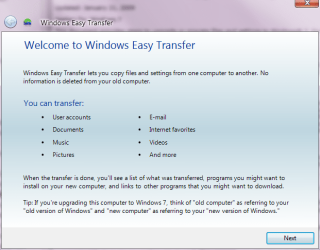
you can automate the process a bit by using windows easy transfer.

just start typing 'windows easy transfer' into the searchbox at the bottom of the start-menu to run it.
 

Attachments

  • easy.PNG
    easy.PNG
    24.6 KB · Views: 3

My Computer My Computer

At a glance

ultimate 64 sp1i5 2500K [email protected]8 gigs GSkill Ripjaws 1600amd hd6950
Computer Manufacturer/Model Number
mickey megabyte 1234
OS
ultimate 64 sp1
CPU
i5 2500K [email protected]
Motherboard
MSI P67A-GD53
Memory
8 gigs GSkill Ripjaws 1600
Graphics Card(s)
amd hd6950
Sound Card
creative x-fi gamer
Monitor(s) Displays
samsung 24"
Screen Resolution
1920x1080
Hard Drives
ocz vertex 2e 60 gig, samsung f3 1tb, buffalo 2tb ext
PSU
antec 550
Case
antec three hundred
Cooling
i'm a cooling fan
Keyboard
saitek eclipse ii
Mouse
logitech g3
Internet Speed
about 4 Mbps
Other Info
i love win7
So anyone took the plunge and upgraded from RC to retail box version, using the cversion.ini method?

going to get the OEM ultimate this weekend and install over my RC.
That method worked when I upgrade beta to RC.

If nobody tried it, I guess i'll be the first guinea pig :D
 

My Computer My Computer

At a glance

Windows 7 RC
OS
Windows 7 RC
As I noted above, I used the method posted here to see if it would work, and it worked perfectly. I then formatted and did a fresh install, because that is always best.
 

My Computer My Computer

At a glance

Windows 7 Professional x64Intel(R) Core(TM) i7-3820 CPU, 4 Cores, 8 Log...32 GB DDR3 1600ATI Radeon HD 8950 3GB vDDR5 & ATI Radeon HD ...
Computer type
PC/Desktop
Computer Manufacturer/Model Number
Alienware Aurora-R4
OS
Windows 7 Professional x64
CPU
Intel(R) Core(TM) i7-3820 CPU, 4 Cores, 8 Logical Cores
Motherboard
Alienware
Memory
32 GB DDR3 1600
Graphics Card(s)
ATI Radeon HD 8950 3GB vDDR5 & ATI Radeon HD 7950 3GB vDDR5
Sound Card
Realtek 7.1 Audio
Monitor(s) Displays
Dell SP2309W 23 inch
Screen Resolution
2048x1152
Hard Drives
7.3 TB in 4 drives (Raid 0), 2TB NAS backup drive.
PSU
875w
Case
ALX Chasis with active venting
Cooling
Liquid cooled with active venting and fans.
Keyboard
Alienware TactX
Mouse
Alienware TactX
Internet Speed
15mb Cable
Antivirus
Malwarebytes
Browser
Pale Moon (Optimized Mozilla Based)
Other Info
http://www.y0himba.net
I did the "upgrade trick" 7100 RC to RTM x64 Ultimate using the cversion.ini edit and I have not had any problems whatsoever. It runs just the same as it did before. I have not yet decided if I am going to do a clean install, although I realize that is generally best. But since the OP was asking if anyone actually has done it successfully, the answer is yes.

Damon
 

My Computer My Computer

At a glance

Win7
OS
Win7
Back
Top