

For the past year, we have been collecting feedback on how we can make Tor Browser work better for you.
Tor Browser 8.0, our first stable release based on Firefox 60 ESR, is now available from the Tor Browser Project page and also from our distribution directory. This release is all about users first.
Tor Browser 8.0 comes with a series of user experience improvements that address a set of long-term Tor Browser issues you’ve told us about. To meet our users' needs, Tor Browser has a new user onboarding experience; an updated landing page that follows our styleguide; additional language support; and new behaviors for bridge fetching, displaying a circuit, and visiting .onion sites.
New User Onboarding
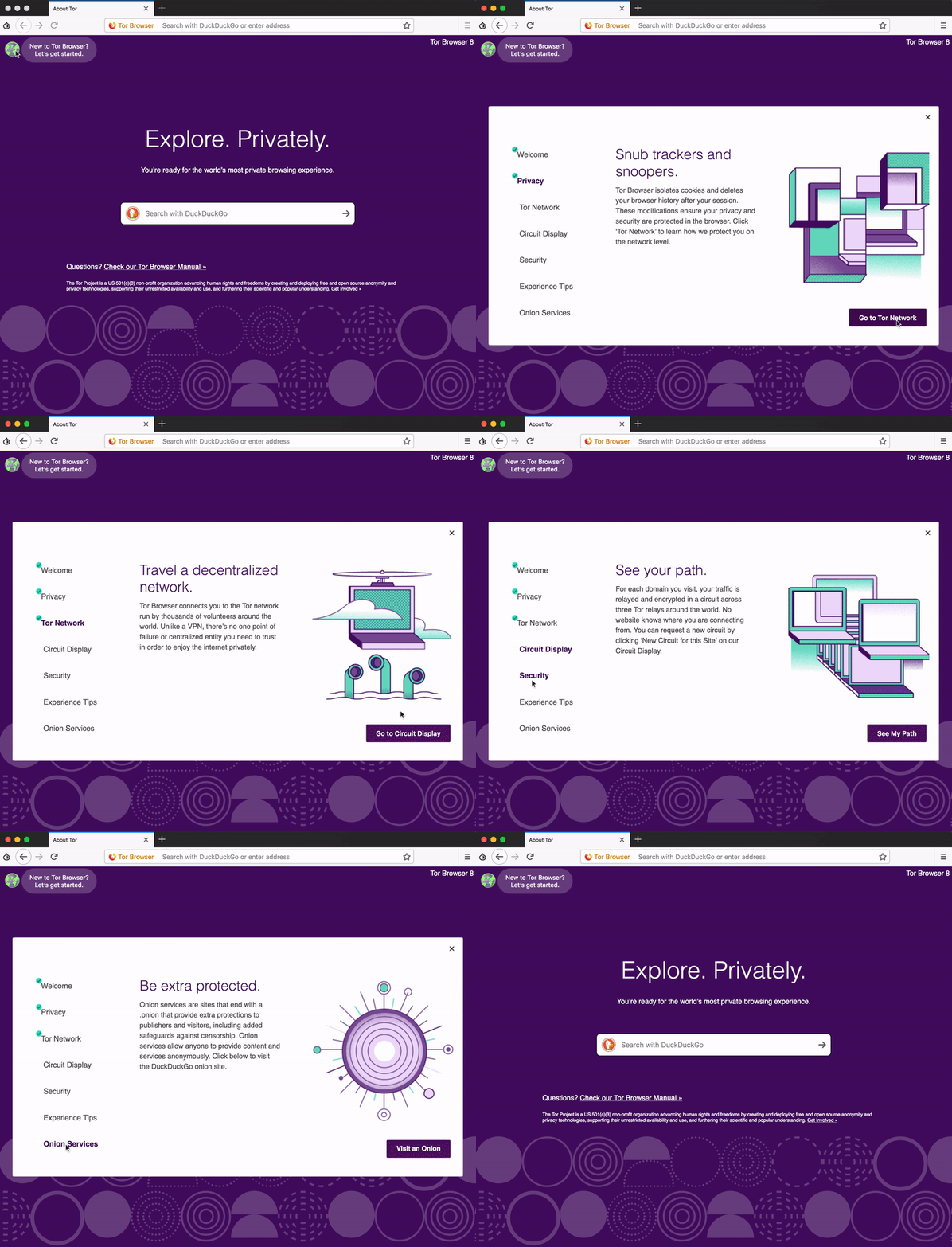

For the most part, using Tor is like using any other browser (and it is based on Firefox), but there are some usage differences and cool things happening behind the scenes that users should be aware of. Our new onboarding experience aims to better let you know about unique aspects of Tor Browser and how to maximize those for your best browsing experience.
Improved Bridge Fetching
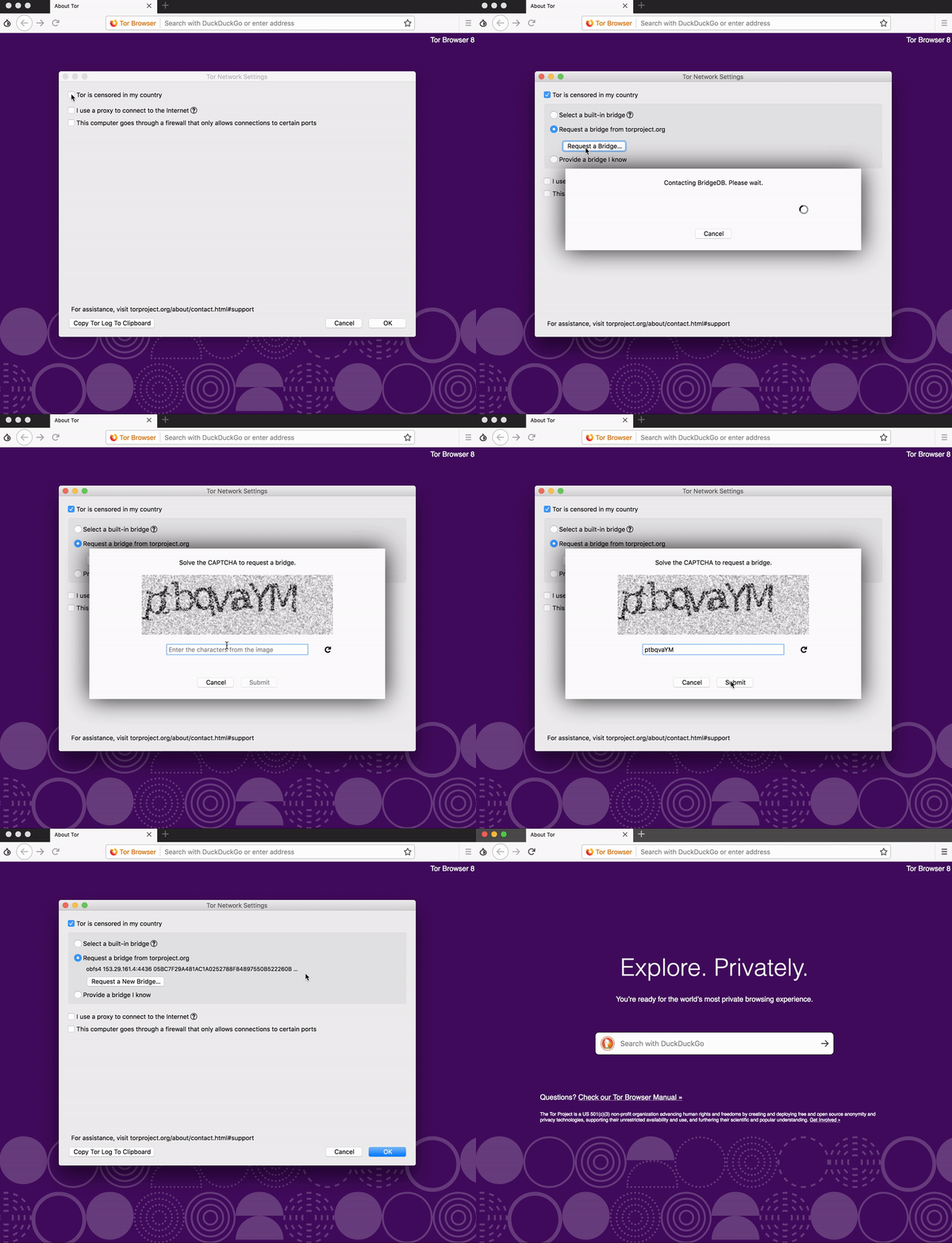
For users where Tor is blocked, we have previously offered a handful of bridges in the browser to bypass censorship. But to receive additional bridges, you had to send an email or visit a website, which posed a set of problems. To simplify how you request bridges, we now have a new bridge configuration flow when you when you launch Tor. Now all you have to do is solve a captcha in Tor Launcher, and you’ll get a bridge IP. We hope this simplification will allow more people to bypass censorship and browse the internet freely and privately.
Better Language Support
Millions of people around the world use Tor, but not everyone has been able to use Tor in their language. In Tor Browser 8, we’ve added resources and support for nine previously unsupported languages: Catalan, Irish, Indonesian, Icelandic, Norwegian, Danish, Hebrew, Swedish, and Traditional Chinese.
Apart from those highlights, a number of other component and toolchains got an update for this major release. In particular, we now ship Tor 0.3.3.9 with OpenSSL 1.0.2p and Libevent 2.1.8. Moreover, we switched to the pure WebExtension version of NoScript (version 10.1.9.1) which we still need to provide the security slider functionality. Additionally, we start shipping 64bit builds for Windows users which should enhance Tor Browser stability compared to the 32bit bundles.
Providing this many improvements for our users could only be possible with collaboration between the Tor Browser team and Tor's UX team, Community team, Services Admin team, and our volunteers. We would like to thank everyone for working hard over the past year to bring all these new features to our users.
Known Issues
We already collected a number of unresolved bugs since Tor Browser 7.5.6 and tagged them with our ff60-esr keyword to keep them on our radar. The most important ones are listed below:
- WebGL is broken right now.
- We disable Stylo on macOS due to reproducibility issues we need to investigate and fix. This will likely not get fixed for Tor Browser 8, as we need some baking time on our nightly/alpha channel before we are sure there are no reproducibility/stability regressions. The tentative plan is to get it ready for Tor Browser 8.5.
Note: This release is signed with a new GPG subkey as the old one expired a couple of days ago. You might need to refresh your copy of the public part of the Tor Browser signing key before doing the verification. The fingerprint of the new subkey is 1107 75B5 D101 FB36 BC6C 911B EB77 4491 D9FF 06E2.
Give Feedback
This is only the beginning of our efforts to put users first. If you find a bug or have a suggestion for how we could improve this release, please let us know.
Changelog...
Read more: New Release: Tor Browser 8.0 | Tor Blog
My Computer
At a glance
64-bit Windows 11 Pro for WorkstationsIntel i7-8700K OC'd to 5 GHz64 GB (4x16GB) G.SKILL TridentZ RGB DDR4 3600...ASUS ROG-STRIX-GTX1080TI-O11G-GAMING
- Computer type
- PC/Desktop
- Computer Manufacturer/Model Number
- Self built custom
- OS
- 64-bit Windows 11 Pro for Workstations
- CPU
- Intel i7-8700K OC'd to 5 GHz
- Motherboard
- ASUS ROG Maximus XI Formula Z390
- Memory
- 64 GB (4x16GB) G.SKILL TridentZ RGB DDR4 3600 MHz
- Graphics Card(s)
- ASUS ROG-STRIX-GTX1080TI-O11G-GAMING
- Sound Card
- Integrated
- Monitor(s) Displays
- 2 x Samsung Odyssey G7 27"
- Screen Resolution
- 2560x1440
- Hard Drives
- 1TB Samsung 990 PRO M.2,
4TB Samsung 990 PRO PRO M.2,
TerraMaster F8 SSD Plus NAS
- PSU
- Seasonic Prime Titanium 850W
- Case
- Thermaltake Core P3
- Cooling
- Corsair Hydro H115i
- Keyboard
- Logitech wireless K800
- Mouse
- Logitech MX Master 4
- Internet Speed
- 2 Gb/s Download and 100 Mb/s Upload
- Antivirus
- Malwarebyte Anti-Malware Premium
- Browser
- Google Chrome
- Other Info
- Logitech Z625 speaker system,
Logitech BRIO 4K Pro webcam,
HP Color LaserJet Pro MFP M477fdn,
APC SMART-UPS RT 1000 XL - SURT1000XLI,
Galaxy S23 Plus phone
