From Windows 7 enterprise to a home version

kristineclara

New member
Local time
12:00 AM
Messages
6
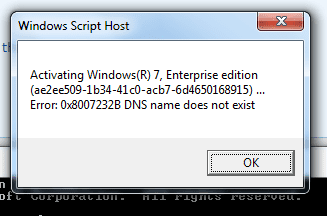
Upon my retirement I could buy my work PC (laptop) running on Windows 7 enterprise. I no longer logon to my former work environment and after 6 months last Saturday, I received an message that my Windows is no genuine. I guess that the license has expired. I am not able to activate. I get error code 0x8007232B

Do I have to buy a new Windows license? Which one do you suggest? Can I do this without going through the pain of a fully new installation?

Thank you for your help.

Kristine Clara

(I live in Belgium and my language is Dutch but I have been working in English all the time and I would prefer to have a Windows version in English)

Code:
Diagnostic Report (1.9.0027.0):
-----------------------------------------
Windows Validation Data-->

Validation Code: 50
Cached Online Validation Code: N/A, hr = 0xc004f012
Windows Product Key: *****-*****-2VJC9-XBBR8-HVTHH
Windows Product Key Hash: k/l/EMDQdwK9OvdCkPtHG1YdosE=
Windows Product ID: 00392-918-5000002-85260
Windows Product ID Type: 1
Windows License Type: KMS Client
Windows OS version: 6.1.7601.2.00010100.1.0.004
ID: {F8317384-88F4-4D08-83EA-6A2A9DA25225}(1)
Is Admin: Yes
TestCab: 0x0
LegitcheckControl ActiveX: N/A, hr = 0x80070002
Signed By: N/A, hr = 0x80070002
Product Name: Windows 7 Enterprise
Architecture: 0x00000000
Build lab: 7601.win7sp1_ldr.170913-0600
TTS Error: 
Validation Diagnostic: 
Resolution Status: N/A

Vista WgaER Data-->
ThreatID(s): N/A, hr = 0x80070002
Version: N/A, hr = 0x80070002

Windows XP Notifications Data-->
Cached Result: N/A, hr = 0x80070002
File Exists: No
Version: N/A, hr = 0x80070002
WgaTray.exe Signed By: N/A, hr = 0x80070002
WgaLogon.dll Signed By: N/A, hr = 0x80070002

OGA Notifications Data-->
Cached Result: N/A, hr = 0x80070002
Version: N/A, hr = 0x80070002
OGAExec.exe Signed By: N/A, hr = 0x80070002
OGAAddin.dll Signed By: N/A, hr = 0x80070002

OGA Data-->
Office Status: 109 N/A
OGA Version: N/A, 0x80070002
Signed By: N/A, hr = 0x80070002
Office Diagnostics: 025D1FF3-364-80041010_025D1FF3-229-80041010_025D1FF3-230-1_025D1FF3-517-80040154_025D1FF3-237-80040154_025D1FF3-238-2_025D1FF3-244-80070002_025D1FF3-258-3

Browser Data-->
Proxy settings: N/A
User Agent: Mozilla/4.0 (compatible; MSIE 8.0; Win32)
Default Browser: C:\Program Files\Google\Chrome\Application\chrome.exe
Download signed ActiveX controls: Prompt
Download unsigned ActiveX controls: Disabled
Run ActiveX controls and plug-ins: Allowed
Initialize and script ActiveX controls not marked as safe: Disabled
Allow scripting of Internet Explorer Webbrowser control: Disabled
Active scripting: Allowed
Script ActiveX controls marked as safe for scripting: Allowed

File Scan Data-->
File Mismatch: C:\WINDOWS\system32\wat\watadminsvc.exe[Hr = 0x80070003]
File Mismatch: C:\WINDOWS\system32\wat\npwatweb.dll[Hr = 0x80070003]
File Mismatch: C:\WINDOWS\system32\wat\watux.exe[Hr = 0x80070003]
File Mismatch: C:\WINDOWS\system32\wat\watweb.dll[Hr = 0x80070003]

Other data-->
Office Details: <GenuineResults><MachineData><UGUID>{F8317384-88F4-4D08-83EA-6A2A9DA25225}</UGUID><Version>1.9.0027.0</Version><OS>6.1.7601.2.00010100.1.0.004</OS><Architecture>x32</Architecture><PKey>*****-*****-*****-*****-HVTHH</PKey><PID>00392-918-5000002-85260</PID><PIDType>1</PIDType><SID>S-1-5-21-1698929565-2193562327-3021727560</SID><SYSTEM><Manufacturer>Dell Inc.</Manufacturer><Model>Latitude E7240</Model></SYSTEM><BIOS><Manufacturer>Dell Inc.</Manufacturer><Version>A07</Version><SMBIOSVersion major="2" minor="7"/><Date>20140102000000.000000+000</Date></BIOS><HWID>D70B0B00018400FC</HWID><UserLCID>0409</UserLCID><SystemLCID>0409</SystemLCID><TimeZone>W. Europe Standard Time(GMT+01:00)</TimeZone><iJoin>0</iJoin><SBID><stat>3</stat><msppid></msppid><name></name><model></model></SBID><OEM><OEMID>DELL  </OEMID><OEMTableID>CBX3   </OEMTableID></OEM><GANotification/></MachineData><Software><Office><Result>109</Result><Products/><Applications/></Office></Software></GenuineResults>  

Spsys.log Content: 0x80070002

Licensing Data-->
Software licensing service version: 6.1.7601.17514

Name: Windows(R) 7, Enterprise edition
Description: Windows Operating System - Windows(R) 7, VOLUME_KMSCLIENT channel
Activation ID: ae2ee509-1b34-41c0-acb7-6d4650168915
Application ID: 55c92734-d682-4d71-983e-d6ec3f16059f
Extended PID: 00392-00170-918-500000-03-1033-7601.0000-2652014
Installation ID: 009050101516612831270403808600520906547791726040554133
Partial Product Key: HVTHH
License Status: Notification
Notification Reason: 0xC004F00F.
Remaining Windows rearm count: 2
Trusted time: 2018-01-08 15:35:03
Please use slmgr.vbs /ato to activate and update KMS client information in order to update values.

Windows Activation Technologies-->
HrOffline: 0x00000000
HrOnline: N/A
HealthStatus: 0x0000000000000000
Event Time Stamp: N/A
ActiveX: Not Registered - 0x80040154
Admin Service: Not Registered - 0x80040154
HealthStatus Bitmask Output:


HWID Data-->
HWID Hash Current: MAAAAAAAAAABAAEAAgABAAAABAABAAEA6GGSzlaWmGMURySA7BOGttSkhMu6irp6

OEM Activation 1.0 Data-->
N/A

OEM Activation 2.0 Data-->
BIOS valid for OA 2.0: yes
Windows marker version: 0x20001
OEMID and OEMTableID Consistent: yes
BIOS Information: 
  ACPI Table Name	OEMID Value	OEMTableID Value
  APIC			DELL  		CBX3   
  FACP			DELL  		CBX3   
  HPET			DELL  		CBX3   
  MCFG			DELL  		CBX3   
  FPDT			DELL  		CBX3   
  ASF!			INTEL 		 HCG
  SLIC			DELL  		CBX3   
  LPIT			DELL  		CBX3   
  SSDT			INTEL		sensrhub
  SSDT			INTEL		sensrhub
  SSDT			INTEL		sensrhub
  SSDT			INTEL		sensrhub
  MSDM			DELL  		CBX3   
  DMAR			INTEL 		HSW
 
Last edited by a moderator:

My Computer My Computer

At a glance

Windows 7 enterprise SP1Intel Core i3 CPU @ 1.70 Ghz
Computer type
Laptop
Computer Manufacturer/Model Number
Dell
OS
Windows 7 enterprise SP1
CPU
Intel Core i3 CPU @ 1.70 Ghz
Welcome to the forum. Being enterprise it needs to re activate on a regular basis and its done locally on a KMS server not via MS
Windows License Type: KMS Client
 

My Computer My Computer

At a glance

win 8 32 bit
Computer type
PC/Desktop
OS
win 8 32 bit
Welcome to the forum. Being enterprise it needs to re activate on a regular basis and its done locally on a KMS server not via MS
Windows License Type: KMS Client


I understand that Samuria, but I cannot get on the KMS server. What do I do? buy a new Windows? which one?
 

My Computer My Computer

At a glance

Windows 7 enterprise SP1Intel Core i3 CPU @ 1.70 Ghz
Computer type
Laptop
Computer Manufacturer/Model Number
Dell
OS
Windows 7 enterprise SP1
CPU
Intel Core i3 CPU @ 1.70 Ghz
Hi Kristine,

Depends on your company, but the error code reported, does NOT say the licence has been cancelled
please use slmgr.vbs /ato
then run KB971033

rerun the tool. post the output


Roy
 

My Computer My Computer

At a glance

W7 home premium 32bit/W7HP 64bit/w10 tp insid...E5300 dual core3gbNvidia Geforce 7100 Nforce 630i
Computer type
PC/Desktop
Computer Manufacturer/Model Number
medionl/Aspire 6930G/acer x55a
OS
W7 home premium 32bit/W7HP 64bit/w10 tp insider ring
CPU
E5300 dual core
Motherboard
medion MS7366
Memory
3gb
Graphics Card(s)
Nvidia Geforce 7100 Nforce 630i
Monitor(s) Displays
avixc
Internet Speed
n (isp resticted to 72)
Antivirus
mse/pands
Browser
palemoon
Other Info
Belkin Fd7050 n USB using Railink RT2870 drivers, more upto date
Hi Kristine,

Depends on your company, but the error code reported, does NOT say the licence has been cancelled
Please run
KB971033
rerun the tool. post the output

Roy

Hi Roy

I think I did what you asked I here is the new output.

Code:
Diagnostic Report (1.9.0027.0):
-----------------------------------------
Windows Validation Data-->

Validation Code: 50
Cached Online Validation Code: N/A, hr = 0xc004f012
Windows Product Key: *****-*****-2VJC9-XBBR8-HVTHH
Windows Product Key Hash: k/l/EMDQdwK9OvdCkPtHG1YdosE=
Windows Product ID: 00392-918-5000002-85260
Windows Product ID Type: 1
Windows License Type: KMS Client
Windows OS version: 6.1.7601.2.00010100.1.0.004
ID: {F8317384-88F4-4D08-83EA-6A2A9DA25225}(3)
Is Admin: Yes
TestCab: 0x0
LegitcheckControl ActiveX: N/A, hr = 0x80070002
Signed By: N/A, hr = 0x80070002
Product Name: Windows 7 Enterprise
Architecture: 0x00000000
Build lab: 7601.win7sp1_ldr.170913-0600
TTS Error: 
Validation Diagnostic: 
Resolution Status: N/A

Vista WgaER Data-->
ThreatID(s): N/A, hr = 0x80070002
Version: N/A, hr = 0x80070002

Windows XP Notifications Data-->
Cached Result: N/A, hr = 0x80070002
File Exists: No
Version: N/A, hr = 0x80070002
WgaTray.exe Signed By: N/A, hr = 0x80070002
WgaLogon.dll Signed By: N/A, hr = 0x80070002

OGA Notifications Data-->
Cached Result: N/A, hr = 0x80070002
Version: N/A, hr = 0x80070002
OGAExec.exe Signed By: N/A, hr = 0x80070002
OGAAddin.dll Signed By: N/A, hr = 0x80070002

OGA Data-->
Office Status: 109 N/A
OGA Version: N/A, 0x80070002
Signed By: N/A, hr = 0x80070002
Office Diagnostics: 025D1FF3-364-80041010_025D1FF3-229-80041010_025D1FF3-230-1_025D1FF3-517-80040154_025D1FF3-237-80040154_025D1FF3-238-2_025D1FF3-244-80070002_025D1FF3-258-3

Browser Data-->
Proxy settings: N/A
User Agent: Mozilla/4.0 (compatible; MSIE 8.0; Win32)
Default Browser: C:\Program Files\Google\Chrome\Application\chrome.exe
Download signed ActiveX controls: Prompt
Download unsigned ActiveX controls: Disabled
Run ActiveX controls and plug-ins: Allowed
Initialize and script ActiveX controls not marked as safe: Disabled
Allow scripting of Internet Explorer Webbrowser control: Disabled
Active scripting: Allowed
Script ActiveX controls marked as safe for scripting: Allowed

File Scan Data-->

Other data-->
Office Details: <GenuineResults><MachineData><UGUID>{F8317384-88F4-4D08-83EA-6A2A9DA25225}</UGUID><Version>1.9.0027.0</Version><OS>6.1.7601.2.00010100.1.0.004</OS><Architecture>x32</Architecture><PKey>*****-*****-*****-*****-HVTHH</PKey><PID>00392-918-5000002-85260</PID><PIDType>1</PIDType><SID>S-1-5-21-1698929565-2193562327-3021727560</SID><SYSTEM><Manufacturer>Dell Inc.</Manufacturer><Model>Latitude E7240</Model></SYSTEM><BIOS><Manufacturer>Dell Inc.</Manufacturer><Version>A07</Version><SMBIOSVersion major="2" minor="7"/><Date>20140102000000.000000+000</Date></BIOS><HWID>D70B0B00018400FC</HWID><UserLCID>0409</UserLCID><SystemLCID>0409</SystemLCID><TimeZone>W. Europe Standard Time(GMT+01:00)</TimeZone><iJoin>0</iJoin><SBID><stat>3</stat><msppid></msppid><name></name><model></model></SBID><OEM><OEMID>DELL  </OEMID><OEMTableID>CBX3   </OEMTableID></OEM><GANotification/></MachineData><Software><Office><Result>109</Result><Products/><Applications/></Office></Software></GenuineResults>  

Spsys.log Content: 0x80070002

Licensing Data-->
Software licensing service version: 6.1.7601.17514

Name: Windows(R) 7, Enterprise edition
Description: Windows Operating System - Windows(R) 7, VOLUME_KMSCLIENT channel
Activation ID: ae2ee509-1b34-41c0-acb7-6d4650168915
Application ID: 55c92734-d682-4d71-983e-d6ec3f16059f
Extended PID: 00392-00170-918-500000-03-1033-7601.0000-2652014
Installation ID: 009050101516612831270403808600520906547791726040554133
Partial Product Key: HVTHH
License Status: Notification
Notification Reason: 0xC004F00F.
Remaining Windows rearm count: 2
Trusted time: 2018-01-08 16:51:18
Please use slmgr.vbs /ato to activate and update KMS client information in order to update values.

Windows Activation Technologies-->
HrOffline: 0x00000000
HrOnline: N/A
HealthStatus: 0x0000000000000000
Event Time Stamp: N/A
ActiveX: Registered, Version: 7.1.7600.16395
Admin Service: Registered, Version: 7.1.7600.16395
HealthStatus Bitmask Output:


HWID Data-->
HWID Hash Current: MAAAAAAAAAABAAEAAgABAAAABAABAAEA6GGSzlaWmGMURySA7BOGttSkhMu6irp6

OEM Activation 1.0 Data-->
N/A

OEM Activation 2.0 Data-->
BIOS valid for OA 2.0: yes
Windows marker version: 0x20001
OEMID and OEMTableID Consistent: yes
BIOS Information: 
  ACPI Table Name	OEMID Value	OEMTableID Value
  APIC			DELL  		CBX3   
  FACP			DELL  		CBX3   
  HPET			DELL  		CBX3   
  MCFG			DELL  		CBX3   
  FPDT			DELL  		CBX3   
  ASF!			INTEL 		 HCG
  SLIC			DELL  		CBX3   
  LPIT			DELL  		CBX3   
  SSDT			INTEL		sensrhub
  SSDT			INTEL		sensrhub
  SSDT			INTEL		sensrhub
  SSDT			INTEL		sensrhub
  MSDM			DELL  		CBX3   
  DMAR			INTEL 		HSW
 
Last edited by a moderator:

My Computer My Computer

At a glance

Windows 7 enterprise SP1Intel Core i3 CPU @ 1.70 Ghz
Computer type
Laptop
Computer Manufacturer/Model Number
Dell
OS
Windows 7 enterprise SP1
CPU
Intel Core i3 CPU @ 1.70 Ghz
Hi Kristina,

did you run
slmgr.vbs /ato

i added it in possibly during you viewing it

Please advise the message received after you ran it..

If it failed then
you could speak to the IT department at your old workplace, see if they could provide you with the required details to re-activate it

OR
Does your comp have a COA attached, may be in the battery compartment.


Roy
 

My Computer My Computer

At a glance

W7 home premium 32bit/W7HP 64bit/w10 tp insid...E5300 dual core3gbNvidia Geforce 7100 Nforce 630i
Computer type
PC/Desktop
Computer Manufacturer/Model Number
medionl/Aspire 6930G/acer x55a
OS
W7 home premium 32bit/W7HP 64bit/w10 tp insider ring
CPU
E5300 dual core
Motherboard
medion MS7366
Memory
3gb
Graphics Card(s)
Nvidia Geforce 7100 Nforce 630i
Monitor(s) Displays
avixc
Internet Speed
n (isp resticted to 72)
Antivirus
mse/pands
Browser
palemoon
Other Info
Belkin Fd7050 n USB using Railink RT2870 drivers, more upto date
Hi Kristina,

did you run
slmgr.vbs /ato
i added it in possibly during you viewing it
Please advise the message received after you ran it..
If it failed then
you could speak to the IT department at your old workplace, see if they could provide you with the required details to re-activate it
OR
Does your comp have a COA attached, may be in the battery compartment.

Roy

Hi Roy,

I ran slmgr.vbs /ato and receive this error message (still the same) see attachment.
There is no COA inside I checked that already.

The problem is I am retired, no longer a staff member and cannot get assistance from my old IT department. I guess I will have to buy my own license and install Windows 7, or 10??? would really dread to do so...I don't see how I can solve this otherwise. Do You?


Kristine
 

Attachments

  • 2018-01-08_1808.png
    2018-01-08_1808.png
    7.2 KB · Views: 27

My Computer My Computer

At a glance

Windows 7 enterprise SP1Intel Core i3 CPU @ 1.70 Ghz
Computer type
Laptop
Computer Manufacturer/Model Number
Dell
OS
Windows 7 enterprise SP1
CPU
Intel Core i3 CPU @ 1.70 Ghz
f you can't find the COA sticker or go back to the IT Department where you worked the only option would be to purchase and install a new Windows OS.
 

My Computer My Computer

At a glance

8.1 home x64
Computer type
PC/Desktop
OS
8.1 home x64
I have my suspicions with the HVTHH Key activation was done by a KMS emulator. The laptop should have come with Pro installed and Dell usually has the COA sticker on the back, though as posted above, it could be in the battery compartment. Look for the sticker and install the correct version.

At my ex-work, the IT department bought DELL PCs in large quantities, rips off the original Windows installations and installs Windows 7 Enterprise on all of them. I have a sticker under the battery saying Windows 8 Pro. but there is no key with it; its just a hologram logo nothing more. So I am stuck again.

Kristine
 
Last edited:

My Computer My Computer

At a glance

Windows 7 enterprise SP1Intel Core i3 CPU @ 1.70 Ghz
Computer type
Laptop
Computer Manufacturer/Model Number
Dell
OS
Windows 7 enterprise SP1
CPU
Intel Core i3 CPU @ 1.70 Ghz
Hi Kristina,

Looks like the IT dept grabbed your comp, and removed the Server DNS, which it would have validated against, which is usually every 180 days = 6 months.
@bat 1 the key showing in the report is the KMS Enterprise default key, and will show on any OS that has not been set-up or as in this case where the licencing files/DNS server details have been removed.

On a happier note
As this comp was shipped with W8, the licence key is embedded on the motherboard, so irrelevant of what your IT dept has done your the original product key is still on your system
please run this tool to confirm
https://github.com/Superfly-Inc/Sho...nload/ShowKeyPlus6477/ShowKeyPlus1.0.6477.zip

hopefully will show either
Windows 8.1 Professional XKY4K-2NRWR-8F6P2-448RF-CRYQH
Windows 8 PRO: XHQ8N-C3MCJ-RQXB6-WCHYG-C9WKB


some AV's show this as as a pup not so false/positive, but may require you to white list it

Roy
 

My Computer My Computer

At a glance

W7 home premium 32bit/W7HP 64bit/w10 tp insid...E5300 dual core3gbNvidia Geforce 7100 Nforce 630i
Computer type
PC/Desktop
Computer Manufacturer/Model Number
medionl/Aspire 6930G/acer x55a
OS
W7 home premium 32bit/W7HP 64bit/w10 tp insider ring
CPU
E5300 dual core
Motherboard
medion MS7366
Memory
3gb
Graphics Card(s)
Nvidia Geforce 7100 Nforce 630i
Monitor(s) Displays
avixc
Internet Speed
n (isp resticted to 72)
Antivirus
mse/pands
Browser
palemoon
Other Info
Belkin Fd7050 n USB using Railink RT2870 drivers, more upto date
Enterprise is only activated via Kms server so you will need to buy a new copy and do a clean install
 

My Computer My Computer

At a glance

win 8 32 bit
Computer type
PC/Desktop
OS
win 8 32 bit
Didn't get much sleep last night and I deleted the post as soon as I realized my mistake :o but it was too late. I'm a Win 8 user so I'd definitely recommend installing it. OP could also grab the Win 10 Free upgrade before it ends.
 

My Computer My Computer

At a glance

8.1 home x64
Computer type
PC/Desktop
OS
8.1 home x64
Katrina,

you might have got really lucky.
As it came with W8 Pro, there were also downgrade rights to W7 Pro.
(off course W10 is also an option the free upgrade is still available)

Go to the Dell website enter your service tag ID


Roy
 

My Computer My Computer

At a glance

W7 home premium 32bit/W7HP 64bit/w10 tp insid...E5300 dual core3gbNvidia Geforce 7100 Nforce 630i
Computer type
PC/Desktop
Computer Manufacturer/Model Number
medionl/Aspire 6930G/acer x55a
OS
W7 home premium 32bit/W7HP 64bit/w10 tp insider ring
CPU
E5300 dual core
Motherboard
medion MS7366
Memory
3gb
Graphics Card(s)
Nvidia Geforce 7100 Nforce 630i
Monitor(s) Displays
avixc
Internet Speed
n (isp resticted to 72)
Antivirus
mse/pands
Browser
palemoon
Other Info
Belkin Fd7050 n USB using Railink RT2870 drivers, more upto date
You have options.

1. Install win8 Pro or 8.1 Pro or win10 Pro - there should be a win8 pro code in the firmware that would be fine for any of those.

2. Or, you could go to the Dell site and see about "downgrade rights" from your win8 pro license to win 7 Pro.

It should be possible to use a variant of a repair install to change your 7 Ent to 7 Pro ( thereby avoiding clean reinstall ) - but you will need a to get license win 7 Pro first - try asking Dell for 7 pro license as mentioned above.
 

My Computers My Computers

  • At a glance

    7 X64i5 84002x8gb 3200mhz
    Computer type
    PC/Desktop
    OS
    7 X64
    CPU
    i5 8400
    Motherboard
    gigabyte b365m ds3h
    Memory
    2x8gb 3200mhz
    Hard Drives
    various
    PSU
    pure power 11 400w cm
    Case
    Coolermaster
    Cooling
    cryorig m9i
  • At a glance

    7x64g54008gb ddr4 2400
    Computer type
    PC/Desktop
    OS
    7x64
    CPU
    g5400
    Motherboard
    ga b365m ds3h
    Memory
    8gb ddr4 2400
    PSU
    xfx pro 450w
Hi Kristina,

Looks like the IT dept grabbed your comp, and removed the Server DNS, which it would have validated against, which is usually every 180 days = 6 months.
@bat 1 the key showing in the report is the KMS Enterprise default key, and will show on any OS that has not been set-up or as in this case where the licencing files/DNS server details have been removed.

On a happier note
As this comp was shipped with W8, the licence key is embedded on the motherboard, so irrelevant of what your IT dept has done your the original product key is still on your system
please run this tool to confirm
https://github.com/Superfly-Inc/Sho...nload/ShowKeyPlus6477/ShowKeyPlus1.0.6477.zip

hopefully will show either
Windows 8.1 Professional XKY4K-2NRWR-8F6P2-448RF-CRYQH
Windows 8 PRO: XHQ8N-C3MCJ-RQXB6-WCHYG-C9WKB


some AV's show this as as a pup not so false/positive, but may require you to white list it

Roy


Hi Roy,

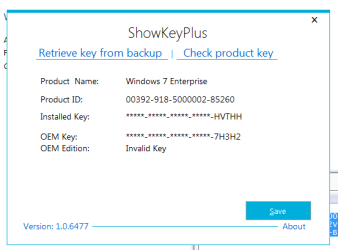
I ran the ShowKeyPlus tool and it DOES NOT SHOW a Windows 8 key, but confirms the Windows 7 enterprise key... Strange.

So there we are again at the start. If you still see an option to avoid reinstalling my pc completely, you are very welcome to give me your recommendations.
Thank you for your help.
 

Attachments

  • 2018-01-08_2140.png
    2018-01-08_2140.png
    6.3 KB · Views: 27

My Computer My Computer

At a glance

Windows 7 enterprise SP1Intel Core i3 CPU @ 1.70 Ghz
Computer type
Laptop
Computer Manufacturer/Model Number
Dell
OS
Windows 7 enterprise SP1
CPU
Intel Core i3 CPU @ 1.70 Ghz
If you get a win 7 Pro license ( possibly through Dell ) then you can do this:

Change these reg entries:
HKEY_LOCAL_MACHINE\SOFTWARE\Microsoft\Windows NT\CurrentVersion\EditionID "Enterprise"
HKEY_LOCAL_MACHINE\SOFTWARE\Microsoft\Windows NT\CurrentVersion\ProductName "Windows 7 Enterprise"
HKEY_LOCAL_MACHINE\SOFTWARE\Wow6432Node\Microsoft\Windows NT\CurrentVersion\EditionID "Enterprise"
HKEY_LOCAL_MACHINE\SOFTWARE\Wow6432Node\Microsoft\Windows NT\CurrentVersion\ProductName "Windows 7 Enterprise"

To these:
HKEY_LOCAL_MACHINE\SOFTWARE\Microsoft\Windows NT\CurrentVersion\EditionID "Professional"
HKEY_LOCAL_MACHINE\SOFTWARE\Microsoft\Windows NT\CurrentVersion\ProductName "Windows 7 Professional"
HKEY_LOCAL_MACHINE\SOFTWARE\Wow6432Node\Microsoft\Windows NT\CurrentVersion\EditionID "Professional"
HKEY_LOCAL_MACHINE\SOFTWARE\Wow6432Node\Microsoft\Windows NT\CurrentVersion\ProductName "Windows 7 Professional"

Then from within your currently running windows ( do not boot the install media) run Setup.exe from Windows 7 Professional SP1 64bit install media. When prompted, choose the "Upgrade" option, ( do not get the latest updates from Microsoft when asked, it takes too long ).

When it has "upgraded" , you can enter your 7 pro product key.


[You can up/down any edition using that method.]
 

My Computers My Computers

  • At a glance

    7 X64i5 84002x8gb 3200mhz
    Computer type
    PC/Desktop
    OS
    7 X64
    CPU
    i5 8400
    Motherboard
    gigabyte b365m ds3h
    Memory
    2x8gb 3200mhz
    Hard Drives
    various
    PSU
    pure power 11 400w cm
    Case
    Coolermaster
    Cooling
    cryorig m9i
  • At a glance

    7x64g54008gb ddr4 2400
    Computer type
    PC/Desktop
    OS
    7x64
    CPU
    g5400
    Motherboard
    ga b365m ds3h
    Memory
    8gb ddr4 2400
    PSU
    xfx pro 450w

My Computers My Computers

  • At a glance

    7 X64i5 84002x8gb 3200mhz
    Computer type
    PC/Desktop
    OS
    7 X64
    CPU
    i5 8400
    Motherboard
    gigabyte b365m ds3h
    Memory
    2x8gb 3200mhz
    Hard Drives
    various
    PSU
    pure power 11 400w cm
    Case
    Coolermaster
    Cooling
    cryorig m9i
  • At a glance

    7x64g54008gb ddr4 2400
    Computer type
    PC/Desktop
    OS
    7x64
    CPU
    g5400
    Motherboard
    ga b365m ds3h
    Memory
    8gb ddr4 2400
    PSU
    xfx pro 450w
Hi Katrina,,

Please go to the Dell website
Input the serviceTag ID, hopefully your old company registered it

if they did what does it say.

As for the results from Showkeyplus im currently speaking to him about the results
they dont look right.
Can you confirm your running a 64Bit version of the OS
and is Chrome 32 or 64, (see in programs&Features)

Roy

After thoughts
can you go
comp > C > Windows ... is there a windows.old folder

If your receiving a pension from your old company, they (I.T) might be a bit more lenient;)
 
Last edited:

My Computer My Computer

At a glance

W7 home premium 32bit/W7HP 64bit/w10 tp insid...E5300 dual core3gbNvidia Geforce 7100 Nforce 630i
Computer type
PC/Desktop
Computer Manufacturer/Model Number
medionl/Aspire 6930G/acer x55a
OS
W7 home premium 32bit/W7HP 64bit/w10 tp insider ring
CPU
E5300 dual core
Motherboard
medion MS7366
Memory
3gb
Graphics Card(s)
Nvidia Geforce 7100 Nforce 630i
Monitor(s) Displays
avixc
Internet Speed
n (isp resticted to 72)
Antivirus
mse/pands
Browser
palemoon
Other Info
Belkin Fd7050 n USB using Railink RT2870 drivers, more upto date
Back
Top