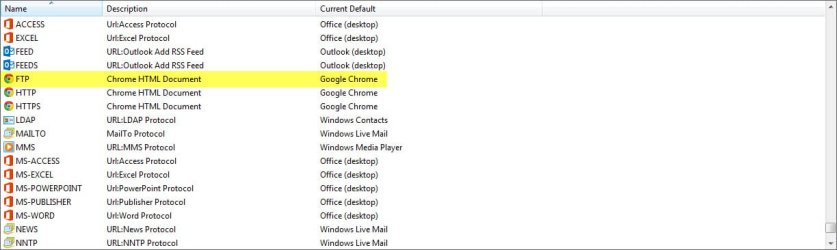
FTP not listed under Default Programs > Set Associations > Protocols

ixfd64

New member
Local time
2:16 PM
Messages
32
FTP not listed under Default Programs > Set Associations > Protocols

I'm trying to change my default FTP client back to Windows Explorer after an accidental Chrome installation changed it to Internet Explorer. I've been told this can be done by going to Default Programs > Set Associations. However, FTP is not listed under Protocols, and there doesn't seem to be any option for adding a new protocol or file extension.

I tried entering
Code:
assoc FTP=
in the command prompt, but it did not help. Is there a way to a new protocol without messing with the registry editor?

I'm sure the solution is very simple, but I can't seem to figure it out for the life of me. Any advice would be greatly appreciated.
 

My Computer

Computer type
PC/Desktop
Computer Manufacturer/Model Number
Alienware X51
OS
Windows 7 Home Premium, 64-bit
CPU
i7-3770
Memory
8 GB
Graphics Card(s)
GTX 555
Antivirus
Microsoft Security Essentials
Browser
Internet Explorer, Firefox
I'm trying to change my default FTP client back to Windows Explorer after an accidental Chrome installation changed it to Internet Explorer. I've been told this can be done by going to Default Programs > Set Associations. However, FTP is not listed under Protocols, and there doesn't seem to be any option for adding a new protocol or file extension.

I tried entering
Code:
assoc FTP=
in the command prompt, but it did not help. Is there a way to a new protocol without messing with the registry editor?

I'm sure the solution is very simple, but I can't seem to figure it out for the life of me. Any advice would be greatly appreciated.

When do you want the default ftp-client to start? When someone clicks or enters ftp://whatever.com ? Is that what you mean? If that's what you mean..... it's not a file association at all! It's a protocol
 

My Computer

Computer type
Laptop
Computer Manufacturer/Model Number
ACER ASPIRE 5742G
OS
Microsoft Windows 7 Home Premium 64-bits 7601 Multiprocessor Free Service Pack 1
CPU
Intel(R) Core(TM) i3 CPU M 370 @ 2.40GHz
Motherboard
Acer Aspire 5742G
Memory
4,00 GB
Graphics Card(s)
ATI Mobility Radeon HD 5400 Series
Sound Card
(1) AMD High Definition Audio Device (2) Realtek High Defi
Screen Resolution
1366 x 768 x 32 bits (4294967296 colors) @ 60 Hz
Hard Drives
WDC WD5000BEVT-22ZAT0
I'm trying to change my default FTP client back to Windows Explorer after an accidental Chrome installation changed it to Internet Explorer. I've been told this can be done by going to Default Programs > Set Associations. However, FTP is not listed under Protocols, and there doesn't seem to be any option for adding a new protocol or file extension.

I tried entering
Code:
assoc FTP=
in the command prompt, but it did not help. Is there a way to a new protocol without messing with the registry editor?

I'm sure the solution is very simple, but I can't seem to figure it out for the life of me. Any advice would be greatly appreciated.

When viewing the list of "File & Protocol Associations" scroll to the very bottom and look for the entry "FTP" (see image below) and change the association there.

http://www.sevenforums.com/tutorials/9154-default-programs-associate-file-type-protocol.html

Protocol Association.jpg

HTH
 
Last edited by a moderator:

My Computer

Computer type
PC/Desktop
Computer Manufacturer/Model Number
Custom Built
OS
Windows 7 Professional x64
CPU
Intel i5 quad processor
Motherboard
DP67BG
Memory
16 GB
Graphics Card(s)
Radeon HD 5770
Sound Card
Realtek High Definition Audio
Monitor(s) Displays
Samsung SyncMaster
Screen Resolution
1920X1080
Hard Drives
WD 2TB (SATA Internal)
WD 1TB (USB External)
PSU
Corsair GS800
Case
Tower (Generic)
Cooling
3 Internal Fans
Keyboard
MS Wireless
Mouse
MS Optical Wired
Internet Speed
54 mbps
Antivirus
Emsisoft
Browser
IE-Version 9, Palemoon-Version 24.2.0
The problem is, FTP is not listed, and I don't see an option to add a "new" protocol.
 

My Computer

Computer type
PC/Desktop
Computer Manufacturer/Model Number
Alienware X51
OS
Windows 7 Home Premium, 64-bit
CPU
i7-3770
Memory
8 GB
Graphics Card(s)
GTX 555
Antivirus
Microsoft Security Essentials
Browser
Internet Explorer, Firefox
I'm having this issue too.

From searching online, it looks like the only fix is to edit the registry.

Please reply to my thread on the Google Chrome forums to provoke a fix on their end:
https://productforums.google.com/forum/#!category-topic/chrome/report-a-problem-and-get-troubleshooting-help/windows/rCADgEdSBUE

Am I right that you were able to use Windows Explorer for FTP until you installed Chrome?

Funny thing is, I was able to use Windows Explorer for FTP even when Chrome was installed, it wasn't until I re-installed it, in order to fix another issue, that this issue occurred.

Btw, I can set IE as default for FTP protocol, but that will still not allow me to use Windows Explorer for FTP.
 

My Computer

Computer type
PC/Desktop
OS
Windows 7 Professional x64
Back
Top