Solved GPU is not listed under device manager

123sam

New member
Local time
11:27 AM
Messages
8
Hey
I recently realized that my graphics card is not showing any where on my computer. I went to the control panel and went to Uninstall Programs and I found the Nvidia driver. Although I can see the driver, I can't see it under hardware, and I no longer see it running on the toolbar. I have a GT310m with optimus (at least I did hahaha). Would be nice to have it back. Thanks:D
 

My Computer

Computer Manufacturer/Model Number
ASUS U30jc
OS
64 bit Windows 7 Home Premium
CPU
Core i3
Memory
4Gb
Graphics Card(s)
GT310m
Hard Drives
320gb
Internet Speed
T1
Hey
I recently realized that my graphics card is not showing any where on my computer. I went to the control panel and went to Uninstall Programs and I found the Nvidia driver. Although I can see the driver, I can't see it under hardware, and I no longer see it running on the toolbar. I have a GT310m with optimus (at least I did hahaha). Would be nice to have it back. Thanks:D

Can we get a snip of the device manager GPU tab?


Ken
 

My Computer

Computer Manufacturer/Model Number
HP Pavillion dv-7 1005 Tx
OS
Win 8 Release candidate 8400
CPU
[email protected]
Memory
4 gigs
Graphics Card(s)
Nvidia 9600M
Sound Card
HD built-in
Monitor(s) Displays
17" Wxga
Screen Resolution
1440x900
Cooling
none
Internet Speed
45Mb down 5Mb up
This your laptop?

http://www.asus.com/product.aspx?P_ID=IZfJRyRqVpStMi76

Do you also have the Intel driver installed? As I understand it these new laptops that have and use both Intel integrated and a separate card (can be either AMD or Nvidia), neither of them work properly unless the drivers for both are installed. If it isn't I would get the one available from Asus as it will have had the necessary modifications made to it to work with the Nvidia GPU, or Optimus as Nvidia calls it,

ASUSTek
 

My Computer

Computer type
PC/Desktop
Computer Manufacturer/Model Number
Me
OS
Win 7 Ultimate x64
CPU
FX-8350 @ 4.6 GHz so far
Motherboard
Asus M5A97 EVO
Memory
ADATA XPG V1 Series Black 8GB DDR3 1600
Graphics Card(s)
Sapphire R9 270x Dual-X
Sound Card
Xonar DGX w/ Corsair Vengence 1300
Monitor(s) Displays
Acer S232HL Abid
Screen Resolution
1920x1080
Hard Drives
120 GB OCZ Vertex 3
500 GB Seagate 7200.12
PSU
Antec Earthwatts 650W Green
Case
Antec Three Hundred
Cooling
Cooler Master 212 EVO
Keyboard
Logitech G510
Mouse
Logitech G500s
Internet Speed
35000/3000
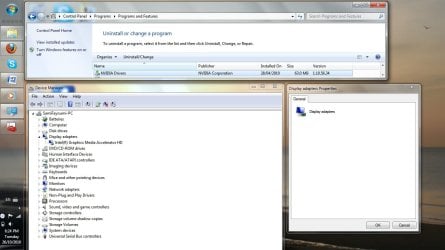
Yea, that's the laptop. I have already tried downloading the drivers from the asus site and they all did not detect the proper hardware. What I'm wondering is whether or not the nvidia card should show up regardless of what driver I have installed, if I have any. I will post a screenshot of the Uninstall Programs window showing the driver (which is installed) and the Device Manager.

Thanks for the interest guys
 

Attachments

  • Device Manager and Properties, Driver.jpg
    Device Manager and Properties, Driver.jpg
    95.6 KB · Views: 374

My Computer

Computer Manufacturer/Model Number
ASUS U30jc
OS
64 bit Windows 7 Home Premium
CPU
Core i3
Memory
4Gb
Graphics Card(s)
GT310m
Hard Drives
320gb
Internet Speed
T1

My Computer

Computer type
PC/Desktop
Computer Manufacturer/Model Number
Me
OS
Win 7 Ultimate x64
CPU
FX-8350 @ 4.6 GHz so far
Motherboard
Asus M5A97 EVO
Memory
ADATA XPG V1 Series Black 8GB DDR3 1600
Graphics Card(s)
Sapphire R9 270x Dual-X
Sound Card
Xonar DGX w/ Corsair Vengence 1300
Monitor(s) Displays
Acer S232HL Abid
Screen Resolution
1920x1080
Hard Drives
120 GB OCZ Vertex 3
500 GB Seagate 7200.12
PSU
Antec Earthwatts 650W Green
Case
Antec Three Hundred
Cooling
Cooler Master 212 EVO
Keyboard
Logitech G510
Mouse
Logitech G500s
Internet Speed
35000/3000
I've tried but that isn't the case and I know that I have used the graphics card on battery power.
 

My Computer

Computer Manufacturer/Model Number
ASUS U30jc
OS
64 bit Windows 7 Home Premium
CPU
Core i3
Memory
4Gb
Graphics Card(s)
GT310m
Hard Drives
320gb
Internet Speed
T1
Try updating your bios and chipset drivers.
 

My Computer

Computer Manufacturer/Model Number
Too many to describe...
OS
Windows 7 x64 pro/ Windows 7 x86 Pro/ XP SP3 x86
Did you look for the Nvidia driver to see if it is listed under monitor or one of the other tabs in Device Manager?

The reason I ask is my PC has 4 sets of drivers for storage, USB and SATA. Intel, JMicron and Marvell.
They are listed under 3 different tabs.

Two video drivers. Samsung installed by MS and Nvidia. Both under two diifferent tabs.

So the drivers won't necessarily be listed together.
One might be listed under monitor or something else.

Worth a look if you haven't yet.
Mike
 

My Computer

Computer Manufacturer/Model Number
Hopalong/ Godzilla
OS
Windows7 Pro 64bit SP-1; Windows XP Pro 32bit
CPU
Intel Core i7-870 Lynnfield 2.93GHz LGA 1156 95W Quad-Core
Motherboard
ASUS P7P55D-E PRO
Memory
8GB@1400MHz Crucial Ballistix DDR3-1600 4x2GB
Graphics Card(s)
ASUS ENGTX460 DirectCU/2DI/1GD5 1GB 256-bit GDDR5
Sound Card
VIA Onboard
Monitor(s) Displays
Asus VS248H-P 24"; Samsung SyncMaster 941BW 19"ws
Screen Resolution
1920x1080; 1440x900
Hard Drives
Samsung 830 120GB SSD
Intel 320 120GB SSD
Western Digital Caviar Black WD7501AALS 750GB 7200 RPM SATA 3.0Gb/s
Western Digital Caviar Black WD6401AALS 640GB 7200 RPM SATA 3.0Gb/s
PSU
COOLER MASTER Silent Pro RS850-AMBAJ3-US 850W Modular
Case
COOLER MASTER HAF 932 RC-932-KKN5-GP Black
Cooling
Scythe "Mugen-2 Rev.B" (2 ScytheKaze-Jyuni PWM fans)
Keyboard
Logitech K-320
Mouse
Kensington
Antivirus
Avast Inernet Suite
Browser
IE 9 ; Chrome
Updating BIOS and chipset drivers? I'm assuming just update from the Device Manager right?

I checked and the driver wasn't under any of the tabs. I also went to the original driver on my hard disk and ran that but it said that it would not proceed because it could not detect the right hardware. I remember seeing the driver under display adapters which brings me back... a while ago I had a problem with aero and some other minor problems with the display. I got advice that I should roll back the driver (I can imagine everyone who is reading this shake their head in disapproval). Well, I did and it rebooted the instant I did. I was worried something got screwed up and did a system restore. Then I just left it trusting that all was well.
I'm sorry if i wasted any of your time or energy because I know this could most likely be the cause.

Any new ideas?
 

My Computer

Computer Manufacturer/Model Number
ASUS U30jc
OS
64 bit Windows 7 Home Premium
CPU
Core i3
Memory
4Gb
Graphics Card(s)
GT310m
Hard Drives
320gb
Internet Speed
T1
You cant update the bios from the device manager. You need to locate the update on the mobo manufacturer's site, then flash either inside windows or in DOS.
 

My Computer

Computer Manufacturer/Model Number
Too many to describe...
OS
Windows 7 x64 pro/ Windows 7 x86 Pro/ XP SP3 x86
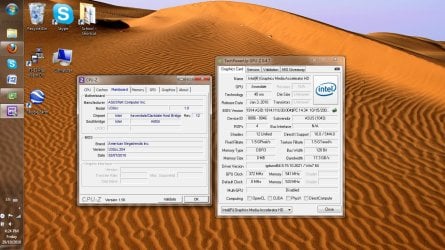
We can see a lot of info if you get two programs and post screenshots:

CPU-Z post screenshot of Mainboard tab. This will show your current BIOS version:
CPUID - System & hardware benchmark, monitoring, reporting

GPU-Z post main tab. This should show you the GPU and drivers installed:
GPU-Z Video card GPU Information Utility

From there, we can tell you if your BIOS is up-to-date, or if there is a more recent BIOS version that you should update to. Flashing the BIOS can be tricky and can harm computers if power is interupted.. So be very careful and read up on what you are doing:

Edit, video deleted
YOUTUBEjXnomlfbXtUYOUTUBE


Added more resources:

http://www.pcstats.com/articleview.cfm?articleID=1605
http://www.motherboards.org/articles/guides/42_1.html
http://www.pcnineoneone.com/howto/biosflash1.html
 
Last edited:

My Computer

Computer type
Laptop
Computer Manufacturer/Model Number
ASUS G60-RBBX05
OS
Win7 Home Premium 64x
CPU
Intel Core 2 Duo P7450 / 2.13 GHz (2.29 with Extreme Turbo)
Memory
4 GB PC-6400 Hyundai (2X2) at 800Mhz
Graphics Card(s)
NVIDIA GeForce GTX 260M 1GB DDR3 VRAM
Monitor(s) Displays
16" LED Backlit
Screen Resolution
1366 x 768 on laptop 1600x1050 max res on 22" external mon
Hard Drives
OCZ Agility 3 60GB SSD / 320 GB - Serial ATA-150 - 7200 rpm
PSU
6-cell Lithium ion { lasts 1.5 hours }
Case
ASUS G60 Laptop
Keyboard
Chicklet type back-lit (white light) keyboard
Mouse
Logitech G9 Laser Mouse 3200dpi and 1000 reports per minute
Internet Speed
Comcast 8.60mb/s up - 3.11mb/s down
Antivirus
MSE
Browser
Firefox
Other Info
General mid-budget gaming Comp. Low batterylife - High FrameRates - currently overheating problems :(

2nd Rig: Case: Rosewill BLACKHAWK Gaming ATX Mid Tower Computer Case

Mobo: GIGABYTE GA-990FXA-UD3
CPU: AMD FX-6200 Zambezi 3.8GHz (4.1GHz Turbo)
Heatsink: COOLER MASTER V8 CPU Cooler
RAM: Patriot Viper 3 8GB (2 x 4GB) 240-Pin DDR3 SDRAM 1866 (PC3 15000)
GPU: SAPPHIRE Radeon HD 6850 1GB 2
Thanks for all the tools. I will read up on BIOS.
Here's the screenshot
 

Attachments

  • Main Tabs.jpg
    Main Tabs.jpg
    178.3 KB · Views: 117

My Computer

Computer Manufacturer/Model Number
ASUS U30jc
OS
64 bit Windows 7 Home Premium
CPU
Core i3
Memory
4Gb
Graphics Card(s)
GT310m
Hard Drives
320gb
Internet Speed
T1
Not that any body is really reading this but, for those who might pass by with a similar problems, I just went to BIOS settings and reset the defaults. In my case it was set to optimized defaults or something like that... After it booted up again I went straight to device manager and... SURPRISE!!! The GT310m showed up. Now I'm going to check whether the drivers work fine.

I honestly don't think I would have bothered with anything BIOS related if it wasn't for you guys mentioning it, however obvious it might have been for you.

Thanks

Am I supposed to mark this solved and if so, how exactly do I do that?

:party:
 

My Computer

Computer Manufacturer/Model Number
ASUS U30jc
OS
64 bit Windows 7 Home Premium
CPU
Core i3
Memory
4Gb
Graphics Card(s)
GT310m
Hard Drives
320gb
Internet Speed
T1
Awesome! I brain-farted and didn't even think about the defaults. I am glad you got it fixed!
 

My Computer

Computer type
Laptop
Computer Manufacturer/Model Number
ASUS G60-RBBX05
OS
Win7 Home Premium 64x
CPU
Intel Core 2 Duo P7450 / 2.13 GHz (2.29 with Extreme Turbo)
Memory
4 GB PC-6400 Hyundai (2X2) at 800Mhz
Graphics Card(s)
NVIDIA GeForce GTX 260M 1GB DDR3 VRAM
Monitor(s) Displays
16" LED Backlit
Screen Resolution
1366 x 768 on laptop 1600x1050 max res on 22" external mon
Hard Drives
OCZ Agility 3 60GB SSD / 320 GB - Serial ATA-150 - 7200 rpm
PSU
6-cell Lithium ion { lasts 1.5 hours }
Case
ASUS G60 Laptop
Keyboard
Chicklet type back-lit (white light) keyboard
Mouse
Logitech G9 Laser Mouse 3200dpi and 1000 reports per minute
Internet Speed
Comcast 8.60mb/s up - 3.11mb/s down
Antivirus
MSE
Browser
Firefox
Other Info
General mid-budget gaming Comp. Low batterylife - High FrameRates - currently overheating problems :(

2nd Rig: Case: Rosewill BLACKHAWK Gaming ATX Mid Tower Computer Case

Mobo: GIGABYTE GA-990FXA-UD3
CPU: AMD FX-6200 Zambezi 3.8GHz (4.1GHz Turbo)
Heatsink: COOLER MASTER V8 CPU Cooler
RAM: Patriot Viper 3 8GB (2 x 4GB) 240-Pin DDR3 SDRAM 1866 (PC3 15000)
GPU: SAPPHIRE Radeon HD 6850 1GB 2
Asus U30JC Nvidia not found

Thanks a lot. My card was not detected until I restored the bios default. Thans for writing the solution even if you believed nobody was going to read it.:cool:
 

My Computer

OS
windows 64
Back
Top