Full glass exe

scorpioninblue

New member
Member
Local time
1:59 PM
Messages
43
Hi all!

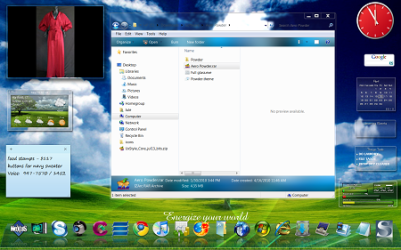
I hope someone may be familiar with this subject and can advise me before I do anything that may cause me to have a breakdown later!! LOL!! :D I found a super all glass theme, and downloaded the zip file. Since I've never applied a theme that would make such a drastic change I opened the folder and looked for a read-me file.....there aren't any instructions just the executable files. I have Uxstyle on my desktop and have used two other visual styles, but neither makes the windows completely transparent. I've attached a shot of the theme and the folder content....I have a 64bit version of 7 and this theme is naturally designed for 7. Has anyone used an all glass theme through Uxstyle yet? If so let me know the details of the application and if you ran into any problems afterward. Thanks!! :)
 

Attachments

  • aero powder.jpg
    aero powder.jpg
    39.6 KB · Views: 1,448
  • Untitled.png
    Untitled.png
    204.2 KB · Views: 1,849
Last edited:

My Computer

OS
windows 7 64 bit
You should be able to just set up a system restore point, test it to make sure it'll work and then install the theme. If everything gets FUBARed then revert.
 

My Computer

Computer Manufacturer/Model Number
Apple Macbook Pro (April 2009)
OS
W7 Ult. x64 | OS X
CPU
Intel Mobile Core 2 Duo 2.93Ghz [T9800 Penryn]
Motherboard
NVIDIA nForce 730i Rev. B1 [Mac-F2268EC8 (U2E1)]
Memory
4096MB Samsung DDR3 Dual Channel [PC3-8500F 1066Mhz]
Graphics Card(s)
NVIDIA GeForce 9600M GT 512MB [G96M Rev. C1]
Sound Card
SB X-Fi Surround 5.1 USB | Onboard Realtek (Disabled)
Monitor(s) Displays
Acer x223wbd 22" | Apple Anti-Glare 17" (Disabled)
Screen Resolution
{Current} 1440x900 {Acer} 1680x1050 {Apple} 1920x1200
Hard Drives
{Internal}
Seagate Momentus 320GB 2.5" 7200RPM [ST9320421AS]

{Externals}
LaCie 320GB USB 2.0 HDD [301284UR]
LaCie 750GB USB 2.0 FW400 eSATA HDD [301314U]
LaCie 1TB USB 2.0 HDD [301304UR]
PSU
Magsafe
Case
Aluminum/Unibody (MBP52)
Cooling
2 x 6000 RPM Fans
Keyboard
Logitech G-15v2 [PN 920-000379]
Mouse
Logitech G-9 [PN 910-000338]
Internet Speed
12Mbps/2.5Mbps w/ 24Mbps Speed Boost [Comcast]
Other Info
Logitech X-540 Speakers [PN 970223-0122]
Sennheiser PC-151 Headset
You should have no issues what so ever to run fullglass.exe
We use it all the time for transparency, and it is a great little application. I am also on a 64bit system and has used that exact same theme without any issues.
 

My Computer

Computer type
PC/Desktop
Computer Manufacturer/Model Number
Self built.
OS
Windows 7 RTM 64bit, Windows 8 Pro 64bit
CPU
Intel i5-2500K @ 3.3Ghz
Motherboard
Asus Maximus IV GENE-Z/GEN3
Memory
16GB G.Skill RaptorX 1600MHz DDR3
Graphics Card(s)
N570GTX Twin Frozr III Power Edition
Sound Card
SupremeFX X-Fi 2
Monitor(s) Displays
BenQ XL2420T 120Hz 24 inch gaming monitor, Acer V233H 23 inc
Screen Resolution
1920x1080
Hard Drives
320GB Seagate Barracuda
WD 1TB Black Caviar
2TB WD Green Caviar
Samsung SSD 840 PRO Series
PSU
CoolerMaster Silent Pro Gold 1200WATT 80 Plus Gold
Case
CoolerMaster HAF X RC-942
Cooling
CoolerMaster V6GT Multi-Platform CPU Cooler
Keyboard
Logitech G510 Gaming Keyboard
Mouse
Logitech G700 Gaming Mouse
Antivirus
Norton Internet Security
Browser
Firefox 21
Other Info
Logitech Extreme 3D Pro Gaming Joystick, Logitech G930 Wireless Gaming Headset
Hey!
Thanks for your reply, I just joined Creativx today! :D I also just posted a question over thereon the specific instructions for applying this theme. I have never used or heard of the full glass exe before! Do I open that first, and then click on the Powder theme? As I said I'm using Uxstyle and I will gladly admit that I am a full-fledged "Scaredy-Cat" when it comes to things like this and the fact that I've only had this desktop for 3 months! I'll go into cardiac arrest if I get the BLUE SCREEN OF DEATH!!! So if you could just go step by step with me it would be great and also helpful to so many who are in the same boat! A lot of people have Windows 7 through a new laptop or desktop...and who wants to mess up or corrupt system files!! Thanks!!:D
 

My Computer

OS
windows 7 64 bit
Tell me more about the full glass exe. file.....I understand that you would see it in your tray...does that mean it starts up automatically and can you exit it? Since you would only use it for specific themes, how would you find it and turn it back on? Another thing, doesn't that modify system files in order to get the transparency? Remember that the reason I'm using Uxstyle is because it doesn't change system files, full glass must do so, I'm still extremely wary of it! Is there anyone who can post a picture of the results they had when they used it in applying a full glass theme?
 

My Computer

OS
windows 7 64 bit
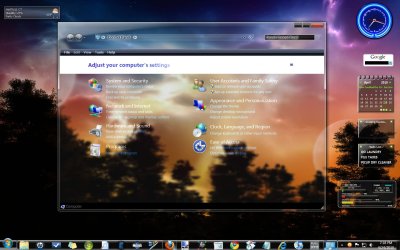
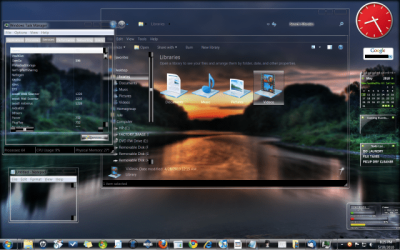
Well I did it! I found this great theme by Fluke at Creativx which uses the Full Glass exe., I used Uxstyle to apply the theme so no changing or replacing of system files was need or taking ownership! If it did involve any of that, I wouldn't have touched it with a 10 foot pole!! LOL!! Uxstyle has really revolutionized the customization of Windows! Full Glass can be turned off and on when needed and is not a memory hog!!! I kept my eye on my cpu and memory meters and they were fine! I still can't believe you can get these effects without the potential damage of the past! Here are a couple of screen shots:
 

Attachments

  • GLASS.jpg
    GLASS.jpg
    215 KB · Views: 1,125
  • CONTROL.jpg
    CONTROL.jpg
    177.8 KB · Views: 795

My Computer

OS
windows 7 64 bit
where can i get full glass?
 

My Computer

OS
Windows 7
CPU
2.3hz
Memory
3GB
Monitor(s) Displays
SAMSUNG
Screen Resolution
1280x1024
Hard Drives
250GB
Case
Compaq
Mouse
Compaq
i opened full glass and it appeared in the tray, but no visible changes were seen. am i messing up?
 

My Computer

OS
Windows 7
CPU
2.3hz
Memory
3GB
Monitor(s) Displays
SAMSUNG
Screen Resolution
1280x1024
Hard Drives
250GB
Case
Compaq
Mouse
Compaq
i opened full glass and it appeared in the tray, but no visible changes were seen. am i messing up?
Close all the open windows and reopen then. I hope you ran it as admin .
 

My Computer

Computer type
PC/Desktop
Computer Manufacturer/Model Number
Self Assembled
OS
Microsoft Windows 10 Pro Insider Preview 64-bit
CPU
Intel(R) Core(TM) i3-4130 CPU @ 3.40GHz
Motherboard
Gigabyte Technology Co., Ltd. B85M-D3H
Memory
Corsair Vengence 4GB x2 (8.00GB Dual-Channel DDR3 @ 798MHz)
Graphics Card(s)
2047MB GeForce GTS 450 (ZOTAC International)
Sound Card
Onboard (Realtek High Definition Audio)
Monitor(s) Displays
LG Flatron E2040T
Screen Resolution
1600x900
Hard Drives
Western Digital 1 TB
Seagate 500 GB
PSU
Corsair VS550
Case
Cooler Master K380
Cooling
Cooler Master Seidon 120V Plus
Keyboard
Logitech MK260r
Mouse
Logitech MK260r
Internet Speed
PMPL Broadband
Antivirus
Windows Defender + MBAM
Browser
Firefox
Other Info
Dell Studio 15" Laptop

My Computer

Computer type
PC/Desktop
Computer Manufacturer/Model Number
Self Assembled
OS
Microsoft Windows 10 Pro Insider Preview 64-bit
CPU
Intel(R) Core(TM) i3-4130 CPU @ 3.40GHz
Motherboard
Gigabyte Technology Co., Ltd. B85M-D3H
Memory
Corsair Vengence 4GB x2 (8.00GB Dual-Channel DDR3 @ 798MHz)
Graphics Card(s)
2047MB GeForce GTS 450 (ZOTAC International)
Sound Card
Onboard (Realtek High Definition Audio)
Monitor(s) Displays
LG Flatron E2040T
Screen Resolution
1600x900
Hard Drives
Western Digital 1 TB
Seagate 500 GB
PSU
Corsair VS550
Case
Cooler Master K380
Cooling
Cooler Master Seidon 120V Plus
Keyboard
Logitech MK260r
Mouse
Logitech MK260r
Internet Speed
PMPL Broadband
Antivirus
Windows Defender + MBAM
Browser
Firefox
Other Info
Dell Studio 15" Laptop
glass

how do i apply the theme ??i installed uxstyle(i think) ,what i mean is how do i know uxstyle is installed, i went to there site and got the uxstyle core an my pc says its installed put i cant find it anywhere??,i tried right-clicking the theme to see if it said install/run with uxstyle but nothing??
am i missing something???
 

My Computer

Computer type
PC/Desktop
OS
Windows 7 X64 Bit
CPU
Intel(R) Core(TM)i7-4771 CPU @ 3.50GH
Motherboard
Asus Sabertooth Z87
Memory
Corsair 4x8 Vengeance (32GB)
Graphics Card(s)
NVIDIA GeForce GTX780
Monitor(s) Displays
LG
Screen Resolution
1920x1080
PSU
Corsair CX750
Case
Corsair 200 series
Cooling
H80i Liquid Cooler
Keyboard
Microsoft
Mouse
Microsoft
Internet Speed
good times-500-850 kbs bad times-50-100 kbs
i ran the glass as admin with no windows open, and it does NADA, do i need to have something, i have my uxtheme patched, do i need UXtheme App?
 

My Computer

OS
Windows 7
CPU
2.3hz
Memory
3GB
Monitor(s) Displays
SAMSUNG
Screen Resolution
1280x1024
Hard Drives
250GB
Case
Compaq
Mouse
Compaq
Here is the website that I found the full glass theme at:
CreativX - Powered by vBulletin

Look for a guy named Fluke among the theme creators, he has two full glass themes I'm running. After downloading and applying the theme you then click the Full Glass application to get the transparency in the windows.

If you successfully applied Uxstyle to your p.c. look for it under the Services tab in your task manager, it should be listed as UnsignedThemes if it's running then everything is okay! :D Have you read the tutorial here on enabling themes without changing system files? If not check it out.

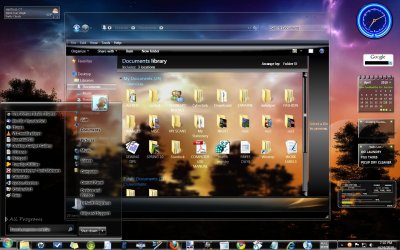
Now I must tell you that when I downloaded the theme and opened the zip files there were items pertaining to replacing system files and taking ownership there. You do not need to do any of that with Uxstyle. I dragged the theme and the matching file folder only into the Themes folder and closed. When I opened the Personalization folder it was there among the other themes! After you open it you will see that the window background is black...here is where Full Glass comes into play. Close that window, click the Full Glass application (make a shortcut to the desktop for later) reopen any window and it should be glassed. Here is shot of the theme I'm currently using, 'In Vitro Full Glass' it has another program called Black Glass Enhanced which does what Full Glass would do but the Task manager and Notepad were added by the creator so they are transparent also!! I use Black Glass Enhanced instead of Full Glass now...there's always something newer and better!
 

Attachments

  • IN VITRO.png
    IN VITRO.png
    110.8 KB · Views: 459

My Computer

OS
windows 7 64 bit
Collin since you have patched your system in the old way, you would have to replace files and take ownership of them. I can't help you there since that's exactly what I wanted to avoid when I put Uxstyle on my p.c. I haven't had a single problem since I've been using it and once a month my p.c. runs a self-analysis on itself and the report says everything is running 100% fine!!
 

My Computer

OS
windows 7 64 bit
i want any software or dll patcher that can make fully transparent windows explorer for Windows 7 Ultimate x86..the one post doesn't work for me:cry:
 

My Computer

Computer Manufacturer/Model Number
Toshiba Satellite L310 PSME6L-005001
OS
Windows 7 Ultimate x86 build 7600
CPU
Intel Pentium Dual CPU T3200 2.0GHz
Motherboard
Toshiba-Pheonix Bios 4.0 Release 6.1
Memory
2Gb (1Gb+1Gb) DDR2
Graphics Card(s)
Intel 4 series Express Accelerator (824Mb)
Sound Card
ConexantHD Smart Audio 221 with Dolby Virtual Sound
Monitor(s) Displays
Toshiba VGA LCD
Screen Resolution
1280x800
Hard Drives
Western Digital Scorpio Blue 320Gb 5400R.P.M.
Case
Laptop plastic case
Cooling
basic
Keyboard
US-Keyboard
Mouse
Sypnatec touchpad
Internet Speed
2 Mbps dsl/cable
i want any software or dll patcher that can make fully transparent windows explorer for Windows 7 Ultimate x86..the one post doesn't work for me:cry:

What post doesn't work for you?
 

My Computer

Computer type
PC/Desktop
Computer Manufacturer/Model Number
Self Built
OS
Win 10 Pro x64
CPU
Intel I5-2500K @3.3GHz
Motherboard
Asrock P67 Extreme4
Memory
16GB G.Skill Ripjaws X (4x4GB)
Graphics Card(s)
EVGA GeForce 750 Ti SC 2GB
Sound Card
ASUS Xonar DG 5.1 Channels 24-bit 96KHz PCI Interface Sound
Monitor(s) Displays
auria eq2367
Screen Resolution
1920 x 1080
Hard Drives
250GB Samsung 850 EVO SSD
1TB WD Blue
1TB Hitachi
PSU
SeaSonic X 650W 80 Plus Gold
Case
Corsair Obsidian 750D
Cooling
Corsair H60, Three 140mm case fans
Keyboard
Logitech Wireless Keyboard K520
Mouse
Logitech Wireless Mouse M310
Internet Speed
Wave Broadband ~ 100 dn 5 up
Antivirus
Windows Defender, Malwarebytes Premium
Browser
Edge, IE11, Chrome
Other Info
Laptop specs: HP g7-1365dx /
CPU: AMD A6-3420M APU with Radeon(tm) HD Graphics /
RAM: Crucial 8Gb (2x4Gb) /
SSD: Crucial M4-CT128M4SSD2 ATA Device/ FW 000F /
GFX: AMD Radeon HD 6520G /
OS: Windows 10 Pro x64

My Computer

Computer Manufacturer/Model Number
Toshiba Satellite L310 PSME6L-005001
OS
Windows 7 Ultimate x86 build 7600
CPU
Intel Pentium Dual CPU T3200 2.0GHz
Motherboard
Toshiba-Pheonix Bios 4.0 Release 6.1
Memory
2Gb (1Gb+1Gb) DDR2
Graphics Card(s)
Intel 4 series Express Accelerator (824Mb)
Sound Card
ConexantHD Smart Audio 221 with Dolby Virtual Sound
Monitor(s) Displays
Toshiba VGA LCD
Screen Resolution
1280x800
Hard Drives
Western Digital Scorpio Blue 320Gb 5400R.P.M.
Case
Laptop plastic case
Cooling
basic
Keyboard
US-Keyboard
Mouse
Sypnatec touchpad
Internet Speed
2 Mbps dsl/cable
thanks btw.. got it already...damn cool
 

My Computer

Computer Manufacturer/Model Number
Toshiba Satellite L310 PSME6L-005001
OS
Windows 7 Ultimate x86 build 7600
CPU
Intel Pentium Dual CPU T3200 2.0GHz
Motherboard
Toshiba-Pheonix Bios 4.0 Release 6.1
Memory
2Gb (1Gb+1Gb) DDR2
Graphics Card(s)
Intel 4 series Express Accelerator (824Mb)
Sound Card
ConexantHD Smart Audio 221 with Dolby Virtual Sound
Monitor(s) Displays
Toshiba VGA LCD
Screen Resolution
1280x800
Hard Drives
Western Digital Scorpio Blue 320Gb 5400R.P.M.
Case
Laptop plastic case
Cooling
basic
Keyboard
US-Keyboard
Mouse
Sypnatec touchpad
Internet Speed
2 Mbps dsl/cable

My Computer

Computer type
PC/Desktop
Computer Manufacturer/Model Number
Self Built
OS
Win 10 Pro x64
CPU
Intel I5-2500K @3.3GHz
Motherboard
Asrock P67 Extreme4
Memory
16GB G.Skill Ripjaws X (4x4GB)
Graphics Card(s)
EVGA GeForce 750 Ti SC 2GB
Sound Card
ASUS Xonar DG 5.1 Channels 24-bit 96KHz PCI Interface Sound
Monitor(s) Displays
auria eq2367
Screen Resolution
1920 x 1080
Hard Drives
250GB Samsung 850 EVO SSD
1TB WD Blue
1TB Hitachi
PSU
SeaSonic X 650W 80 Plus Gold
Case
Corsair Obsidian 750D
Cooling
Corsair H60, Three 140mm case fans
Keyboard
Logitech Wireless Keyboard K520
Mouse
Logitech Wireless Mouse M310
Internet Speed
Wave Broadband ~ 100 dn 5 up
Antivirus
Windows Defender, Malwarebytes Premium
Browser
Edge, IE11, Chrome
Other Info
Laptop specs: HP g7-1365dx /
CPU: AMD A6-3420M APU with Radeon(tm) HD Graphics /
RAM: Crucial 8Gb (2x4Gb) /
SSD: Crucial M4-CT128M4SSD2 ATA Device/ FW 000F /
GFX: AMD Radeon HD 6520G /
OS: Windows 10 Pro x64
Back
Top