full path to My document and Desktop...

dtvonly

New member
Local time
7:13 AM
Messages
10
Hi. I want to know the full path to documents and desktop in windows 7, and I want to full path for all users. the problem is when I look in my c:\users\public there is no documents nor is there a desktop folder. I don't want to specify a user's name to a path since my application (.exe) can and will be used on any computer.

To summarize:

I need: C:\Users\Pulbic\Desktop or C:\Users\Pulbic\Documents

I don't need: C:\users\john_doe\Desktop or C:\users\john_doe\Documents

Please advise.
 

My Computer My Computer

Computer type
PC/Desktop
Computer Manufacturer/Model Number
HP
OS
windows 7
Hello dtvonly, and welcome to Seven Forums.

You could use the %UserProfile% variable for this. It's a shortcut for the "C:\Users\(user-name)" path of any user.

For example, use this path below to open the current user's desktop folder.

%UserProfile%\Desktop

Hope this helps, :)
Shawn
 

My Computer My Computer

Computer type
PC/Desktop
Computer Manufacturer/Model Number
Self built custom
OS
64-bit Windows 11 Pro for Workstations
CPU
Intel i7-8700K OC'd to 5 GHz
Motherboard
ASUS ROG Maximus XI Formula Z390
Memory
64 GB (4x16GB) G.SKILL TridentZ RGB DDR4 3600 MHz
Graphics Card(s)
ASUS ROG-STRIX-GTX1080TI-O11G-GAMING
Sound Card
Integrated
Monitor(s) Displays
2 x Samsung Odyssey G7 27"
Screen Resolution
2560x1440
Hard Drives
1TB Samsung 990 PRO M.2,
4TB Samsung 990 PRO PRO M.2,
TerraMaster F8 SSD Plus NAS
PSU
Seasonic Prime Titanium 850W
Case
Thermaltake Core P3
Cooling
Corsair Hydro H115i
Keyboard
Logitech wireless K800
Mouse
Logitech MX Master 4
Internet Speed
2 Gb/s Download and 100 Mb/s Upload
Antivirus
Malwarebyte Anti-Malware Premium
Browser
Google Chrome
Other Info
Logitech Z625 speaker system,
Logitech BRIO 4K Pro webcam,
HP Color LaserJet Pro MFP M477fdn,
APC SMART-UPS RT 1000 XL - SURT1000XLI,
Galaxy S23 Plus phone
Hi brink. I tried:
c:\users\%userprofile%\Desktop\"myfile.text"

Windows 7 didn't like that.

Please provide full path to public desktop or Document.

Thank you
 

My Computer My Computer

Computer type
PC/Desktop
Computer Manufacturer/Model Number
HP
OS
windows 7
No worries. You just didn't use it properly. You would use this instead for that path. This is for the user's personal Desktop folder location though, and not the Public folder location.

%UserProfile%\Desktop\myfile.text

OR

(If spaces in path)
"%UserProfile%\Desktop\my file.text"
 

My Computer My Computer

Computer type
PC/Desktop
Computer Manufacturer/Model Number
Self built custom
OS
64-bit Windows 11 Pro for Workstations
CPU
Intel i7-8700K OC'd to 5 GHz
Motherboard
ASUS ROG Maximus XI Formula Z390
Memory
64 GB (4x16GB) G.SKILL TridentZ RGB DDR4 3600 MHz
Graphics Card(s)
ASUS ROG-STRIX-GTX1080TI-O11G-GAMING
Sound Card
Integrated
Monitor(s) Displays
2 x Samsung Odyssey G7 27"
Screen Resolution
2560x1440
Hard Drives
1TB Samsung 990 PRO M.2,
4TB Samsung 990 PRO PRO M.2,
TerraMaster F8 SSD Plus NAS
PSU
Seasonic Prime Titanium 850W
Case
Thermaltake Core P3
Cooling
Corsair Hydro H115i
Keyboard
Logitech wireless K800
Mouse
Logitech MX Master 4
Internet Speed
2 Gb/s Download and 100 Mb/s Upload
Antivirus
Malwarebyte Anti-Malware Premium
Browser
Google Chrome
Other Info
Logitech Z625 speaker system,
Logitech BRIO 4K Pro webcam,
HP Color LaserJet Pro MFP M477fdn,
APC SMART-UPS RT 1000 XL - SURT1000XLI,
Galaxy S23 Plus phone
Hi. Ok here is my full path in VB6:

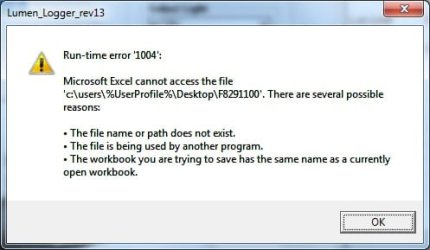
OUTPATH = "c:\users\%UserProfile%\Desktop\" & FName & ".xlsx"
where FName = "myfile"

so the full file name is myfile.xlsx

Please see attached image for error message. Please advice. Thank.
 

Attachments

  • Windows7_save_error.jpg
    Windows7_save_error.jpg
    19.1 KB · Views: 18

My Computer My Computer

Computer type
PC/Desktop
Computer Manufacturer/Model Number
HP
OS
windows 7
%UserProfile% = C:\Users\current-user-name


Use:

OUTPATH = "%UserProfile%\Desktop\" & FName & ".xlsx"

Instead of:

OUTPATH = "c:\users\%UserProfile%\Desktop\" & FName & ".xlsx"
 

My Computer My Computer

Computer type
PC/Desktop
Computer Manufacturer/Model Number
Self built custom
OS
64-bit Windows 11 Pro for Workstations
CPU
Intel i7-8700K OC'd to 5 GHz
Motherboard
ASUS ROG Maximus XI Formula Z390
Memory
64 GB (4x16GB) G.SKILL TridentZ RGB DDR4 3600 MHz
Graphics Card(s)
ASUS ROG-STRIX-GTX1080TI-O11G-GAMING
Sound Card
Integrated
Monitor(s) Displays
2 x Samsung Odyssey G7 27"
Screen Resolution
2560x1440
Hard Drives
1TB Samsung 990 PRO M.2,
4TB Samsung 990 PRO PRO M.2,
TerraMaster F8 SSD Plus NAS
PSU
Seasonic Prime Titanium 850W
Case
Thermaltake Core P3
Cooling
Corsair Hydro H115i
Keyboard
Logitech wireless K800
Mouse
Logitech MX Master 4
Internet Speed
2 Gb/s Download and 100 Mb/s Upload
Antivirus
Malwarebyte Anti-Malware Premium
Browser
Google Chrome
Other Info
Logitech Z625 speaker system,
Logitech BRIO 4K Pro webcam,
HP Color LaserJet Pro MFP M477fdn,
APC SMART-UPS RT 1000 XL - SURT1000XLI,
Galaxy S23 Plus phone
Hi. I tried OUTPATH = "%UserProfile%\Desktop\" & FName & ".xlsx"

and it still did not like it.
 

Attachments

  • More_windows7_save_error.jpg
    More_windows7_save_error.jpg
    19.6 KB · Views: 16

My Computer My Computer

Computer type
PC/Desktop
Computer Manufacturer/Model Number
HP
OS
windows 7
Something is still not correct with the code since the path it shows in the error still has "C:\Users\dvu\Documents" in front of the "%UserProfile%" variable.
 

My Computer My Computer

Computer type
PC/Desktop
Computer Manufacturer/Model Number
Self built custom
OS
64-bit Windows 11 Pro for Workstations
CPU
Intel i7-8700K OC'd to 5 GHz
Motherboard
ASUS ROG Maximus XI Formula Z390
Memory
64 GB (4x16GB) G.SKILL TridentZ RGB DDR4 3600 MHz
Graphics Card(s)
ASUS ROG-STRIX-GTX1080TI-O11G-GAMING
Sound Card
Integrated
Monitor(s) Displays
2 x Samsung Odyssey G7 27"
Screen Resolution
2560x1440
Hard Drives
1TB Samsung 990 PRO M.2,
4TB Samsung 990 PRO PRO M.2,
TerraMaster F8 SSD Plus NAS
PSU
Seasonic Prime Titanium 850W
Case
Thermaltake Core P3
Cooling
Corsair Hydro H115i
Keyboard
Logitech wireless K800
Mouse
Logitech MX Master 4
Internet Speed
2 Gb/s Download and 100 Mb/s Upload
Antivirus
Malwarebyte Anti-Malware Premium
Browser
Google Chrome
Other Info
Logitech Z625 speaker system,
Logitech BRIO 4K Pro webcam,
HP Color LaserJet Pro MFP M477fdn,
APC SMART-UPS RT 1000 XL - SURT1000XLI,
Galaxy S23 Plus phone
Hi. Please see the attached *.bas module.
 

Attachments

My Computer My Computer

Computer type
PC/Desktop
Computer Manufacturer/Model Number
HP
OS
windows 7
I'm afraid that I'm not familiar enough with working with Excel and .bas modules to help much on that.

Hopefully someone better at coding will be able to know. :(


Code:
Attribute VB_Name = "ExcelSave"
 
Option Explicit
 
'Const VK_MENU = 18                 ' Alt key
Const VK_MENU = 11                  ' Ctrl key
Const VK_SNAPSHOT = 44
Const KEYEVENTF_EXTENDEDKEY = &H1
Const KEYEVENTF_KEYUP = &H2
 
Private Declare Sub keybd_event Lib "user32.dll" (ByVal bVk As Byte, ByVal bScan As Byte, ByVal dwFlags As Long, ByVal dwExtraInfo As Long)
'
'   this routine saves all collected data to MS Excel
'
Public Sub Save_B4_Exit()
 
Dim FName As String
Dim test_str1 As String
Dim test_str2 As String
Dim test_str3 As String
Dim OUTPATHNETWORK As String
Dim OUTPATHNETWORK_BAK As String
Dim OUTPATHLOCAL As String
Dim OUTPATH As String
 
xlWS.Cells(1, 1).ColumnWidth = 20
xlWS.Cells(1, 1).HorizontalAlignment = xlCenter
Call Write2Excel(1, 1, "Test Location: NH" & Test_location)
 
test_str1 = Form1.Combo3.List(Form1.Combo3.ListIndex) & "_"
test_str2 = Form1.Text1.Text & "_"
test_str3 = "NH" & Test_location
FName = test_str1 & test_str2 & test_str3
 
'OUTPATH = Form1.Text5.Text & FName & ".xlsx"                       '   use this with MSOffice 2007/2010. Mostly for Windows 7.
'OUTPATH = "C:\" & FName & ".xlsx"                                  '   use this with MSOffice 2007/2010
'OUTPATH = "C:\" & FName & ".xls"                                   '   use this with MSOffice 2003
 
OUTPATH = "%UserProfile%\Desktop\" & FName & ".xlsx"                 '   Windows 7 desktop
 
OUTPATHNETWORK = "S:\QUALITY CONTROL LOG\Light Tube Testing\" & FName & ".xlsx" ' use this with MSOffice 2007 to network path
'OUTPATHNETWORK = "S:\" & FName & ".xlsx"
'OUTPATHNETWORK_BAK = "S:\QUALITY CONTROL LOG\Light Tube Testing\" & FName & "_bak.xlsx"
 
xlApp.DisplayAlerts = False
xlWB.SaveAs OUTPATH
xlWB.SaveAs OUTPATHNETWORK
 
If (Exit_button) Then
    xlWB.Close (True)
    xlApp.Quit
    Set xlWS = Nothing
    Set xlWB = Nothing
    Set xlApp = Nothing
End If
 
End Sub

 

My Computer My Computer

Computer type
PC/Desktop
Computer Manufacturer/Model Number
Self built custom
OS
64-bit Windows 11 Pro for Workstations
CPU
Intel i7-8700K OC'd to 5 GHz
Motherboard
ASUS ROG Maximus XI Formula Z390
Memory
64 GB (4x16GB) G.SKILL TridentZ RGB DDR4 3600 MHz
Graphics Card(s)
ASUS ROG-STRIX-GTX1080TI-O11G-GAMING
Sound Card
Integrated
Monitor(s) Displays
2 x Samsung Odyssey G7 27"
Screen Resolution
2560x1440
Hard Drives
1TB Samsung 990 PRO M.2,
4TB Samsung 990 PRO PRO M.2,
TerraMaster F8 SSD Plus NAS
PSU
Seasonic Prime Titanium 850W
Case
Thermaltake Core P3
Cooling
Corsair Hydro H115i
Keyboard
Logitech wireless K800
Mouse
Logitech MX Master 4
Internet Speed
2 Gb/s Download and 100 Mb/s Upload
Antivirus
Malwarebyte Anti-Malware Premium
Browser
Google Chrome
Other Info
Logitech Z625 speaker system,
Logitech BRIO 4K Pro webcam,
HP Color LaserJet Pro MFP M477fdn,
APC SMART-UPS RT 1000 XL - SURT1000XLI,
Galaxy S23 Plus phone
Back
Top