function keys don't work windows 7 ultimate

lida80

New member
Local time
12:45 PM
Messages
2
Hello
My laptop is Hp-pavilion dv6-core I7,but function keys don't work in windows 7 ultimate.
I can't find any useful driver for that.
All help is appreciated, Thanks for reading.
 

My Computer

Computer type
Laptop
Computer Manufacturer/Model Number
hp dv6-core i7
OS
win 7 ultimate-64bit
Hi Welcome to Seven Forums .. You need to Download the HP Quick Launch Software ..
 

My Computer

Computer Manufacturer/Model Number
W530-3630QM1
OS
windows 7 home 64bit
CPU
INTEL-CORE I7
Memory
16GB
Hard Drives
750GB
Browser
Chrome
Did these key work with Windows 7 Home Premium?
Did they ever work after installing Windows 7 Ultimate?
 

My Computer

Computer type
PC/Desktop
Computer Manufacturer/Model Number
Home made Desktop
OS
Windows 10 Pro. 64/ version 1709 Windows 7 Pro/64
CPU
Intel i7-6800K @ 4.3
Motherboard
ASUS X-99 Deluxe II
Memory
Corsair Platinum 16 gig @2400
Graphics Card(s)
EVGA GTX 1070 OC
Monitor(s) Displays
Asus 27" LED LCD/VE278Q
Screen Resolution
1920-1080 or 1280-720 HDMI
Hard Drives
INTEL SSD 730-240 Gb Sata 3.0/
PSU
EVGA Platium 1200W
Case
Phanteks Luxe Tempered Glass 8 fans/ one radiator
Cooling
XSPC/ Water Cooled CPU
Keyboard
Das 4 Professional
Mouse
Logitech M705/MX Anywhere 2-S
Internet Speed
100 mbits
Antivirus
Microsoft Security Essentials/ Malwarebytes Premium 3.0/ SAS
Browser
I.E. 11 default/Firefox/ ISP Time Warner Cable/Spectrum
Other Info
LG BluRay Burner/
Sound system-KLipsch-THX/
Icy Dock ssd Hot Swap bays.
Hi Welcome to Seven Forums .. You need to Download the HP Quick Launch Software ..
No!!!

HP Quick Launch is one of the most useless apps of all HP bloatware, also known for its bad compatibility. As a long time HP user with almost exclusively HP products, I ask each and every HP laptop user to forget this software. If you have installed it, please do yourself a favor and uninstall it as soon as possible.

Hello
My laptop is Hp-pavilion dv6-core I7,but function keys don't work in windows 7 ultimate.
I can't find any useful driver for that.
All help is appreciated, Thanks for reading.
The function keys on HP laptops (as on almost any laptop) have two functions, the normal Windows function like F1 for help or F5 to refresh a browser page, and laptop's own control functions like volume plus or minus, dim display and so on. Selecting between Windows defalt function or HP laptop's specific function when an F key is pressed is done with the Fn key.

The examples below based on HP Envy series laptop, other HP laptops might have slightly different terms and HP specific functions used. BIOS setting in question on Envy laptops is called Action keys. Depending on if Action keys is enabled or disabled in BIOS, the function keys work as this:
  • Action keys disabled in BIOS
    • Pressing F key performs its normal Windows function, for instance F11 switches browser to kiosk mode (full screen, no menus and addressbar)
    • Pressing Fn + F key performs an HP laptop specific function, for instance Fn + F10 disables WiFi and Bluetooth
  • Action keys enabled in BIOS
    • Pressing F key performs an HP laptop specific function, for instance F10 disables WiFi and Bluetooth
    • Pressing Fn + F key performs its default Windows function, for instance Fn + F11 switches browser to kiosk mode (full screen, no menus and addressbar)
Kari
 

My Computer

Computer type
Laptop
Computer Manufacturer/Model Number
HP ENVY 17-1150eg
OS
Windows 10 Pro x64 EN-GB
CPU
1.6 GHz Intel Core i7-720QM Processor
Memory
6 GB
Graphics Card(s)
ATI Mobility Radeon HD 5850 Graphics
Sound Card
Beats sound system with integrated subwoofer
Monitor(s) Displays
17" laptop display, 22" LED and 32" Full HD TV through HDMI
Screen Resolution
1600*900 (1), 1920*1080 (2&3)
Hard Drives
Internal: 2 x 500 GB SATA Hard Disk Drive 7200 rpm
External: 2TB for backups, 3TB USB3 network drive for media
Cooling
As Envy runs a bit warm, I have it on a Cooler Master pad
Keyboard
Logitech diNovo Media Desktop Laser (bluetooth)
Mouse
Logitech Performance Mouse MX
Internet Speed
50/10 Mbps VDSL
Antivirus
Windows Defender 4.3.9431.0
Browser
Maxthon 3.5.2., IE11
Many thanks for the input Kari :) ... HP is about the only Computer Model i have never owned ..
 

My Computer

Computer Manufacturer/Model Number
W530-3630QM1
OS
windows 7 home 64bit
CPU
INTEL-CORE I7
Memory
16GB
Hard Drives
750GB
Browser
Chrome
Did these key work with Windows 7 Home Premium?yes
Did they ever work after installing Windows 7 Ultimate?NO
 

My Computer

Computer type
Laptop
Computer Manufacturer/Model Number
hp dv6-core i7
OS
win 7 ultimate-64bit
HP Quick Launch is one of the most useless apps of all HP bloatware, also known for its bad compatibility. As a long time HP user with almost exclusively HP products, I ask each and every HP laptop user to forget this software. If you have installed it, please do yourself a favor and uninstall it as soon as possible.

Hi Kari

Would you please explain the exact consequences\issues of installing quick launch software ?. I never experienced any issues by installing quick launch but when someone familiar and experienced with HP machines is advising to not install it, there should be some known issues which i am not aware of.
 

My Computer

Computer type
PC/Desktop
OS
Windows 7 Ultimate x64
For the first, it really is totally unnecessary, sitting there, being of no use eating both memory and resources.

For the second, on my Pavilion series laptops which I do no longer have but which I have had several, Quick Launch was quite often the culprit when analyzing BSOD logs.

Third, this being of course only a subjective opinion of an experienced user (experienced regarding both Windows OS and HP computers), every application that does not add any functionality is useless. Both default Windows functions, as well as HP specific functions for each F key can be used without Quick Launch application. Also, the other function of this application, to open user selected application with a button, can be done with Windows shortcut keys.

Give me one example of how you use the Quick Launch application, I'll show you how to use the same function without it. My recommendation to users of all HP computers (applies to any other PC label with pre-installed OS) is to get rid of all these "special" applications and do a clean install instead, using an original Microsoft Windows install media instead of the one delivered with the PC. See this tutorial: http://www.sevenforums.com/tutorials/219487-clean-reinstall-factory-oem-windows-7-a.html

Kari
 

My Computer

Computer type
Laptop
Computer Manufacturer/Model Number
HP ENVY 17-1150eg
OS
Windows 10 Pro x64 EN-GB
CPU
1.6 GHz Intel Core i7-720QM Processor
Memory
6 GB
Graphics Card(s)
ATI Mobility Radeon HD 5850 Graphics
Sound Card
Beats sound system with integrated subwoofer
Monitor(s) Displays
17" laptop display, 22" LED and 32" Full HD TV through HDMI
Screen Resolution
1600*900 (1), 1920*1080 (2&3)
Hard Drives
Internal: 2 x 500 GB SATA Hard Disk Drive 7200 rpm
External: 2TB for backups, 3TB USB3 network drive for media
Cooling
As Envy runs a bit warm, I have it on a Cooler Master pad
Keyboard
Logitech diNovo Media Desktop Laser (bluetooth)
Mouse
Logitech Performance Mouse MX
Internet Speed
50/10 Mbps VDSL
Antivirus
Windows Defender 4.3.9431.0
Browser
Maxthon 3.5.2., IE11
In years of daily use of many different HP laptops, never experienced any problems whatsoever using QLB. Got some functions I do not need or want, but uninstalling\disabling it results (in my experience) in an effective (and very unwanted) killing of any specific screen brightness control keys. BTW, used qlb on xp, vista, w7 homepro up to enterprise, w8, w8.1, w8.1.1, zero problems.
 

My Computer

Computer type
Laptop
Computer Manufacturer/Model Number
Dell \ Lenovo\ HP \ Toshiba
OS
W7, W8.1
Antivirus
MSE, Malwarebytes
Browser
FF
In years of daily use of many different HP laptops, never experienced any problems whatsoever using QLB. Got some functions I do not need or want, but uninstalling\disabling it results (in my experience) in an effective (and very unwanted) killing of any specific screen brightness control keys. BTW, used qlb on xp, vista, w7 homepro up to enterprise, w8, w8.1, w8.1.1, zero problems.

I have not installed Quick Launch on any of my HP laptops (currently 3) yet I have no issues in using all HP function buttons (brightness, volume, WiFi ON/OFF and so on).

Cannot understand how you can "effective" kill these functions? User error? I cannot kill them even if I wanted to.
 

My Computer

Computer type
Laptop
Computer Manufacturer/Model Number
HP ENVY 17-1150eg
OS
Windows 10 Pro x64 EN-GB
CPU
1.6 GHz Intel Core i7-720QM Processor
Memory
6 GB
Graphics Card(s)
ATI Mobility Radeon HD 5850 Graphics
Sound Card
Beats sound system with integrated subwoofer
Monitor(s) Displays
17" laptop display, 22" LED and 32" Full HD TV through HDMI
Screen Resolution
1600*900 (1), 1920*1080 (2&3)
Hard Drives
Internal: 2 x 500 GB SATA Hard Disk Drive 7200 rpm
External: 2TB for backups, 3TB USB3 network drive for media
Cooling
As Envy runs a bit warm, I have it on a Cooler Master pad
Keyboard
Logitech diNovo Media Desktop Laser (bluetooth)
Mouse
Logitech Performance Mouse MX
Internet Speed
50/10 Mbps VDSL
Antivirus
Windows Defender 4.3.9431.0
Browser
Maxthon 3.5.2., IE11
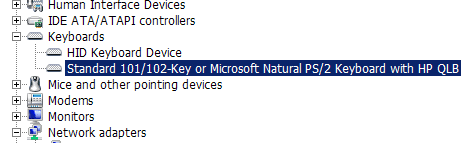
Hello, surely some different configurations out there. On any HP I've dealt with (mainly business models), stopping QLBctrl.exe immediately stops HP's function key assignment (assigning special functions to function keys is one of QLB's jobs). Unistalling the HP keyboard driver does the same, of course.

QLB working perfect for years here on all the HP's I owned, own or use at work, and it's a small, unobtrusive and transparent service (and very needed on my HP's). Of course others may have trouble, I recommend unistalling the driver, and then reinstall a fresh one downloaded from HP. For those models that may not need any special keyboard driver, that's fine! Good luck.
 

Attachments

  • Capture1.PNG
    Capture1.PNG
    4.9 KB · Views: 11

My Computer

Computer type
Laptop
Computer Manufacturer/Model Number
Dell \ Lenovo\ HP \ Toshiba
OS
W7, W8.1
Antivirus
MSE, Malwarebytes
Browser
FF
I have some problems following your logics. What on earth has a hardware device like keyboard to do with an app? It's like saying you can only use WD external HDD together with WD software.

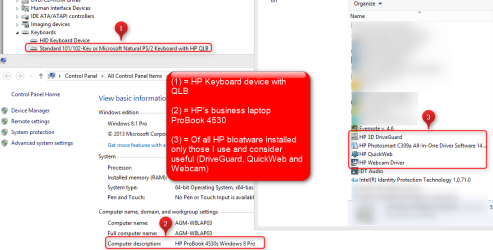
My HP ProBook business laptops show the same keyboard device in Device Manager, with HP QLB. As a keyboard device it works perfectly well without QLB software, all HP ProBook specific button functions are there.

My HP Envy laptops report a standard keyboard, also with all HP Envy specific button functions available. No QLB app installed.
 

My Computer

Computer type
Laptop
Computer Manufacturer/Model Number
HP ENVY 17-1150eg
OS
Windows 10 Pro x64 EN-GB
CPU
1.6 GHz Intel Core i7-720QM Processor
Memory
6 GB
Graphics Card(s)
ATI Mobility Radeon HD 5850 Graphics
Sound Card
Beats sound system with integrated subwoofer
Monitor(s) Displays
17" laptop display, 22" LED and 32" Full HD TV through HDMI
Screen Resolution
1600*900 (1), 1920*1080 (2&3)
Hard Drives
Internal: 2 x 500 GB SATA Hard Disk Drive 7200 rpm
External: 2TB for backups, 3TB USB3 network drive for media
Cooling
As Envy runs a bit warm, I have it on a Cooler Master pad
Keyboard
Logitech diNovo Media Desktop Laser (bluetooth)
Mouse
Logitech Performance Mouse MX
Internet Speed
50/10 Mbps VDSL
Antivirus
Windows Defender 4.3.9431.0
Browser
Maxthon 3.5.2., IE11
In addition to my last post, to make my point clear: QLB app not installed, HP specific button functions are all there, working flawlessly in this setup:

2014-05-17_15h19_02.png
 

My Computer

Computer type
Laptop
Computer Manufacturer/Model Number
HP ENVY 17-1150eg
OS
Windows 10 Pro x64 EN-GB
CPU
1.6 GHz Intel Core i7-720QM Processor
Memory
6 GB
Graphics Card(s)
ATI Mobility Radeon HD 5850 Graphics
Sound Card
Beats sound system with integrated subwoofer
Monitor(s) Displays
17" laptop display, 22" LED and 32" Full HD TV through HDMI
Screen Resolution
1600*900 (1), 1920*1080 (2&3)
Hard Drives
Internal: 2 x 500 GB SATA Hard Disk Drive 7200 rpm
External: 2TB for backups, 3TB USB3 network drive for media
Cooling
As Envy runs a bit warm, I have it on a Cooler Master pad
Keyboard
Logitech diNovo Media Desktop Laser (bluetooth)
Mouse
Logitech Performance Mouse MX
Internet Speed
50/10 Mbps VDSL
Antivirus
Windows Defender 4.3.9431.0
Browser
Maxthon 3.5.2., IE11
Hello, just a note with some info and examples, hopefully of use to OP and any readers.

Some of my hp's use the 'old' Keyboard driver with HP QLB keyboard\function key, gets installed by running this (example from my 'b' laptops), refered to as Standard 101/102-Key or Microsoft Natural PS/2 Keyboard with HP Quick Launch Buttons:
Drivers, Software and Firmware for HP Compaq 6730b Notebook PC - HP Support Center

On my recent (ex) 6560b Probook, the 'new' qlb\keyboard driver is denominated 'HP HotKey Support' (refered to as Standard 101/102-Key or Microsoft Natural PS/2 Keyboard with HP QLB):
Drivers, Software and Firmware for HP ProBook 6560b Notebook PC - HP Support Center

Both are small sub-30mb downloads, and just work out of the box, need no further messing with here, install and forget. Memory impact is around 2mb here (other hp models\consumer laptops may use other drivers, like on my current Toshiba, where it loads a 2mb 'Function Key Main Module').

About 'bloatware', I am of the opinion to not immediately cry wolf, some vendor installed programs are needed and\or helpful, and removing any programs\drivers should be done only after careful evaluation (whatever one may read on some random forum) and after making a system image (or at least a restore point) in case of troubles or resulting missing functionality. But of course, the likes of mcafee and some 900mb dvd player etc can go lol.

btw, when I did some fresh os install on any of my HP's, lately got no need to go to hp, as Windows Updates fetches qlb\function key\keyboard driver etc as required and installs everything correctly. Regarding drivers for brand\model-specific needs, seems Windows Update has been improving vastly over the years, am impressed.

I also recommend some reading on HP's own support forums, excellent resource regarding QLB \ function keys. Have a fine day.

 

My Computer

Computer type
Laptop
Computer Manufacturer/Model Number
Dell \ Lenovo\ HP \ Toshiba
OS
W7, W8.1
Antivirus
MSE, Malwarebytes
Browser
FF
Back
Top