FX 5500 (agp) not getting detected by nvidia driver

coolbro

New member
Local time
3:08 AM
Messages
4
hello, i hope everyone is doing great here is my problem :

i bought for my old pentium 4 ( dell precision 360 worksation tower) an agp graphic card the fx 5500 in order to have the aero effects but the drivers who are meant for that graphic card doesnt work ( it says that nvidia driver couldnt find compatible hardware ),

first this pc had windows xp so i tried on xp with nvidia fx5500 drivers for xp : nothing same error
tried on windows 7 : with every possible driver and also from device manager to install it manualy : nothing
the card is FX 5500 when i boot the computer ther is message that say the graphic card name .

what do you think about it guys ?
 

My Computers My Computers

  • At a glance

    Windows 7
    OS
    Windows 7
  • Computer type
    PC/Desktop
Dell Precision 360 WorkStation (main support site)

It appears that model computer was introduced about 20 years ago and came with Windows XP 32-bit.

What is the 7-character "service tag" number on yours?
 

My Computer My Computer

At a glance

Windows 7 Professional SP1 64-bitIntel Core i7-4790 3.60 GHz32 GB DDR3-1600 MHzIntegrated Intel HD Graphics 4600
Computer type
PC/Desktop
Computer Manufacturer/Model Number
Dell OptiPlex 9020
OS
Windows 7 Professional SP1 64-bit
CPU
Intel Core i7-4790 3.60 GHz
Memory
32 GB DDR3-1600 MHz
Graphics Card(s)
Integrated Intel HD Graphics 4600
Monitor(s) Displays
Viewsonic 32" LCD
Hard Drives
Kingston SATA 3 240 GB SSD
Internet Speed
Spectrum Internet 1000 Mbps
This is the driver for XP.

This is the driver for XP 64 bit.

There is no driver for this GPU (Graphics Processor Unit) for Windows 7.

If you still have trouble installing, do the following:

Download 7-Zip from here.

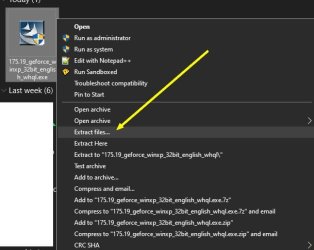
After 7z is installed, right click the graphics (GPU) driver and extract the driver file to a folder on your desktop or what ever. Chose the Extract files option. Don't chose the Extract Here option otherwise you'll splatter the install files all over the place. You want the Extract files option so you can chose a folder to extract into.

Now, go into Device Manager and point the GPU entry to that extracted driver folder. Device Manager should automatically see the required inf install file and install the driver straight away.


tgrfhr.jpg


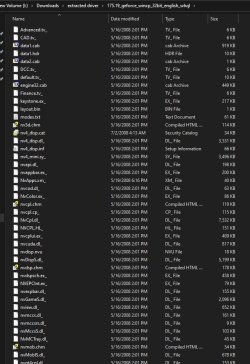
The extracted contents should look something like this:


dfrhgdr.jpg
 

My Computer My Computer

At a glance

Windows 7 Ultimate x64
Computer type
PC/Desktop
OS
Windows 7 Ultimate x64
I have a GeForce FX 5900 (AGP) graphics card which uses the same driver as an FX 5500. I have use it with Windows XP and 7 with drivers:

Windows XP: XP driver 175.19
Windows 7: Vista driver 96.85

However, in researching the Dell Precision 360 Workstation I found that it may have come with an Nvidia Quadro graphics card.

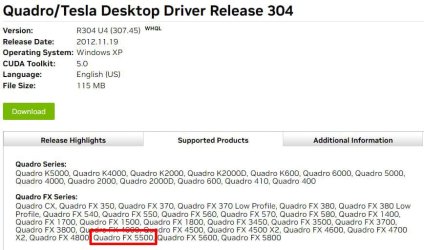
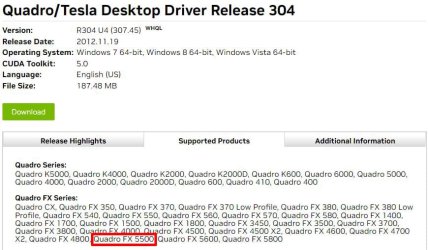
Are you sure you don't have a Quadro FX 5500 graphics card? That is not the same as a Geforce FX 5500 and takes a different driver.

Windows XP Driver
Quadro/Tesla Desktop Driver Release 304 | R304 U4 (307.45) | Windows XP | NVIDIA

Windows 7 64-bit Driver
Quadro/Tesla Desktop Driver Release 304 | R304 U4 (307.45) | Windows 7 64-bit, Windows 8 64-bit, Windows Vista 64-bit | NVIDIA


UPDATE

I have to rethink this. The Quadro FX 5500 is PCIe(x16) while the Dell Precission 360 Workstation has an AGP slot. However, the the Quadro FX 500 is AGP. Could you check again to make sure whether you have a GeForce or Quadro graphics card and what model it is.
 

Attachments

  • Quadro_Windows XP_Driver.jpg
    Quadro_Windows XP_Driver.jpg
    87.3 KB · Views: 1
  • Quadro_Windows 7 64-bit_Driver.jpg
    Quadro_Windows 7 64-bit_Driver.jpg
    89.5 KB · Views: 1
Last edited:

My Computers My Computers

  • At a glance

    Windows 7 Professional 64bit / Windows 10 Hom...AMD FX-8350GSKILL Ripjaw-X PC3 12800 12GB (2x4GB, 2x2GB)ASUS ENGTX560 DCII OC/2DI/1GD5 1GB
    Computer type
    PC/Desktop
    Computer Manufacturer/Model Number
    Custom build
    OS
    Windows 7 Professional 64bit / Windows 10 Home 64bit
    CPU
    AMD FX-8350
    Motherboard
    Gigabyte GA-990FXA-UD3 (AM3+) Rev. 4.0
    Memory
    GSKILL Ripjaw-X PC3 12800 12GB (2x4GB, 2x2GB)
    Graphics Card(s)
    ASUS ENGTX560 DCII OC/2DI/1GD5 1GB
    Sound Card
    Integrated
    Monitor(s) Displays
    Asus VE228H (21.5-in)
    Screen Resolution
    1920x1080 60Hz
    Hard Drives
    SAMSUNG 870 EVO 1TB (2.5" SATA SSD)
    SAMSUNG 870 EVO 500GB (2.5" SATA SSD)
    PSU
    Antec TruePower (new) TP-650 (650 watts)
    Case
    Antec Three Hundred
    Cooling
    AMD stock (plan to upgrade to Cooler Master Hyper 212 EVO)
    Keyboard
    Logitech K540 (wireless)
    Mouse
    Logitech M310 (wireless)
    Internet Speed
    Comcast Gigabit X2 Internet (2100Mbps down / 300Mbps up)
    Browser
    Firefox, Edge, Chrome
    Other Info
    Optical drive: ASUS DRW-24B3ST/BLK/G (Black) (24X)
    External hard drives: 2TB & 6TB
    Internet Gateway: Comcast XB8
  • Computer type
    PC/Desktop
This is the driver for XP.

This is the driver for XP 64 bit.

There is no driver for this GPU (Graphics Processor Unit) for Windows 7.

If you still have trouble installing, do the following:

Download 7-Zip from here.

After 7z is installed, right click the graphics (GPU) driver and extract the driver file to a folder on your desktop or what ever. Chose the Extract files option. Don't chose the Extract Here option otherwise you'll splatter the install files all over the place. You want the Extract files option so you can chose a folder to extract into.

Now, go into Device Manager and point the GPU entry to that extracted driver folder. Device Manager should automatically see the required inf install file and install the driver straight away.


View attachment 422966


The extracted contents should look something like this:


View attachment 422967
thank u sir for the effort provided , and yes i tried to install the driver from the device manager and it doesnt work, and iafter what i have read, its teh vista driver who work for windows 7 for this card

- - - Updated - - -

I have a GeForce FX 5900 (AGP) graphics card which uses the same driver as an FX 5500. I have use it with Windows XP and 7 with drivers:

Windows XP: XP driver 175.19
Windows 7: Vista driver 96.85

However, in researching the Dell Precision 360 Workstation I found that it may have come with an Nvidia Quadro graphics card.

Are you sure you don't have a Quadro FX 5500 graphics card? That is not the same as a Geforce FX 5500 and takes a different driver.

Windows XP Driver
Quadro/Tesla Desktop Driver Release 304 | R304 U4 (307.45) | Windows XP | NVIDIA

Windows 7 64-bit Driver
Quadro/Tesla Desktop Driver Release 304 | R304 U4 (307.45) | Windows 7 64-bit, Windows 8 64-bit, Windows Vista 64-bit | NVIDIA


UPDATE

I have to rethink this. The Quadro FX 5500 is PCIe(x16) while the Dell Precission 360 Workstation has an AGP slot. However, the the Quadro FX 500 is AGP. Could you check again to make sure whether you have a GeForce or Quadro graphics card and what model it is.
hello sir , when the computer turn on the first screen shows : FX 5500 256 MB
 

My Computers My Computers

  • At a glance

    Windows 7
    OS
    Windows 7
  • Computer type
    PC/Desktop

My Computers My Computers

  • At a glance

    Windows 7 Professional 64bit / Windows 10 Hom...AMD FX-8350GSKILL Ripjaw-X PC3 12800 12GB (2x4GB, 2x2GB)ASUS ENGTX560 DCII OC/2DI/1GD5 1GB
    Computer type
    PC/Desktop
    Computer Manufacturer/Model Number
    Custom build
    OS
    Windows 7 Professional 64bit / Windows 10 Home 64bit
    CPU
    AMD FX-8350
    Motherboard
    Gigabyte GA-990FXA-UD3 (AM3+) Rev. 4.0
    Memory
    GSKILL Ripjaw-X PC3 12800 12GB (2x4GB, 2x2GB)
    Graphics Card(s)
    ASUS ENGTX560 DCII OC/2DI/1GD5 1GB
    Sound Card
    Integrated
    Monitor(s) Displays
    Asus VE228H (21.5-in)
    Screen Resolution
    1920x1080 60Hz
    Hard Drives
    SAMSUNG 870 EVO 1TB (2.5" SATA SSD)
    SAMSUNG 870 EVO 500GB (2.5" SATA SSD)
    PSU
    Antec TruePower (new) TP-650 (650 watts)
    Case
    Antec Three Hundred
    Cooling
    AMD stock (plan to upgrade to Cooler Master Hyper 212 EVO)
    Keyboard
    Logitech K540 (wireless)
    Mouse
    Logitech M310 (wireless)
    Internet Speed
    Comcast Gigabit X2 Internet (2100Mbps down / 300Mbps up)
    Browser
    Firefox, Edge, Chrome
    Other Info
    Optical drive: ASUS DRW-24B3ST/BLK/G (Black) (24X)
    External hard drives: 2TB & 6TB
    Internet Gateway: Comcast XB8
  • Computer type
    PC/Desktop
Yes yes i did , maybe i think that i have to try updating the bios but the problem is that i cant find the last bios version which is A04 ( i have A03) even in the officiel website because i guess they dropped the support for this computer ... Dell precision 360 workstation pentium 4 tower
 

My Computers My Computers

  • At a glance

    Windows 7
    OS
    Windows 7
  • Computer type
    PC/Desktop
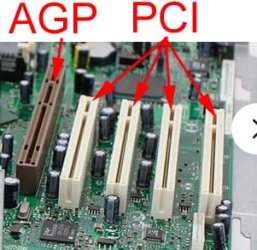
I would like to confirm that your FX 5500 plugs into AGP and not PCI?

I see that the FX 5500 came in several revisions. Some plugged into PCI while others plugged into AGP. They had anywhere from 64MB to 256MB video memory.

I have a FX5900 AGP. It only has 128MB video memory. One time I I tried a newer NVIDIA GeForce 6200 AGP (256MB) video card. I put the FX5900 back in because it was much faster.
 

Attachments

  • AGPvsPCI.jpg
    AGPvsPCI.jpg
    62.4 KB · Views: 5

My Computers My Computers

  • At a glance

    Windows 7 Professional 64bit / Windows 10 Hom...AMD FX-8350GSKILL Ripjaw-X PC3 12800 12GB (2x4GB, 2x2GB)ASUS ENGTX560 DCII OC/2DI/1GD5 1GB
    Computer type
    PC/Desktop
    Computer Manufacturer/Model Number
    Custom build
    OS
    Windows 7 Professional 64bit / Windows 10 Home 64bit
    CPU
    AMD FX-8350
    Motherboard
    Gigabyte GA-990FXA-UD3 (AM3+) Rev. 4.0
    Memory
    GSKILL Ripjaw-X PC3 12800 12GB (2x4GB, 2x2GB)
    Graphics Card(s)
    ASUS ENGTX560 DCII OC/2DI/1GD5 1GB
    Sound Card
    Integrated
    Monitor(s) Displays
    Asus VE228H (21.5-in)
    Screen Resolution
    1920x1080 60Hz
    Hard Drives
    SAMSUNG 870 EVO 1TB (2.5" SATA SSD)
    SAMSUNG 870 EVO 500GB (2.5" SATA SSD)
    PSU
    Antec TruePower (new) TP-650 (650 watts)
    Case
    Antec Three Hundred
    Cooling
    AMD stock (plan to upgrade to Cooler Master Hyper 212 EVO)
    Keyboard
    Logitech K540 (wireless)
    Mouse
    Logitech M310 (wireless)
    Internet Speed
    Comcast Gigabit X2 Internet (2100Mbps down / 300Mbps up)
    Browser
    Firefox, Edge, Chrome
    Other Info
    Optical drive: ASUS DRW-24B3ST/BLK/G (Black) (24X)
    External hard drives: 2TB & 6TB
    Internet Gateway: Comcast XB8
  • Computer type
    PC/Desktop

My Computer My Computer

At a glance

W7 home premium 32bit/W7HP 64bit/w10 tp insid...E5300 dual core3gbNvidia Geforce 7100 Nforce 630i
Computer type
PC/Desktop
Computer Manufacturer/Model Number
medionl/Aspire 6930G/acer x55a
OS
W7 home premium 32bit/W7HP 64bit/w10 tp insider ring
CPU
E5300 dual core
Motherboard
medion MS7366
Memory
3gb
Graphics Card(s)
Nvidia Geforce 7100 Nforce 630i
Monitor(s) Displays
avixc
Internet Speed
n (isp resticted to 72)
Antivirus
mse/pands
Browser
palemoon
Other Info
Belkin Fd7050 n USB using Railink RT2870 drivers, more upto date
You might want to visit the Dell support forums if you haven't already. I can't find a BIOS for that thing and other resources on the Internet are sketchy.
 

My Computer My Computer

At a glance

Windows 7 Ultimate x64
Computer type
PC/Desktop
OS
Windows 7 Ultimate x64
Back
Top