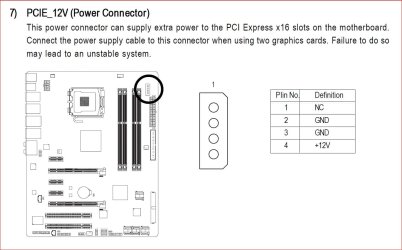
Hello,
Now,My knowledge of PC hardware was good, but this problem is something thats out of my reach,experience.
Small Description:
I'm upgrading my current systems GPU as this is the last thing I can upgrade for my "older" system (bought a Q9650 last time).
So I bought 2 x 6950 (2GB - Reference model).
The idea is to put those 2 cards in CF and i'm good for another 1-2 years, then ill do a full (new) upgrade.
The Problem:
Well, its still a mystery what the exact problem is.
Had alot of problems to get the both cards working in CF just to get a BIOS screen, not even loading an OS
So here is a small list of things that are part of the problem :
Hardware:
Hardware info :
What is working
In the beginning I was thinking that is was my mobo which had problems, but it works fine with my 8800GTS & GT240.. so ...
What I think the problem is :
After 3 days of trying to get a working CF setup and failing, I came up with the following explanation:
Its just a combination of several things:
Old Mobo & Old bios (2yrs old & latest update)
Brand new cards (6950)
So having brand new cards & an old mobo is the core problem here...
Lack of driver support to make my mobo work with those 2 cards
Other ?
Side Question :
Would buying an GA-X48-DQ6 help ? or would I end up having the same problems ? Thx
Please let me know what you think ! this helps me alot !
Now,My knowledge of PC hardware was good, but this problem is something thats out of my reach,experience.
Small Description:
I'm upgrading my current systems GPU as this is the last thing I can upgrade for my "older" system (bought a Q9650 last time).
So I bought 2 x 6950 (2GB - Reference model).
The idea is to put those 2 cards in CF and i'm good for another 1-2 years, then ill do a full (new) upgrade.
The Problem:
Well, its still a mystery what the exact problem is.
Had alot of problems to get the both cards working in CF just to get a BIOS screen, not even loading an OS
So here is a small list of things that are part of the problem :
- Its not working in general
- On a fresh windows 7 installation the 2 cards go blank screen after 5-10 minutes
- I'm not able to detect the 2nd Card anywhere in windows, its just not there (GPUz,Windows Device Manager,AIDA64) (CF Bridge not mounted)
Hardware:
- Motherboard :GA-X38-DQ6
- Power Supply : 800W Gigabyte Odin GT
- CPU : Q9650 (Stock Settings)
- Memory : 8GB 4x2GB DDR2
- SSD : Intel 320 80GB (Connected with SATAII)
- GPU1* : HD6950 (2GB - Asus Reference Model)
- GPU2* : HD6950 (2GB - Asus Reference Model)
- GPU3* : 8800GTS 512MB (Asus)
- GPU4* : GT240 (Came with a stock PC)
- GPU5* : HD 5830 (is in another PC but could use this one if needed)
Hardware info :
- Current Mobo BIOS : F9i
- HD6950(1) BIOS : 013.008.000.009.039285 (Stock BIOS)
- HD6950(2) BIOS : 013.008.000.009.039285 (Stock BIOS)
What is working
In the beginning I was thinking that is was my mobo which had problems, but it works fine with my 8800GTS & GT240.. so ...
What I think the problem is :
After 3 days of trying to get a working CF setup and failing, I came up with the following explanation:
Its just a combination of several things:
Old Mobo & Old bios (2yrs old & latest update)
Brand new cards (6950)
So having brand new cards & an old mobo is the core problem here...
Lack of driver support to make my mobo work with those 2 cards
Other ?
Side Question :
Would buying an GA-X48-DQ6 help ? or would I end up having the same problems ? Thx
Please let me know what you think ! this helps me alot !
My Computer
At a glance
7 x64
- OS
- 7 x64