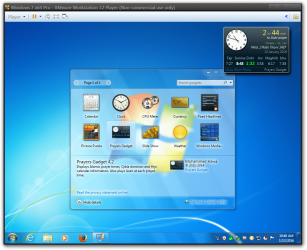
Recently reverted back to Windows 7 from Windows 10. I did a clean install using a Windows 7 Ultimate x64 December 2015 slipstreamed copy.
I only installed Office 2016 and Foxit PDF viewer.
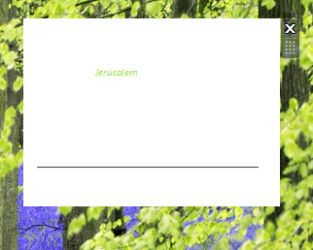
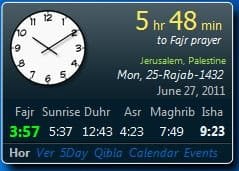
I wanted to run a Muslim prayer gadget but it showed up messed up as you can see in one of the attachments and I've added another picture of how it's supposed to look. I don't know if linking is allowed but it is literally the first hit on Google if you search for "prayer gadget".
My other gadgets (weather, CPU monitor) work fine. I tried other gadgets like a calendar and they work fine, too. The problem seems to be exclusive to this gadget. I contacted the author of the gadget and he suspects it has to do with something I installed. I think it might be due to some Windows update that was slipstreamed and installed which is causing this.
I wasted a long time looking for a solution right here and went down the list; from uninstalling IE11 (my DPI scaling was already set to 100%) to running all those command prompt commands to register the various DLLs and deleting the IE Zones registry entry. I even uninstalled and reinstalled Gadgets from the "Turn Windows features on or off" setting.
This app worked perfectly fine when I was using Windows 7 before I installed Windows 10 back in August.
Sad thing is, I recall having a similar problem a year (or more) ago with this gadget and resolving it pretty easily but now I'm just pulling my hair out lol...........
(note that the Gadget has not changed or been updated by the author since 2014 so the changes are on my end)
EDIT: Creating a new user results in the same problem so might not be a user profile thing. Restoring all associations to Windows default also does nothing.
I only installed Office 2016 and Foxit PDF viewer.
I wanted to run a Muslim prayer gadget but it showed up messed up as you can see in one of the attachments and I've added another picture of how it's supposed to look. I don't know if linking is allowed but it is literally the first hit on Google if you search for "prayer gadget".
My other gadgets (weather, CPU monitor) work fine. I tried other gadgets like a calendar and they work fine, too. The problem seems to be exclusive to this gadget. I contacted the author of the gadget and he suspects it has to do with something I installed. I think it might be due to some Windows update that was slipstreamed and installed which is causing this.
I wasted a long time looking for a solution right here and went down the list; from uninstalling IE11 (my DPI scaling was already set to 100%) to running all those command prompt commands to register the various DLLs and deleting the IE Zones registry entry. I even uninstalled and reinstalled Gadgets from the "Turn Windows features on or off" setting.
This app worked perfectly fine when I was using Windows 7 before I installed Windows 10 back in August.
Sad thing is, I recall having a similar problem a year (or more) ago with this gadget and resolving it pretty easily but now I'm just pulling my hair out lol...........
(note that the Gadget has not changed or been updated by the author since 2014 so the changes are on my end)
EDIT: Creating a new user results in the same problem so might not be a user profile thing. Restoring all associations to Windows default also does nothing.
Attachments
Last edited:
My Computer
At a glance
Windows 7 Ultimate x64i32x2GB Patriot Viper Extreme DDR2nVidia 480 GTX
- Computer type
- PC/Desktop
- OS
- Windows 7 Ultimate x64
- CPU
- i3
- Motherboard
- Gigabye GA-B75M D3H
- Memory
- 2x2GB Patriot Viper Extreme DDR2
- Graphics Card(s)
- nVidia 480 GTX
- Sound Card
- On board
- Monitor(s) Displays
- Ben Q 24"
- Screen Resolution
- 1920x1200
- PSU
- OCZ 850W Gamexstream
- Cooling
- Noctua D-14
- Keyboard
- Logitech G15
- Mouse
- G400s
- Internet Speed
- 100 Mbps