
let me start off by saying I am aware of the whole security hole business with windows gadgets. I only use the gadgets provided by windows and the laptop maker, Toshiba.
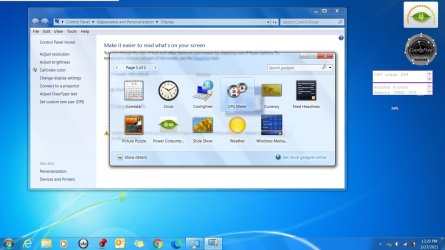
I am getting older and my eyes are not what they used to be. so, I tried setting the setting under "make it easier to read what's on your screen to medium (default small). (control panel > appearance and personalization > Display > make text and other items larger or smaller) but as soon as I did the log off and log on needed by the settings change, the CPU Meter started no longer displaying properly. gone was the meter, and in its place, was a text box and text that displayed both inside and outside the text box. I am not sure if this is caused by a previous update or what. has anyone encountered this issue before? is there a workaround? the issue disappears once the DPI is set back to default. I have tried restoring default gadgets using the option for it in windows, but it seems to not have any effect.
I am getting older and my eyes are not what they used to be. so, I tried setting the setting under "make it easier to read what's on your screen to medium (default small). (control panel > appearance and personalization > Display > make text and other items larger or smaller) but as soon as I did the log off and log on needed by the settings change, the CPU Meter started no longer displaying properly. gone was the meter, and in its place, was a text box and text that displayed both inside and outside the text box. I am not sure if this is caused by a previous update or what. has anyone encountered this issue before? is there a workaround? the issue disappears once the DPI is set back to default. I have tried restoring default gadgets using the option for it in windows, but it seems to not have any effect.
Attachments
My Computer
At a glance
Windows 7 Ultimate SP1 x64Intel i7-720QM 1.6 Ghz With Turboboost Techno...8 Gb DDR3 1066MHzNVIDIA® GeForce® GT 330M with 1GB GDDR3 discr...
- Computer Manufacturer/Model Number
- Toshiba Satellite P500-ST6844 PSPGSU-0Q2012
- OS
- Windows 7 Ultimate SP1 x64
- CPU
- Intel i7-720QM 1.6 Ghz With Turboboost Technology 2.8Ghz
- Motherboard
- Unknown. Intel HM55 5 series/3400 series chipset
- Memory
- 8 Gb DDR3 1066MHz
- Graphics Card(s)
- NVIDIA® GeForce® GT 330M with 1GB GDDR3 discrete graphics
- Sound Card
- Conexant SmartAudio HD/ Sound Blaster Recon3D Omega Wireless
- Monitor(s) Displays
- 18.4” diagonal widescreen TruBrite TFT LCD display @1680x945
- Hard Drives
- Primary: Hitachi 500 Gb 7200RPM
Secondary: Hitachi 500 Gb 7200RPM
Backup: Seagate GoFlex Desk 2Tb running Rebit 5
- PSU
- 120W (19V x 6.32A) Auto-sensing ,100-240V/50-60Hz AC Adapter
- Case
- Fusion™ Finish Sonic Pattern in Black Onyx with Edge-to-Edge
- Cooling
- NZXT CRYO LX


