Solved Gadget not displaying properly

malignant

New member
Local time
1:31 PM
Messages
14
Recently reverted back to Windows 7 from Windows 10. I did a clean install using a Windows 7 Ultimate x64 December 2015 slipstreamed copy.

I only installed Office 2016 and Foxit PDF viewer.

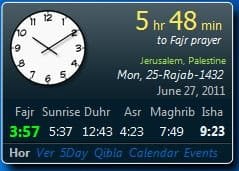
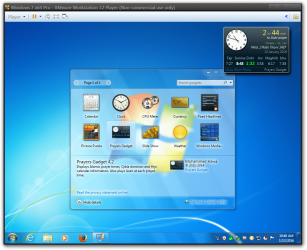
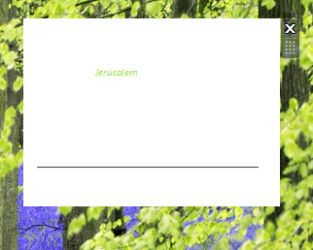
I wanted to run a Muslim prayer gadget but it showed up messed up as you can see in one of the attachments and I've added another picture of how it's supposed to look. I don't know if linking is allowed but it is literally the first hit on Google if you search for "prayer gadget".

My other gadgets (weather, CPU monitor) work fine. I tried other gadgets like a calendar and they work fine, too. The problem seems to be exclusive to this gadget. I contacted the author of the gadget and he suspects it has to do with something I installed. I think it might be due to some Windows update that was slipstreamed and installed which is causing this.

I wasted a long time looking for a solution right here and went down the list; from uninstalling IE11 (my DPI scaling was already set to 100%) to running all those command prompt commands to register the various DLLs and deleting the IE Zones registry entry. I even uninstalled and reinstalled Gadgets from the "Turn Windows features on or off" setting.

This app worked perfectly fine when I was using Windows 7 before I installed Windows 10 back in August.

Sad thing is, I recall having a similar problem a year (or more) ago with this gadget and resolving it pretty easily but now I'm just pulling my hair out lol...........

(note that the Gadget has not changed or been updated by the author since 2014 so the changes are on my end)

EDIT: Creating a new user results in the same problem so might not be a user profile thing. Restoring all associations to Windows default also does nothing.
 

Attachments
  • messedup.png
    messedup.png
    93.5 KB · Views: 27
  • horizontal.jpg
    horizontal.jpg
    48.3 KB · Views: 27
Last edited:

My Computer

Computer type
PC/Desktop
OS
Windows 7 Ultimate x64
CPU
i3
Motherboard
Gigabye GA-B75M D3H
Memory
2x2GB Patriot Viper Extreme DDR2
Graphics Card(s)
nVidia 480 GTX
Sound Card
On board
Monitor(s) Displays
Ben Q 24"
Screen Resolution
1920x1200
PSU
OCZ 850W Gamexstream
Cooling
Noctua D-14
Keyboard
Logitech G15
Mouse
G400s
Internet Speed
100 Mbps
Do you have windows up to date?
I downloaded it and it looks fine, maybe it got a corrupt download, delete the Prayers.gadget folder it at C:\Users\YOUR USER NAME\AppData\Local\Microsoft\Windows Sidebar\Gadgets and download it again.
AppData is hidden use step 3 of this tutorial to unhide it http://www.sevenforums.com/tutorials/56005-file-folder-hide-unhide.html

Jerry
Windows 7 x64 Pro 2).png
 

My Computer

Computer type
Laptop
Computer Manufacturer/Model Number
Sager NP9170
OS
Win 7 Pro x64 / Win 10 Pro
CPU
Intel(R) Core(TM) i7-3630QM CPU @ 2.40GHz
Motherboard
CLEVO P170EM
Memory
12 GB
Graphics Card(s)
(1) Intel(R) HD Graphics 4000 (2) NVIDIA GeForce GTX 675M
Sound Card
(1) Realtek High Definition Audio (2) Intel(R) Display Aud
Monitor(s) Displays
17.3
Screen Resolution
1920x1080
Hard Drives
(1) Samsung 860 EVO 500GB(OS) (1) Samsung 860 EVO 500GB(Data)
Keyboard
Backlite
Antivirus
MSE, Malwarebytes Pro
Browser
Firefox
Other Info
DESKTOP: Custom-built.
OS: Win 10 Pro x64.
CASE: Rosewill R5.
CPU: Intel I5 4670K CPU @ 3.40GHz.
CPU COOLER: Cool Master Hyper 212 EVO.
MOTHERBOARD: Asus Z87-A.
MEMORY: Kingston HyperX 2x4 GB.
GPU: Nvidia Geforce 650 TI.
PSU: Corsair TX750.
DRIVES: (1) Samsung 840 120 GB SSD (2) Western Digital blue 500 GB 7200 RPM.
Yeah, Windows is up to date. I deleted the folder and reinstalled but I'm still getting the same result.
 

My Computer

Computer type
PC/Desktop
OS
Windows 7 Ultimate x64
CPU
i3
Motherboard
Gigabye GA-B75M D3H
Memory
2x2GB Patriot Viper Extreme DDR2
Graphics Card(s)
nVidia 480 GTX
Sound Card
On board
Monitor(s) Displays
Ben Q 24"
Screen Resolution
1920x1200
PSU
OCZ 850W Gamexstream
Cooling
Noctua D-14
Keyboard
Logitech G15
Mouse
G400s
Internet Speed
100 Mbps

My Computer

Computer type
Laptop
Computer Manufacturer/Model Number
Sager NP9170
OS
Win 7 Pro x64 / Win 10 Pro
CPU
Intel(R) Core(TM) i7-3630QM CPU @ 2.40GHz
Motherboard
CLEVO P170EM
Memory
12 GB
Graphics Card(s)
(1) Intel(R) HD Graphics 4000 (2) NVIDIA GeForce GTX 675M
Sound Card
(1) Realtek High Definition Audio (2) Intel(R) Display Aud
Monitor(s) Displays
17.3
Screen Resolution
1920x1080
Hard Drives
(1) Samsung 860 EVO 500GB(OS) (1) Samsung 860 EVO 500GB(Data)
Keyboard
Backlite
Antivirus
MSE, Malwarebytes Pro
Browser
Firefox
Other Info
DESKTOP: Custom-built.
OS: Win 10 Pro x64.
CASE: Rosewill R5.
CPU: Intel I5 4670K CPU @ 3.40GHz.
CPU COOLER: Cool Master Hyper 212 EVO.
MOTHERBOARD: Asus Z87-A.
MEMORY: Kingston HyperX 2x4 GB.
GPU: Nvidia Geforce 650 TI.
PSU: Corsair TX750.
DRIVES: (1) Samsung 840 120 GB SSD (2) Western Digital blue 500 GB 7200 RPM.
I have done all of those, as I described in the OP. Plus, my weather gadget and calendar work fine. It's only this particular gadget that does weird white box thing.
 

My Computer

Computer type
PC/Desktop
OS
Windows 7 Ultimate x64
CPU
i3
Motherboard
Gigabye GA-B75M D3H
Memory
2x2GB Patriot Viper Extreme DDR2
Graphics Card(s)
nVidia 480 GTX
Sound Card
On board
Monitor(s) Displays
Ben Q 24"
Screen Resolution
1920x1200
PSU
OCZ 850W Gamexstream
Cooling
Noctua D-14
Keyboard
Logitech G15
Mouse
G400s
Internet Speed
100 Mbps
I think it might be due to some Windows update that was slipstreamed and installed which is causing this.
From your original post, beings you only installed them 2 programs maybe you need to get a Windows 7 .ISO or disk without the slipstreamed and try a clean reinstall.

I am all out of ideas.

Jerry
 

My Computer

Computer type
Laptop
Computer Manufacturer/Model Number
Sager NP9170
OS
Win 7 Pro x64 / Win 10 Pro
CPU
Intel(R) Core(TM) i7-3630QM CPU @ 2.40GHz
Motherboard
CLEVO P170EM
Memory
12 GB
Graphics Card(s)
(1) Intel(R) HD Graphics 4000 (2) NVIDIA GeForce GTX 675M
Sound Card
(1) Realtek High Definition Audio (2) Intel(R) Display Aud
Monitor(s) Displays
17.3
Screen Resolution
1920x1080
Hard Drives
(1) Samsung 860 EVO 500GB(OS) (1) Samsung 860 EVO 500GB(Data)
Keyboard
Backlite
Antivirus
MSE, Malwarebytes Pro
Browser
Firefox
Other Info
DESKTOP: Custom-built.
OS: Win 10 Pro x64.
CASE: Rosewill R5.
CPU: Intel I5 4670K CPU @ 3.40GHz.
CPU COOLER: Cool Master Hyper 212 EVO.
MOTHERBOARD: Asus Z87-A.
MEMORY: Kingston HyperX 2x4 GB.
GPU: Nvidia Geforce 650 TI.
PSU: Corsair TX750.
DRIVES: (1) Samsung 840 120 GB SSD (2) Western Digital blue 500 GB 7200 RPM.
I fixed it!

It was my fault, too, but how was I supposed to know? Lol.

So, after I had finished installing Windows, I thought I should remove Windows Media Player from the "Turn Windows features on or off" option in the Programs and Features tab in Control Panel because I don't use WMP at all nor ever intend to. Somehow, that messed up this gadget.

Re-enabling WMP fixed the gadget and it works perfectly.

Thanks Jerry for your time and effort. Much appreciated.
 

My Computer

Computer type
PC/Desktop
OS
Windows 7 Ultimate x64
CPU
i3
Motherboard
Gigabye GA-B75M D3H
Memory
2x2GB Patriot Viper Extreme DDR2
Graphics Card(s)
nVidia 480 GTX
Sound Card
On board
Monitor(s) Displays
Ben Q 24"
Screen Resolution
1920x1200
PSU
OCZ 850W Gamexstream
Cooling
Noctua D-14
Keyboard
Logitech G15
Mouse
G400s
Internet Speed
100 Mbps
That is good to here.

You're welcome
 

My Computer

Computer type
Laptop
Computer Manufacturer/Model Number
Sager NP9170
OS
Win 7 Pro x64 / Win 10 Pro
CPU
Intel(R) Core(TM) i7-3630QM CPU @ 2.40GHz
Motherboard
CLEVO P170EM
Memory
12 GB
Graphics Card(s)
(1) Intel(R) HD Graphics 4000 (2) NVIDIA GeForce GTX 675M
Sound Card
(1) Realtek High Definition Audio (2) Intel(R) Display Aud
Monitor(s) Displays
17.3
Screen Resolution
1920x1080
Hard Drives
(1) Samsung 860 EVO 500GB(OS) (1) Samsung 860 EVO 500GB(Data)
Keyboard
Backlite
Antivirus
MSE, Malwarebytes Pro
Browser
Firefox
Other Info
DESKTOP: Custom-built.
OS: Win 10 Pro x64.
CASE: Rosewill R5.
CPU: Intel I5 4670K CPU @ 3.40GHz.
CPU COOLER: Cool Master Hyper 212 EVO.
MOTHERBOARD: Asus Z87-A.
MEMORY: Kingston HyperX 2x4 GB.
GPU: Nvidia Geforce 650 TI.
PSU: Corsair TX750.
DRIVES: (1) Samsung 840 120 GB SSD (2) Western Digital blue 500 GB 7200 RPM.
Back
Top