Gadget problem

jav

Security Enthusiast
Guru
Local time
12:29 AM
Messages
713
Hello,
After uninstalling McAfee AV with McAfee removal tool and installing NIS 2010
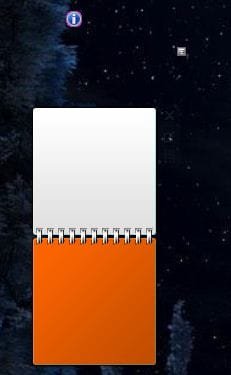
I got problems with Weather and Calendar gadgets (look at pics)
1. I tried uninstall gadget and use get back default gadgets function
2. Turn off gadgets from Windows Feauteres and turn on back

Nothing worked.
can anybody help me?

At the attached image.. upper one (almost invisible) is weather and below is calendar.

Thank you!
 

Attachments
  • Capture.JPG
    Capture.JPG
    15.8 KB · Views: 78

My Computer

OS
Windows 7 Ultimate x86 SP1
We need to first ascertain whether this issue is caused by NIS. Open MSCONFIG and disable NIS startup. Reboot and check if the gadget shows up.

Post the results.
 

My Computer

Computer Manufacturer/Model Number
MacBook Pro
OS
Lion
CPU
i5
Memory
4GB
Graphics Card(s)
Intel
Screen Resolution
1200x800
Hard Drives
Seagate FreeAgent GO 250GB Ext. HDD
  • Like
Reactions: jav
I tried to do as you said.
But I can't disable it.

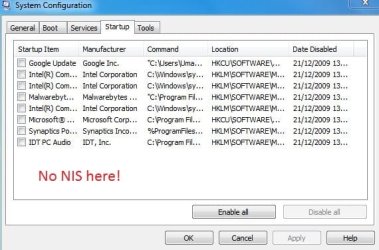
I logged in as Adminstrator account and opened msconfig, on startup there is no NIS (see pic)
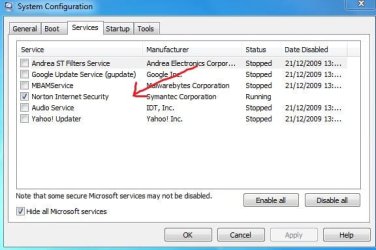
I found NIS on services, but when I disable it (or even press disable all) and press apply, it auto enables itself.
I think it is self protection.
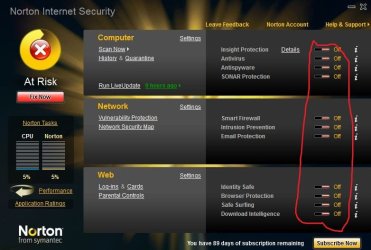
So I turned off all settings from NIS (see pic), and tried it. Still it auto enables itself.

I tried to boot in safe mode and disable it, but again it auto enables itself :shock:
What to do now?
Thank you.
 

Attachments

  • Capture.JPG
    Capture.JPG
    38.3 KB · Views: 161
  • Capture1.JPG
    Capture1.JPG
    46.5 KB · Views: 92
  • Capture2.JPG
    Capture2.JPG
    57.2 KB · Views: 98

My Computer

OS
Windows 7 Ultimate x86 SP1
Open NIS - Miscellaneous settings - Turn off tamper protection and then try disabling the service.

In safe mode, only MS services run. NIS doesnt run in there. So, check in safe mode whether your gadgets work.
 

My Computer

Computer Manufacturer/Model Number
MacBook Pro
OS
Lion
CPU
i5
Memory
4GB
Graphics Card(s)
Intel
Screen Resolution
1200x800
Hard Drives
Seagate FreeAgent GO 250GB Ext. HDD
Sorry to invade your thread, but I have the same exact problem (my gadgets look exactly the same). I think I also unistalled McAfee, installed CA security suite, but have since uninstalled CA and am running no virus protection at this time and those two gadgets still don't work.
 

My Computer

Computer Manufacturer/Model Number
Acer
OS
Windows 7
CPU
Centrino
Motherboard
???
Memory
4G
Graphics Card(s)
ATI HD4570
Sound Card
None
Monitor(s) Displays
Laptop
how about using gpu monitor with riva tuner?i already install gpu monitor but x know how to use riva tune,it say for low lvl h/ware monitoring model but cannot find it in the application....some1 here can fix it 4 me?

Nvidia GeForce 7000m/610m
 

My Computer

Computer Manufacturer/Model Number
Acer Aspire 4520
OS
Windows 7 Ultimate x86/Ubuntu 10.10
Memory
2.5 GB
Graphics Card(s)
Nvidia GeForce 7000M
Open NIS - Miscellaneous settings - Turn off tamper protection and then try disabling the service.

In safe mode, only MS services run. NIS doesnt run in there. So, check in safe mode whether your gadgets work.

I already tried in safe mode.
Got this massage:
Gadgets aren't available in safe mode.

Will try to turn off tamper protection.
 

My Computer

OS
Windows 7 Ultimate x86 SP1
Couldn't disable NIS even with temper protection off...
 

My Computer

OS
Windows 7 Ultimate x86 SP1
Sorry to be late. I wonder why it is not working for you. What do you mean by not able to disable NIS?
Better, remove NIS and check. You can very well re-install it.
 

My Computer

Computer Manufacturer/Model Number
MacBook Pro
OS
Lion
CPU
i5
Memory
4GB
Graphics Card(s)
Intel
Screen Resolution
1200x800
Hard Drives
Seagate FreeAgent GO 250GB Ext. HDD
I suspect the issue is with vbscript Registering the vbscript.dll file from an admin. Command Prompt might fixes the problem.

1, Go to Start > Under start search Type cmd
2, Right Click on cmd then Run as administrator
3, regsvr32.exe vbscript.dll
4, Make sure the Gadget is closed when you do this
5, Open it then see whether the Calendar is visible

Hope this helps
 

My Computer

Computer Manufacturer/Model Number
Samsung NP550P5C-S02IN
OS
Windows 7 Ultimate - 64-bit | Windows 8 Pro - 64-bit
CPU
Intel® Core™ i7 Processor 3,610QM (2.30Hz, 6MB L3 Cach
Memory
8 GB
Graphics Card(s)
NVIDIA® GeForce® GT 650M 2GB Graphics, Optimus™ techno
Sound Card
SoundAlive™ JBL 3 Speakers (With sub-Woofer)
Monitor(s) Displays
39.62cm (15.6) SuperBright 300nit HD+ LED Display
Screen Resolution
1,600 x 900, Anti-Reflective
Hard Drives
1TB S-ATA II Hard Drive (5,400RPM)
Thank to all of you.

Sorry that I haven't reported back myself. (and I recommend people to report back :confused: typical mistake)

So, I have solved it:

1. Disabled Windows Gadgets through Widows features.
2. System restore to the place before uninstalling McAfee.
3. Disabled Windows Gadgets through Widows features again.
4. Uninstalled McAfee through RevoUninstaller (note first time I uninstalled with McAfee uninstaller)
5. Enabled Windows Gadgets
6. Checked if they are showing correct (result: they are correct)
7. Disabled Windows Gadgets through Widows features.
8. Installed NIS 2010.
9. Enabled Windows Gadgets.

Everything is working perfect :)

Thank you for your responses.
 

My Computer

OS
Windows 7 Ultimate x86 SP1
MS is unpredictable. When we think of some big problem, it used to be very very simple. So finally, disabling gadgets during the install fixed it. LOL.

Anyways, glad ur issue is fixed. Happy 2010 bro.
 

My Computer

Computer Manufacturer/Model Number
MacBook Pro
OS
Lion
CPU
i5
Memory
4GB
Graphics Card(s)
Intel
Screen Resolution
1200x800
Hard Drives
Seagate FreeAgent GO 250GB Ext. HDD
Thank you ;)

Happy New year!
 

My Computer

OS
Windows 7 Ultimate x86 SP1
Back
Top