
Gadgets and desktop size keep getting messed up, help!

mrthreeplates

New member
Local time
6:42 PM
Messages
4
Hi All,

Recently I've run into a problem that I can't seem to fix and would appreciate any advice. I don't know what triggered it, but Windows seems to think my desktop is smaller (width-wise) than it actually is.

I have a Dell 6400 laptop, with an ATI radeon x1200 graphics card, and I'm running Windows 7 with Aero. The native resolution is 1680 x 1050. For some reason, Windows thinks my desktop size is something less (perhaps 1300 x 1050 or thereabouts). All of my desktop gadgets get moved to left, leaving 200 pixels or so unusable. If I try to maximize a windows, it won't use that far right region.

I figured this was a graphics driver problem, so I uninstalled (then reinstalled) the ATI driver. This seemed to fix it for a while. Then (usually after a resume from hibernation), the problem reappears.

I've tried googling around, but I don't know what exactly to search for.

The maddening thing is that Windows 7 has been working great on my laptop for weeks when this suddenly showed up.

The only clue that I have is that the problem seemed to show up after I accidentally hit the Windows-P button. I also had been playing with the magnifier a bit. Afterwards, I noticed this problem.

Note that the screen resolution is correct (1680 x 1050). I can change the resolution, but that seem to have no effect.

Any hints or suggestions on how I can get rid of this problem greatly appreciated...

I've attached a snapshot of the upper right section of my desktop. Note that the gadgets are all pushed left.

George
 

Attachments
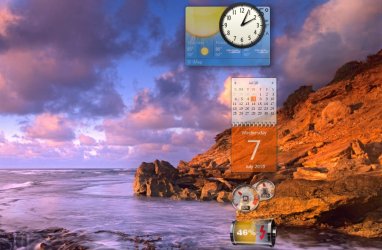
  • desktop.jpg
    desktop.jpg
    99.1 KB · Views: 21

My Computer My Computer

OS
windos 7
Right click on screen and refresh. If does not work:
Remove Gadgets and then install again:

Try adjusting the DPI, as shown in our Tutorial
 

My Computer My Computer

Computer type
PC/Desktop
Computer Manufacturer/Model Number
Dell XPS 420
OS
Windows 10, Home Clean Install
CPU
Intel Core2 processsor Q8200(2.33Ghz 1333FSB) Quad Core Tech
Motherboard
Dell
Memory
6 gb
Graphics Card(s)
ATI Radeon 256MB HD3650
Sound Card
Intergrated 7.1 Channel Audio
Monitor(s) Displays
Dell SP2009W 20"
Hard Drives
640 GB Serial ATA Hard drive
Cooling
Fan
Keyboard
Dell USB Keyboard
Mouse
Dell Premium Optical USB
Internet Speed
DSL 2.85
Right click on screen and refresh. If does not work:
Remove Gadgets and then install again:

Try adjusting the DPI, as shown in our Tutorial

Note: my DPI settings were at default. I changed them to 125%, logged off. When I logged in again, I could use my full desktop again. I set the dpi back to 100% (repeated the process) and the screen was still good.

However, I forgot to mention that I had previously noticed that by logging off / in the problem seems to go away for a while (without changing anything).

Now that I've tweaked the DPI, I'll report back if the problem reappears (or is now fixed).

Thanks!

George
 

My Computer My Computer

OS
windos 7
My gut says that if you remove all the gadgets, boot, and then install the gadgets, they will work properly.
 

My Computer My Computer

Computer type
PC/Desktop
Computer Manufacturer/Model Number
Dell XPS 420
OS
Windows 10, Home Clean Install
CPU
Intel Core2 processsor Q8200(2.33Ghz 1333FSB) Quad Core Tech
Motherboard
Dell
Memory
6 gb
Graphics Card(s)
ATI Radeon 256MB HD3650
Sound Card
Intergrated 7.1 Channel Audio
Monitor(s) Displays
Dell SP2009W 20"
Hard Drives
640 GB Serial ATA Hard drive
Cooling
Fan
Keyboard
Dell USB Keyboard
Mouse
Dell Premium Optical USB
Internet Speed
DSL 2.85
You mentioned hitting Windows + P. That allows you to choose a presentation display mode. Press them again, and you will get 4 choices:

Display using the built-in screen only.

Display a duplicate image on the built-in screen and external monitor or projector.

Extend the desktop across both the built-in and external display.

Display only on the external screen.

Choose Display using the built-in screen only. See if that isn't the fix.

A Guy
 

My Computer My Computer

Computer type
PC/Desktop
OS
Windows 10 Home x64
CPU
INTEL Core i5-750 Quad-Core 3.37GHz
Motherboard
ASUS P7P55D
Memory
HyperX Fury Black Series 8GB (2 x 4GB) 1866Mhz
Graphics Card(s)
EVGA GeForce GTX 750 Superclocked 1GB 128-Bit GDDR5
Monitor(s) Displays
LG 32MA68HY 32" IPS
Screen Resolution
1920 x 1080
Hard Drives
Samsung 840 Evo 120GB, SEAGATE 500GB Barracuda® 7200.12, SATA 3 Gb/s, 7200 RPM, 16MB cache
PSU
ANTEC TruePower New TP-550, 80 PLUS, 550W
Case
ANTEC Three Hundred Illusion
Cooling
COOLER MASTER Hyper 212 Plus, 4 x 120mm 1 x 140mm Noctua's
Internet Speed
85 + Mbps
Antivirus
Avast
Browser
Vivaldi
You mentioned hitting Windows + P. That allows you to choose a presentation display mode. Press them again, and you will get 4 choices:

Display using the built-in screen only.

Display a duplicate image on the built-in screen and external monitor or projector.

Extend the desktop across both the built-in and external display.

Display only on the external screen.

Choose Display using the built-in screen only. See if that isn't the fix.

A Guy

Thanks! However, I tried that early on and it didn't fix it.

FWIW, the problem hasn't reappeared since adjusting the DPI per above. I'm keeping my fingers crossed...

George
 

My Computer My Computer

OS
windos 7
Sounds like a DPI problem to me.
 

My Computer My Computer

Computer type
PC/Desktop
Computer Manufacturer/Model Number
Dell XPS 420
OS
Windows 10, Home Clean Install
CPU
Intel Core2 processsor Q8200(2.33Ghz 1333FSB) Quad Core Tech
Motherboard
Dell
Memory
6 gb
Graphics Card(s)
ATI Radeon 256MB HD3650
Sound Card
Intergrated 7.1 Channel Audio
Monitor(s) Displays
Dell SP2009W 20"
Hard Drives
640 GB Serial ATA Hard drive
Cooling
Fan
Keyboard
Dell USB Keyboard
Mouse
Dell Premium Optical USB
Internet Speed
DSL 2.85
Let's hope it's fixed, good help Rich :)

A Guy
 

My Computer My Computer

Computer type
PC/Desktop
OS
Windows 10 Home x64
CPU
INTEL Core i5-750 Quad-Core 3.37GHz
Motherboard
ASUS P7P55D
Memory
HyperX Fury Black Series 8GB (2 x 4GB) 1866Mhz
Graphics Card(s)
EVGA GeForce GTX 750 Superclocked 1GB 128-Bit GDDR5
Monitor(s) Displays
LG 32MA68HY 32" IPS
Screen Resolution
1920 x 1080
Hard Drives
Samsung 840 Evo 120GB, SEAGATE 500GB Barracuda® 7200.12, SATA 3 Gb/s, 7200 RPM, 16MB cache
PSU
ANTEC TruePower New TP-550, 80 PLUS, 550W
Case
ANTEC Three Hundred Illusion
Cooling
COOLER MASTER Hyper 212 Plus, 4 x 120mm 1 x 140mm Noctua's
Internet Speed
85 + Mbps
Antivirus
Avast
Browser
Vivaldi
Thanks Guy

I have been in threads with you, and you have had more than your share of good calls.
 

My Computer My Computer

Computer type
PC/Desktop
Computer Manufacturer/Model Number
Dell XPS 420
OS
Windows 10, Home Clean Install
CPU
Intel Core2 processsor Q8200(2.33Ghz 1333FSB) Quad Core Tech
Motherboard
Dell
Memory
6 gb
Graphics Card(s)
ATI Radeon 256MB HD3650
Sound Card
Intergrated 7.1 Channel Audio
Monitor(s) Displays
Dell SP2009W 20"
Hard Drives
640 GB Serial ATA Hard drive
Cooling
Fan
Keyboard
Dell USB Keyboard
Mouse
Dell Premium Optical USB
Internet Speed
DSL 2.85
Seems fixed now, thanks!

Well, it hasn't reoccurred since changing the DPI setting & logging off / in. I'm still scratching my head as to how it got messed up or why changing the DPI fixed it. But I'm much happier now!

Thanks much!!!

George
 

My Computer My Computer

OS
windos 7
TY for the rep George. I am glad that I was able to help you solve your problem. You are welcome to return often both to learn and to share your own expertise with others.
 

My Computer My Computer

Computer type
PC/Desktop
Computer Manufacturer/Model Number
Dell XPS 420
OS
Windows 10, Home Clean Install
CPU
Intel Core2 processsor Q8200(2.33Ghz 1333FSB) Quad Core Tech
Motherboard
Dell
Memory
6 gb
Graphics Card(s)
ATI Radeon 256MB HD3650
Sound Card
Intergrated 7.1 Channel Audio
Monitor(s) Displays
Dell SP2009W 20"
Hard Drives
640 GB Serial ATA Hard drive
Cooling
Fan
Keyboard
Dell USB Keyboard
Mouse
Dell Premium Optical USB
Internet Speed
DSL 2.85
Back
Top