Gadgets - Create a Custom Clock Gadget

Gadgets – Creating a Custom clock gadget.

31783d1255810273-gadgets-create-custom-gadget-clock-4141.png


For this you will need:

  • An orb of any kind (Circle) to use as the gadget clock (Browse DeviantArt)
  • Photo Editing Software
  • Pre made clock (Attached)
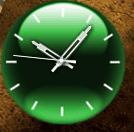
In this tutorial we will be working from a clock called GTA4 (Not the name of the folder, but the original name of the gadget).

First install the gadget. This is done by unzipping the ZIP file and placing the folder in the zip file in shell:gadgets (Seach from start menu)

Now go the gadget folder (Shell:gadgets folder), and go to the folder of the gadget (Which in this case is: GreenClock.gadget)

Now there should be 3 images in that folder. Drag.png, icon.png and logo.png (logo.png is the logo for the details, So it doesn’t need to be changed). The icon.png is for the gadget icon in the gadget library. The drag.png is for the gadget itself.

Inside the images folder there should be 2 images called GTA4_settings and GTA4. Also here is the clock arms. The clock arms has to applied correctly on the GTA4_settings orb.

To make it easier for you to apply the clock arms correctly on the GTA4_settings.png orb, I have attached the clock arms for you, they just need to be placed/inserted in the orb.

Now make 3 orbs. 2x clean 131x131(One called drag.png and one called GTA4.png) and 1x With clock arms 131x131 (Called GTA4_settings.png)
Remember to make the background transparent and save as .png

The last orb (icon.png) is the one that shows for the gadget in the gadget library. Choose any image you want, but remember it has to 71x71 (Might work with a bigger size).

Now when you are done with making the orbs, replace the original files in the gadget folder (Clo2c2k.gadget)
Now the custom clock should show correctly. If it doesn’t, try again :)


Now to editing the XML info (optional):

First go to the Shell:gadgets folder (search for the folder via the start menu search) and select the folder of the gadget you want to edit.

Now open the XML file called Gadget.xml with notepad (This file might be in a ‘en-us’ folder)

Now you should see this (This can be different from gadget to gadget)
Here’s the info from my custom gadget clock:


Code:
<?xml version="1.0" encoding="utf-8"?>
<gadget>
<name>Red Fusion v2</name>
<namespace><!--_locComment_text="{Locked}"-->microsoft.windows</namespace>
<version><!--_locComment_text="{Locked}"-->2.0</version>
<author name="sergiogarcia9">
<info url="https://www.sevenforums.com/" text="www.sevenforums.com"/>
<logo src="logo.png"/>
</author>
<copyright><!--_locComment_text="{Locked}"-->© 2009</copyright>
<description>Watch the Red Fusion clock in your time zone. Designed by sergiogarcia9 from Seven Forums.</description>
<icons>
<icon height="48" width="48" src="icon.png"/>
</icons>
<hosts>
<host name="sidebar">
<autoscaleDPI><!--_locComment_text="{Locked}"-->true</autoscaleDPI>
<base type="html" apiVersion="2.0.0" src="clock.html"/>
<permissions><!--_locComment_text="{Locked}"-->full</permissions>
<platform minPlatformVersion="1.0"/>
<defaultImage src="drag.png"/>
</host>
</hosts>
</gadget>
And to change the logo in the details box, simply change the logo.png in the gadget folder to your custom one (The logo will be resized if it’s too big).

Edit these as you wish to, but remember do not take credit for other peoples work, if you are going to upload them and share them at least mention the original artist, or email the artist and ask for permeation to publish the gadget.
Enjoy :) And please comment.


Clock arms White:
31781d1255810065-gadgets-create-custom-gadget-clock-white.png


Clock arms Black:
31780d1255810065-gadgets-create-custom-gadget-clock-black.png


Pre made Clock Download:

Download


Credit to the original maker of the clock provided: Pauliewog
 

Attachments

  • GreenClock.zip
    GreenClock.zip
    115.7 KB · Views: 7,964
  • black.png
    black.png
    743 bytes · Views: 40,090
  • white.png
    white.png
    705 bytes · Views: 39,715
  • 4232.PNG
    4232.PNG
    22.2 KB · Views: 86
  • 4141.PNG
    4141.PNG
    7.3 KB · Views: 40,405
Last edited by a moderator:
Nice one Sergio.... +rep
 

My Computer

Computer type
PC/Desktop
Computer Manufacturer/Model Number
LENOVO K450 @3.0GHZ
OS
64-bit Windows 8.1 Pro
CPU
Core(TM) i5 CPU 4330 Haswell @ 3.20GHz
Motherboard
LENOVO
Memory
12.00 GB
Graphics Card(s)
Intel(R) HD Graphics
Sound Card
Intel HD integtrated
Monitor(s) Displays
HP 25' ISP Monitor
Screen Resolution
1900/1020
Hard Drives
(1) ST1000DM003-1CH162 (2) Generic STORAGE DEVICE USB Device (3) Generic STORAGE DEVICE USB Device
Internet Speed
100mb down/10mb up
Sergio

Boy did that get my attention. Good job
 

My Computer

Computer Manufacturer/Model Number
HP Pavillion dv-7 1005 Tx
OS
Win 8 Release candidate 8400
CPU
[email protected]
Memory
4 gigs
Graphics Card(s)
Nvidia 9600M
Sound Card
HD built-in
Monitor(s) Displays
17" Wxga
Screen Resolution
1440x900
Cooling
none
Internet Speed
45Mb down 5Mb up
Thanks guys :) I hope it isnt too messy, i will try if i can get some pictures up tomorrow ;)
 
Cool great job Sergio.
 

My Computer

Computer Manufacturer/Model Number
HP Compaq Presario/SR5113WM
OS
Windows 7 Ultimate x64/ Windows Vista Ultimate x64
CPU
AMD Athlon 64 X2 3600+ 1.9Ghz
Motherboard
Asus M2N68-LA
Memory
PNY Optima Memory DDR2 2GB 2x1 kit
Graphics Card(s)
PNY Nvidia 8400 GS 256MB
Sound Card
On board RealTek
Monitor(s) Displays
Acer X163W LCD
Screen Resolution
1366x768
Hard Drives
Western Digital 160 GB SATA 3G (3.0Gb/sec)
7200 rpm
Western Digital 160 GB IDE
PSU
Dynex 400w
Case
Nothin Special
Cooling
Stock
Keyboard
Standard 102 key with volume and sleep buttons
Mouse
Wireless Logitech LX7
Internet Speed
Comcrap 10mb cable
Other Info
Insignia 2.1 speakers, wireless Xbox 360 controller w/plug n play charger, Belkin wireless G + mimo usb network adapter.
thanks sergio just what i was looking for.+rep
well i would if i could remember how:D
 

My Computer

OS
windows7 7100 x64
CPU
amd athlon 64 3500+
Motherboard
asus a8n sli deluxe
Memory
2gb
Graphics Card(s)
nvidia 7800gt
Screen Resolution
1280x1024
thanks sergio just what i was looking for.+rep
well i would if i could remember how:D
your welcome :)
Actually i think i will do an updated version of this tutorial soon, which will include multiple skins for each clock :)
 
ive come across a slight problem even though i have put the folder in shell:gadgets it doesnt show up at all in the gadget gallery.

edit-- im dumb i put the whole file "green clock" into shell:gadgets when i should have put in "green clock.gadget" in . thanks again sergio works sweet i know have my clock i asked for in the forums and i did it myself.
 
Last edited:

My Computer

OS
windows7 7100 x64
CPU
amd athlon 64 3500+
Motherboard
asus a8n sli deluxe
Memory
2gb
Graphics Card(s)
nvidia 7800gt
Screen Resolution
1280x1024
Man, got stuck on the first step. :p

First install the gadget.

What gadget? :doh:
Sorry if its obvious :o
 

My Computer

Computer type
PC/Desktop
Computer Manufacturer/Model Number
The Dominator?
OS
Windows Seven Ultimate
CPU
AMD Piledriver FX 8320 @ 3.5GHz
Motherboard
ASUS M5A97 EVO R2.0
Memory
Crucial Ballistix 8GB 1600 MHz DDR3
Graphics Card(s)
ASUS GeForce GTX 970 Strix Edition @ 1.114 GHz
Sound Card
Integrated
Monitor(s) Displays
LG 23EA63V 23" IPS 1080p Monitor
Screen Resolution
1920x1080
Hard Drives
Samsung SSD 840 EVO 120 GB
1x WD GreenPower 500GB 7200RPM
1 External HDD 1TB
PSU
Corsair CX500
Case
Zalman Z9 Plus
Cooling
CPU - Corsair Hydro H80i, Case - 3x Aerocool Shark Edition
Keyboard
Xenta Backlit Keyboard (Not very good!)
Mouse
Logitech G400
Internet Speed
Download: 7 mb/s Upload: 0.76 mb/s
Antivirus
Microsoft Security Essentials
Browser
Google Chrome
Other Info
Overclockers UK Desk Pad 89 x 45 cm
1200x730x600mm Desk
Using Virtual Audio Cable to split stereo sound into Audio Technica ATH-M50 headphones and Logitech X-530 speakers.
Oh, I thought that download button was for the clock arms :doh:
 

My Computer

Computer type
PC/Desktop
Computer Manufacturer/Model Number
The Dominator?
OS
Windows Seven Ultimate
CPU
AMD Piledriver FX 8320 @ 3.5GHz
Motherboard
ASUS M5A97 EVO R2.0
Memory
Crucial Ballistix 8GB 1600 MHz DDR3
Graphics Card(s)
ASUS GeForce GTX 970 Strix Edition @ 1.114 GHz
Sound Card
Integrated
Monitor(s) Displays
LG 23EA63V 23" IPS 1080p Monitor
Screen Resolution
1920x1080
Hard Drives
Samsung SSD 840 EVO 120 GB
1x WD GreenPower 500GB 7200RPM
1 External HDD 1TB
PSU
Corsair CX500
Case
Zalman Z9 Plus
Cooling
CPU - Corsair Hydro H80i, Case - 3x Aerocool Shark Edition
Keyboard
Xenta Backlit Keyboard (Not very good!)
Mouse
Logitech G400
Internet Speed
Download: 7 mb/s Upload: 0.76 mb/s
Antivirus
Microsoft Security Essentials
Browser
Google Chrome
Other Info
Overclockers UK Desk Pad 89 x 45 cm
1200x730x600mm Desk
Using Virtual Audio Cable to split stereo sound into Audio Technica ATH-M50 headphones and Logitech X-530 speakers.
Thanks, I have it up and running but the little slashes that represent the hours aren't there. Am I supposed to put them on one of the pictures I made ?
 

My Computer

OS
Windows 7
Thanka But all of that is not usefull

thanks but I made a clock without using "GTA4_settings.png" and thank you VERY VERY VERY VERY VERY VERY VERY VERY VERY VERY :)
 

My Computer

Computer Manufacturer/Model Number
AMD
OS
Windows 7 Ultimate x64
brother thank you very much for this tutorial. very helpful indeed. i was able to create my own clock BUT using the files that you included in your tutorial. i however attempted to start everything from scratch but my clock was not displaying (using different file names such as clock.png as opposed to GTA4.png in the images folder) properly. is there anyway to do this - change the filenames of the image files? i tried looking at the .xml / .html / .css /.js files in the en-US folder for clues, but no such luck (unless I missed it).

also, are the files in the en-US folder that came from your tutorial the same with the built-in Win7 clock?

thanks a lot!
 

My Computer

OS
Windows 7 Ultimate x64
CPU
Core 2 Duo E8400
Motherboard
Gigabyte EP45-DS3R
Memory
8GB OCZ DDR2 Gold Ed.
Graphics Card(s)
2x Powercolor HD4850 1GB (Crossfire)
Sound Card
Onboard Realtek HD Audio
Hard Drives
600GB WD Velociraptor - Win7 / 500GB WD Caviar RE2 - OSx86 / 1TB WD Caviar Green - Data
PSU
FSP Everest 800w 80+
Case
Coolermaster Elite 371
Cooling
CM Hyper 212 CPU Cooler / Deepcool Windblade Case Fans
got it! never mind, i hacked the .js files.

thanks again!
 

My Computer

OS
Windows 7 Ultimate x64
CPU
Core 2 Duo E8400
Motherboard
Gigabyte EP45-DS3R
Memory
8GB OCZ DDR2 Gold Ed.
Graphics Card(s)
2x Powercolor HD4850 1GB (Crossfire)
Sound Card
Onboard Realtek HD Audio
Hard Drives
600GB WD Velociraptor - Win7 / 500GB WD Caviar RE2 - OSx86 / 1TB WD Caviar Green - Data
PSU
FSP Everest 800w 80+
Case
Coolermaster Elite 371
Cooling
CM Hyper 212 CPU Cooler / Deepcool Windblade Case Fans
I know this is years late but...video tutorial?
 

My Computer

Computer type
PC/Desktop
Computer Manufacturer/Model Number
Custom Build
OS
Windows 7 Ultimate x64 / Windows 10 Home x64
CPU
Intel i7 6700K
Motherboard
ASRock Z170 Extreme7+ LGA 1151 Intel Z170 HDMI SATA 6Gb/s US
Memory
16GB
Graphics Card(s)
GeForce GTX 980 TI
Monitor(s) Displays
HP 25VX | AOC 27 Inch
Screen Resolution
1920x1080
Hard Drives
Windows 7: 250GB
Windows 10: 1TB
Storage: 3TB
PSU
CoolerMaster 700W
Case
ThermalTake Chaser MK-1
Cooling
Fan
Keyboard
Razer Blackwidow Chroma
Mouse
Razer Mamba
Antivirus
Kaspersky Total Security
Browser
Chrome
Back
Top